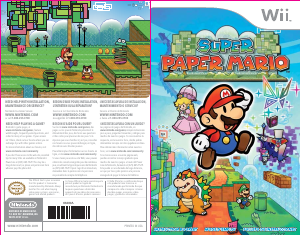
Bruksanvisning Nintendo Wii Super Paper Mario

Behöver du en bruksanvisning för din Nintendo Wii Super Paper Mario? Nedan kan du se och ladda ner PDF-bruksanvisningen gratis på svenska. Den här produkten har för närvarande 3 vanliga frågor, 0 kommentarer och har 1 röst med ett genomsnittligt produktbetyg på 0/100. Om det här inte är bruksanvisningen du vill ha, vänligen kontakta oss.

Är produkten defekt och erbjuder bruksanvisningen ingen lösning? Gå till ett Repair Café för gratis reparationstjänster.

Bruksanvisning

Loading…
CharactersCharacters
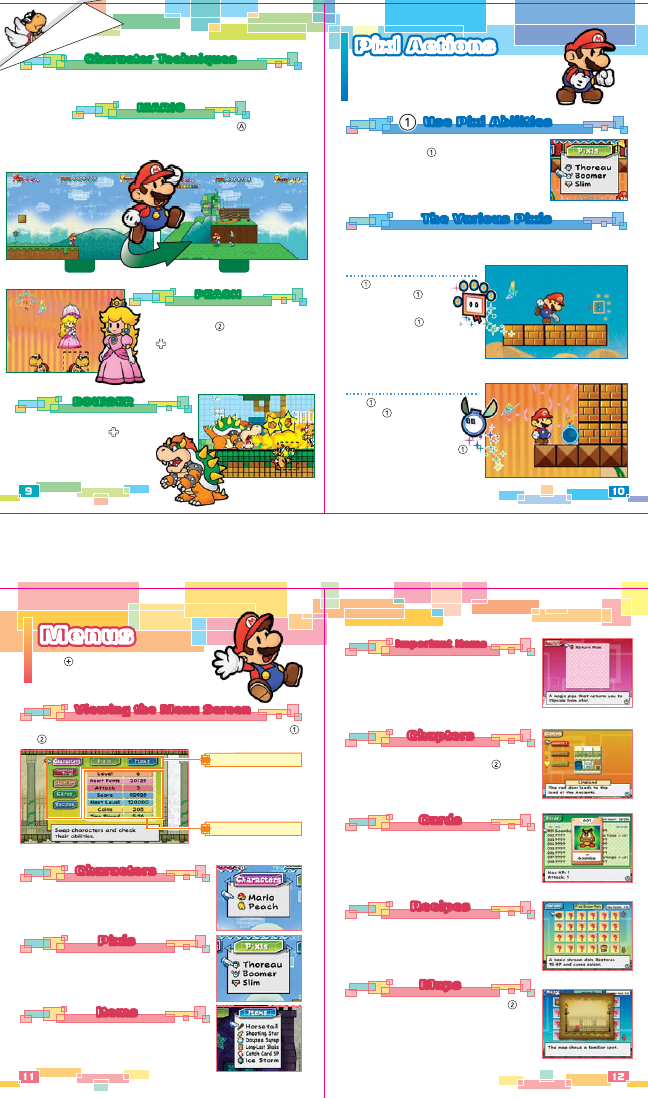
You can swap out characters or learn about
character techniques here.
MenusMenusMenus
Press on any stage to open the menu
screen, where you can swap characters or
peruse various bits of information.
Viewing the Menu ScreenViewing the Menu Screen
You can display the Characters/Pixls/Items portions of the menu by pressing
and at the same time in the game. This is called the “quick menu.”
Menus
As the game progresses,
new menu tabs with
different types of informa-
tion will appear here.
Play Information
You can view character
info and time played here.
PixlsPixls
You can swap out Pixls here. You can choose this
option as soon as you befriend a Pixl other than Tippi.
ItemsItems
You can use items in your possession here. You can
also learn how each item is used by viewing it in this
menu. You can buy items at shops or receive them by
defeating enemies.
These are items you will need to advance in the game.
Some you can only use in a certain place—others,
like the Return Pipe that takes you back to Flipside
from anywhere, will not disappear when you use them.
The Return Pipe works one way back to flipside. You
can’t use it to return to your previous location.
CardsCards
You can view all of the Catch Cards that you have
collected here. Cards will contain enemy information,
and just possessing one can double your Attack
against that enemy. (You can even triple or
quadruple your Attack against an enemy if you have
2 or 3 of its cards.)
RecipesRecipes
You can view all of the recipes you’ve made here.
Use recipes to help you cook items in your inventory
and make them more potent.
MapsMaps
Display a map you have obtained by pressing .
You can buy maps from a mysterious map seller and
use them to find hidden treasure. Go to the place
shown on the maps and use a certain Pixl to find
the treasure.
ChaptersChapters
Here you can view descriptions of all the chapters
you’ve visited. Select a chapter and press to see a
detailed description.
Important ItemsImportant Items
Boomer
Press to set down Boomer,
and press again to detonate
him. You can do this to attack
enemies or break blocks. If you
wait long enough, Boomer will
explode even if you don’t press .
Thoreau
Use to grab objects and
enemies and press again
to throw them. Just remember,
you can’t pick up spiky enemies.
You can also press to throw
Thoreau and activate switches
at a distance.
Pixl ActionsPixl ActionsPixl Actions
There are other Pixls besides just your helpful friend
Tippi. Lots of Pixls out there have various helpful
abilities. These are just a few of the Pixls you may
find. There are others out there sleeping in the
various worlds, waiting to become your friend.
You will find the Pixls in lots of different places. Each new Pixl may have a power
that lets you open up a previously inaccessible area.
The Various PixlsThe Various Pixls
Use Pixl AbilitiesUse Pixl Abilities
You can travel around with Tippi and one other Pixl at
your side. You can use to activate the powers of
Pixls other than Tippi. Also, open the Pixls tab of your
menu to swap out Pixls.
Character Techniques
Each character has a unique ability. Experiment with their abilities to find
the best character for the situation.
BOWSER
BOWSER
Bowser can incinerate enemies with his ferocious
fire breath! Press down on , and Bowser
will breathe fire on anything in his path.
PEACH
PEACH
Peach can float through the sky with her
parasol if you press . She can also shield
herself with her parasol by pressing down
on .
3-D2-D
Mario has the amazing ability to flip between dimensions using ! When Mario
flips, everything shifts between 2-D and 3-D, revealing interesting secrets, hidden
enemies, and a whole new perspective on the world. Most enemies appear only in
one dimension, but some can flip between them. You never know what you'll see
when you flip!
MARIOMARIO
Ladda ner bruksanvisning i Engelska (PDF, 1.75 MB)
(Tänk på miljön och skriv endast ut denna bruksanvisning om det verkligen är nödvändigt)

Loading…

Betyg

Berätta vad du tycker om Nintendo Wii Super Paper Mario genom att betygsätta den. Vill du dela med dig av dina åsikter om denna produkt eller ställa en fråga? Lämna en kommentar nederst på sidan.
Är du nöjd med Nintendo Wii Super Paper Mario?
Ja Nej
0%
100%
1 röst

Delta i konversationen om denna produkt

Här kan du dela vad du tycker om Nintendo Wii Super Paper Mario. Om du har en fråga, läs först noggrant igenom manualen. Att begära en manual kan göras genom att använda vårt kontaktformulär.

Mer om denna bruksanvisning

Vi förstår att det är trevligt att ha en pappersbruksanvisning för din Nintendo Wii Super Paper Mario. Du kan alltid ladda ner bruksanvisningen från vår hemsida och skriva ut den själv. Om du vill ha en originalbruksanvisning rekommenderar vi att du kontaktar Nintendo Wii. De kanske kan tillhandahålla en originalbruksanvisning. Letar du efter bruksanvisningen för din Nintendo Wii Super Paper Mario på ett annat språk? Välj ditt föredragna språk på vår hemsida och sök efter modellnumret för att se om vi har det tillgängligt.

Specifikationer

Märke Nintendo Wii
Modell Super Paper Mario
Kategori Spel
Filtyp PDF
Filstorlek 1.75 MB

Alla bruksanvisningar för Nintendo Wii Spel
Fler bruksanvisningar för Spel

Vanliga frågor om Nintendo Wii Super Paper Mario

Vårt supportteam söker efter användbar produktinformation och svar på vanliga frågor. Om du hittar en felaktighet bland våra vanliga frågor uppskattar vi om du meddelar oss detta via vårt kontaktformulär.

Vad betyder regionskoden på mitt Nintendo Wii-spel? Verifierad

Regionskoderna anger för vilken modellspeldator ditt spel passar. Till exempel kan ett PAL-spel bara spelas på en PAL-speldator. Följande regionkoder finns: PAL (Europa och Oceanien), NTSC-U (Nordamerika, Sydamerika, Singapore, Malaysia och Filippinerna), NTSC-J (Japan, Hong Kong & Taiwan) och NTSC-K (Sydkorea) .

Detta hjälpte (15) Läs mer

Kan jag spela mitt Nintendo Wii-spel på Nintendo Wii U också? Verifierad

Ja, Nintendo säger att alla Wii-spel också kan spelas på Wii U.

Detta hjälpte (9) Läs mer

Kan jag reparera repor på en spelskiva själv? Verifierad

Repor förhindrar att lasern läser skivan korrekt. När reporna bara är ytliga är det möjligt att reparera dem själv genom att polera skivan med en lätt slipande förening. Helst använder du en professionell slipmedel men det är också möjligt att använda vanlig tandkräm. Efter att du har polerat skivan måste den tvättas och torka. Det finns specialiserade företag som kan göra detta.

Detta hjälpte (9) Läs mer
Bruksanvisning Nintendo Wii Super Paper Mario

Relaterade produkter

Relaterade kategorier

×
Download