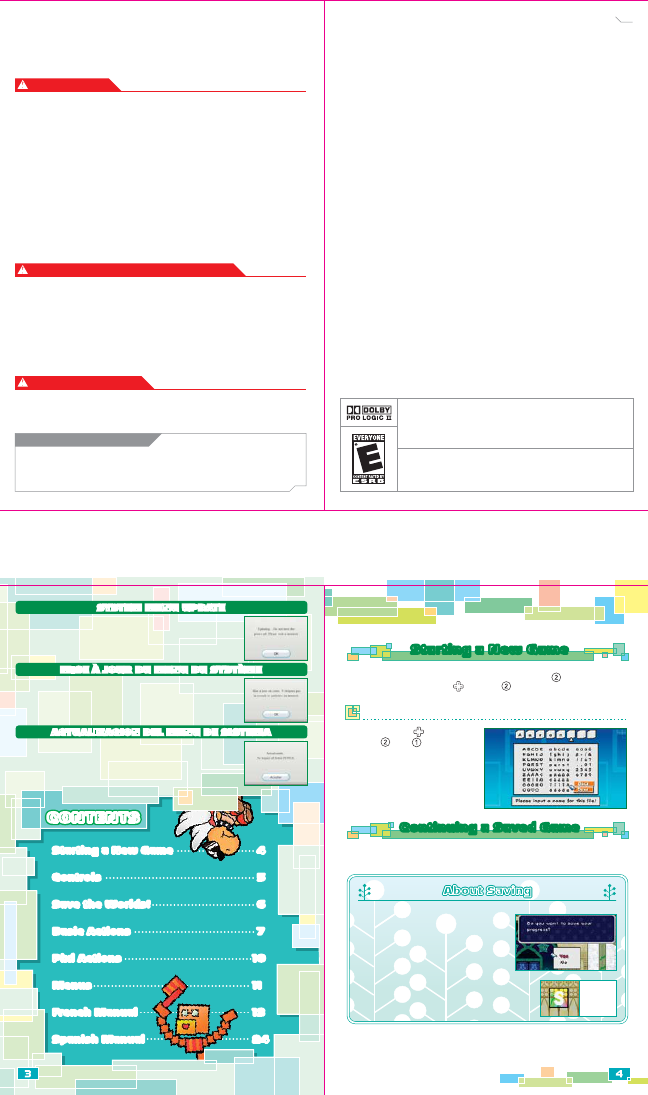
When you play for the first time, a game file will be created on your Wii system
memory. All save data will be saved here. After that, press on the title screen,
then select a save file slot with and press to create a new save file. Then
put your name on this save file.
Choose letters with , then enter
them with . Use to go back a
space. When you have finished,
choose “Done.” Once you have
entered your name, the game
will begin.
Putting Your Name on Save Data
You can choose to resume a game from the last point you saved. Simply choose
the save file you want to play on the file-selection screen.
•Press the HOME Button to change the Wii Remote volume or adjust Rumble
features on the Wii Remote Settings screen. Please see your Wii Operations
Manual for more information.
Starting a New GameStarting a New Game
Continuing a Saved GameContinuing a Saved Game
About Saving
About SavingAbout Saving
You can save your game by hitting a Save
Block or by clearing a chapter. You will
need at least one free block of memory on
your Wii system memory to save a game.
•Please see your Wii Operations Manual
for more information about how to free
up memory on your Wii.
•You can create up to four save files.
•Please do not turn off the power while saving.
This could damage your console.
Save
Block
Notez bien que lorsque vous insérerez le Disque de Jeu dans la console
pour la première fois, la Wii vérifiera automatiquement que vous avez le
menu du système le plus récent et, si nécessaire, un écran de Mise à Jour
du Système Wii s'affichera. Appuyez sur OK pour continuer.
MISE À JOUR DU MENU DU SYSTÈMEMISE À JOUR DU MENU DU SYSTÈME
Por favor ten en cuenta que al colocar primero el Disco en la consola Wii,
el sistema verificará si tienes el menú de sistema más reciente, y de ser
necesario, aparecerá una pantalla de actualización del sistema Wii. Para
continuar presiona ACEPTAR.
ACTUALIZACION DEL MENU DE SISTEMA ACTUALIZACION DEL MENU DE SISTEMA
CONTENTSCONTENTSCONTENTS
Starting a New Game 4
Controls 5
Save the Worlds! 6
Basic Actions 7
Pixl Actions 10
Menus 11
French Manual 13
Spanish Manual 24
Please note that when first loading the Game Disc into the Wii console, the
Wii will check if you have the latest system menu, and if necessary a Wii
system update screen will appear. Press OK to proceed.
SYSTEM MENU UPDATESYSTEM MENU UPDATE
Starting a New Game 4
Controls 5
Save the Worlds! 6
Basic Actions 7
Pixl Actions 10
Menus 11
French Manual 13
Spanish Manual 24
© 2007 Nintendo/INTELLIGENT SYSTEMS.
Copyrights of all Characters and Music reserved by Nintendo. Copyrights of Game, Scenario and Program, except
Copyrights owned by Nintendo, reserved by Nintendo and INTELLIGENT SYSTEMS.
TM,
®
and the Wii logo are trademarks of Nintendo. © 2007 Nintendo. All rights reserved.
WARRANTY & SERVICE INFORMATION
You may need only simple instructions to correct a problem with your product. Try our website at
www.nintendo.com or call our Consumer Assistance Hotline at 1-800-255-3700, rather than going to
your retailer. Hours of operation are 6 a.m. to 7 p.m., Pacific Time, Monday - Sunday (times subject to change). If
the problem cannot be solved with the troubleshooting information available online or over the telephone, you will
be offered express factory service through Nintendo. Please do not send any products to Nintendo without
contacting us first.
HARDWARE WARRANTY
Nintendo of America Inc. ("Nintendo") warrants to the original purchaser that the hardware product shall be free
from defects in material and workmanship for twelve (12) months from the date of purchase. If a defect covered by
this warranty occurs during this warranty period, Nintendo will repair or replace the defective hardware product or
component, free of charge. The original purchaser is entitled to this warranty only if the date of purchase is
registered at point of sale or the consumer can demonstrate, to Nintendo's satisfaction, that the product was
purchased within the last 12 months.
GAME & ACCESSORY WARRANTY
Nintendo warrants to the original purchaser that the product (games and accessories) shall be free from defects in
material and workmanship for a period of three (3) months from the date of purchase. If a defect covered by this
warranty occurs during this three (3) month warranty period, Nintendo will repair or replace the defective
product, free of charge.
SERVICE AFTER EXPIRATION OF WARRANTY
Please try our website at www.nintendo.com or call the Consumer Assistance Hotline at 1-800-255-3700 for
troubleshooting
information and repair or replacement options and pricing. In some instances, it may be necessary
for you to ship the complete product, FREIGHT PREPAID AND INSURED FOR LOSS OR DAMAGE, to Nintendo. Please
do not send any products to Nintendo without contacting us first.
WARRANTY LIMITATIONS
THIS WARRANTY SHALL NOT APPLY IF THIS PRODUCT: (a) IS USED WITH PRODUCTS NOT SOLD OR LICENSED BY
NINTENDO (INCLUDING, BUT NOT LIMITED TO, NON-LICENSED GAME ENHANCEMENT AND COPIER DEVICES, ADAPTERS,
AND POWER SUPPLIES); (b) IS USED FOR COMMERCIAL PURPOSES (INCLUDING RENTAL); (c) IS MODIFIED OR
TAMPERED WITH; (d) IS DAMAGED BY NEGLIGENCE, ACCIDENT, UNREASONABLE USE, OR BY OTHER CAUSES UNRELATED
TO DEFECTIVE MATERIALS OR WORKMANSHIP; OR (e) HAS HAD THE SERIAL NUMBER ALTERED, DEFACED OR REMOVED.
ANY APPLICABLE IMPLIED WARRANTIES, INCLUDING WARRANTIES OF MERCHANTABILITY AND FITNESS FOR A
PARTICULAR PURPOSE, ARE HEREBY LIMITED IN DURATION TO THE WARRANTY PERIODS DESCRIBED ABOVE (12
MONTHS OR 3 MONTHS, AS APPLICABLE). IN NO EVENT SHALL NINTENDO BE LIABLE FOR CONSEQUENTIAL OR
INCIDENTAL DAMAGES RESULTING FROM THE BREACH OF ANY IMPLIED OR EXPRESS WARRANTIES. SOME STATES
DO NOT ALLOW LIMITATIONS ON HOW LONG AN IMPLIED WARRANTY LASTS OR EXCLUSION OF CONSEQUENTIAL OR
INCIDENTAL DAMAGES, SO THE ABOVE LIMITATIONS MAY NOT APPLY TO YOU.
This warranty gives you specific legal rights. You may also have other rights which vary from state to state or
province to province.
Nintendo's address is: Nintendo of America Inc., P.O. Box 957, Redmond, WA 98073-0957 U.S.A.
This warranty is only valid in the United States and Canada.
Manufactured under license from Dolby Laboratories. Dolby, Pro Logic, and the double-D symbol are
trademarks of Dolby Laboratories.
This game is presented in Dolby Pro Logic II. To play games that carry the Dolby Pro Logic II logo in
surround sound, you will need a Dolby Pro Logic II, Dolby Pro Logic or Dolby Pro Logic IIx receiver. These
receivers are sold separately.
Playing video games can make your muscles, joints, skin or eyes hurt. Follow these instructions to
avoid problems such as tendonitis, carpal tunnel syndrome, skin irritation or eyestrain:
• Avoid excessive play. Parents should monitor their children for appropriate play.
• Take a 10 to 15 minute break every hour, even if you don't think you need it.
• If your hands, wrists, arms or eyes become tired or sore while playing or if you feel symptoms such
as tingling, numbness, burning or stiffness, stop and rest for several hours before playing again.
• If you continue to have any of the above symptoms or other discomfort during or after
play, stop playing and see a doctor.
• Some people (about 1 in 4000) may have seizures or blackouts triggered by light flashes or
patterns, and this may occur while they are watching TV or playing video games, even if they have
never had a seizure before.
• Anyone who has had a seizure, loss of awareness, or other symptom linked to an epileptic
condition, should consult a doctor before playing a video game.
• Parents should watch their children play video games. Stop playing and consult a doctor if you or
your child has any of the following symptoms:
Convulsions Eye or muscle twitching Altered vision
Loss of awareness Involuntary movements Disorientation
• To reduce the likelihood of a seizure when playing video games:
1. Sit or stand as far from the screen as possible.
2. Play video games on the smallest available television screen.
3. Do not play if you are tired or need sleep.
4. Play in a well-lit room.
5. Take a 10 to 15 minute break every hour.
Playing video games can cause motion sickness in some players. If you or your child feels dizzy or
nauseous when playing video games, stop playing and rest. Do not drive or engage in other
demanding activity until you feel better.
This Nintendo game is not designed for use with
any unauthorized device. Use of any such device will invalidate your Nintendo product warranty.
Copying of any Nintendo game is illegal and is strictly prohibited by domestic and international
intellectual property laws. “Back-up” or “archival” copies are not authorized and are not necessary to
protect your software. Violators will be prosecuted.
REV–E
IMPORTANT LEGAL INFORMATION
WARNING – Seizures
CAUTION – Motion Sickness
WARNING –
Repetitive Motion Injuries and Eyestrain
REV–P
PLEASE CAREFULLY READ THE Wii™ OPERATIONS MANUAL COMPLETELY BEFORE USING YOUR
Wii HARDWARE SYSTEM, GAME DISC OR ACCESSORY. THIS MANUAL CONTAINS IMPORTANT
HEALTH AND SAFETY INFORMATION.
IMPORTANT SAFETY INFORMATION: READ THE FOLLOWING WARNINGS BEFORE YOU OR
YOUR CHILD PLAY VIDEO GAMES.


Delta i konversationen om denna produkt
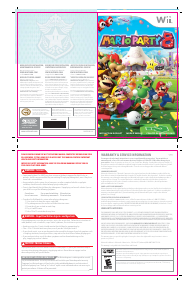
Här kan du dela vad du tycker om Nintendo Wii Super Paper Mario. Om du har en fråga, läs först noggrant igenom manualen. Att begära en manual kan göras genom att använda vårt kontaktformulär.