LANGUAGE SELECTION
To play this game in English, change your language settings in Wii System Settings.
Getting Started
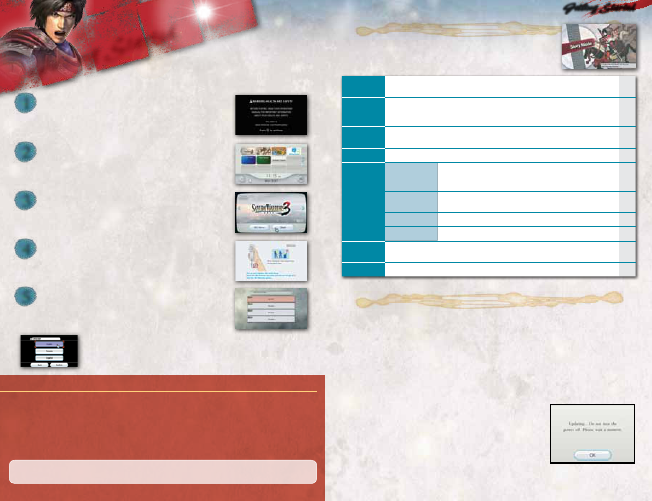
Insert the SAMURAI WARRIORS
™
3 Disc into the disc slot. The Wii console
will switch on. The Health and Safety Screen, as shown here, will be
displayed. After reading the details, press the A Button. The Health and
Safety Screen will be displayed even if the Disc is inserted after turning the Wii
console’s power on.
Point at the Disc Channel on the Wii Menu Screen, and press the A
Button.
The Channel Preview Screen will be displayed. Point at Start and
press the A Button.
The Strap Usage Screen will be displayed. Tighten the strap around
your wrist, then press the a Button (A Button).
You will then be prompted to select a save data file. Once you have
selected a save data file, the opening movie will begin to play.
Note: You can create up to four save data files. To do so, there must be
12 blocks available in the Wii system memory.
Getting StartedGetting Started
Game data is automatically saved when a scenario is cleared or when a character is upgraded.
Note: The game is saved after the results of a battle are shown and when returning from any of the menu items selected in the Dojo.
Saving During a Battle
Select SAVE on the Pause Menu (
P.13
) in Story Mode or Free Mode to save your progress. Free Mode and Story Mode share
the same save data.
Note:
• Saving during a battle will overwrite any previous save.
• Starting a new game will delete any previously saved data.
• You cannot save during battle in Murasame Castle Mode or Historical Mode.
• Once deleted or overwritten, save data cannot be restored.
The Title Screen will appear when the title sequence has ended or has been
skipped by pressing
+
/ START Button (
+
Button). The Main Menu will be
displayed by pressing any button on the Title Screen.
Main Menu
STORY MODE
This is the main mode. Select a warrior and play a scenario specifically tailored to that character.
Complete the scenario to unlock the next one.
P.14
FREE MODE
Play any scenario with a warrior of your choice. Choose from any of the playable scenarios in Story Mode.
Note: Warrior development data is shared by Story Mode, Free Mode, and Murasame Castle Mode.
You can upgrade your warrior and gather gems to upgrade equipment.
—
MURASAME
CASTLE
In this mode, take on strange opponents and discover the secrets of the mysterious Murasame Castle.
P.19
NETWORK Connect to Nintendo Wi-Fi Connection and view your Friend Roster.
P.19
DOJO
UNLOCK
BONUSES
Here you can unlock more warriors for use in Story Mode. You can also unlock
max stats, weapons, and the ability to customize warriors' appearances.
Note: The rice stipends you receive after battle are needed for this feature.
—
EDIT
CHARACTERS
Create a new warrior or adjust the color settings for Musou characters.
—
VAULT View character information and movies.
—
SETTINGS Change various game settings.
—
HISTORICAL
MODE
Battle through the Warring States timeline in this mode. Can only be played using a new warrior.
Note: Create a new warrior by selecting CUSTOM CHARACTERS under Edit characters within the Dojo.
—
RESUME BATTLE Resume your previously saved game.
—
About Saving
Getting Started ............................ 3
Battle Controls ............................. 5
• Classic Controller Pro/Classic Controller .. 5
• Wii Remote and Nunchuk ........................ 7
• Nintendo GameCube Controller .............. 8
• Normal Attack/Power Attack .................. 9
• Special Skill ............................................... 9
• Spirit Charge ........................................... 10
• Musou Attack ............................................ 10
Game Screen ............................. 11
• Main Screen .............................................. 11
• Battle Preparation Screen ....................... 13
• Pause Menu ............................................... 13
Story Mode ................................. 14
• Playing Story Mode .................................. 14
• Battle Items ............................................. 14
• Battlefield Items ....................................... 15
• Battle Results ............................................ 15
Warrior Development ................ 16
• Warrior Growth ......................................... 16
• Upgrading Equipment .............................. 17
• Types of Abilities ....................................... 18
Murasame Castle .................... 19
• Playing Murasame Castle Mode ............. 19
• Playing over Nintendo Wi-Fi Connection .. 19
• During Network Play ................................ 21
• Nintendo Wi-Fi Connection ..................... 22
Contents
• The primary controls described in this manual are for play using the Classic Controller Pro
™
/ Classic Controller
™
.
• Controls for the Wii Remote
™
and Nunchuk
™
controllers are displayed in parentheses in the form "a Button (A Button)."
1
2
3
4
5
SYSTEM MENU UPDATE
Please note that when first loading the Game Disc into the Wii console, the system will
check if you have the latest version of the system menu, and if necessary a Wii system menu
update screen will appear. Select OK to proceed with the update. Please note that the Wii
console must have the latest version of the Wii system menu in order to play the Game Disc.
When the system menu is updated, unauthorized hardware and/or software modifications
may be detected and unauthorized content may be removed, causing the immediate or
delayed inoperability of your console. Failure to accept the update may render this game, and
future games, unplayable. Please note that Nintendo cannot guarantee that unauthorized
software or accessories will continue to function with the Wii console after this or future
updates of the Wii system menu.





Delta i konversationen om denna produkt
Här kan du dela vad du tycker om Nintendo Wii Samurai Warriors 3. Om du har en fråga, läs först noggrant igenom manualen. Att begära en manual kan göras genom att använda vårt kontaktformulär.