ninjakitchen.co.uk
ninjakitchen.co.uk
NOTE:
• Once speed if selected, runtime will count up on the display in seconds.
• Functions vary by model. Refer to your Quick Start Guide for your model’s specific configuration.
NOTE: Press the dial to START or STOP any program. Turn to select.
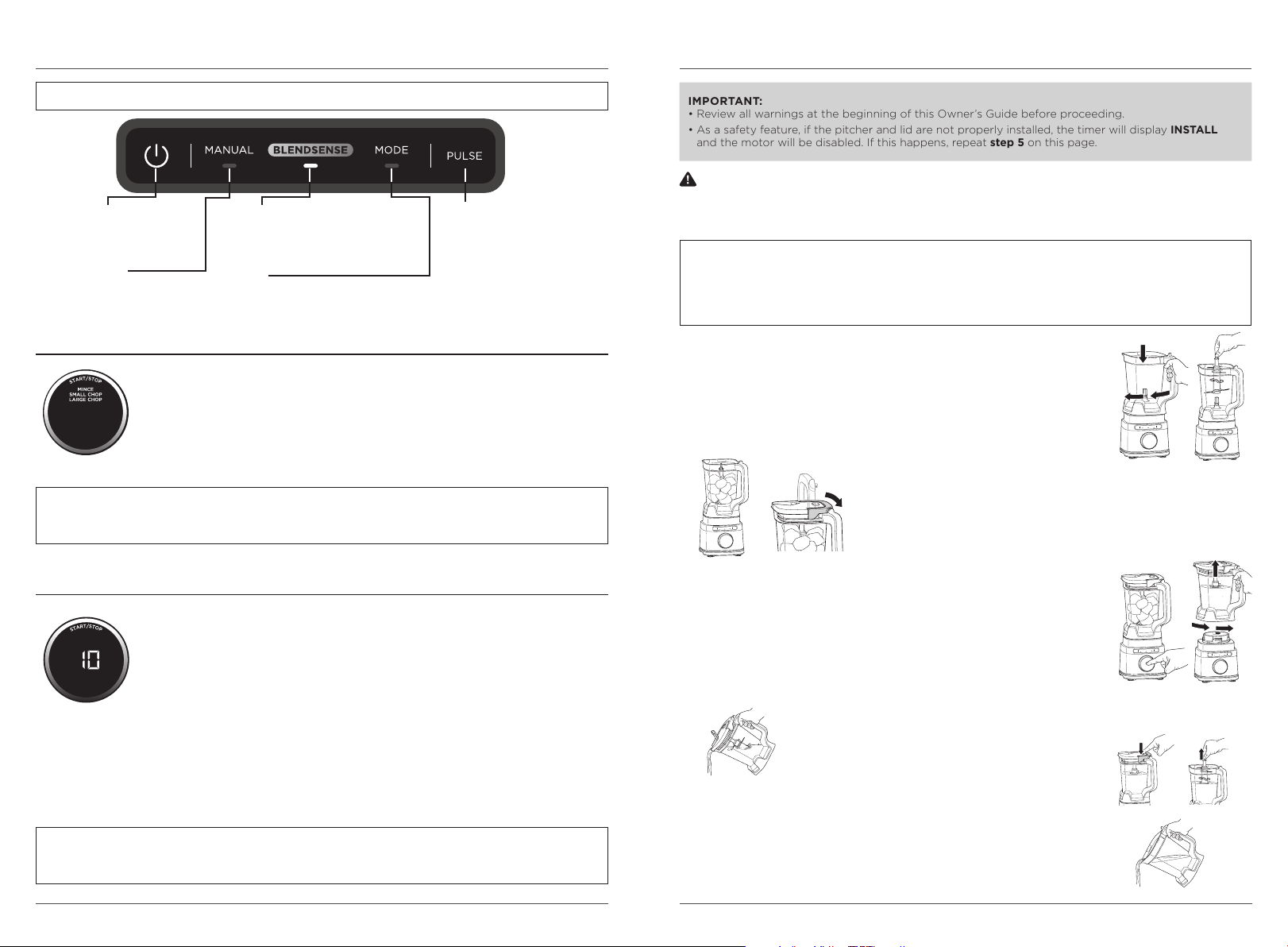
USING THE CONTROL PANEL
Go manual for total control of your blending speed and textures. Press MANUAL, turn
the dial to select your desired speed, then press START/STOP. When selected, each
speed runs continuously for 60 seconds. Press the dial again to stop the program
sooner. Manual programs do not work in conjunction with the BlendSense program or
Processing Mode programs.
TB201: VARIABLE SPEED CONTROL (Speeds 1–10):
START SLOW (Speeds 1–3): Always start at low speed to better incorporate
ingredients and prevent them from sticking to the sides of the vessel.
DIAL UP THE SPEED (Speeds 4–7): Smoother blends call for higher speeds. Low speeds
are great for chopping veggies, but you’ll need to ramp up for purées and dressings.
HIGH-SPEED BLENDING (Speeds 8–10): Blend until your desired consistency is reached.
The longer you blend, the better the breakdown and smoother the outcome will be.
TB200: LOW, MEDIUM, HIGH Speeds
MANUAL PROGRAMS
PULSE
Operates only when PULSE
is pressed. Use short presses
for short pulses and long
presses for long pulses.
BLENDSENSE
Intelligent one-touch program
that senses your ingredients
and blends to perfection.
CHOP FUNCTIONS:
TB201: LARGE CHOP, SMALL CHOP, and MINCE
TB200: CHOP
Smart preset programs combine unique pausing patterns that chop for you. Press
MODE, turn the dial to select your desired program, then press START/STOP. The
program will automatically stop when complete. Press the dial again to stop the
program sooner. They do not work in conjunction with the BlendSense program
or Manual programs.
NOTE:
• Number of seconds is displayed for each program runtime.
• Functions vary by model. Refer to your Quick Start Guide for your model’s specific configuration.
PROCESSING MODE PROGRAMS
MANUAL
Adjustable speed for
total blending control.
MODE
Preset processing programs
that chop for you.
USING THE PITCHER
1 Plug in motor base and place on a clean, dry, level surface such as a
countertop or table.
2 Lower the pitcher onto the motor base. The handle should be aligned slightly
to the right and the pitcher should be oriented so the LOCK symbols are
visible on the motor base. Rotate the pitcher clockwise until it clicks into place.
3 Exercising care, grasp the Stacked Blade Assembly by the top of the shaft and
place it onto the drive gear inside the pitcher. Note that the blade assembly
will fit loosely onto the drive gear.
4 Add ingredients to the pitcher. DO NOT add ingredients past the
MAX LIQUID line.
5 Place the lid on the pitcher. Press down on the handle until it clicks
into place. Once the lid is locked in place, press the Power button to
turn unit on. The BlendSense program will illuminate.
IMPORTANT:
• Review all warnings at the beginning of this Owner’s Guide before proceeding.
•
As a safety feature, if the pitcher and lid are not properly
installed, the timer will display INSTALL
and the motor will be disabled. If this happens, repeat step 5 on this page.
6a If using the BlendSense program, simply press the dial. The program will
automatically stop once complete. To stop the unit at any time, press the dial again.
6b If using a Processing Mode program, select MODE, then use the dial to select
your desired program. To start, press the dial. The program will automatically
stop once complete. To stop the unit at any time, press the dial again.
6c If using a Manual program, select MANUAL, then use the dial to select your
desired speed (varies by model). To start, press the dial. Once the ingredients
have reached your desired consistency, press the dial again
or wait 60 seconds for the unit to come to a complete stop on its own.
7 To remove the pitcher from the motor base, turn the pitcher counterclockwise and then lift up.
8a To pour out thinner mixtures, ensure the lid is
locked in place, then open the pour spout cap.
8b For thicker mixtures that cannot be emptied through the pour spout,
remove the lid and Stacked Blade Assembly before pouring. To remove
the lid, press the RELEASE button and lift the handle. To remove the
blade assembly, carefully grasp it by the top of the shaft and pull straight
up. The pitcher can then be emptied.
9 Turn the unit o by pressing the Power button. Unplug the unit when
finished. Refer to the Care & Maintenance section for cleaning and
storage instructions.
POWER
Press to power
the unit on and off.
WARNING: Ninja Detect Total Crushing® & Chopping Blades (Stacked Blade Assembly) are
loose and sharp and NOT locked in place. If using the pour spout, ensure the lid is fully locked onto the
blender pitcher. If pouring with the lid removed, carefully remove the Stacked Blade Assembly first,
holding it by the shaft. Failure to do so will result in a risk of laceration.
NOTE:
• DO NOT add ingredients before completing installation of the Stacked Blade Assembly.
• If the Stacked Blade Assembly is not fully seated, you will not be able to install and lock the lid.
• The pitcher lid handle will not fold down unless it is attached to the pitcher.
• DO NOT process or grind dry ingredients.



Delta i konversationen om denna produkt
Här kan du dela vad du tycker om Ninja TB201UK Blender. Om du har en fråga, läs först noggrant igenom manualen. Att begära en manual kan göras genom att använda vårt kontaktformulär.