Bruksanvisning Naxa NE-970 Hörlurar

Behöver du en bruksanvisning för din Naxa NE-970 Hörlurar? Nedan kan du se och ladda ner PDF-bruksanvisningen gratis på svenska. Den här produkten har för närvarande 6 vanliga frågor, 0 kommentarer och har 0 röster. Om det här inte är bruksanvisningen du vill ha, vänligen kontakta oss.

Är produkten defekt och erbjuder bruksanvisningen ingen lösning? Gå till ett Repair Café för gratis reparationstjänster.

Bruksanvisning

Loading…
English
Front
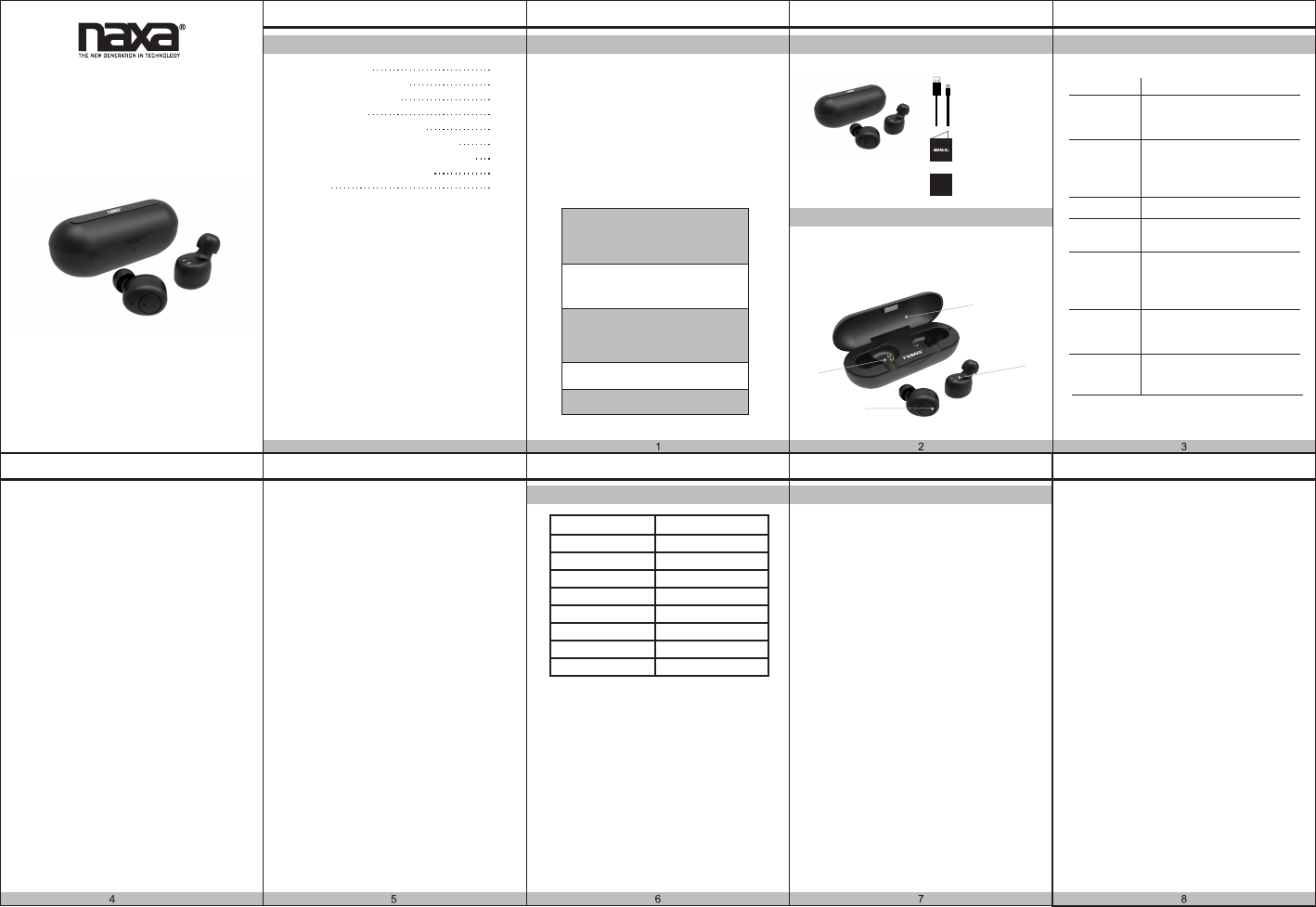
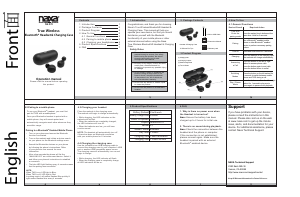
Introduction
Package Contents
Product Diagram
How To Use
4.1 General functions
4.2 Pairing to mobile phone
4.3 Charging your headphones
Product Specifications
FAQ
1
2
2
3
3
4
5
6
7
1
2
3
4
5
6
Congratulations, and thank you for choosing
Naxa’s True Wireless Bluetooth® Headset &
Charging Case. This manual will help you
operate your new device, but first you should
familiarize yourself with the Bluetooth
functionality of your mobile phone or other
external devices before using the Naxa
True Wireless Bluetooth® Headset & Charging
Case.
1 2 3
1.Introduction 2. Package Contents
5.Product Specifications 6.FAQ
4.How To Use
4.3.Charging your headset
4.1.General Functions
4.2.Pairing to a mobile phone
Pairing to a Bluetooth
®
Enabled Mobile Phone
To use your Bluetooth
®
headset, you must first
pair the TWS with a mobile phone.
Once your Bluetooth
®
headset is paired with a
mobile phone, they will remain paired and
automatically recognize each other whenever they
are within range.
1. Why is there no power even when
the Headset is turned on?
2. There is no sound during playback.
Ans: Ensure the battery has been
charged up to 2 hours for initial use.
Ans: Check t
he connection between the
headset and the phone or computer.
If the connection is not established,
please connect again. Make sure the
headset is paired with an external
Bluetooth
®
enabled device.
3.Product Diagram
Turn on your phone and ensure the Bluetooth
function is activated.
Tunr on the earbuds and initiate a device search
on your phone via the Bluetooth settings menu.
Search the Bluetooth
®
devices on your phone
by following the phones instructions. Refer
to your phones user manual for more
information.
After a few seconds the phone will list the
“NAXA NE-970” as a discovered device. Select it
and follow your phone’s instructions to establish
a connecton.
The blue LED light flashing every 4 seconds means
that the pairing was successful.
Place the earbuds in the charging case.
The earbuds will begin to charge automatically.
• While charging, the LED indicators on the
earbuds will be Red.
• When the earbuds are completely charged,
the LED indicators will turn off.
• When the batteries are low, you will hear
a notice sound.
NOTE: The headset will automatically turn off
if there has been no Bluetooth connection
with your mobile phone for 10 minutes.
Use the included micro USB charging cable to
connect the charging case to your computer’s USB
port or another USB-compatible power source.
The charging case will automatically turn on and
begin to charge.
• While charging, the LED indicator will flash.
• When the charging case is completely charge,
all LED indicators will be on.
Contents
1X Micro USB Cable
1X Instruction Manual
1X Warranty card
1X True Wireless Bluetooth
Headset & Charging Case
1X Silicone Ear Tips
®
50mAh each
500mAh
18mAh/h
LanxunDP8812
5.0
Bluetooth®
2.5 hours
2 hours for earbuds
2.5 hours for case
Battery (Earbud)
Battery (Charge Case)
Power Dissipation
Chipset
Version
Wireless Source
Play Time
Charging Time
Charging Time
NE-970
WARRANTY
Support
If you have problems with your device,
please consult the instructions in this
manual. Please also visit us on the web
at www.naxa.com to get up the minute
news, alerts, and documentation for your
device. For additional assistance, please
contact Naxa Technical Support.
True Wireless
Bluetooth® Headset & Charging Case
1 Please follow the rules depicted in this
manual closely to ensure your safety.
Before using the product, we would
strongly encourage you to read
through this user manual.
2 Be wary of any edges, uneven surfaces,
metal parts, accessories and its
packaging to prevent any possible injury
or damage.
Do not modify, repair or dismantle the
product. Doing so may result in fire,
electric shock, complete breakdown
of the product, etc. All of which are
not covered under warranty.
3
Do not use any diluent or volatile liquid
to clean the product.
4
Do not use the product in a hazardous
location.
5
Safety Rules
NAXA Technical Support
2320 East 49th St.
Vernon, CA 90058
http://www.naxa.com/supportcenter/
Keep All Relevant Information for Future Reference.
Desired Result Required Action
Turn on &
Enter the
pairing mode
Pairing
Turn off
Charging
Use a Bluetooth
®
enabled mobile
phone or other Bluetooth
®
enabled
device to perform necessary pairing
actions.
Place the earbuds in the charging case.
The earbuds will charge automatically.
Answering
a Call
Press the earbud touch buttons at the
same time. Hold for 3 seconds.
Press and hold button for 4 seconds.
Play / Pause
Mus
ic
Press the button on either the left or right
earbud for 1 second to play music.
Press again to pause music playback.
Press the button on the left or right
earbud to answer phone calls.
Press the button again to end calls.
Press the button twices to redial.
(1) Charging Case
(2) Charging Outputs
(3) Earbud Charge Ports
(4) Touch Button
Operation manual
Please read the manual before operat ing
this product.
(1)
(2)
(3)
(4)
Press the button on the left earbud for
2 seconds to switch between mobile
phone and TWS during a call.
NOTE:
When TWS is on: LED light is Blue.
When TWS is off: LED light is Red.
In pairing mode: Left earbud flashes Blue quickly &
right earbud flashes blue every 4 seconds.
4.4.Charging the charging case
Switching
Modes
Ladda ner bruksanvisning i Engelska (PDF, 7.86 MB)
(Tänk på miljön och skriv endast ut denna bruksanvisning om det verkligen är nödvändigt)

Loading…

Betyg

Berätta vad du tycker om Naxa NE-970 Hörlurar genom att betygsätta den. Vill du dela med dig av dina åsikter om denna produkt eller ställa en fråga? Lämna en kommentar nederst på sidan.
Är du nöjd med Naxa NE-970 Hörlurar?
Ja Nej
Bli den första personen som betygsätter denna produkt
0 röster

Delta i konversationen om denna produkt

Här kan du dela vad du tycker om Naxa NE-970 Hörlurar. Om du har en fråga, läs först noggrant igenom manualen. Att begära en manual kan göras genom att använda vårt kontaktformulär.

Mer om denna bruksanvisning

Vi förstår att det är trevligt att ha en pappersbruksanvisning för din Naxa NE-970 Hörlurar. Du kan alltid ladda ner bruksanvisningen från vår hemsida och skriva ut den själv. Om du vill ha en originalbruksanvisning rekommenderar vi att du kontaktar Naxa. De kanske kan tillhandahålla en originalbruksanvisning. Letar du efter bruksanvisningen för din Naxa NE-970 Hörlurar på ett annat språk? Välj ditt föredragna språk på vår hemsida och sök efter modellnumret för att se om vi har det tillgängligt.

Specifikationer

Märke Naxa
Modell NE-970
Kategori Hörlurar
Filtyp PDF
Filstorlek 7.86 MB

Alla bruksanvisningar för Naxa Hörlurar
Fler bruksanvisningar för Hörlurar

Vanliga frågor om Naxa NE-970 Hörlurar

Vårt supportteam söker efter användbar produktinformation och svar på vanliga frågor. Om du hittar en felaktighet bland våra vanliga frågor uppskattar vi om du meddelar oss detta via vårt kontaktformulär.

När jag ansluter en hörlur till min enhet fungerar den inte korrekt, vad kan jag göra? Verifierad

Det är möjligt att smuts har samlats i öppningen där hörlurarna är ansluten, vilket förhindrar att den kommer i rätt kontakt. Det bästa sättet att rengöra detta är med tryckluft. Om du är osäker, gör detta av en professionell.

Detta hjälpte (1159) Läs mer

När är musiken för hög? Verifierad

Ljud över 80 decibel (dB) kan börja skada hörseln. Ljud över 120 dB skadar omedelbart hörseln. Skadans allvarhetsgrad beror på hur ofta och hur länge ljudet är närvarande.

Detta hjälpte (1048) Läs mer

Vad är brusreducerande? Verifierad

Noise Cancelling är en teknik som huvudsakligen används i hörlurar. Aktiv bullerkontroll används för att sänka eller eliminera påverkan av omgivande buller.

Detta hjälpte (639) Läs mer

Fungerar Bluetooth genom väggar och tak? Verifierad

En Bluetooth-signal fungerar genom väggar och tak, såvida inte dessa är gjorda av metall. Beroende på tjockleken och väggens material kan signalen förlora i styrka.

Detta hjälpte (251) Läs mer

Upp till vilken ljudnivå är det säkert för barn? Verifierad

Barn får hörseln skadad snabbare än vuxna. Därför är det viktigt att aldrig utsätta barn för buller som är högre än 85 dB. När det gäller hörlurar finns det speciella modeller för barn. I händelse av högtalare eller andra situationer måste du vara uppmärksam, bullret överstiger inte den nivån.

Detta hjälpte (181) Läs mer

Kan jag linda sladden runt enheten efter användning? Verifierad

Det är bättre att inte göra detta eftersom det kan skada sladden. Det bästa du kan göra är att slå in sladden som den var när produkten förpackades.

Detta hjälpte (181) Läs mer
Bruksanvisning Naxa NE-970 Hörlurar

Relaterade produkter

Relaterade kategorier

×
Download