Bruksanvisning Mitsubishi EX321U-ST Projektor

Behöver du en bruksanvisning för din Mitsubishi EX321U-ST Projektor? Nedan kan du se och ladda ner PDF-bruksanvisningen gratis på svenska. Den här produkten har för närvarande 3 vanliga frågor, 0 kommentarer och har 0 röster. Om det här inte är bruksanvisningen du vill ha, vänligen kontakta oss.

Är produkten defekt och erbjuder bruksanvisningen ingen lösning? Gå till ett Repair Café för gratis reparationstjänster.

Bruksanvisning

Loading…
EN-5
ENGLISH
Important safeguards
Please read all these instructions regarding your projector and retain
them for future reference. Follow all warnings and instructions marked
on the projector.
1. Read instructions
All the safety and operating instructions should be read before
the appliance is operated.
2. Retain instructions
The safety and operating instructions should be retained for
future reference.
3. Warnings
All warnings on the appliance and in the operating instructions
should be adhered to.
4. Instructions
All operating instructions must be followed.
5. Cleaning
Unplug this projector from the wall outlet before cleaning it. Do
not use liquid aerosol cleaners. Use a damp soft cloth for clean-
ing.
6. Attachments and equipment
Never add any attachments and/or equipment without the
approval of the manufacturer as such additions may result in the
risk of fire, electric shock or other personal injury.
7. Water and moisture
Do not use this projector near water or in contact with water.
8. Accessories
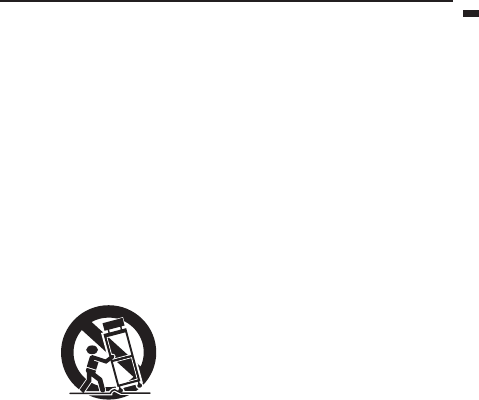
Do not place this projector on an unstable cart, stand, tripod,
bracket or table. Use only with a cart, stand, tripod bracket, or
table recommended by the manufacturer or sold with the projec-
tor. Any mounting of the appliance should follow the manufac-
turer’s instructions and should use a mounting accessory
recommended by the manufacturer.
An appliance and cart combination should be moved with care.
Quick stops, excessive force and uneven surfaces may cause the
appliance and cart combination to overturn.
9. Ventilation
Slots and openings in the cabinet are provided for ventilation,
ensuring reliable operation of the projector and to protect it from
overheating. Do not block these openings or allow them to be
blocked by placing the projector on a bed, sofa, rug, or bookcase.
Ensure that there is adequate ventilation and that the manufac-
turer’s instructions have been adhered to.
10. Power sources
This projector should be operated only from the type of power
source indicated on the marking label. If you are not sure of the
type of power, please consult your appliance dealer or local
power company.
11. Power-cord protection
Power-supply cords should be routed so that they are not likely to
be walked on or pinched by items placed upon or against them.
Pay particular attention to cords at plugs, convenience recepta-
cles, and points where they exit from the appliance. Do not put
the power cord under a carpet.
12. Overloading
Do not overload wall outlets and extension cords as this can
result in a fire or electric shock.
13. Objects and liquids
Never push objects of any kind through openings of this projector
as they may touch dangerous voltage points or short-out parts
that could result in a fire or electric shock. Never spill liquid of any
kind on the projector.
14. Servicing
Do not attempt to service this projector yourself. Refer all servic-
ing to qualified service personnel.
15. Damage requiring service
Unplug this projector from the wall outlet and refer servicing to
qualified service personnel under the following conditions:
(a) If the power-supply cord or plug is damaged.
(b) If liquid has been spilled, or objects have fallen into the pro-
jector.
(c) If the projector does not operate normally after you follow the
operating instructions. Adjust only those controls that are
covered by the operating instructions. An improper adjust-
ment of other controls may result in damage and may often
require extensive work by a qualified technician to restore
the projector to its normal operation.
(d) If the projector has been exposed to rain or water.
(e) If the projector has been dropped or the cabinet has been
damaged.
(f) If the projector exhibits a distinct change in performance -
this indicates a need for service.
16. Replacement parts
When replacement parts are required, be sure that the service
technician has used replacement parts specified by the manufac-
turer or parts having the same characteristics as the original part.
Unauthorized substitutions may result in fire, electric shock or
other hazards.
17. Safety check
Upon completion of any service or repair to this projector, ask the
service technician to perform safety checks determining that the
projector is in a safe operating condition.
Ladda ner bruksanvisning i Engelska (PDF, 1.57 MB)
(Tänk på miljön och skriv endast ut denna bruksanvisning om det verkligen är nödvändigt)

Loading…

Betyg

Berätta vad du tycker om Mitsubishi EX321U-ST Projektor genom att betygsätta den. Vill du dela med dig av dina åsikter om denna produkt eller ställa en fråga? Lämna en kommentar nederst på sidan.
Är du nöjd med Mitsubishi EX321U-ST Projektor?
Ja Nej
Bli den första personen som betygsätter denna produkt
0 röster

Delta i konversationen om denna produkt

Här kan du dela vad du tycker om Mitsubishi EX321U-ST Projektor. Om du har en fråga, läs först noggrant igenom manualen. Att begära en manual kan göras genom att använda vårt kontaktformulär.

Mer om denna bruksanvisning

Vi förstår att det är trevligt att ha en pappersbruksanvisning för din Mitsubishi EX321U-ST Projektor. Du kan alltid ladda ner bruksanvisningen från vår hemsida och skriva ut den själv. Om du vill ha en originalbruksanvisning rekommenderar vi att du kontaktar Mitsubishi. De kanske kan tillhandahålla en originalbruksanvisning. Letar du efter bruksanvisningen för din Mitsubishi EX321U-ST Projektor på ett annat språk? Välj ditt föredragna språk på vår hemsida och sök efter modellnumret för att se om vi har det tillgängligt.

Specifikationer

Märke Mitsubishi
Modell EX321U-ST
Kategori Projektorer
Filtyp PDF
Filstorlek 1.57 MB

Alla bruksanvisningar för Mitsubishi Projektorer
Fler bruksanvisningar för Projektorer

Vanliga frågor om Mitsubishi EX321U-ST Projektor

Vårt supportteam söker efter användbar produktinformation och svar på vanliga frågor. Om du hittar en felaktighet bland våra vanliga frågor uppskattar vi om du meddelar oss detta via vårt kontaktformulär.

Kan jag stänga av projektorn omedelbart efter användning? Verifierad

När projektorn har använts är lampan väldigt het. Det rekommenderas att lämna projektorn på efter användning och låta lampan svalna med hjälp av den inbyggda fläkten. Det förlänger lampans livslängd.

Detta hjälpte (214) Läs mer

Vad är keystone-korrigering? Verifierad

En projektor kan ofta inte placeras rakt framför en skärm eller vägg. Den projicerade bilden kan bli förvrängd på grund av detta. Detta är keystone-effekten. Keystone-korrigering är en funktion som hanterar denna snedvridning. Inte alla projektorer erbjuder keystone-korrigering.

Detta hjälpte (158) Läs mer

Vad är kontrastförhållandet? Verifierad

Kontrastförhållandet berättar hur långt den vitaste vita är från den svartaste. Ett kontrastförhållande på exempelvis 400: 1 betyder att den svartaste på skärmen är 400 gånger mörkare än den vitaste vita. Ett högt kontrastförhållande bidrar till bildens skärpa.

Detta hjälpte (104) Läs mer
Bruksanvisning Mitsubishi EX321U-ST Projektor

Relaterade produkter

Relaterade kategorier

×
Download