GB-1 GB-2 GB-3
CANCEL
1
2
3
4
5
6
1
2
3
4
5
6
REHEAT
DEFROST
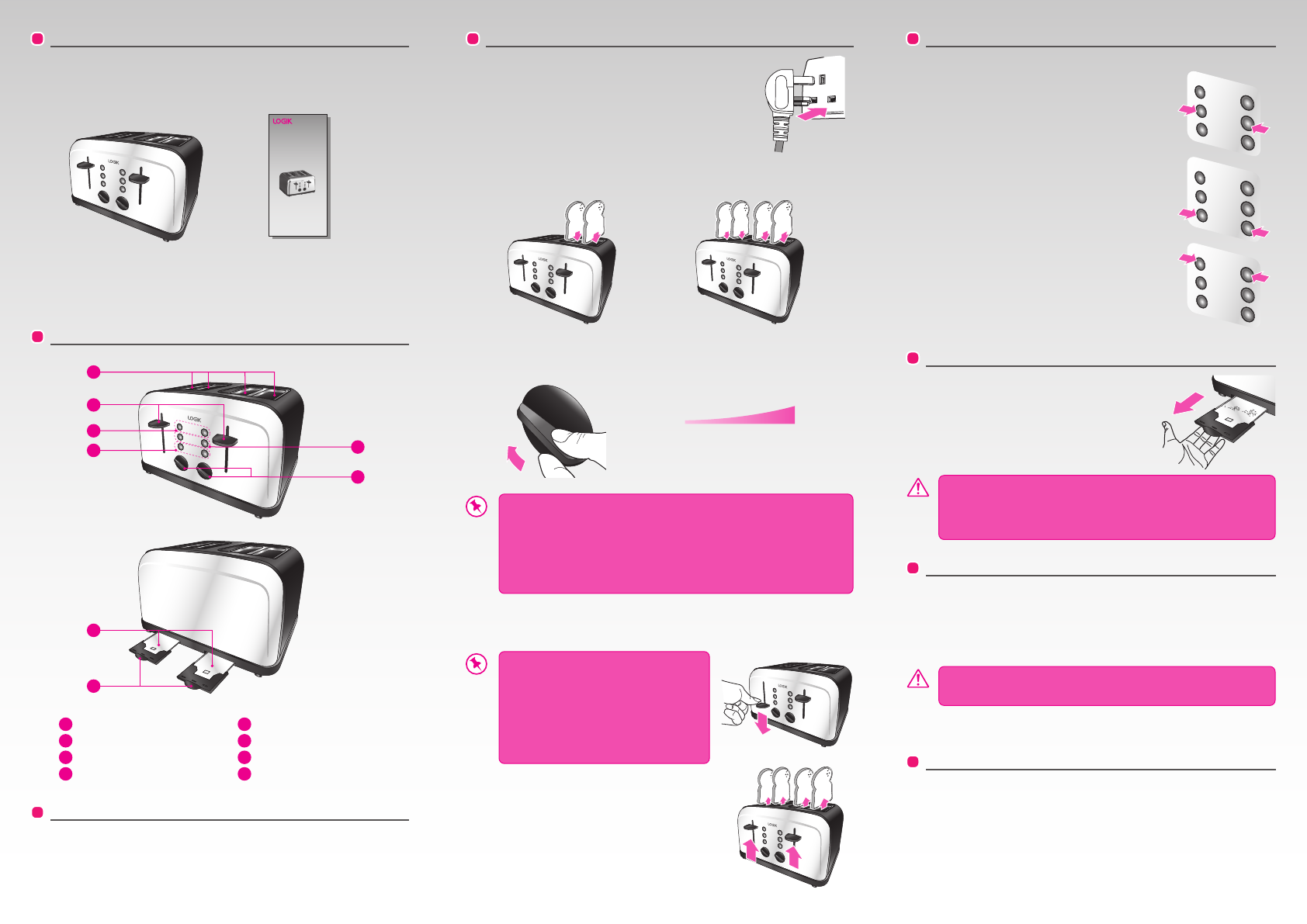
UNPACKING
Remove all packaging from the unit. Retain the packaging. If you dispose of it
please do so according to local regulations.
The following items are included:
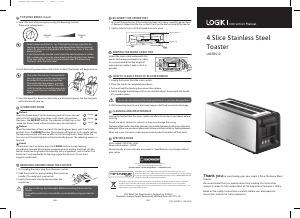
TOASTING BREAD
To prevent jamming, do not use your toaster with torn slices
of bread. Make sure the size and thickness of the slices of
bread t easily into the toast slots. Always watch your
toaster when in use. Never leave your toaster unattended.
1. Plug the mains plug into the mains socket.
2. Put bread slices into the bread slots.
Two sets of controls for defrost, reheat, cancel, browning
control and the toasting lever. Both sets of controls can work
together or separately. For four slice toasting and other
functional controls, both sets of control must be pressed.
OTHER FUNCTIONS
Reheat
Insert the cold slices of toast and lower the toasting lever
until it remains in a downward position. Press the REHEAT
button. The indicator will illuminate. In this mode, setting
the browning control will have no effect as the toasting
time is xed. When the time runs out, the toasting lever
will automatically pop up and nish the reheating process.
Defrost
Insert the frozen bread. Set the browning control to your
desired colour. Lower the toasting lever down until it
remains in a downward position, then press the DEFROST
button. The indicator will illuminate. In this mode, the
frozen bread will be toasted to your desired colour.
Cancel
If the toaster starts to smoke, press the CANCEL button to
stop toasting immediately. Remove all protective
wrapping prior to putting the bread into the toaster.
Avoid toasting the food with extremely runny ingredients
such as butter. The bread slot is only applicable for
toasting regular bread slices. Do not toast irregular sized
bread.
REMOVING CRUMBS FROM THE TOASTER
1. First remove the mains plug from the mains
socket.
2. Slide the crumb tray out by holding the crumb
tray handle. (The metal part may be hot.)
3. Empty the crumbs into the bin and clean the
crumb tray.
HOW TO CLEAR A PIECE OF BLOCKED BREAD
1. Remove the mains plug from the mains socket.
2. Allow the toaster to completely cool down.
3. Push and hold the toasting lever down then release.
4. Gently dislodge the blockage with a non-metallic object, for example the
handle of a wooden spoon.
5. Lift the toasting lever to remove the blockage.
CLEANING AND MAINTENANCE
Remove the mains plug from the mains socket and allow the toaster to cool down
before cleaning.
Do not use harsh cleaners or solvents as they may damage the casing.
The body of the toaster should be cleaned using a cloth dampened with warm
water. Make sure you do not allow water to seep into the controls or heating
elements.
When not in use, the mains cable may be wound under the bottom of the toaster.
FIRST TIME USE
Please note there may be manufacturing residue or oil remaining in the toaster or
heating element. Odour may be emitted the rst time you use it. This is normal and
will not occur after using your toaster for several times. The rst time you use your
toaster we suggest that you operate it without bread.
PRODUCT OVERVIEW
• The Main Unit
Toast Slots
• Instruction Manual
(P.N.: L04TR_TB_TC12-001)
1
2
7
8
3
5
6
4
1
REHEAT Button
5
Toasting Lever
2
Browning Control
6
CANCEL Button
3
Crumb Tray
7
DEFROST Button
4
Crumb Tray Handle
8
CANCEL
1
2
3
4
5
6
1
2
3
4
5
6
REHEAT
DEFROST
CANCEL
1
2
3
4
5
6
1
2
3
4
5
6
REHEAT
DEFROST
CANCEL
1
2
3
4
5
6
1
2
3
4
5
6
REHEAT
DEFROST
Let the crumb tray dry thoroughly before reinserting it back into the
toaster.
Ensure the crumb tray is completely inserted before using your
toaster again.
Ensure you don’t make contact with the heating elements, as you may
damage them.
• Select a lower position (i.e. 1 or 2) for light browning, especially for
toasting only one slice or for dry (old) bread. Note that the toasting colour
for one slice will be darker than that for two slices at the same level.
• If you have already toasted some bread, the toaster elements will be hot,
so when you put some more bread into the toaster it may become
browner faster than the rst slices that were toasted, even if the Browning
Control is set to the same level.
• Only when the toaster is connected to
the mains power, can the toasting lever
be locked in the downward position.
• During the toasting process, you may
observe the toasting colour. Press the
CANCEL button to cancel the operation
at any time if you are satised with the
colour.
3. Select the level of browning by turning the Browning Control.
There are 6-setting levels:
(1) (6)
DarkestWhitest
4. Lower the toasting lever down vertically until it is positioned in place. The toaster
will begin at once.
5. Once the bread has been toasted to the preset
browning level, the toasting lever will automatically
pop up.
CANCEL
1
2
3
4
5
6
1
2
3
4
5
6
REHEAT
DEFROST
CANCEL
1
2
3
4
5
6
1
2
3
4
5
6
REHEAT
DEFROST
CANCEL
1
2
3
4
5
6
1
2
3
4
5
6
REHEAT
DEFROST
CANCEL
1
2
3
4
5
6
1
2
3
4
5
6
REHEAT
DEFROST
CANCEL
1
2
3
4
5
6
1
2
3
4
5
6
REHEAT
DEFROST
Stainless Steel Toaster
Thank you for purchasing your new Logik Toaster.
We recommend that you spend some time reading this instruction manual
in order to fully understand all the operational features it offers.
Read all the safety instructions carefully before use and keep this
instruction manual for future reference.
LC04TB12
Brilliant Blue
LC04TC12
Classic Cream
LC04TR12
Ruby Red
If items are missing or damaged, please contact Partmaster (UK only).
Tel: 0844 800 3456 for assistance.
C
M
Y
CM
MY
CY
CMY
K
LC04TR_TB_TC12_IB_final120504_with logo.pdf 2 04/05/2012 4:00 PM


Delta i konversationen om denna produkt
Här kan du dela vad du tycker om Logik LC04TR12 Brödrost. Om du har en fråga, läs först noggrant igenom manualen. Att begära en manual kan göras genom att använda vårt kontaktformulär.