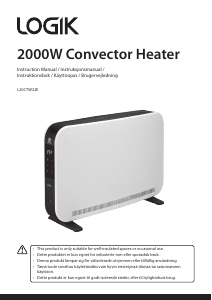
Bruksanvisning Logik L20CHTW25 Värmefläkt

Behöver du en bruksanvisning för din Logik L20CHTW25 Värmefläkt? Nedan kan du se och ladda ner PDF-bruksanvisningen gratis på svenska. Den här produkten har för närvarande 2 vanliga frågor, 0 kommentarer och har 0 röster. Om det här inte är bruksanvisningen du vill ha, vänligen kontakta oss.

Är produkten defekt och erbjuder bruksanvisningen ingen lösning? Gå till ett Repair Café för gratis reparationstjänster.

Bruksanvisning

Loading…

IB-L20CHTW25-250328V1
Thank you for purchasing your new product.
We recommend that you spend some time reading this instruction manual in order that
you fully understand all the operational features it oers.
Read all the safety instructions carefully before use and keep this instruction manual for
future reference.
2kw Digital Convector
Heater with Timer
Instruction Manual
L20CHTW25
This product is only suitable for well-insulated spaces or occasional use.
Before using this appliance, read all safety instructions carefully rst in the Safety
Warnings booklet and keep them for future reference.
Product Overview
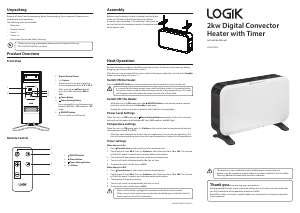
Front View
Unpacking
Remove all items from the packaging. Retain the packaging. If you dispose of it please do so
according to local regulations.
The following items are included:
Main Unit
Remote Control
Foot × 2
Screw × 4
Instruction Manual and Safety Warnings
Heat Operation
Position the heater upright on the oor away from curtains, furniture or wall coverings before
plugging your heater into the mains socket.
After the unit is connected with the mains socket with power supply, the unit will enter Standby
mode, and the display will show ––“.
Switch ON the Heater
Press the ON/OFF Button on the control panel or remote control to switch on the unit.
It is normal for the heater to emit some smell and fumes when it is turned on for the
rst time or when turned on after not being used for a long period of time. This smell
will disappear when the heater has been turned on for a short while.
Switch OFF the Heater
While the unit is in ON mode, press the ON/OFF Button on the control panel or remote
control to switch the unit into Standby mode again.
Unplug the unit from the mains socket to switch o the unit completely.
Power Level Settings
When the unit is in ON mode, press Power Setting Button repeatedly on the unit or remote
control to set the power level between H1 (low), H2 (medium) and H3 (high).
Temperature settings
When the unit is in ON mode, press +/– Button on the control panel or remote control to adust
the temperaure from 5°C to 35°C.
When the room temperature reaches the set temperature, the unit will stop operating. The
unit will resume operating again when the room temperature is below the set temperature.
Timer settings
When the unit is On:
1. Press
Timer Button on the control panel or remote control.
2. The display will show 00 h. Press +/– Button to adust the timer from 1h to 24h. The set time
will ash for about 5 seconds on the display before conrmation.
3. The display will alternatively show the set timer and temperature.
4. The unit will switch o automatically after the set time.
5. To cancel the timer, set the timer to 00 h.
When the unit is O:
1. Press
Timer Button on the control panel or remote control.
2. The display will show 00 h. Press +/– Button to adust the timer from 1h to 24h. The set time
will ash for about 5 seconds on the display before conrmation.
3. The display will show the set timer.
4. The unit will switch on automatically after the set time.
5. To cancel the timer, set the timer to 00 h.
Make sure the heater is plugged into a power socket for the timer to work.
When using in timer mode, due consideration should be given to the fact that the
heater may turn on whilst unattended.
If items are missing or damaged, please contact Partmaster (UK only).
Tel: 0344 800 3456 for assistance.
1. Digital Control Panel
2. +/– Button
When the unit is on, press to adjust
the set temperature from 5°C to 35°C.
After pressing the
Timer button,
press to set the timer from 00h to
24h.
3.
Timer Button
4.
Power Setting Button
Press repeatedly to set the power level
between H1 (low) / H2 (medium) / H3
(high).
5.
ON/OFF Button
Press to switch on/o the unit.
1.
ON/OFF Button
2.
Timer Button
3.
Power Setting Button
4. +/– Button
°C
h
1
2
3
4
5
Assembly
Before using the heater, the feet (supplied) must be tted
to the unit. Attach the feet to the base of the heater
using the screws provided (2 for each foot), taking care to
ensure that they are located correctly in the bottom ends
of the heater’s side.
Remote Control
1
3
4
2
Ladda ner bruksanvisning i Engelska (PDF, 0.41 MB)
(Tänk på miljön och skriv endast ut denna bruksanvisning om det verkligen är nödvändigt)

Loading…

Betyg

Berätta vad du tycker om Logik L20CHTW25 Värmefläkt genom att betygsätta den. Vill du dela med dig av dina åsikter om denna produkt eller ställa en fråga? Lämna en kommentar nederst på sidan.
Är du nöjd med Logik L20CHTW25 Värmefläkt?
Ja Nej
Bli den första personen som betygsätter denna produkt
0 röster

Delta i konversationen om denna produkt

Här kan du dela vad du tycker om Logik L20CHTW25 Värmefläkt. Om du har en fråga, läs först noggrant igenom manualen. Att begära en manual kan göras genom att använda vårt kontaktformulär.

Mer om denna bruksanvisning

Vi förstår att det är trevligt att ha en pappersbruksanvisning för din Logik L20CHTW25 Värmefläkt. Du kan alltid ladda ner bruksanvisningen från vår hemsida och skriva ut den själv. Om du vill ha en originalbruksanvisning rekommenderar vi att du kontaktar Logik. De kanske kan tillhandahålla en originalbruksanvisning. Letar du efter bruksanvisningen för din Logik L20CHTW25 Värmefläkt på ett annat språk? Välj ditt föredragna språk på vår hemsida och sök efter modellnumret för att se om vi har det tillgängligt.

Specifikationer

Märke Logik
Modell L20CHTW25
Kategori Värmefläktar
Filtyp PDF
Filstorlek 0.41 MB

Alla bruksanvisningar för Logik Värmefläktar
Fler bruksanvisningar för Värmefläktar

Vanliga frågor om Logik L20CHTW25 Värmefläkt

Vårt supportteam söker efter användbar produktinformation och svar på vanliga frågor. Om du hittar en felaktighet bland våra vanliga frågor uppskattar vi om du meddelar oss detta via vårt kontaktformulär.

Hur påverkar damm effektiviteten hos en värmare? Verifierad

Damm kan samlas på värmeelementen och i luftfiltren på en värmare, vilket minskar dess effektivitet. Detta kan få värmaren att arbeta hårdare för att producera samma mängd värme, vilket leder till ökad energiförbrukning och högre elräkningar. För att upprätthålla effektiviteten hos din värmare, se till att rengöra den regelbundet och byt ut luftfiltret vid behov.

Detta hjälpte (207) Läs mer

Hur bestämmer jag storleken på värmaren jag behöver för ett rum? Verifierad

Storleken på värmaren du behöver för ett rum beror på rummets storlek och utrymmets isolering. En allmän tumregel är att använda 60 watt per kvadratmeter utrymme. Till exempel, om ett rum är 14 kvadratmeter, skulle en 840-watts värmare vara lämplig.

Detta hjälpte (172) Läs mer
Bruksanvisning Logik L20CHTW25 Värmefläkt

Relaterade produkter

Relaterade kategorier

×
Download