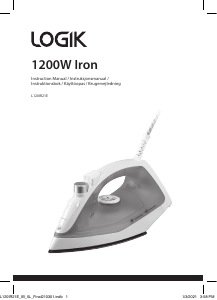
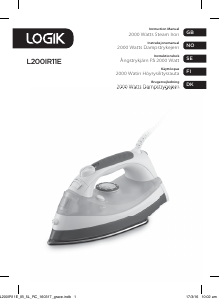
Bruksanvisning Logik L200IR12 Strykjärn

Behöver du en bruksanvisning för din Logik L200IR12 Strykjärn? Nedan kan du se och ladda ner PDF-bruksanvisningen gratis på svenska. Den här produkten har för närvarande 4 vanliga frågor, 1 kommentarer och har 0 röster. Om det här inte är bruksanvisningen du vill ha, vänligen kontakta oss.

Är produkten defekt och erbjuder bruksanvisningen ingen lösning? Gå till ett Repair Café för gratis reparationstjänster.

Bruksanvisning

Loading…

Thank you for purchasing your new Logik Steam Iron.
We recommend that you spend some time reading this instruction
manual in order to fully understand all the operational features it
offers.
Read all the safety instructions carefully before use and keep this
instruction manual for future reference.
DSG Retail Ltd. (co. no. 504877)
1 Portal Way, London, W3 6RS, UK
Visit Partmaster.co.uk today for the easiest way to buy
electrical spares and accessories. With over 1 million
spares and accessories available we can deliver direct
to your door the very next day. Visit www.partmaster.co.uk or call 0344 800 3456 (UK
customers only) Calls charged at National Rate.
IB-L200IR12-160226V3
Plug the iron into the mains socket.
Set the highest settings on the Temperature
Dial and Steam Control.
Unplug the iron once the Temperature
Indicator goes o, the iron should be held
over a bowl before pressing and holding the
Self Clean button immediately. Water will
drain out with impurities.
Release the Self Clean button. Slightly tilt the
iron to drain water out.
Plug the iron into the mains socket again. Set the highest settings on the
Temperature Dial and iron on a damp cloth to remove deposits on the soleplate.
When the iron is cool:
Open the Filler Door, invert the iron and pour away
the excess water from the reservoir. When pouring
away the water, gently shake the iron to remove any
loose particles from the reservoir.
SPECIFICATIONS
Voltage Rating: 230V ~ 50Hz
Power consumption: 2000W
We continually strive to improve our products. Specifications may change without
prior notice.
SELF-CLEANING
The self-cleaning feature cleans the inside of the plate, removing impurities. We
recommend using it every 10-15days.
CAUTION!
• In between ironing always stand the iron in the
upright position. NEVER leave the iron face down.
• After you have nished ironing, turn the Steam
Control to the OFF position. Unplug the iron from
the mains socket. Stand the iron in its upright
position and allow it to completely cool down.
AFTER YOU HAVE FINISHED IRONING
Move the Steam Control to the OFF position and
switch the iron o at the mains socket and unplug.
Stand the iron in the upright position and let the iron
completely cool down.
s
e
l
f
c
l
e
a
n
GB-4 GB-5
Instruction Manual
2000 Watts Steam Iron
L200IR12
SPRAY BUTTON
Press the Spray button to spray
water on the material. It may be
used for steam or dry ironing.
To avoid staining, do not use the spray on silk or synthetics, and be very
careful when you iron delicate fabrics.
To operate the spray and steam shot functions, the water reservoir must be
at least one-quarter full. If these features stop working, fill the water
reservoir.
VERTICAL STEAM
Hold the iron upright and press the
Shot of Steam button for vertical
ironing. If the Temperature indicator
illuminates, stop pressing the Shot of
Steam button and wait for it to go
o before using this feature again.
ANTI-DRIP SYSTEM
This is designed to prevent water escaping from the soleplate when the iron is cold.
During use, the anti drip system may click loudly, particularly when heating up or
cooling down. This is perfectly normal and indicates that the system is functioning
correctly.
ANTI-SCALE SYSTEM
The built - in anti-scale cartridge is designed to reduce the build-up of lime scale
which occurs during steam ironing and will prolong the working life of your iron.
The anti-scale cartridge will not completely stop the natural process of lime scale
build-up so always empty the water after use and self-clean the iron regularly.
SHOT OF STEAM BUTTON
This feature may be used during steam or dry
ironing only when the iron is at the highest
settings on the temperature dial.
Press the Shot of Steam button to release a
powerful surge of steam. You may need to press
the button a few times to prime the surge of steam.
Wait a few seconds for the steam to penetrate the
fabric before pressing the button again.
Excessive use of this feature will cause the iron to
cool, and the Temperature Indicator will illumi-
nate.
If this happens, wait for the Temperature Indica-
tor to go o before using this feature again.
The symbol on the product or its packaging indicates that this product must not be
disposed of with your other household waste. Instead, it is your responsibility to dispose of
your waste equipment by handing it over to a designated collection point for the recycling
of waste electrical and electronic equipment. The separate collection and recycling of your
waste equipment at the time of disposal will help conserve natural resources and ensure
that it is recycled in a manner that protects human health and the environment.
For more information about where you can drop o your waste for recycling, please
contact your local authority, or where you purchased your product.
For general information about this appliance
and handy hints and tips, please visit
www.knowhow.com/knowledgebank or call 0344 5611234.
L200IR12_IB_RC_160226_grace.pdf 1 26/2/16 2:26 pm
Ladda ner bruksanvisning i Engelska (PDF, 4.86 MB)
(Tänk på miljön och skriv endast ut denna bruksanvisning om det verkligen är nödvändigt)

Loading…

Betyg

Berätta vad du tycker om Logik L200IR12 Strykjärn genom att betygsätta den. Vill du dela med dig av dina åsikter om denna produkt eller ställa en fråga? Lämna en kommentar nederst på sidan.
Är du nöjd med Logik L200IR12 Strykjärn?
Ja Nej
Bli den första personen som betygsätter denna produkt
0 röster

Delta i konversationen om denna produkt

Här kan du dela vad du tycker om Logik L200IR12 Strykjärn. Om du har en fråga, läs först noggrant igenom manualen. Att begära en manual kan göras genom att använda vårt kontaktformulär.

Mer om denna bruksanvisning

Vi förstår att det är trevligt att ha en pappersbruksanvisning för din Logik L200IR12 Strykjärn. Du kan alltid ladda ner bruksanvisningen från vår hemsida och skriva ut den själv. Om du vill ha en originalbruksanvisning rekommenderar vi att du kontaktar Logik. De kanske kan tillhandahålla en originalbruksanvisning. Letar du efter bruksanvisningen för din Logik L200IR12 Strykjärn på ett annat språk? Välj ditt föredragna språk på vår hemsida och sök efter modellnumret för att se om vi har det tillgängligt.

Specifikationer

Märke Logik
Modell L200IR12
Kategori Strykjärn
Filtyp PDF
Filstorlek 4.86 MB

Alla bruksanvisningar för Logik Strykjärn
Fler bruksanvisningar för Strykjärn

Vanliga frågor om Logik L200IR12 Strykjärn

Vårt supportteam söker efter användbar produktinformation och svar på vanliga frågor. Om du hittar en felaktighet bland våra vanliga frågor uppskattar vi om du meddelar oss detta via vårt kontaktformulär.

Kan jag rengöra botten på strykjärnet med en skurmedel? Verifierad

Nej, detta kan skada botten. Använd en fuktig trasa eller en mjuk svamp för att rengöra den.

Detta hjälpte (426) Läs mer

Vad är det för skillnad mellan ett ångstrykjärn och ett vanligt strykjärn? Verifierad

Den största fördelen med ett ångstrykjärn är att det enkelt tar bort skrynklor och veck med hjälp av varm ånga. Ett vanligt strykjärn är dock mycket lättare och ofta billigare.

Detta hjälpte (348) Läs mer

Sålen på mitt strykjärn är missfärgat, kan jag fortfarande stryka med det? Verifierad

Det är möjligt, men det finns en chans att det kommer att gnugga på ljusa kläder.

Detta hjälpte (289) Läs mer

Kan jag stryka över knappar? Verifierad

Nej, detta kommer att skada stryksulan och det förhindrar att strykjärnet fungerar korrekt. Stryk aldrig över knappar, blixtlås eller andra hårda föremål.

Detta hjälpte (240) Läs mer
Bruksanvisning Logik L200IR12 Strykjärn

Relaterade produkter

Relaterade kategorier

×
Download