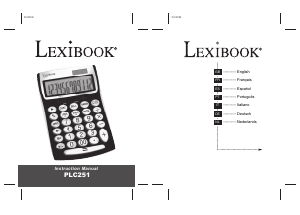
Bruksanvisning Lexibook PLC251 Räknemaskin

Behöver du en bruksanvisning för din Lexibook PLC251 Räknemaskin? Nedan kan du se och ladda ner PDF-bruksanvisningen gratis på svenska. Den här produkten har för närvarande 1 vanliga frågor, 0 kommentarer och har 0 röster. Om det här inte är bruksanvisningen du vill ha, vänligen kontakta oss.

Är produkten defekt och erbjuder bruksanvisningen ingen lösning? Gå till ett Repair Café för gratis reparationstjänster.

Bruksanvisning

Loading…
PLC251IM PLC251IM
Copyright Lexibook 2008
1
Copyright Lexibook 2008
2
English
English
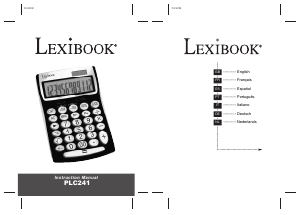
Congratulations! You have just acquired the PLC251 Semi Desktop Calculator from Lexibook®.
This calculator will allow you to perform standard calculations as well as advanced functions such as
percentage, memory, profit analysis, and euro conversions.
In order to get the most out of your PLC251 calculator, read this instruction manual carefully and keep it in
a safe place for future reference.
The “00” key allows you to quickly enter hundreds. Example: Press “5”, then the “00” key, and the
calculator will display “500”.
The “+/-” key allows you to change a positive number to negative, or vice versa.
If you repeatedly press the calculation signs (+, -, x, ÷), the calculation will be repeated.
The decimal point selector allows you to select from 0, 2, 4 decimal places, or a floating decimal place
(position F), or an automatic conversion to 2 decimal places (position A).
The round down/up selector allows you to choose round down to the nearest lower unit (position “ ”),
round up to the nearest higher unit (position “ ”), or a result automatically rounded up/down (position “5/4”).
To correct a number, press the “ ” key until you reach the number you want to enter. To completely delete
a number you have just entered, press “C/CE” once. The “C/CE” key is also used to turn on the calculator.
The % key allows you to perform operations with percentage values.
M+/M-/MRC – Memory operation keys.
COST/SELL/MARGIN – these keys are used to perform a profit analysis.
LOCAL/EURO – these keys are used to perform currency conversions.
1. Basic calculations
Introduction
Keys
Calculations
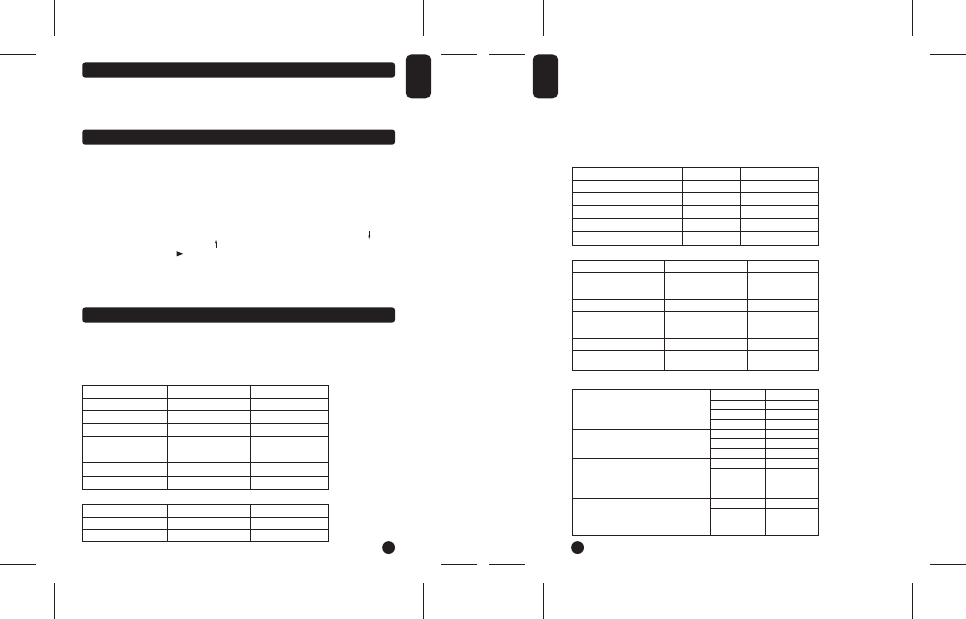
To calculate Press Display
23 + 203 - 56 = 23 + 203 - 56 = 170
562 x (38-96) = 38 - 96 x 562 = -32596
(23 x 6 + 78) ÷ 2.3 - 89 = 23 x 6 + 78 ÷ 2.3 - 89= 4.9130434782
1234567 x 9876543 = 1234567 x 9876543 = MEMORY ERROR
12.19325406118
C/CE 12.19325406118
C/CE 0
To calculate the margin
Cost: 60
Sale price: 100
Margin?
To calculate the cost
Sale price: 200
Margin: 6%
Cost?
To calculate the sale price
Cost: 120
Margin: 5%
Press
60[COST]100[SELL]
Press
200[SELL] 6 [MARGIN]
Press
120[COST]5[MARGIN]
Display
MARGIN%40
Display
COST 188
Display
SELL 126.31
To calculate Press Display
20 + 6% = 21.2 20 + 6 % 21.2
150 minus 20% = 120 150 - 20 % 120
2. Percentage calculations
3. Calculations using memory
Before saving a new value to the memory, the content must first be deleted by pressing the 'MRC' key twice
and then pressing the 'C/CE' key to delete all previous calculations.
To add a value to the memory, enter the chosen number or calculation and then press the 'M+’ key. The
result of the calculation is worked out and, if applicable, added to the value in the memory.
When 'M' is displayed, it indicates that a value is stored in the memory.
To deduct a value from the memory, enter the chosen number or calculation, and then press the “
M-” key.
The number entered (or the result of the calculation) is deducted from the value stored in the memory. In
order to display the value stored in the memory press “MRC”. To delete the memory content, press twice
on “MRC”, the caption “M” will disappear.
4. Profit analysis
5. Currency function
To save a number in the memory Press Display
2 x 3 = 6 2 x 3 "M+" M 6
-) 3 x 4 = 12 3 x 4 "M-" M 12
+) 4 x 5 = 20 4 x 5 "M+" M 20
14 MRC M 14
MRC 14
To set exchange rate
Recall exchange rate
Calculation:
Exchange rate: 1EURO = 5 units of
local currency.
Value of 10 euros in local currency?
Calculation:
Exchange rate: 1EURO = 5 units of
local currency.
Value of 50 units of local currency in euros?
Press
5
RATE
LOCAL
Press
RATE
EURO
Press
10 [LOCAL]
Press
50 [EURO]
Display
5
RATE 5
C1C2 5
Display
RATE 0
C2 5
Display
50
Display
10
Before using your calculator for the first time, please follow the steps given below:
1. Remove carefully the protection tab of the battery compartment by pulling on the end of the tab.
2. If the tab remains jammed, use a coin to remove the battery compartment, the battery and then the tab.
Replace the battery (+ side facing up) and close back the battery compartment.
3. Remove the static label from the LCD screen and press the Reset key.
Ladda ner bruksanvisning i Engelska (PDF, 1.46 MB)
(Tänk på miljön och skriv endast ut denna bruksanvisning om det verkligen är nödvändigt)

Loading…

Betyg

Berätta vad du tycker om Lexibook PLC251 Räknemaskin genom att betygsätta den. Vill du dela med dig av dina åsikter om denna produkt eller ställa en fråga? Lämna en kommentar nederst på sidan.
Är du nöjd med Lexibook PLC251 Räknemaskin?
Ja Nej
Bli den första personen som betygsätter denna produkt
0 röster

Delta i konversationen om denna produkt

Här kan du dela vad du tycker om Lexibook PLC251 Räknemaskin. Om du har en fråga, läs först noggrant igenom manualen. Att begära en manual kan göras genom att använda vårt kontaktformulär.

Mer om denna bruksanvisning

Vi förstår att det är trevligt att ha en pappersbruksanvisning för din Lexibook PLC251 Räknemaskin. Du kan alltid ladda ner bruksanvisningen från vår hemsida och skriva ut den själv. Om du vill ha en originalbruksanvisning rekommenderar vi att du kontaktar Lexibook. De kanske kan tillhandahålla en originalbruksanvisning. Letar du efter bruksanvisningen för din Lexibook PLC251 Räknemaskin på ett annat språk? Välj ditt föredragna språk på vår hemsida och sök efter modellnumret för att se om vi har det tillgängligt.

Specifikationer

Märke Lexibook
Modell PLC251
Kategori Räknemaskiner
Filtyp PDF
Filstorlek 1.46 MB

Alla bruksanvisningar för Lexibook Räknemaskiner
Fler bruksanvisningar för Räknemaskiner

Vanliga frågor om Lexibook PLC251 Räknemaskin

Vårt supportteam söker efter användbar produktinformation och svar på vanliga frågor. Om du hittar en felaktighet bland våra vanliga frågor uppskattar vi om du meddelar oss detta via vårt kontaktformulär.

Ett batteri i min enhet är oxiderat, kan jag fortfarande använda det säkert? Verifierad

Ja, enheten kan fortfarande användas säkert. Ta först bort det oxiderade batteriet. Använd aldrig bara händer för att göra detta. Rengör sedan batterifacket med en bomullspinne doppad i ättika eller citronsaft. Låt det torka och sätt i nya batterier.

Detta hjälpte (484) Läs mer
Bruksanvisning Lexibook PLC251 Räknemaskin

Relaterade produkter

Relaterade kategorier

×
Download