Bruksanvisning Leapfrog LeapPad Classic Tablet

Behöver du en bruksanvisning för din Leapfrog LeapPad Classic Tablet? Nedan kan du se och ladda ner PDF-bruksanvisningen gratis på svenska. Den här produkten har för närvarande 11 vanliga frågor, 0 kommentarer och har 0 röster. Om det här inte är bruksanvisningen du vill ha, vänligen kontakta oss.

Är produkten defekt och erbjuder bruksanvisningen ingen lösning? Gå till ett Repair Café för gratis reparationstjänster.

Bruksanvisning

Loading…
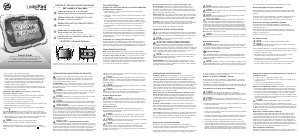
LeapPad
Learning System Products
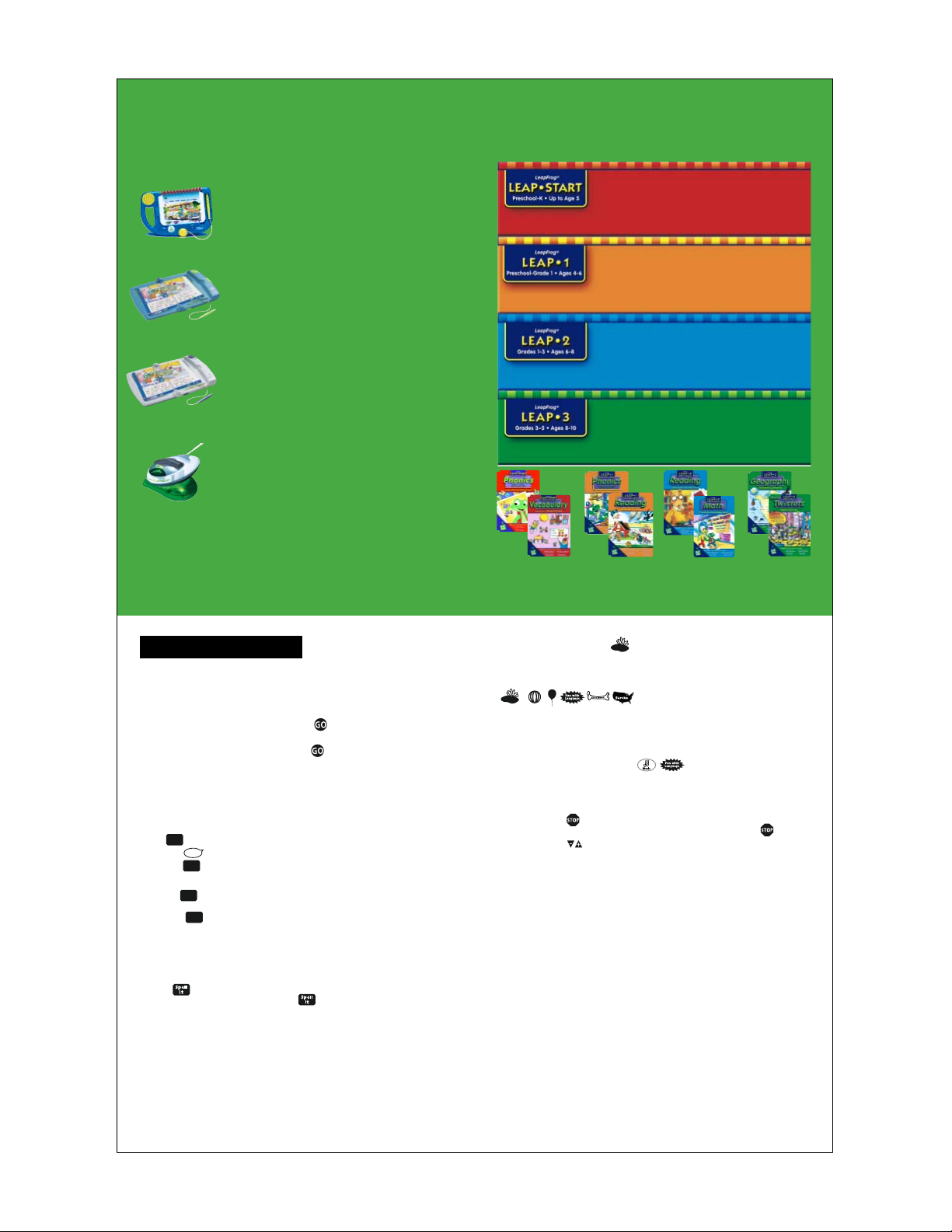
The LeapPad family of products is designed to make reading and learning
fun! From pre-readers to more advanced learners who are developing reading
fluency, there’s a LeapPad system for every stage!
My First LeapPad
Learning System
(Ages 3 and up)
Engages and delights with fun, interactive stories and activities that
teach pre-reading skills. Interactive talking Flip Books come alive as
children touch, play and learn!
LeapPad
Learning System
(Ages 4 and up)
Interactive talking books come to life and reinforce the magic of
reading. LeapPad books include special tools that develop vocabulary,
spelling, and phonics awareness. Each book is packed with engaging
activities, games, stories and facts that make reading and learning fun!
LeapPad
Pro Learning System
(Ages 6 and up)
LeapPad Pro learning system is designed to provide a more challenging
learning experience for more advanced readers. Activities on each page
help reinforce a variety of subjects in new and exciting ways. Books are
designed to broaden vocabulary and improve reading comprehension,
with topics such as math, science, geography, music and more!
Mind Station
connector
The Mind Station connector provides access to a world of learning on
www.leapfrog.com. Using the Mind Station connector and cartridge,
you can download new content and activities for use on your LeapPad.
Join the LeapFrog Never-Ending Learning Club to get Leaps Pond
magazine, LeapPad Reading Activity Sheets and more!
(Paid subscription required for some content.)
Visit www.leapfrog.com for more details.
The LeapPad
Library
Open the Door to Learning with the LeapPad Library!
The LeapPad library is divided into Leap levels, which make it easy for you
to tailor the system to your child’s current reading level and special interests.
Reading Readiness/Simple Activities
Leap Start introduces concepts that develop reading readiness, such
as letter recognition, phonics, repetition and rhyme, matching,
music and simple poems.
Learning to Read/Early Activities
Leap 1 teaches your child how to read by developing basic reading
fundamentals. These books have special vocabulary builders, and
focus on the relationship between letters and sounds (phonics).
Characters and themes stimulate interest in beginning story reading.
Reading Practice/School-Related Subjects
Leap 2 introduces your child to chapter books, and strengthens
vocabulary and reading comprehension skills through subjects
such as math, science and foreign languages.
Reading Comprehension/Reading to Learn
Leap 3 is for readers ready to master more complex vocabulary,
develop logic and reasoning skills and explore school subjects such
as science, geography, history and music.
Each sold separately. Actual artwork may vary.
©1999, 2001 LeapFrog Enterprises, Inc. ARTHUR ©1998 by Marc Brown. ARTHUR
®
is a registered trademark of
Marc Brown. All rights reserved. ONCE UPON A TIME Illustrations ©1993 John Prater. All rights reserved.
RICHARD SCARRY ©1991 The Estate of Richard Scarry. Published with the authorization of Egmont Books A/S.
All rights reserved.
GETTING STARTED
• Insert the cartridge and place the LeapPad
book into the LeapPad player.
(Please note: you will not need a cartridge for the LeapPad collection book,
included with your LeapPad.)
• Press the ON/OFF button to begin play.
• Use the LeapPad Neartouch
®
pen to touch the GOon the edge of the page.
• Now use your LeapPad Neartouch pen to touch words and pictures and make them
come to life! Remember, you must touch the GOevery time you turn the page.
Only the LeapPad pen will work with your LeapPad learning system. Never
use a regular pen or pencil on any of the LeapPad books.
The LeapPad Learning System Helps
Teach Your Child to Read!
Say It
Touch the to hear the entire page read aloud.
Touch the with the LeapPad pen, then touch any word on the page to
hear it spoken.
Sound It
Explore letters (or groups of letters) and their sounds.
Touch the with the LeapPad pen to hear words spoken.
Try touching each letter in a word (left to right) or lightly drag the LeapPad pen
across a word to hear it sounded out.
• Certain letter combinations, or letter groups, are highlighted in yellow.These letters
make phonic sounds that are different from the phonic sounds of each letter.Touch a
letter group to hear the sound it makes.
Spell It
• Learn how to spell words by touching the with the LeapPad pen, then touching
any word on the page.
Define It
• Learn the definition and hear the proper pronunciation of words in bold in the
chapter books and Classics.Touch a word in bold once for pronunciation, twice for
the definition.
Sound
It
Sound
It
Say
It
Say
It
Play a Fun Learning Game
Look for the game icon at the bottom of the page to play a fun learning game.When you
see one of these icons, touch it with the LeapPad
pen to shift into game mode.The icon
for each book will be unique, but will always be located at the bottom of the page.
Touch the game icon at the bottom of the page with the Pen, and then follow the
instructions.
Try keeping track of correct answers so you can play against yourself and friends!
• Look for other special icons at the bottom of the page that feature fun activities such
as music mode and language mode.
Interact with Pictures on the Page
Touch any of the characters or pictures with the LeapPad pen to hear them magically
come alive.Touch them again, and they may surprise you with more fun sounds and
phrases!
Stop an Activity
You can stop any activity, story or sound by touching the LeapPad pen to .
Volume Control
Touch the LeapPad pen to the volume controls to adjust the audio volume on your
LeapPad learning system.
Automatic Shut-off
When you are done playing with the LeapPad learning system, press the ON/OFF
button with your finger. Otherwise, the LeapPad player will turn off automatically if it
hasn’t been used for a few minutes.
Headphone Jack
For quiet play, the LeapPad learning system has a jack for use with your personal
headphones (or speakers) located on the back of the LeapPad base. Consult the head-
phone or speaker manufacturer’s operating instructions. Headphones are not included.
Warning:
• Headphone wires can be dangerous to small children. Headphones should only be
used under adult supervision.
• In case of electrostatic disturbance, the unit will turn to standby mode.To resume
play, simply turn the LeapPad on again.
Care and Maintenance
Caring for your LeapPad learning system and LeapPad books:
• Keep away from food and beverages
To clean, use a slightly damp cloth and mild soap. Air dry only
• Never use in water, or submerge in water
Avoid bending, fraying, or biting LeapPad books
• Remove batteries for prolonged storage
• Avoid extreme temperatures
KITE
Ladda ner bruksanvisning i Engelska (PDF, 0.41 MB)
(Tänk på miljön och skriv endast ut denna bruksanvisning om det verkligen är nödvändigt)

Loading…

Betyg

Berätta vad du tycker om Leapfrog LeapPad Classic Tablet genom att betygsätta den. Vill du dela med dig av dina åsikter om denna produkt eller ställa en fråga? Lämna en kommentar nederst på sidan.
Är du nöjd med Leapfrog LeapPad Classic Tablet?
Ja Nej
Bli den första personen som betygsätter denna produkt
0 röster

Delta i konversationen om denna produkt

Här kan du dela vad du tycker om Leapfrog LeapPad Classic Tablet. Om du har en fråga, läs först noggrant igenom manualen. Att begära en manual kan göras genom att använda vårt kontaktformulär.

Mer om denna bruksanvisning

Vi förstår att det är trevligt att ha en pappersbruksanvisning för din Leapfrog LeapPad Classic Tablet. Du kan alltid ladda ner bruksanvisningen från vår hemsida och skriva ut den själv. Om du vill ha en originalbruksanvisning rekommenderar vi att du kontaktar Leapfrog. De kanske kan tillhandahålla en originalbruksanvisning. Letar du efter bruksanvisningen för din Leapfrog LeapPad Classic Tablet på ett annat språk? Välj ditt föredragna språk på vår hemsida och sök efter modellnumret för att se om vi har det tillgängligt.

Specifikationer

Märke Leapfrog
Modell LeapPad Classic
Kategori Tablets
Filtyp PDF
Filstorlek 0.41 MB

Alla bruksanvisningar för Leapfrog Tablets
Fler bruksanvisningar för Tablets

Vanliga frågor om Leapfrog LeapPad Classic Tablet

Vårt supportteam söker efter användbar produktinformation och svar på vanliga frågor. Om du hittar en felaktighet bland våra vanliga frågor uppskattar vi om du meddelar oss detta via vårt kontaktformulär.

Kan jag använda min surfplatta när jag laddar den? Verifierad

Ja, du kan använda din surfplatta medan du laddar den. Laddningsprocessen går långsammare när du gör det.

Detta hjälpte (277) Läs mer

Mitt SIM-kort passar inte min mobiltelefon, varför är det? Verifierad

Det finns flera SIM-kortstorlekar, vanliga, mikro och nano. Det är möjligt att använda en adapter eller att göra SIM-kortet mindre.

Detta hjälpte (220) Läs mer

När jag ansluter min enhet till laddaren laddas den dåligt eller inte alls, varför är det så? Verifierad

Det är möjligt att smuts har samlats i öppningen där laddaren är ansluten, vilket förhindrar att den kommer i rätt kontakt. Det bästa sättet att rengöra detta är med tryckluft. Om du är osäker, gör detta av en professionell.

Detta hjälpte (123) Läs mer

Fungerar Bluetooth genom väggar och tak? Verifierad

En Bluetooth-signal fungerar genom väggar och tak, såvida inte dessa är gjorda av metall. Beroende på tjockleken och väggens material kan signalen förlora i styrka.

Detta hjälpte (71) Läs mer

Måste jag ladda ur litiumjonbatteriet helt innan jag laddar upp det igen? Verifierad

Nej, det behövs inte. Det rekommenderades förr i tiden, med gamla batterier. Litiumjonbatterier kan laddas efter användningen och när som helst kopplas loss från laddaren.

Detta hjälpte (51) Läs mer

Vad betyder IMEI? Verifierad

IMEI står för International Mobile Equipment Identity och är ett (ofta) unikt nummer som används för att identifiera mobila enheter som surfplattor och smartphones och skydda dem mot stöld.

Detta hjälpte (47) Läs mer

Under vilka förhållanden fungerar mitt litiumjonbatteri optimalt? Verifierad

Litiumjonbatterier fungerar bäst vid en temperatur mellan 5 °C och 45 °C. Vid mycket kallt eller varmt väder kan du märka att batteriet tar slut snabbare. Vi rekommenderar att inte ladda batteriet vid temperaturer under +5 °C eller över +45 °C.

Detta hjälpte (38) Läs mer

Vad kan jag bäst använda för att rengöra skärmen på min mobila enhet? Verifierad

Det är bäst att använda en mikrofiberduk, eventuellt med ett specialtvättmedel. Använd aldrig kökshanddukar eller andra pappersdukar, de lämnar repor!

Detta hjälpte (37) Läs mer

När jag ansluter en hörlur till min enhet fungerar den inte korrekt, vad kan jag göra? Verifierad

Det är möjligt att smuts har samlats i öppningen där hörlurarna är ansluten, vilket förhindrar att den kommer i rätt kontakt. Det bästa sättet att rengöra detta är med tryckluft. Om du är osäker, gör detta av en professionell.

Detta hjälpte (37) Läs mer

Hur ska man förvara litiumjonbatterier som man inte använder under en längre period? Verifierad

Bästa sätt att förvara ett litiumjonbatteri är vid en temperatur mellan +5 °C och 45 °C. Det är också en god idé att se till att batteriet är laddat till cirka 67 % innan det läggs undan för förvaring.

Detta hjälpte (34) Läs mer

Måste jag rengöra skärmen på min enhet innan jag använder ett skärmskydd? Verifierad

Ja, ett skärmskydd fäster bäst på fett- och dammfria ytor.

Detta hjälpte (33) Läs mer
Bruksanvisning Leapfrog LeapPad Classic Tablet

Relaterade produkter

Relaterade kategorier

×
Download