Home > Datorer & Mjukvara > Stationära datorer > LC-Power Stationära datorer > LC-Power LC2220AIO Tyon Stationär dator
Bruksanvisning LC-Power LC2220AIO Tyon Stationär dator
Behöver du en bruksanvisning för din LC-Power LC2220AIO Tyon Stationär dator? Nedan kan du se och ladda ner PDF-bruksanvisningen gratis på svenska. Den här produkten har för närvarande 1 vanliga frågor, 0 kommentarer och har 0 röster. Om det här inte är bruksanvisningen du vill ha, vänligen kontakta oss.
Är produkten defekt och erbjuder bruksanvisningen ingen lösning? Gå till ett Repair Café för gratis reparationstjänster.
Bruksanvisning
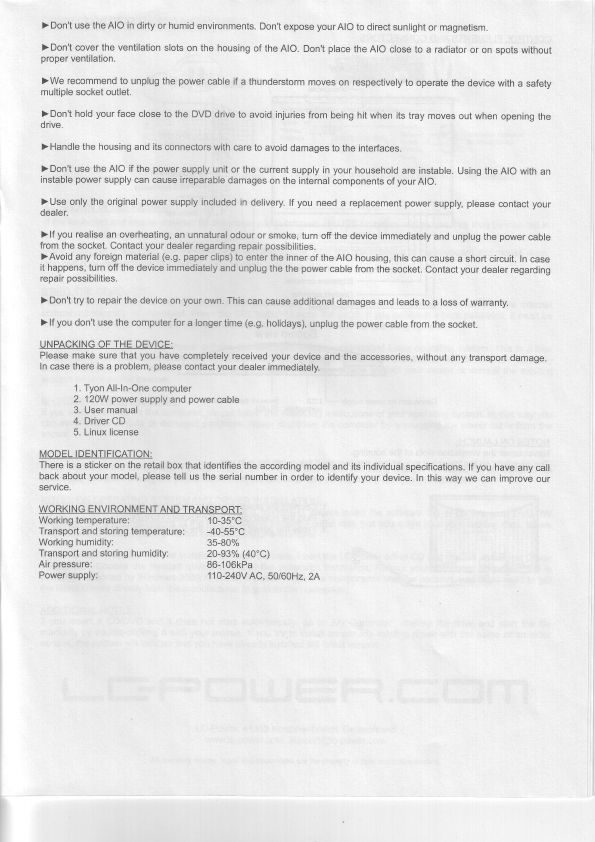
) Don't use the AIO in
dirty
or humid
environments.
Don't
expose
your
AIO
to direct
sunlight
or magnetism.
)Don't cover the ventilation
slots
on the housing
of
the AlO.
Don't
place
the AIO
close
to a radiator
or on
spots without
proper
ventilation.
)We recommend to unplug
the
power
cable if
a thunderstorm
moves
on respectively
to operate
the device
with
a safetv
multiple socket outlet.
)Don't hold
your
face close
to the DVD
drive
to avoid
injuries
from
being hit when
its
tray moves
out when
opening
the
drive.
) Handle the
housing
and its
connectors
with
care
to avoid
damages
to the interfaces.
)Don't use the AIO if
the
power
supply
unit or
the current
supply in
your
household
are instable.
Using the AIO
with
an
instable
power
supply
can cause irreparable
damages
on
the internal
components
of
your
AlO.
)Use only the original
power
supply included
in
delivery.
lf
you
need
a replacement
power
supply,
please
contact
your
dealer.
)lf
you
realise
an overheating,
an unnatural
odour
or smoke,
turn off
the device immediately
and unplug
the
power
cable
from the socket. Contact
your
dealer regarding
repair
possibilities.
)Avoid any
foreign
material
(e.9. paper
clips)
to enter
the inner
of theAlO
housing,
this can
cause a short
circuit.
In case
it happens, turn off the
device immediately
and
unplug
the the
power
cable from
the socket.
Contact
your
dealer
regarding
repair
possibilities.
) Don't try to repair the device
on
your
own. This
can cause
additional
damages
and leads
to a loss
of warranty.
) lf
you
don't use the computer
for a longer
time
(e.9.
holidays),
unplug
the
power
cable from
the
socket.
UNPACKING OF
THE
DEVICE:
Please make sure that
you
have
completely received your
device
and the
accessories,
without
any transport
damage.
In
case
there is a
problem,
please
contact
your
dealer
immediately.
1. Tyon All-ln-One
computer
2. 12OW
power
supply and
power
cable
3. User manual
4. Driver CD
5. Linux
license
MODEL IDENTIFICATION:
There is a sticker on the
retail
box that
identifies
the
according
model
and its individual
specifications.
lf
you
have
any
call
back about
your
model,
please
tell
us the serial
number
in
order to identify
your
device. In
this way
we can
improve
our
service.
WORKI NG
ENVIRONMENT
AND TRANSPORT:
Working temperature:
10-35'C
Transport
and storing
temperature:
-40-55'C
Working humidity;
35-80%
Transport and storing humidity:
20-93%
(40'C)
Air
pressure:
86-106kPa
Power supply:
110-240V
AC,50t60Hz,2A

Betyg
Berätta vad du tycker om LC-Power LC2220AIO Tyon Stationär dator genom att betygsätta den. Vill du dela med dig av dina åsikter om denna produkt eller ställa en fråga? Lämna en kommentar nederst på sidan.Är du nöjd med LC-Power LC2220AIO Tyon Stationär dator? Ja NejBli den första personen som betygsätter denna produkt
0 röster
Mer om denna bruksanvisning
Vi förstår att det är trevligt att ha en pappersbruksanvisning för din LC-Power LC2220AIO Tyon Stationär dator. Du kan alltid ladda ner bruksanvisningen från vår hemsida och skriva ut den själv. Om du vill ha en originalbruksanvisning rekommenderar vi att du kontaktar LC-Power. De kanske kan tillhandahålla en originalbruksanvisning. Letar du efter bruksanvisningen för din LC-Power LC2220AIO Tyon Stationär dator på ett annat språk? Välj ditt föredragna språk på vår hemsida och sök efter modellnumret för att se om vi har det tillgängligt.
Vanliga frågor om LC-Power LC2220AIO Tyon Stationär dator
Vårt supportteam söker efter användbar produktinformation och svar på vanliga frågor. Om du hittar en felaktighet bland våra vanliga frågor uppskattar vi om du meddelar oss detta via vårt kontaktformulär.
Hur mycket är kilobyte, megabyte, gigabyte och terabyte? Verifierad
En kilobyte är 1 000 byte. 1 megabyte = 1 000 kilobyte. 1 gigabyte = 1 000 megabyte. 1 terabyte = 1 000 gigabyte.
Detta hjälpte (30) Läs mer



Delta i konversationen om denna produkt
Här kan du dela vad du tycker om LC-Power LC2220AIO Tyon Stationär dator. Om du har en fråga, läs först noggrant igenom manualen. Att begära en manual kan göras genom att använda vårt kontaktformulär.