Bruksanvisning Kogan KHBICSPDMTR Cykeldator

Behöver du en bruksanvisning för din Kogan KHBICSPDMTR Cykeldator? Nedan kan du se och ladda ner PDF-bruksanvisningen gratis på svenska. Den här produkten har för närvarande 3 vanliga frågor, 0 kommentarer och har 0 röster. Om det här inte är bruksanvisningen du vill ha, vänligen kontakta oss.

Är produkten defekt och erbjuder bruksanvisningen ingen lösning? Gå till ett Repair Café för gratis reparationstjänster.

Bruksanvisning

Loading…
Wireless Bicycle Computer
KHBICSPDMTR
Quick Start Guide
Using the wireless bicycle computer, you can measure your speed and distance travelled with a
great degree of accuracy.
Product Checklist
The following items are included:
1 x Digital Readout Computer
1 x A23 12V Battery
1 x Magnet
1 x Gauge Stand
6 x Zip Ties
Getting Started
1. Remove the battery cover from the wireless sensor and put a 23A 12V battery into the
battery compartment, in accordance with the correct polarity.
2. Install the sensor onto the front tyre fork of your bicycle by threading the zip ties through
the gaps at the back of the sensor. Ensure it is placed so that the sensor is near the
magnet. The sensor can also be underlaid with the adhesive backup plate to position it
correctly.
3. Unscrew the end of the magnet and wrap it around a spoke on your tyre. Position it to
ensure it will pass by the sensor. The magnet must face the sensor, and the two objects
should pass each other, with a distance of approximately 1mm between them. Adjust the
relative locations of the sensor and magnet if necessary.
4. The gauge stand can be fastened to the handlebars via the zip ties being threaded
through the back of the stand (between the gauge and the handlebar barrier). Ensure
that when you attach it, the small plastic hook is at the bottom, as the Digital Readout
Computer slots in above this.
5. Slot the computer into the top of the gauge stand and press down until it clicks into
place. To remove, simply apply slight pressure to the small plastic hook at the bottom of
the computer and slide it upwards.
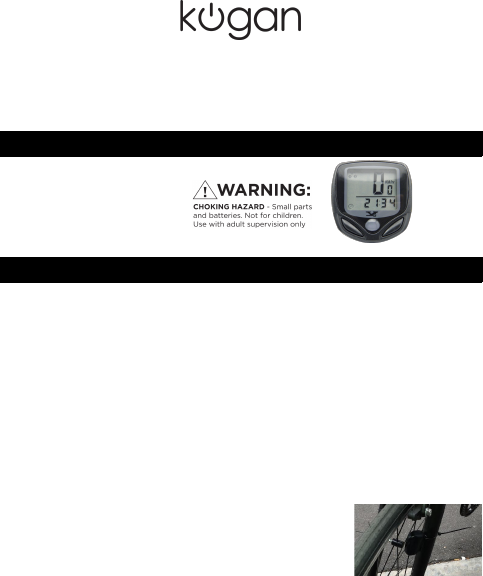
6. Turn the front wheel until the magnet passes the sensor, as
shown in the picture to right. Check the screen to confirm that
you have a signal. If there is no signal or the computer has not
reacted, please check the relative locations of the sensor and
magnet, plus confirm that both units have functioning batteries
inserted correctly. You now have your speedometer installed
and are ready to configure and use it!
Setting the Wheel Cycle
Once the battery has been installed, the screen will display '2060', with one of the numbers
flashing. Select the exact cycle of your bike according to the following list. Push the right key to
change the number, then press left key to confirm your selection. Set from right to left;
selectable values range from 0mm to 9999mm.
You may make your own measurements using the following method: first, make a mark on the
wheel, then push the bicycle to the end of one full cycle. In doing so, you will be able to measure
out the distance between two marks and set the wheel cycle accordingly. For example, if the
measurement is 1.615m, then input 1615.
Continuing to press the left key will enable the KMMile Mode setting.
1
Ladda ner bruksanvisning i Engelska (PDF, 2.31 MB)
(Tänk på miljön och skriv endast ut denna bruksanvisning om det verkligen är nödvändigt)

Loading…

Betyg

Berätta vad du tycker om Kogan KHBICSPDMTR Cykeldator genom att betygsätta den. Vill du dela med dig av dina åsikter om denna produkt eller ställa en fråga? Lämna en kommentar nederst på sidan.
Är du nöjd med Kogan KHBICSPDMTR Cykeldator?
Ja Nej
Bli den första personen som betygsätter denna produkt
0 röster

Delta i konversationen om denna produkt

Här kan du dela vad du tycker om Kogan KHBICSPDMTR Cykeldator. Om du har en fråga, läs först noggrant igenom manualen. Att begära en manual kan göras genom att använda vårt kontaktformulär.

Mer om denna bruksanvisning

Vi förstår att det är trevligt att ha en pappersbruksanvisning för din Kogan KHBICSPDMTR Cykeldator. Du kan alltid ladda ner bruksanvisningen från vår hemsida och skriva ut den själv. Om du vill ha en originalbruksanvisning rekommenderar vi att du kontaktar Kogan. De kanske kan tillhandahålla en originalbruksanvisning. Letar du efter bruksanvisningen för din Kogan KHBICSPDMTR Cykeldator på ett annat språk? Välj ditt föredragna språk på vår hemsida och sök efter modellnumret för att se om vi har det tillgängligt.

Specifikationer

Märke Kogan
Modell KHBICSPDMTR
Kategori Cykeldatorer
Filtyp PDF
Filstorlek 2.31 MB

Alla bruksanvisningar för Kogan Cykeldatorer
Fler bruksanvisningar för Cykeldatorer

Vanliga frågor om Kogan KHBICSPDMTR Cykeldator

Vårt supportteam söker efter användbar produktinformation och svar på vanliga frågor. Om du hittar en felaktighet bland våra vanliga frågor uppskattar vi om du meddelar oss detta via vårt kontaktformulär.

Varför måste jag ange storleken på mitt hjul? Verifierad

För att beräkna det färdade avståndet använder cykeldatorn antalet varv. Antalet varvtal multiplicerat med hjulets storlek är lika med det färdade avståndet.

Detta hjälpte (4402) Läs mer

Hur många mil är en kilometer? Verifierad

En kilometer motsvarar 0,621 mil. Tio kilometer gör 6,21 miles. En mil motsvarar 1 609 kilometer. Tio mil gör 16,09 kilometer.

Detta hjälpte (772) Läs mer

Ett batteri i min enhet är oxiderat, kan jag fortfarande använda det säkert? Verifierad

Ja, enheten kan fortfarande användas säkert. Ta först bort det oxiderade batteriet. Använd aldrig bara händer för att göra detta. Rengör sedan batterifacket med en bomullspinne doppad i ättika eller citronsaft. Låt det torka och sätt i nya batterier.

Detta hjälpte (772) Läs mer
Bruksanvisning Kogan KHBICSPDMTR Cykeldator

Relaterade produkter

Relaterade kategorier

×
Download