GM-P420PCE
GM-P421PCE
GM-P420E
1-3
No.51953
3
ENGLISH
– For United Kingdom: This product is equipped with a three-wire plug. This plug will fit only into a grounded power
outlet. If you are unable to insert the plug into the outlet, contact your electrician to install the proper outlet. Do not
defeat the safety purpose of the grounded plug.
– Power-supply cords should be routed so that they are not likely to be walked on or pinched by items placed upon or
against them. Pay particular attention to cords at doors, plugs, receptacles, and the point where they exit from the
product.
– For added protection of this product during a lightning storm, or when it is left unattended and unused for long periods
of time, unplug it from the wall outlet and disconnect the cable system. This will prevent damage to the product due to
lightning and power line surges.
– Do not overload wall outlets, extension cords, or convenience receptacles on other equipment as this can result in a
risk of fire or electric shock.
– Never push objects of any kind into this product through openings as they may touch dangerous voltage points or short
out parts that could result in a fire or electric shock. Never spill liquid of any kind on the product.
– Do not attempt to service this product yourself as opening or removing covers may expose you to dangerous voltages
and other hazards. Refer all service to qualified service personnel.
– Unplug this product from the wall outlet and refer service to qualified service personnel under the following conditions:
a)When the power supply cord or plug is damaged.
b)If liquid has been spilled, or objects have fallen on the product.
c)If the product has been exposed to rain or water.
d)If the product operated normally by following the operating instructions. Adjust only those controls that are covered
by the Operation Manual, as an improper adjustment of controls may result in damage and will often require
extensive work by a qualified technician to restore the product to normal operation.
e)If the product has been dropped or damaged in any way.
f) When the product exhibits a distinct change in performance – this indicates a need for service.
– When replacement parts are required, be sure the service technician has used replacement parts specified by the
manufacturer or with same characteristics as the original part. Unauthorized substitutions may result in fire, electric
shock, or other hazards.
– Upon completion of any service or repairs to this product, ask the service technician to perform safety checks to
determine that the product is in proper operating condition.
– The product should be placed more than 30 cm away from heat sources such as radiators, heat registers, stoves, and
other products (including amplifiers) that produce heat.
– When connecting other products such as VCR’s, and personal computers, you should turn off the power of this product
for protection against electric shock.
– Do not place combustibles behind the cooling fan. For example, cloth, paper, matches, aerosol cans or gas lighters
that present special hazards when over heated.
– Use only the accessory cord designed for this product to prevent shock.
– Do not touch the handles on the rear soon after many hours of continuous use. They are so hot and will cause a burn
on the hand. If you need to touch the handles, for example, to move the product, wait until the handles are cooled
enough.
–
Option terminal: This terminal is intended exclusively to be used to drive the fan motor.
Do not connect any plugs to the terminal other than JVC’s recommended optional parts.
Polarity of terminal
POWER CONNECTION
The power supply voltage rating of this product is AC 230 V.
The power cords attached conform to the following power supply
voltage and countries. Use only the power cord designated to ensure
Safety and EMC regulations of each country.
Note for the United Kingdom power cord only
The plug on the United Kingdom power cord has a built-in fuse.
When replacing the fuse, be sure to use only a correctly rated
approved type, re-fit the fuse cover. (Consult your dealer or qualified
service personnel.)
How to replace the fuse
Open the fuse
compartment with the
blade screw driver, and
replace the fuse.
Fuse
For United Kingdom:
AC 230 V
For European countries:
AC 230 V
4
Parts Identification
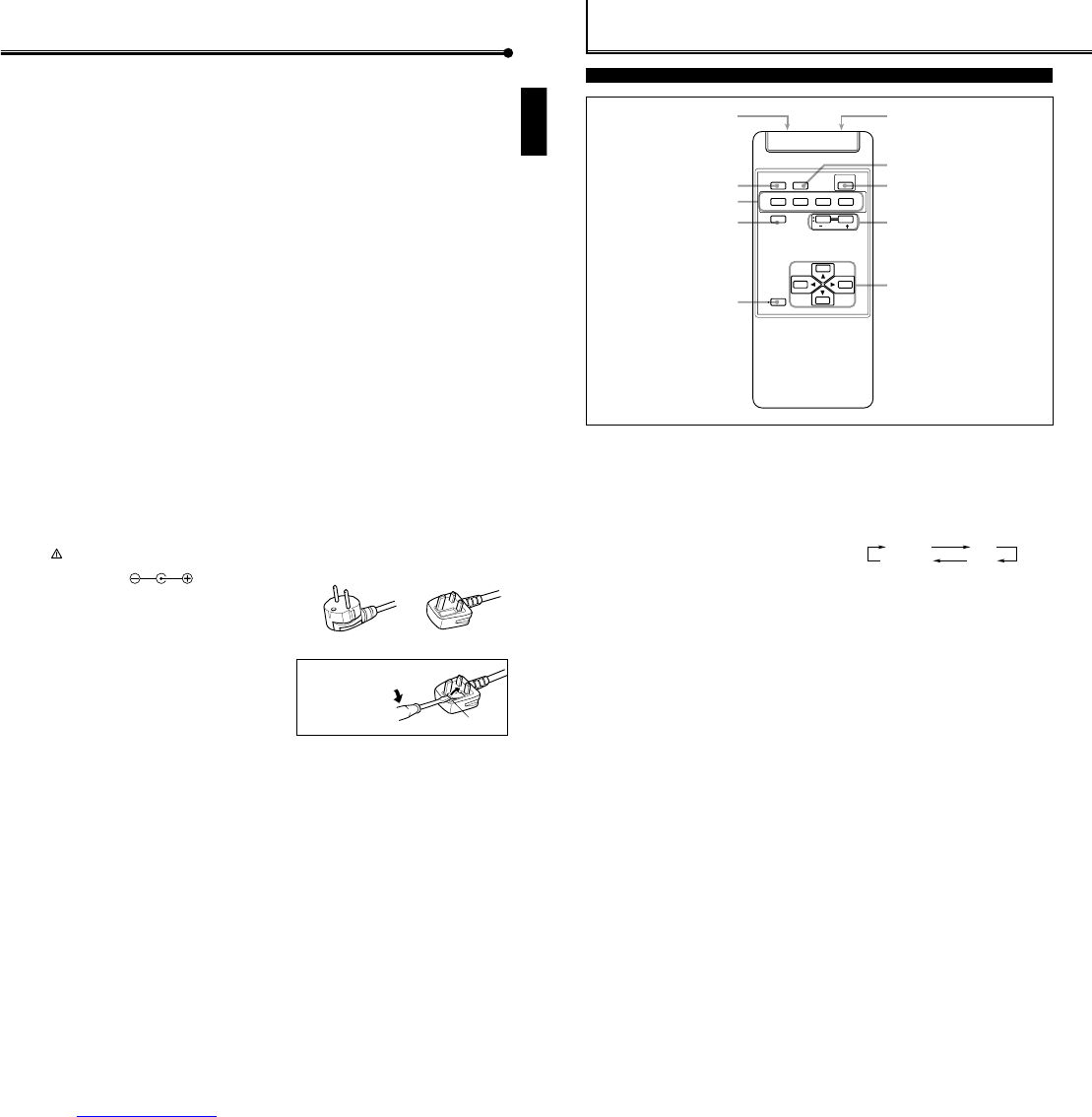
Remote Control
5 MENU/EXIT button
Use this button to display or erase menus.
While a sub-menu is displayed, pressing this button will
move you one screen back to the preceding menu.
6 Remote signal transmission window
7 ASPECT button (page 15)
Use this button to switch between aspect ratios. Each time
you press the button, the aspect ratio changes as follows:
8 POWER button (page 14)
Use this button to turn on/off the power.
9 VOLUME + / – buttons (page 14)
Use these buttons to adjust the volume level.
• The VOLUME – button can be also used to display the
Setup Menu (see page 25).
p 2 / 3 / 5 / ∞ buttons
Use these buttons to select menu items or make
adjustments.
1 Remote control cable jack (page 11)
Connect the remote control cable (not supplied) when
using this remote control as a wired remote control.
2 DISPLAY button (page 14)
Use this button to display the input terminal, color system
(for VIDEO A or VIDEO B input), scan system (for
COMPONENT input) and horizontal/vertical frequency
(for RGB A and RGB B input).
Pressing the button again will make the display disappear.
3 VIDEO A, VIDEO B, COMPO./RGB B and RGB A buttons
(page 14)
Use these buttons to switch between inputs.
To select the COMPONENT or RGB B input, you have to
set “RGB/COMPO.” correctly on the menu (see page 23).
• Only for GM-P420PCE and GM-P421PCE: Only RGB A
input can be used.
To reproduce images through the other inputs, you need
to install video input unit (IF-C422P1G), which is
separately purchased.
4 MUTING button (page 14)
Use this button to turn off the volume immediately.
Pressing the button again will resume the previous
volume level.
16
7
8
9
p
2
4
3
5
DISPLAY ASPECT POWER
RGB A
COMPO.
VIDEO BVIDEO A
MUTING
MENU/EXIT
RM-C576 REMOTE CONTROL UNIT
VOLUME
RGB B
REGULAR FULL
ZOOMPANORAMIC



Delta i konversationen om denna produkt
Här kan du dela vad du tycker om JVC GM-P420E Plasmaskärm. Om du har en fråga, läs först noggrant igenom manualen. Att begära en manual kan göras genom att använda vårt kontaktformulär.