Bruksanvisning IncrediSonic 3D VR-glasögon

Behöver du en bruksanvisning för din IncrediSonic 3D VR-glasögon? Nedan kan du se och ladda ner PDF-bruksanvisningen gratis på svenska. Den här produkten har för närvarande 0 vanliga frågor, 0 kommentarer och har 0 röster. Om det här inte är bruksanvisningen du vill ha, vänligen kontakta oss.

Är produkten defekt och erbjuder bruksanvisningen ingen lösning? Gå till ett Repair Café för gratis reparationstjänster.

Bruksanvisning

Loading…
START
SELECT
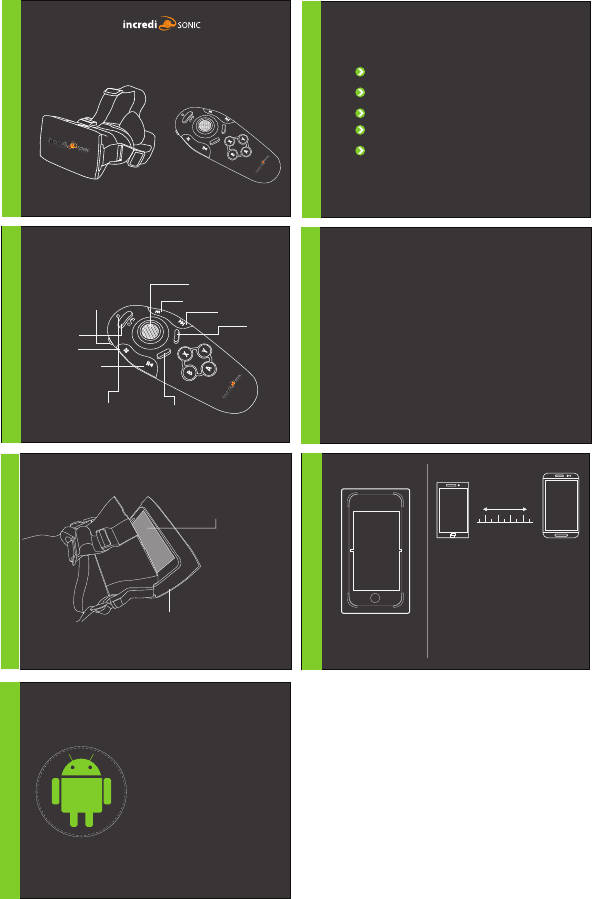
3D VR GLASSES USER MANUAL
*If pairing to another device un-pair this from the original device
Insert 2 AAA batteries (not included) into the controller
The controller must be in Pairing Mode, press and hold the power
button for 12 seconds, LED light will ash rapidly
Go to your Bluetooth Settings and press Scan for Bluetooth Devices
VRG-RMC will appear, select and press Pair
Once pairing is complete the Bluetooth controller is now synced with
your phone
Key/Game Switch Functions
Key Mode
Mouse functionality for Android phones
The joystick acts as a mouse, the Start key is the left click and the Select key is the right click on a mouse.
Button Functionality for Music and Videos (Android & iOS)
L1 is for playing music, X is for volume Up, B is volume down, L1 is play/pause, R2 is next track, R1 is previous
track or begin track.
ATTN: There is a small portion of smart phones that cannot use the VR controller for full functionality.
Camera Control
iOS: Click X to take photo
Android: Use the cursor to take photo
Included as a bonus you will nd an NFC Sticker Tag. This is
strictly for NFC enabled Android phones. The NFC tag sends
a beacon to your phone when in close proximity *, and
using the free app from the Google Play store named “NFC
Task Launcher”, you can assign actions to perform once the
connection has been made such as “Launch Google
Cardboard”. This makes it simpler for the phone to recognize
it has been placed in the VR Glasses by attaching the sticker
to the inside of the device behind where the phone is to be
placed and also makes the application launch hands free.
* Approximately a few centimeters from the phones NFC
chip, locations may vary, please consult your phones user
manual if needed, NFC and Bluetooth must be turned ON
for this feature to work
Game Mode for Android
The joystick and buttons A, B, X, Y, L1, L2, R1, R2, Start and Select correspond according to the game.
Bluetooth Controller Paring Directions:
Dual Function Remote
NFC Sticker Tag
START
SELECT
4.7”
Suitable with Smartphone size 4.7” - 6”
2D Streaming movies
2D to 3D Presentations
3D Side by side
360 + 3D Action cam
360 + 3D Professional
360 + 3D Interactive gaming
6”-
4 5 6 7
4.7”
6”
SELECT
STARTINDICATOR LIGHT
L2
L1
KEY / GAME
SWITCH
LCD screen must be centered
Opening for ventillation and
access to audio jack for
headphones
POWER
ON/OFF
R1
D PAD
R2
Button Layout
Insert Phone
iPhone 5
plastic insert
NFC
Ladda ner bruksanvisning i Engelska (PDF, 10.92 MB)
(Tänk på miljön och skriv endast ut denna bruksanvisning om det verkligen är nödvändigt)

Loading…

Betyg

Berätta vad du tycker om IncrediSonic 3D VR-glasögon genom att betygsätta den. Vill du dela med dig av dina åsikter om denna produkt eller ställa en fråga? Lämna en kommentar nederst på sidan.
Är du nöjd med IncrediSonic 3D VR-glasögon?
Ja Nej
Bli den första personen som betygsätter denna produkt
0 röster

Delta i konversationen om denna produkt

Här kan du dela vad du tycker om IncrediSonic 3D VR-glasögon. Om du har en fråga, läs först noggrant igenom manualen. Att begära en manual kan göras genom att använda vårt kontaktformulär.

Mer om denna bruksanvisning

Vi förstår att det är trevligt att ha en pappersbruksanvisning för din IncrediSonic 3D VR-glasögon. Du kan alltid ladda ner bruksanvisningen från vår hemsida och skriva ut den själv. Om du vill ha en originalbruksanvisning rekommenderar vi att du kontaktar IncrediSonic. De kanske kan tillhandahålla en originalbruksanvisning. Letar du efter bruksanvisningen för din IncrediSonic 3D VR-glasögon på ett annat språk? Välj ditt föredragna språk på vår hemsida och sök efter modellnumret för att se om vi har det tillgängligt.

Specifikationer

Märke IncrediSonic
Modell 3D
Kategori VR-glasögonen
Filtyp PDF
Filstorlek 10.92 MB

Alla bruksanvisningar för IncrediSonic VR-glasögonen
Fler bruksanvisningar för VR-glasögonen
Bruksanvisning IncrediSonic 3D VR-glasögon

Relaterade produkter

Relaterade kategorier

×
Download