Bruksanvisning Imou Bullet Lite 4MP IP Kamera

Behöver du en bruksanvisning för din Imou Bullet Lite 4MP IP Kamera? Nedan kan du se och ladda ner PDF-bruksanvisningen gratis på svenska. Den här produkten har för närvarande 0 vanliga frågor, 3 kommentarer och har 2 röster med ett genomsnittligt produktbetyg på 100/100. Om det här inte är bruksanvisningen du vill ha, vänligen kontakta oss.

Är produkten defekt och erbjuder bruksanvisningen ingen lösning? Gå till ett Repair Café för gratis reparationstjänster.

Bruksanvisning

Loading…

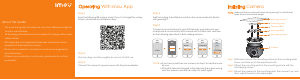
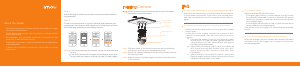
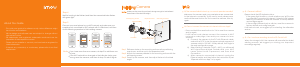
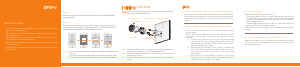
Installing Camera
Make sure the mounting surface is strong enough to hold at least
three times of the device weight.
Step1 Drill screw holes on the mounting surface as the positioning
map shows, and then put in the expansion bolts.
Step2 Attach the camera pedestal to the mounting surface with the
self-tapping screws.
Step3 Power up the camera, and then adjust the lens to the ideal
angle.
Step 5
Step 4
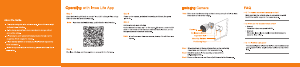
Connect your smart phone to your Wi-Fi network, and make sure your
smartphone is connected to Wi-Fi network with 2.4 GHz band, and then
do the following operations to finish adding camera.
Wait for booting to be finished, and then the camera indicator flashes
with green light.
Note:
If the Wi-Fi network has changed or the indicator status goes
wrong, reset the camera, and then do step 5 to add it again.
If you have more than one camera, do step 5 to add them one
by one.
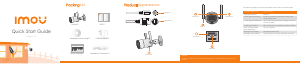
Mounting Surface
Expansion Bolt
Self-tapping Screw
Camera
Positionting Map
This quick start guide is for reference only. Minor difference might
be found in user interface.
All the design and software here are subject to change without
prior written notice.
All trademarks and registered trademarks mentioned are the
properties of their respective owners.
Please visit our website or contact your local service engineer for
more information.
If there is any uncertainty or controversy, please refer to our final
explanation.
About the Guide
-
-
-
-
-
Q: Cannot connect the camera to Internet with Imou App?
Q: The camera failed to boot up, or cannot operate normally?
FAQ
Make sure the camera and your smartphone are connected
to the Internet successfully. If still cannot work, please press
and hold the reset button for 10s to reset the camera, then try
again.
Press and hold the reset button for 10s to reset the camera
and try again.
If still cannot work, please connect the camera to Wi-Fi
network on web page, then add your camera to Imou
account.
Connect the camera to the PC with Ethernet cable,
and set the PC IP to be the same network segment of
camera which is 192.168.1.108 by default, then login to
the web configuration page.
Select Setting > Network > Wi-Fi > Wi-Fi, you will see all
Wi-Fi signal around listed. Double-click your Wi-Fi
name, enter the Wi-Fi password, and then click
Connection.
After camera is connected to Internet, unplug the
Ethernet cable, and then follow the instruction of part
“Operate with Imou App” to try again.
-
-
a)
b)
c)
Q: Can I continue recording when the SD Card is full?
Q: Camera is offline?
Please check the LED indicator status:
If the green light is solid on, check whether your Wi-Fi router
is successfully connected to Internet. If Internet is OK, please
reboot your camera, or reset the camera to factory default
and configure again.
If the red light flashes slowly or solid on, reset the camera to
factory default and configure again.
If still cannot work, we suggest you contacting the aftersales
service.
When the storage is full, the camera will overwrite the oldest
existing records. We suggest you storing your important
recordings regularly.
-
-
Ladda ner bruksanvisning i Engelska (PDF, 2.51 MB)
(Tänk på miljön och skriv endast ut denna bruksanvisning om det verkligen är nödvändigt)

Loading…

Betyg

Berätta vad du tycker om Imou Bullet Lite 4MP IP Kamera genom att betygsätta den. Vill du dela med dig av dina åsikter om denna produkt eller ställa en fråga? Lämna en kommentar nederst på sidan.
Är du nöjd med Imou Bullet Lite 4MP IP Kamera?
Ja Nej
100%
0%
2 röster

Delta i konversationen om denna produkt

Här kan du dela vad du tycker om Imou Bullet Lite 4MP IP Kamera. Om du har en fråga, läs först noggrant igenom manualen. Att begära en manual kan göras genom att använda vårt kontaktformulär.

Mer om denna bruksanvisning

Vi förstår att det är trevligt att ha en pappersbruksanvisning för din Imou Bullet Lite 4MP IP Kamera. Du kan alltid ladda ner bruksanvisningen från vår hemsida och skriva ut den själv. Om du vill ha en originalbruksanvisning rekommenderar vi att du kontaktar Imou. De kanske kan tillhandahålla en originalbruksanvisning. Letar du efter bruksanvisningen för din Imou Bullet Lite 4MP IP Kamera på ett annat språk? Välj ditt föredragna språk på vår hemsida och sök efter modellnumret för att se om vi har det tillgängligt.

Specifikationer

Märke Imou
Modell Bullet Lite 4MP
Kategori IP Kameror
Filtyp PDF
Filstorlek 2.51 MB

Alla bruksanvisningar för Imou IP Kameror
Fler bruksanvisningar för IP Kameror
Bruksanvisning Imou Bullet Lite 4MP IP Kamera

Relaterade produkter

Relaterade kategorier

×
Download