How can I switch the CM61 off?
Press the OFF button. The unit has an intelligent built-in frost protection
feature, so that if the temperature falls below 5°C, it will automatically
switch the heating on.
How do change the batteries?
With no other accessories tted and for applications other than electric
heating, the batteries should last about 4 years.
When the batteries need replacing, a ashing symbol will be
displayed.
To change the batteries:
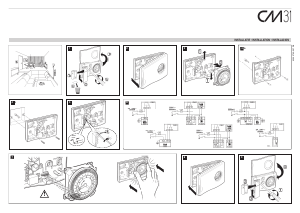
1. Lift up the front ap to reveal the battery compartment. Open the
battery compartment by inserting a coin underneath the bottom right
edge of the ap and lift out.
2. Replace the used batteries with 2 new AA LR6 Alkaline Batteries and
push the battery compartment rmly back into the front of the unit.
RESPECT YOUR ENVIRONMENT!
Take care to dispose of used batteries carefully.
NOTE: If you take more than one minute to change the batteries the clock
may need to be reset - see How do I adjust the time?
Can I use my CM61 to control my air-conditioning
system?
Yes. Please refer to your installer for more information.
What does 'SERVICE' on the display of my CM61
mean (optional)?
NOTE:
This option only works if activated by your installer.
The 'SERVICE' indicator is displayed at set intervals as a reminder that
your heating system requires a routine check. Please call your installer
to arrange a maintenance visit.
The symbol will remain on the display of the CM61 until it is either reset
or disabled by your installer. The CM61 and heating system will continue
to operate as normal.
How do I set the time?
The time can be set with the CM61 in the AUTO, MAN or OFF operating
modes. Press
+ or
-
until the correct time is displayed. Each button
press will change the time by one minute. Holding the button down for a
few seconds will change the time slowly at rst, then quickly. Make sure
AM or PM is correct.
How do I get started with the factory default tem-
perature program?
Press the AUTO button. The CM61 will now control your heating using
the built-in temperature program:-
3. Press TEMP
or
to adjust the rst temperature level. Holding
the button down will change the temperature quickly. The temperature
can be set in 0.5°C steps from 5°C to 30°C.
4. Press PROG 2 to display the second temperature level and time
levels. Set these by pressing
+ or
-
and TEMP
or
.
5. The remaining temperature changes can be displayed by pressing
PROG buttons 3, 4, 5 and 6 and adjusted by using
+ or
-
and
TEMP
or
. (If you don’t want to use all the temperature change
times 2, 3, 4, 5 or 6 refer to the section “What if I don’t want to use
all 6 temperature change times?”).
6. Press AUTO when you have completed your programming, The CM61
will now control the room temperature to match your program.
What if I don’t want to use all 6 temperature
change times?
Although the CM61 has up to 6 temperature / time changes available
(PROG 1 – 6), any unused settings may be deleted by holding down the
appropriate button (PROG 2 – 6) for 2 seconds.
To reinstate any deleted setting hold down the button again for 2
seconds.
Can I change the programmed temperature for a
short time?
When the CM61 is in AUTO mode (display will show “AUTO”) the
temperature can be adjusted temporarily by pressing TEMP
or
. The temperature will return to the program at the next temperature
change time.
How do I check the programmed temperature?
In normal operation the temperature displayed is the actual room
temperature. To check the programmed temperature press
and the
display will show the programmed temperature with the two small
arrows.
How do I set one temperature for the whole day?
To operate as a simple thermostat with one temperature throughout the
day, press MAN. Adjust the manual temperature by pressing
TEMP
or
. The manual temperature can be set anywhere from 5°C to 30°C
in 0.5°C steps.
I am going on holiday for a few days. How do I
save energy but ensure that the house is warm
when I return?
1. Make sure the CM61 is in AUTO or MAN mode.
2. Press (HOLIDAY) to display the holiday days counter and
temperature.
3. Press
+ or
-
to set the holiday time (1 - 99 days).
4. Press TEMP
or
to set the holiday temperature (5°C - 30°C).
The unit will control to the new temperature for the set number of days
holiday. At midnight the holiday counter will be reduced by one until the
selected number of days have passed. The unit will then return to normal
control as set by the MAN or AUTO button.
To cancel the HOLIDAY setting, press the button a second time.
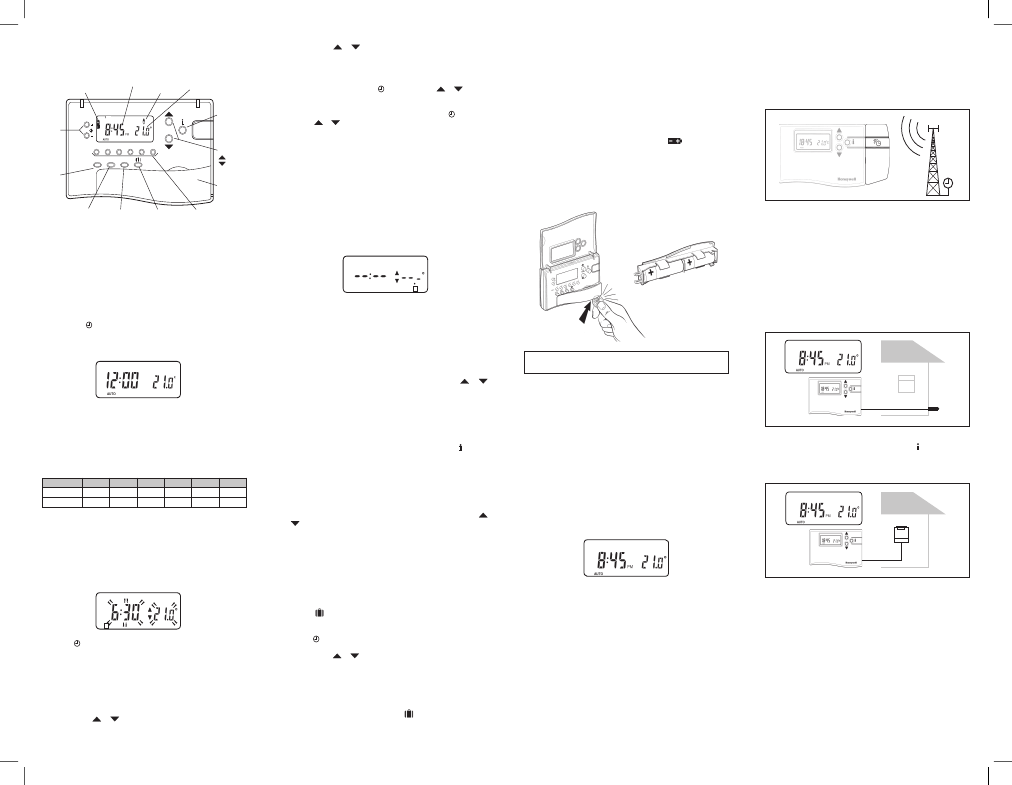
CM61 Controls/Display Layout
The diagram below details the key button functions and display
information.
PM
What other accessories can I buy that work with
the CM61?
Honeywell provides other accessories and “Add-On” modules that can
be used with your CM61, ask your installer for details :
1. Automatic Time Setting (ATS) “Add-On” Module *
The ATS module picks up a daily time signal from a transmitter in Central
Europe and corrects the time on the CM61 display. So:
• You never need to set or adjust the time
• There is no need to adjust the unit by -/+ 1 hour in summer / winter
since the unit does this automatically
• Your CM61 is the most accurate clock in your home, so you can use
this information to set-up all your other clocks.
* Not available in all Geographic Regions depending on transmitter range
and home location.
2. Outside Temperature Sensor Accessory
The Outside Temperature Sensor accessory can be tted to your CM61
to display the outside temperature. By pressing the
twice, the CM61
displays the external temperature.
3. Remote Temperature Sensor Accessory
The Remote Temperature Sensor accessory can be tted to your CM61
to control the temperature of another room where it is inconvenient to
locate the CM61 e.g. commercial premises where the public may adjust
buttons.
Daily
Program 1 2 3 4 5 6
Time 6:30 8:00 12:00 2:00 6:00 10:30
Temperature 21°C 18°C 21°C 18°C 21°C 16°C
1 2 3 4 5 6
Battery Low
Indicator
Time Display Burner on
Indicator
Temperature
Change Buttons
= increase
= decrease
Information
Enquiry
Button
Temperature
Display
Holiday ButtonOff Button
Manual Function
Button
Battery
Compartment
Time
Change
Buttons
Program
Buttons
Automatic
Function
Button
TEMP
AUTO MAN OFF
1 2 3 4 5 6
PROG
EXT
CM61 Display Backlight
The CM61 has a backlit display that
will illuminate when a button is pressed
for easier viewing of the display in low light conditions. After the last button
press the backlight will remain on for 7 seconds.
SERVICE
How do I set my own daily temperature
program?
1. Press PROG 1. The rst temperature change time and temperature
level will ash to indicate they can be changed. (the two small
arrows are displayed only when the programmed temperature level
is shown).
2. Press
+ or
-
to adjust the rst temperature change time. Holding
the button down will change the time quickly. The change time can be
set in 10 minute steps from 03:00 in the morning. The change time
can be adjusted up to 02:50 on the next morning, so you can maintain
the evening temperature after midnight.
(Note: If you attempt to move a change time past the next change
time, both times will be moved).
3. Press TEMP
or
to adjust the rst temperature level. Holding
the button down will change the temperature quickly. The temperature
can be set in 0.5°C steps from 5°C to 30°C.
1 2 3 4 5 6


Delta i konversationen om denna produkt
Här kan du dela vad du tycker om Honeywell CM61 Thermostat. Om du har en fråga, läs först noggrant igenom manualen. Att begära en manual kan göras genom att använda vårt kontaktformulär.