INSTRUCTION
AGES 8 & UP
MODEL 88-304
883040001IWTI-03
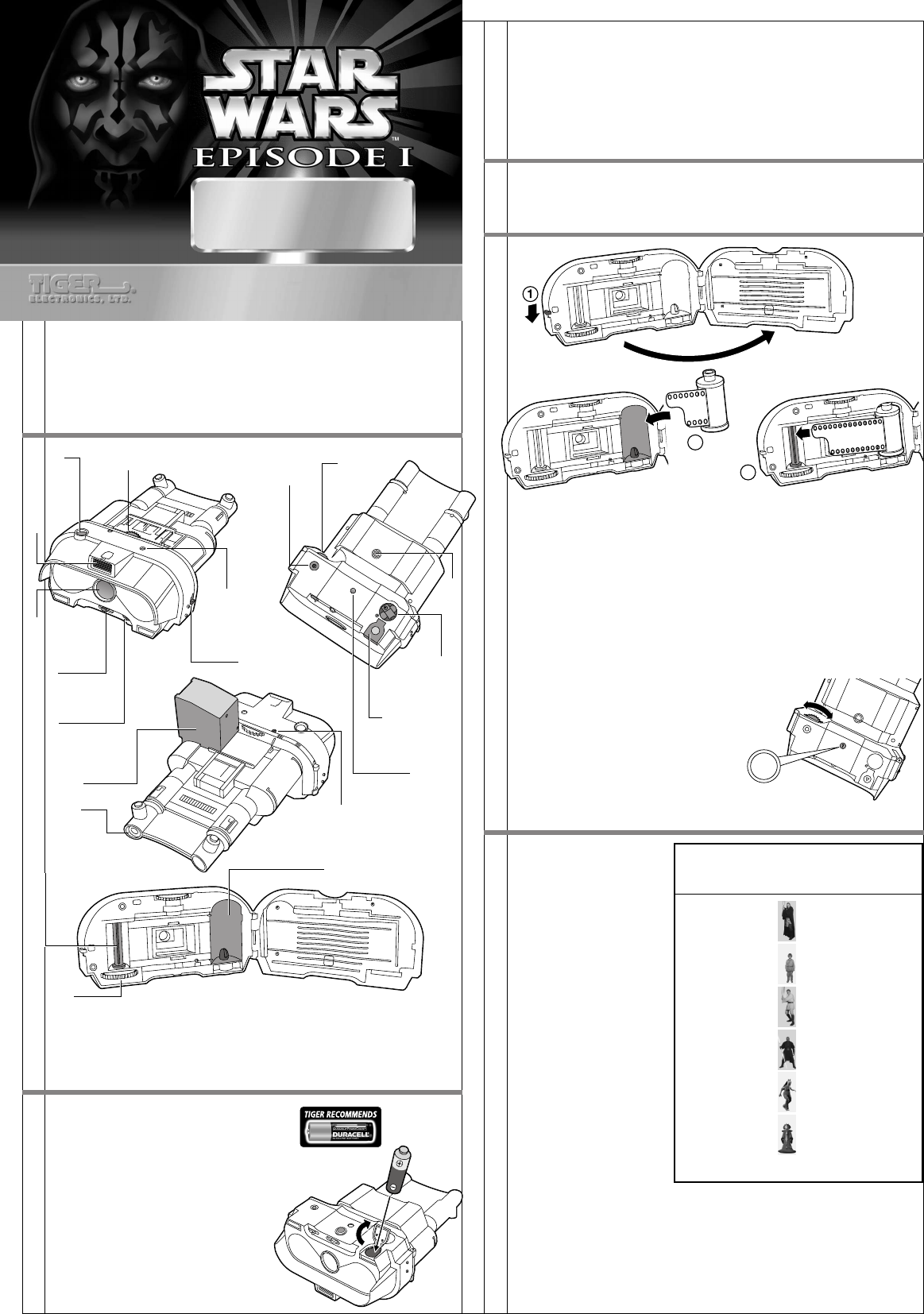
Battle droids are the foot soldiers of the Trade Federation army. Under the
control of the Neimoidians, they serve as security, ground troops, and pilots
of the Trade Federation battleships. Battle droids overwhelm their enemy and
attack in massive waves. These electrobinoculars are standard issue to battle
droid unit commanders.
GETTING STARTED
Note: Binoculars are for style only and do not have any magnification or
function.
BATTERY INSTALLATION
To open the battery compartment cover,
push the cover in the direction of the
arrow marked on the outside of the cover
and then lift up the cover. Insert 1 "AA"
or LR6 battery (not included), making
sure to align the "+" and "-" signs as
shown. Return the battery compartment
cover to its original position.
TO ENSURE PROPER FUNCTION :
– DO NOT MIX OLD AND NEW BATTERIES.
– DO NOT MIX ALKALINE, STANDARD OR
RECHARGEABLE BATTERIES.
– BATTERY INSTALLATION SHOULD BE DONE
BY AN ADULT.
– NON-RECHARGEABLE BATTERIES ARE NOT TO
BE RECHARGED.
– RECHARGEABLE BATTERIES ARE TO BE REMOVED FROM THE TOY BEFORE
BEING CHARGED (IF REMOVABLE).
– RECHARGEABLE BATTERIES ARE ONLY TO BE CHARGED UNDER ADULT
SUPERVISION (IF REMOVABLE).
– ONLY BATTERIES OF THE SAME OR EQUIVALENT TYPE AS RECOMMENDED
ARE TO BE USED.
– BATTERIES ARE TO BE INSERTED WITH THE CORRECT POLARITY.
– EXHAUSTED BATTERIES ARE TO BE REMOVED FROM THE TOY.
– THE SUPPLY TERMINALS ARE NOT TO BE SHORT-CIRCUITED.
CHOOSING FILM
This camera accepts standard 35mm(135), ISO 400 film with up to 36
exposures.
LOADING THE FILM
1. Pull down on the film door latch to open the film compartment.
2. Insert the film cartridge into the right side of the film compartment.
Make certain the film cartridge fits securely or the film will not advance.
3. Pull out the film cartridge leader from the cartridge and insert the tip of
the film into the slot of the take-up spool. The take-up spool is located
on the left side of the film compartment. Turn the manual film advance
wheel so the slot for the film is facing up. Make certain the film leader
fits completely into the slot before proceeding. The second or third lower
perforation on the film must lock onto the small tab on the edge of
the slot.
4. Turn the film advance wheel to the left until it stops turning. Make certain
that the upper perforations on the film are properly aligned with the film
wheel between the two film compartments. If the film advance wheel
does not stop, the film has not been loaded properly.
5. Press the shutter button once and turn
the film advance wheel again to make
certain the film has wound onto the take
up spool properly.
6. Close the film compartment door. Press
the shutter button and turn the film
advance wheel until the number "1"
appears in the film counter window.
(as shown in the illustration at right.)
SELECTING A BACKGROUND
There are 6 pre-selected
backgrounds built into this
camera. The pre-selected
background will appear on
the left side of your photo.
To select one of the 6, turn
the background index wheel
to the letter that corresponds
to the background you wish
to use on your picture. The
wheel can be turned to the
left or right. A slight "click"
will be felt as the wheel is
turned to indicate that the
wheel is in the correct
position or white dot is
appeared on the wheel. The
letter of the background
selected will be visible in the
background index window.
A different background may
be chosen for each picture
simply by turning the
background index wheel to a
different corresponding letter
before taking a picture.
To turn off the background and to take a picture without a background, turn
the background index wheel to the "-" symbol, which can be located after
the letter "F".
IMPORTANT NOTES:
1. The shutter button will not take a picture if the background index wheel
is not in the correct position.
2. The flash must be turned ON when taking a picture indoors or outdoors
with a pre-selected background.
1
Shutter
Button
Lens
Cover
Switch
Background
Index Wheel
Background
Index
Window
Built-In
Flash
Viewfinder
Box
Camera
Lens
Film
Counter
Window
Flash
Ready Light
Film
Advance
Wheel
Film Take-Up
Spool
Rewind
Knob
Film
Loading
Compartment
Battery
Compartment
Film
Compartment
Door Switch
Rewind
Release
Button
Flash
On/Off
Switch
Background Pre-Selected
Index Wheel Background
Symbol
Film
Advance
Wheel
2
3
Viewfinder
A Qui-Gon Jinn
B Anakin Skywalker
C Obi-Wan Kenobi
D Darth Maul
E Jar Jar Binks
F Queen Amidala
– no background
Viewfinder
button
Viewfinder
button
PICTURE PLUS IMAGE
CAMERA
PICTURE PLUS IMAGE
CAMERA




Delta i konversationen om denna produkt
Här kan du dela vad du tycker om Hasbro Star Wars Episode I Picture Plus Image Camera. Om du har en fråga, läs först noggrant igenom manualen. Att begära en manual kan göras genom att använda vårt kontaktformulär.