Before using for the first time en
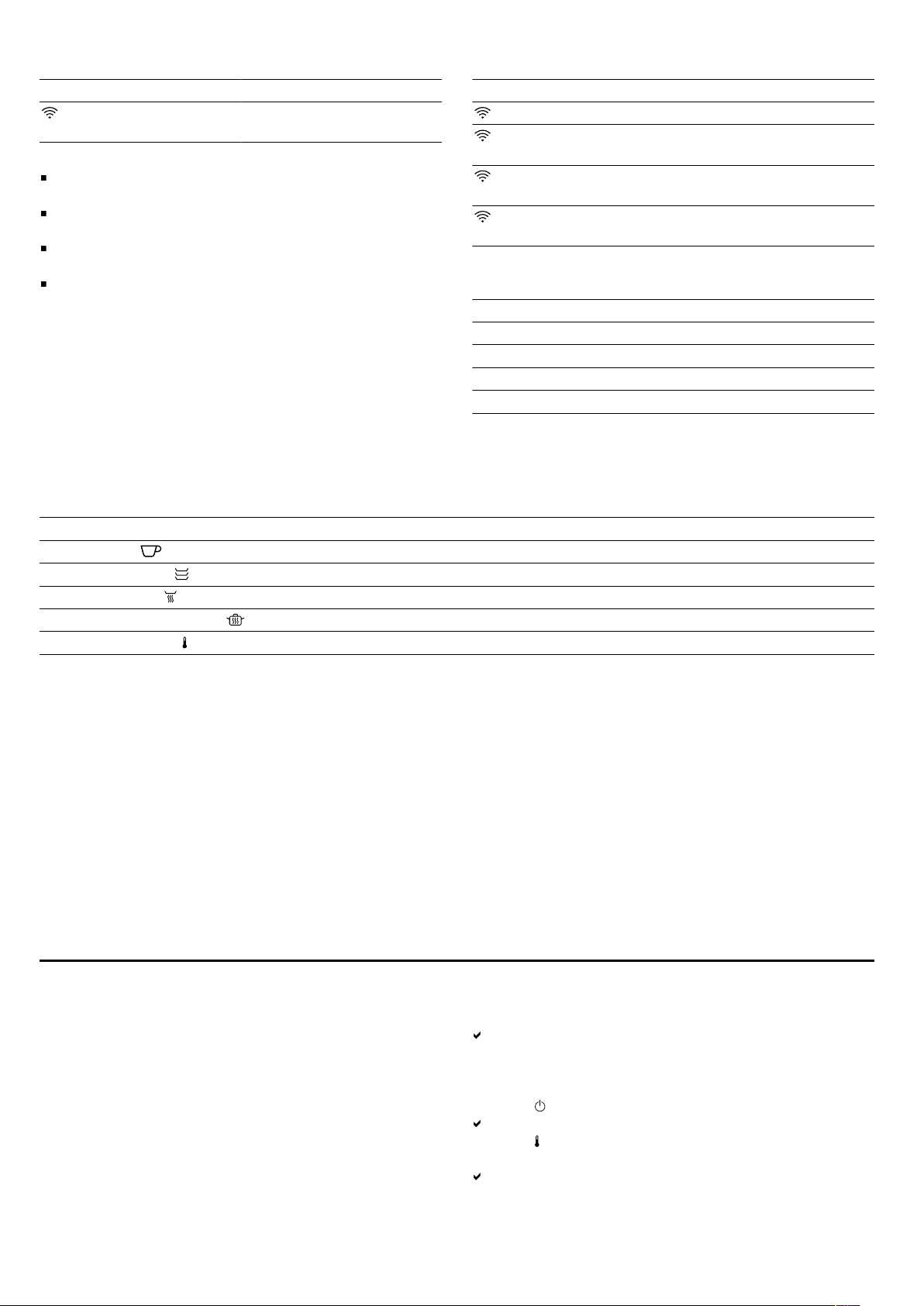
Touch field Function
Starting HomeConnect
pairing
Notes
If you touch the touch field, the appliance performs
the corresponding function.
Touch fields that cannot currently be selected do not
light up.
The settings that are currently selected light up in col-
our.
Always keep the controls dry. Moisture reduces its ef-
fectiveness.
Displays
The displays on the control panel show the operating
status of the appliance.
Display Function
lights up white HomeConnect is available.
flashes white Appliance connects to
HomeConnect.
lights up in colour Appliance is connected to
HomeConnect.
flashes in colour Connection to HomeCon-
nect is faulty.
The operation indicator is located on the appliance's
front panel.
Operation indicator Function
Off Appliance OFF
Lights up Appliance ON
Flashes Heating-up display
Flashes quickly Fault
Default temperature and temperature range
The appliance displays the possible temperature range depending on the operating mode selected. The selected op-
erating mode and the corresponding default temperature light up in colour.
When the appliance is switched on, the operating mode and temperature that were last set light up in colour.
Operating mode Default temperature in °C Adjustable temperature range in °C
Preheat cups 50 40-60
Preheat cookware 60 50-70
Keep food warm 70 60-80
Low-temperature cooking 80 70-80
Temperature range 50 30-80
4.3 Long-term timer
With this function, the appliance keeps the temperature
between 30 and 80°C for a longer period of time.
You can keep food warm for up to 74hours without hav-
ing to switch the appliance on or off. Bear in mind that
food which spoils easily should not be left in the appli-
ance for too long.
If you open the appliance during this function, the appli-
ance continues to heat up and the fan runs.
4.4 Lighting
By default, the lighting switches on automatically when
the appliance is opened.
You can switch the lighting on and off, and change the
factory setting, using the HomeConnect app.
4.5 Safety shut-off
For your safety, the appliance has a safety shut-off func-
tion. Any kind of heating will be switched off after
24hours if the appliance controls are not used during
this time. All displays are off. When the appliance
switches off, an audible signal sounds. The appliance
will also remain off after a power failure.
If the "Long-term timer" function is activated, the safety
shut-off is deactivated.
Before using for the first time5 Before using for the first time
Prepare the appliance for use.
5.1 Cleaning and heating up the appliance
before using it for the first time
Note: When the appliance is switched on for the first
time, it takes approx.60seconds until the appliance is
ready to use. A signal tone sounds. The touch fields
light up in ascending order from left to right.
Requirement: There are no objects in the appliance.
1.
Press on the appliance's front panel.
The appliance opens and can be pulled out as far as
it will go by the sides or underside of the front panel.
2.
Clean the appliance with a damp cloth and a neutral
cleaning agent, such as washing-up liquid and water.
3.
Press .
A signal tone sounds.
4.
Press .
5.
Press 80°C and close the appliance.
The operation indicator flashes while the appliance is
preheating.
5




Delta i konversationen om denna produkt
Här kan du dela vad du tycker om Gaggenau GW453120 Värmelådan. Om du har en fråga, läs först noggrant igenom manualen. Att begära en manual kan göras genom att använda vårt kontaktformulär.