
FAO
®
and FAO Schwarz
®
names and logos are trademarks or registered trademarks.
www.fao.com © 2023 MerchSource LLC. All rights reserved.
Distributed by and © 2023 MerchSource, Irvine, CA 92618.
For customer support, please call 1-888-987-6533.
Model Number: 1018033
The artwork and design of this manual are protected by US copyright law and may not be
reproduced, distributed, displayed, published, or used for any purpose without prior written
permission. It is not permitted to alter, remove, or reproduce any trademarks, or copyright notice
from this manual.
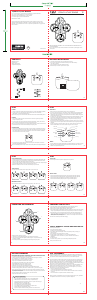
STEALTH STUNT DRONE
SPEED AUTO ORIENTATION
TRIM TRIM
KEEP THIS INSTRUCTION MANUAL AS IT CONTAINS IMPORTANT INFORMATION FOR
FUTURE REFERENCE.
Due to continuous product improvements, illustrations in this manual may differ slightly from the
actual product.
Stealth Stunt Drone
Remote Control
USB-C Charging Cable
4 Replacement Propellers
1. The remote control requires 3 AAA 1.5V batteries (not included).
2. Use a tool to press the button and release the battery cover. Slide the battery
cover down to remove it.
3. Insert the batteries in the same orientation as shown.
4. Slide the battery cover back up and secure it in place.
AAA
AAA
AAA
Back
POWER
1. To power on the remote control, press the power button once. The power LED will light up gradually.
2. To power on the drone, press the power switch (located at the end of the drone) for
approximately 1 second until the drone lights up.
Note: If there is no input for 5 minutes, both the drone and remote control will automatically shut off.
PAIRING
1. After powering on both the remote control and drone, move the left joystick up and down
quickly to start pairing mode.
2. If the drone and remote control cannot be paired successfully within 1 minute, power off and
power on both to exit sleep mode and then restart the pairing process.
Note: The remote control and drone use a 2.4GHz wireless connection. If either the remote control
or the drone disconnects, the other will automatically enter pairing mode.
STABILIZATION
1.If the drone has stability issues after an impact, reset the gyroscope by simultaneously pointing
the left joystick to the bottom left and the right joystick to the bottom right as shown. The lights
on the drone will flash and there will be one beep from remote control to indicate recalibration
was successful and the drone is ready for flight.
2. If the resetting the gyroscope does not resolve the issue, power off and power on the drone
and remote control and pair both again.
Note: The recalibration process in step 1 can be used to clear previous trim settings before flights.
CONTROLS
• Place the drone on a level and solid surface to ensure a steady takeoff.
• There are 2 methods for take off. To auto take off, push the flight button to automatically begin
flight. The drone will rise between 3.3 and 4.9 feet (1 and 1.5 m) and remain suspended. To
manually begin flight, press the left joystick up and the drone will take off. Release the joystick
to have the drone hover in place.
• To land the drone, either push the flight button and the drone will land automatically, or use the
left joystick to manually land the drone. Be sure to land the drone on a level solid surface.
In the event the propellers will not stop spinning, you can perform an emergency stop by
pressing and holding the flight button.
• The left joystick is used to control height and rotation of the drone. Push up to fly up and push
down to fly down. Push left to spin the drone counterclockwise and push right to spin the drone
clockwise.
• Use the right joystick to control the drone on the x axis. Push the stick up to move forward,
down to move backwards, left to move to the left and right to move to the right.
SPEED
• To switch between low and high speed modes, press the speed button. The remote control will
beep twice when in high speed mode and once when back in low speed mode. The drone
defaults to low speed when powered on.
AUTO ORIENTATION
• Press the auto orientation button to activate auto orientation mode. Press it again to deactivate this mode.
• The drone will always move in the direction you press the right joystick in relation to the remote
control, no matter which direction the drone is currently facing.
• Pressing the right joystick up will make the drone fly away from the remote control, and pressing the
right joystick down will make the drone fly towards the remote control.
• When auto orientation is active, the remote control will beep every 6 seconds.
TURN STUNTS
Press the turn button and then press the right joystick up, down, left or right.
AUTO ORIENTATION
TRIM TRIM
SPEED
Corkscrew Left
AUTO ORIENTATION
TRIM TRIM
SPEED
Corkscrew Right Left Twist 360
AUTO ORIENTATION
TRIM TRIM
SPEED AUTO ORIENTATION
TRIM TRIM
SPEED
Right Twist 360
MANEUVER STUNTS
Press the maneuver button and then press the right joystick up, down, left or right.
AUTO ORIENTATION
TRIM TRIM
SPEED
Leap Frog
AUTO ORIENTATION
TRIM TRIM
SPEED
Fade Away Banked Loop Left
AUTO ORIENTATION
TRIM TRIM
SPEED AUTO ORIENTATION
TRIM TRIM
SPEED
Banked Loop Right
FLIP STUNT
Press the flip button and then press the right joystick in any direction.
AUTO ORIENTATION
TRIM TRIM
SPEED
ADJUST TRIM
• If the drone drifts backward without pilot input, press the forward trim button (figure A).
• If the drone drifts forward without pilot input, press the backward trim button (figure B).
• If the drone drifts right without pilot input, press the left trim button (figure C).
• If the drone drifts left without pilot input, press the right trim button (figure D).
A B C D
AUTO ORIENTATION
TRIM TRIM
SPEED AUTO ORIENTATION
TRIM TRIM
SPEED
AUTO ORIENTATION
TRIM TRIM
SPEED AUTO ORIENTATION
TRIM TRIM
SPEED
Propellers must be replaced by an adult.
1. Pull directly up on each damaged propeller until it releases from the drone.
2. Verify the correct propeller letter against the above diagram. The top/underside of the
propellers are labeled.
3. Install the replacement propeller by aligning and pressing it securely into place.
1. The drone features a built-in rechargeable battery. Charge fully before first use.
2. Plug the USB-C charging cable (included) into the drone charging port.
3. Plug the other end of the charging cable into a power adapter.
4. The red LED will light up while charging and will turn off when fully charged. The drone will fully
charge in approximately 50 minutes and will fly for approximately 5 minutes on a full charge.
5. When the battery runs low, both the blue and red LEDs on the drone will flash rapidly. The
remote control will play a short beep sound every 2 seconds. The sound will stop after the
drone is powered off or recharged. Turn stunt , maneuver stunt and flip stunt function will be
disabled when battery is with low power.
Note: The drone cannot be operated while charging.
SAFETY WARNINGS: PLEASE READ BEFORE USE
• Adult supervision required.
• Do not touch spinning propellers.
• Use this item only for its intended purpose.
• Do not pilot the drone towards people, animals, or fragile objects. May cause injury or
property damage.
• Do not expose to extreme temperatures or moisture.
• Throughly inspect products before every use. If the product appears worn,
frayed/splintered, cracked, or broken in any manner, discontinue use and discard
immediately.
• For indoor use only.
• Use caution and pay attention to your surrounding while operating this item.
• Always turn off when not in use.
RECHARGEABLE BATTERY WARNINGS: NON-REPLACEABLE BATTERY
• This product contains batteries that are non-replaceable.
• There is a risk of fire and personal injury if battery is punctured, damaged, or misused.
• Do not dismantle, crush, incinerate or short-circuit battery.
• Never expose battery to extreme temperatures or moisture.
• Keep away from flammable materials and direct sunlight.
• Only charge using the provided charger, cable, and/or adapters.
• Rechargeable battery is only to be charged by an adult.
• Adult supervision is required while charging the battery.
• Allow battery to cool to room temperature before charging.
• Charge on a non-flammable surface and keep away from flammable products.
• Discontinue charging if battery becomes hot, swells, smokes, or gives off a strong odor.
• Battery chargers used with the product are to be regularly examined for damage to the cord,
plug, enclosure, and other parts. In the event of such damage, chargers must not be used until
the damage has been repaired.
• Recycle or dispose of battery according to federal, state, and local laws.
• Keep these instructions for future reference.
BATTERY WARNINGS
• Do not mix old and new batteries
• Do not mix alkaline, standard (carbon-zinc), or rechargeable batteries
• Alkaline batteries are recommended. Use only the specified voltage.
• Insert batteries using the correct polarity. Always use, replace, and recharge (if
applicable) batteries under adult supervision
• Do not charge with non-rechargeable batteries
• Do not short-circuit the battery supply terminals
• Do not dispose of batteries in fire, batteries may explode or leak.
• Remove batteries (if removable) before storing.
• Recycle or dispose of batteries according to federal, state, and local laws.
This device complies with Part 15 of the FCC Rules. Operation is subject to the following two
conditions: (1) this device may not cause harmful interference, and (2) this device must accept
any interference received, including interference that may cause undesired operation.
Note: This equipment has been tested and found to comply with the limits for a Class B digital
device, pursuant to part 15 of the FCC Rules. These limits are designed to provide reasonable
protection against harmful interference in a residential installation. This equipment generates,
uses and can radiate radio frequency energy and, if not installed and used in accordance with the
instructions, may cause harmful interference to radio communications.
However, there is no guarantee that interference will not occur in a particular installation. If this
equipment does cause harmful interference to radio or television reception, which can be
determined by turning the equipment off and on, the user is encouraged to try to correct the
interference by one or more of the following measures:
— Reorient or relocate the receiving antenna.
— Increase the separation between the equipment and receiver.
— Connect the equipment into an outlet on a circuit different from that to which the receiver is
connected.
— Consult the dealer or an experienced radio/TV technician for help.
Warning: Changes or modifications to this unit not expressly approved by the party responsible
for compliance could void the user's authority to operate the equipment.
9 10
BATTERY WARNINGS FCC STATEMENTS
7
5
8
PROPELLER REPLACEMENT CHARGING THE BATTERY
6
PLAY PLAY
3 4
PLAYPLAY
1 2
A
C
B
A
STEALTH STUNT DRONE
8+
AGES
SPEED AUTO ORIENTATION
TRIM TRIM
CONTENTS BATTERY INSTALLATION
AUTO ORIENTATION
TRIM TRIM
SPEED
Printed in China
BC
SPEED AUTO ORIENTATION
TRIM TRIM
Turn
Maneuver
On/Off
Right Joystick
Auto Orientation
Left Joystick
Speed
Trimming
Trimming
Power LED
Flight
Flip
Front


Delta i konversationen om denna produkt
Här kan du dela vad du tycker om FAO Schwarz 1018033 Drönare. Om du har en fråga, läs först noggrant igenom manualen. Att begära en manual kan göras genom att använda vårt kontaktformulär.