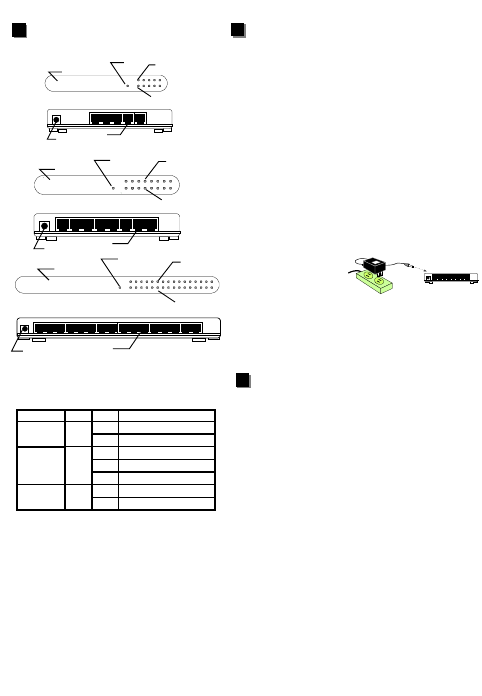
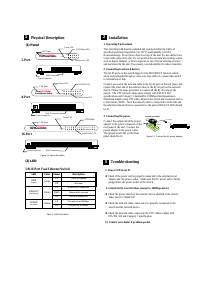
(2) LED
Table 1-1 LED description
Power is supplied
No power
LED Color Status Description
PWR
(Power)
Green
Lit
Off
A valid link is established
No link is established
Data packets received
Off
LNK/ACT
(Link/Activity)
SPEED
(10/100M)
Green
Yellow
Lit
Off
Lit
This port run at 100Mbps
This port run at 10Mbps
Flash
5/8/16 Port Fast Ethernet Switch
2
2
Installation
1. Operating Environment
This switching hub must be installed and operated within the limits of
specified operating temperature (32-131
0
F) and humidity (10-95%
Noncondensing). Do not place objects on top of the unit. Do not obstruct any
vents at the sides of the unit. Do not position the unit near any heating source
such as heater, radiator, or direct exposure to sun. Prevent entering of water
and moisture into the unit. If necessary, use dehumidifier to reduce humidity.
2. Connecting to network devices
The RJ-45 ports on the switch support Auto-MDI/MDI-X function which
allow using straight-through or cross-over type cables to connect this switch
to workstation or hub.
Connect one end of the network cable to the RJ-45 port on the rear panel, and
connect the other end of the network cable to the RJ-45 port on the network
device. Follow the same procedure to connect all the RJ-45 ports of the
switch. The UTP network cables must comply with EIA/TIA 568
specifications and Category 5 standard for 100Mbps data transmission.
Maximum length, using UTP cable, between the switch and connected device
is 100 meters (300ft). Once the network cable is connected to both ends and
the attached network device is powered on, the green LNK/ACT LED should
be lit.
3. Connecting the power
Connect the output end of the power
adapter to the power connector on the
rear panel of the unit. Connect the
power adapter to the power outlet.
The green Power LED on the front
panel should be lit.
Figure 2-1 Connect the AC power adapter
DC Power
AC Power
External Power Adapter
3
3
Trouble-shooting
1. Power LED is not lit
z Check if the power cord is properly connected to the external power
adapter and the power outlet. Make sure the DC power jack is firmly
plugged into the power socket of the switch.
2. Link/Activity is not lit when connect to 100Mbps device
z Check the power switch of the network device attached to the switch;
make sure it is turned ON.
z Check the network cable; make sure it is properly connected to the
switch and the network device.
z Check the network cable; make sure the UTP cables comply with
EIA/TIA 568 and Category 5 specification.
[!] Contact your dealer if problem persist.
1
1
Physical Description
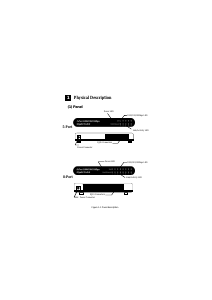
(1) Panel
Figure 1-1 Panel description
Power LED
LED Panel
RJ45 Connectors
Power Connector
POWER
100M
LNK/ACT
Fast Ethernet Switch
41526378
10/100M LED
Link/Activity LED
8-Port 10/100Mbps
LED Panel
Power LED
100/10Mbps LED
Link/Activity LED
POWER
100M
LNK/ACT
Fast Ethernet Switch
12345
RJ45 Connectors
Power Connector
5-Port 10/100Mbps
POWER
100M
LNK/ACT
31121019412513614715816
Fast Ethernet Switch
LED Panel
RJ45 Connectors
Power Connector
100/10Mbps
Link/Activity LED
Power LED
16-Port 10/100Mbps
5-Port
8-Port
16-Port


Delta i konversationen om denna produkt
Här kan du dela vad du tycker om Edimax ES-3108P Switch. Om du har en fråga, läs först noggrant igenom manualen. Att begära en manual kan göras genom att använda vårt kontaktformulär.