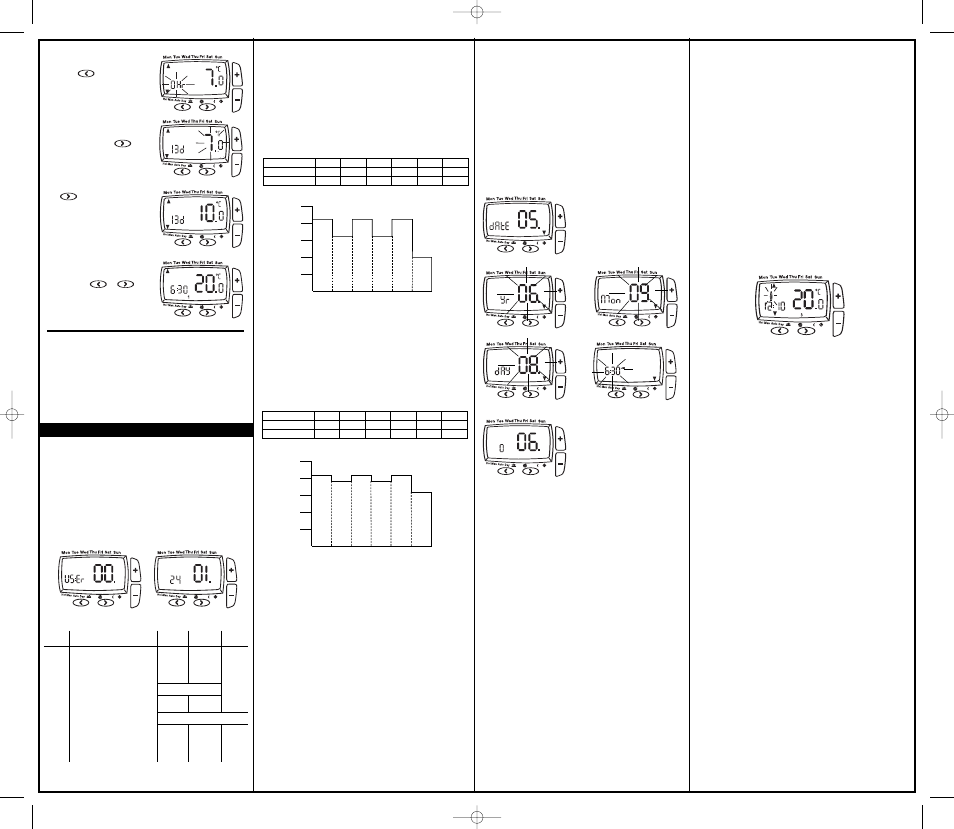
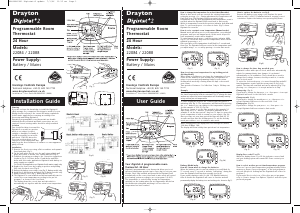
If you wish to change any User Options (shown in table 1) they
can be accessed from Auto or Man by pressing < and >
simultaneously for 3 seconds. Once you have accessed the User
Options Menu (Fig 4) press > to scroll through selectable options.
The settings for each option can be changed by pressing + or -
as required. Press > to accept the change and move to the next
option. To exit press < and > simultaeously for 3 seconds.
Alternatively, not pressing any buttons for 2 mins will cause the
Digistat +2RF to return to Auto. (Fig 5) shows option 01 24 (24
hour clock).
Only selected options that have been accepted by pressing >
will be changed.
(Fig 4) (Fig 5)
To set holiday mode:
1. Press twice, the display
shows time flashing
T
ime periods between 1 to
2
3(Hr)hours and 1 to
1
99(d)days can be set.
2
. Press + or - buttons to
adjust the count down time
a
s required. Press once
t
o confirm, the display will
s
how temperature flashing.
User Options
3. Press + or - buttons to
a
djust temperature and press
t
o start holiday count
down time. Alternatively after
10 seconds the temperature
w
ill stop flashing and holiday
c
ount down time will start.
D
isplay shows count down
time and ambient room
t
emperature.
4.
To exit the holiday mode
press the or
o
nce, to return to auto.
User
options What is it Min Max Default
01 Change 12h or 24h clock 12 24 24
02 Change to another
pre-set programme 1 3 1
03 Change the number of
programme events per day 2, 4 or 6 6
04 Switch on/off automatic
summer/winter time change On Off On
05 Adjust date and time Factory Set
06 Change temperature offset
0
C-5 5 0
07 Restore pre-set programme On Off Off
08 To disable Off function On Off On
09 Access protection lock On Off Off
(Table 1)
(Option 03)
How to change the number of program events per day.
Enter user options, select option 03 and use + and – keys to
select desired option. 2 = 2 time / temp events per day, 4 = 4
time / temp events per day and 6 = 6 time / temp events per day.
Press > to accept desired change.
(Option 04)
How to switch on/off the automatic summer
/
winter time
change.
Twice a year the actual time is automatically changed to keep it in
line with the summer / winter time change. Default setting is On.
If you wish to disable / enable this feature enter user options,
select option 04 and press – or + key to display Off or On as
desired. Press > to accept desired change.
(Option 01)
How to change from 24hr to 12hr clock.
E
nter user options, select option 01 and use + and – keys to select
d
esired option, 12 = 12hr and 24 = 24hr. Press > to accept change.
(
Option 02)
H
ow to change to another predefined program 1, 2 or 3.
E
nter user options, select option 02 and use + and – keys to
select desired program 1, 2 or 3. 1 = program 1, 2 = program 2
and 3 = program 3. Press > to accept desired change.
P
reset programs 2 and 3 are shown below:
Event 1 2 3 4 5 6
Time 6:30 8:30 12:00 14:00 16:30 22:30
Temperature 21.0 16.0 21.0 16.0 21.0 10.0
*The above settings can be understood using the chart below
123456
25ºC
2
0ºC
15ºC
1
0ºC
5
ºC
06:30 08:30 12:00 14:00 16:30 22:30
Time Period
Room Temp
Event 1 2 3 4 5 6
Time 6:00 8:30 12:00 14:00 17:30 22:30
Temperature 21.0 19.0 21.0 19.0 21.0 16.0
*The above settings can be understood using the chart below
123456
25ºC
20ºC
15ºC
10ºC
5ºC
06:00 08:30 12:00 14:00 17:30 22:30
Time P
eriod
Room Temp
Pre-set Program 2. (Home for Lunch)
Pre-set Program 3. (Home Worker)
Date and time setting.
D
igistat +2RF comes with a pre-set clock, which also
a
utomatically adjusts for summer/winter time changes. It is
activated automatically on 1st installation. There should be no
n
eed to change these settings, however, should you wish to, it
c
an be done in Option 05.
(Option 05)
H
ow to adjust date and time.
E
nter user options, select option 05 (fig 6)
T
o change the year press > once (fig 7)
To change the month press > again (fig 8)
T
o change the day press > again (fig 9)
T
o change the time press > again (fig 10)
Once you have selected your required display, to adjust press
+
or - and > to accept change.
To select option 06 press > until option 06 display is shown
(fig 11)
(Option 06)
How to change temperature offset.
The temperature displayed on the thermostat may not match
that of other temperature measuring devices in the controlled
space, because of its location. The displayed temperature may
be offset to bring it in line with other devices. To adjust the
temperature, enter the user options, select option 06. The
temperature may be offset by +/- 5 degrees by pressing the
+ and – keys. Press > to accept the desired change.
(Option 07)
How to restore the built in time temperature programs.
Enter user options, select option 07 and use + and – keys to
select desired option. Off = current programs retained. On =
restore factory program settings. Press > to select the desired
change. The Option 07 display automatically reverts back to
OFF.
Please note enabling this function will lose any user
changes to the preset programs.
(Option 08)
How to disable the OFF function.
To disable the OFF function, enter user options, select option
08 and use + or – keys to select Off. Press > to accept change.
It is now not possible to switch the Digistat+2RF OFF using the
+ and- keys as previously described. To enable the OFF
function return to option 08 and select ON. Press > to accept
change.
(Fig 10)(Fig 9)
(Fig 8)(Fig 7)
(Fig 6)
(Fig 11)
As you can see, at 06:30, the heating will come on to raise the
t
emperature to 21°C.
At 08:30, the temperature set point is dropped to 16°C, it stays at
16°C until 12:00 when the heating comes on to raise the
t
emperature to 21°C
. The temperature stays at 21°C
until 14:00
when it drops to 16°C. At 16:30 the heating comes on to raise the
temperature to 21°C where it stays until 22:30 when the
temperature drops down to a setback temperature of 10°C until
06:30 when the cycle repeats the next day.
As you can see, at 06:00, the heating will come on to raise the
temperature to 21°C.
At 08:30, the temperature set point is dropped to 19°C, it stays at
19
°
C until 12:00 when the heating comes on to raise the
temperature to 21°C. The temperature stays at 21°C until 14:00
when it drops to 19°C. At 17:30 the heating comes on to raise the
temperature to 21
°
C where it stays until 22:30 when the
temperature drops down to a setback temperature of 16°C until
06:00 when the cycle repeats the next day.
To switch OFF the thermostat:
Press the + and – simultaneously for 5 seconds until the OFF is
d
isplayed.
The thermostat and heating system will now be OFF unless the
t
emperature in the controlled space falls below 7°C, the frost
protection set point. Please note this does not affect the
operation of the domestic hot water where provided.
To switch ON the thermostat, press any key to return to auto mode.
(Option 09)
How to lock the key pad - Access Protection Lock.
T
he access protection lock allows you to lock the
D
igistat +2RF
s
o
t
hat it cannot have any adjustments.
T
he default is OFF mode allowing you to adjust the
D
igistat +2RF
.
To Lock the
Digistat +2RF settings enter the User Options Menu
O
ption 09 and select On and press > to accept.
O
nce the User Options Menu is exited all buttons will be locked.
T
o switch off the Protection Lock enter the User Menu and change
to OFF. Press > to accept.
O
nce the User Menu is exited all buttons will be free to adjust.
S
pecial Note:
The following only applies when the Intelligent delayed start
feature is enabled by the installer.
W
hen the delay period is operating indicated by the flame symbol
flashing (Fig12), pressing any button returns the Digistat +2RF to
auto mode allowing normal button operation until the next time/
t
emperature event, when it will resume the delay start mode or
follows the Holiday, Manual, Override or Off modes as selected.
Changes to the installer options and pre-set programmes must be
made with the flame symbol not flashing.
What is Intelligent delayed start?
Intelligent Delayed Start (Energy saving feature)
The Intelligent Delayed Start is an energy saving feature which
automatically reduces the warm up time for the heating system. As
the weather becomes milder, Intelligent Start will delay the heating
start times so that the fuel is not wasted bringing the room up to
temperature earlier than necessary.
(
Fig 12)
06490097001 IssA 24-1-07 13/2/07 11:59 Page 2


Delta i konversationen om denna produkt
Här kan du dela vad du tycker om Drayton Digistat+2RF Thermostat. Om du har en fråga, läs först noggrant igenom manualen. Att begära en manual kan göras genom att använda vårt kontaktformulär.