
WWW.COVERWATCHES.COM
1
0
20
30
12
2
4
6
8
10
15
60
30
4
5
23
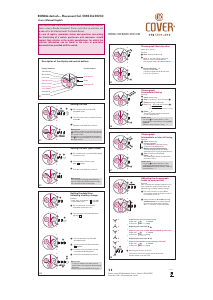
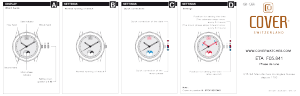
Description of the display and control buttons
Control buttons
Push button A
Crown
Push button B
23
Display elements
Second hand
Minute hand
Hour hand
Second counter
Minute counter
Hour counter
(only 5030.D)
Date 5021.B
Date 5030.D
1
0
2
0
3
0
12
2
4
6
8
1
0
15
60
30
4
5
23
10
2
0
3
0
12
2
4
6
8
1
0
1
5
60
30
4
5
23
Chronograph: Basic function
(Start / Stop / Reset)
Example:
Start:
Press push-button
A
.
Stop:
to stop the timing, press push-
button A once more and read the
chronograph hands:
1h
/
20min
/
38 sec.
Zero positioning:
Press push-button
B
.
(The chronograph hands will be reset
to their zero positions.)
1
0
2
0
3
0
12
2
4
6
8
1
0
15
60
30
4
5
23
10
2
0
3
0
12
2
4
6
8
1
0
1
5
60
30
4
5
23
Chronograph:
Accumulated timing
Example:
Start:
(start timing)
Stop:
(e.g.
15
min
5
sec following
)
Restart:
(timing is resumed)
*
Stop:
(e.g.
5
min
12
secfollowing
)
= 20 min17 sec
(
The accumulated measured time is shown
)
Reset:
The chronograph hands are returned
to their zero positions.
Please note:
*Following
, the accumulation of the
timing can be continued by pressing
push-
button A
(Restart/Stop, Restart/Stop, …).
1
0
2
0
3
0
12
2
4
6
8
1
0
15
60
30
4
5
23
10
2
0
3
0
12
2
4
6
8
1
0
1
5
60
30
4
5
23
Chronograph:
Intermediate or interval timing
Example:
Start:
(start timing)
Display interval:
e.g. 20 minutes 17 seconds (timing
continues in the background)
Making up the measured time:
(The chronograph hands are quickly
advanced to the ongoing measured time.)
Stop:
(Final time is displayed)
Reset:
The chronograph hands are returned to
their zero position.
Please note:
*Following
, further intervals or inter-
mediates can be displayed by pressing
push-button B
(display interval/make up
measured time, ...).
*
1
0
2
0
3
0
12
2
4
6
8
1
0
15
60
30
4
5
III III
23
10
2
0
3
0
12
2
4
6
8
1
0
1
5
60
30
4
5
23
III
Adjusting the chronograph
hands to zero position
Example:
One or several chronograph hands are not in
their correct zero positions and have to be
adjusted (e.g. following a battery change).
Pull out the crown to position
III
(all
chronograph hands are in their correct or
incorrect zero position).
Keep push-buttons
A and B
depressed
simultaneously
for at least 2 seconds
(the second counter hand rotates by
360°
corrective mode is activated).
Adjusting the second counter hand
A
A
1 x short
long
Single step
Continuous
Adjusting the next hand
B
Adjusting the next hand
B
Returning the crown to position
I
Termination of the chronograph hands adjustment
(can be carried out at any time).
III
III
A
B
A
A
B
A
A
1 x short
long
Single step
Continuous
A
A
1 x short
long
Single step
Continuous
Adjusting the hour counter hand at 5030.D (position 6h)
Adjusting the minute counter hand (position 9h)
III III
10
20
3
0
1
2
2
4
6
8
10
15
60
3
0
4
5
23
III III
10
2
0
3
0
12
2
4
6
8
1
0
1
5
60
30
4
5
23
Setting the time
*
Pull out the crown to position
III
(the watch stops).
Turn the crown until you reach the correct
time
8:45
.
*
Push the crown back into position
I.
Please note:
*In order to set the time to the exact second,
must be pulled out when the second hand
is in position «60».
Once the hour and minute hands have been
set,
must be pushed back into position I at
the exact second.
III
1
0
2
0
3
0
12
2
4
6
8
1
0
15
60
30
4
5
31
III
10
2
0
3
0
12
2
4
6
8
1
0
1
5
60
30
4
5
1
Setting the date (quick mode)
Pull out the crown to position
II
(the watch
continues to run).
Turn the crown until the correct
date appears.
Push the crown back into position
I
.
1
Please note:
During the date changing phase between
approx. 9 PM and 12 PM; the date must be
set to the date of the following day.
III
10
20
30
1
2
2
4
6
8
10
15
6
0
30
4
5
17
III
10
2
0
30
12
2
4
6
8
10
1
5
60
3
0
4
5
3
Setting the date/time
following a battery change
Example:
– Date / time on the watch: /1:25 AM
– Present date / time:/ 8:30 PM
Pull out the crown to position
II
(the watch continues to run).
Turn the crown until yesterday’s date
appears
.
3
17
4
IIIIII
10
20
30
1
2
2
4
6
8
10
1
5
60
30
45
3
IIIIII
10
2
0
30
12
2
4
6
8
10
1
5
60
3
0
45
4
**
Pull out the crown to position
III
(the watch stops).
**
Turn the crown until the correct date
appears.
**
Continue to turn the crown until the
correct time 8:30 PM appears.
**
Push the crown back into position
I
.
4
Please note:
*
*
To set your watch to the exact second,
please refer to the chapter entitled «setting
the time».
**
Please observe the AM/PM clock rhythm.
RONDA startech – Movement Cal. 5030.D & 5021.D
User’s Manual English
You have decided to buy a watch, which was assembled by a watch-
maker using a Ronda movement. Please note that no watches are
produced or distributed under the Ronda Brand.
In case of repairs, guarantee claims and questions concerning
the functioning of a watch, purchasers and consumers should
contact their retailer or the watch manufacturer, for which the
relevant information can be found in the sales or guarantee
documentation provided with the watch.
06 /2014
Battery type: 395 (diameter 9.5 mm x 2.6 mm / SR 927 SW)
Accuracy: +20 / -10 seconds per month
B
B
B
B
B
B
B
B
B
B
B
B
B
B
B
B
A
A
A
A
A
A
A
A
A
A
A
A
A
A
A
A
01
05
02
06
03
07
04
08
1
0
20
30
12
2
4
6
8
10
15
60
30
4
5
23
Description of the display and control buttons
Control buttons
Push button A
Crown
Push button B
23
Display elements
Second hand
Minute hand
Hour hand
Second counter
Minute counter
Hour counter
(only 5030.D)
Date 5021.B
Date 5030.D
1
0
2
0
3
0
12
2
4
6
8
1
0
15
60
30
4
5
23
10
2
0
3
0
12
2
4
6
8
1
0
1
5
60
30
4
5
23
Chronograph: Basic function
(Start / Stop / Reset)
Example:
Start:
Press push-button
A
.
Stop:
to stop the timing, press push-
button A once more and read the
chronograph hands:
1h
/
20min
/
38 sec.
Zero positioning:
Press push-button
B
.
(The chronograph hands will be reset
to their zero positions.)
1
0
2
0
3
0
12
2
4
6
8
1
0
15
60
30
4
5
23
10
2
0
3
0
12
2
4
6
8
1
0
1
5
60
30
4
5
23
Chronograph:
Accumulated timing
Example:
Start:
(start timing)
Stop:
(e.g.
15
min
5
sec following
)
Restart:
(timing is resumed)
*
Stop:
(e.g.
5
min
12
secfollowing
)
= 20 min17 sec
(
The accumulated measured time is shown
)
Reset:
The chronograph hands are returned
to their zero positions.
Please note:
*Following
, the accumulation of the
timing can be continued by pressing
push-
button A
(Restart/Stop, Restart/Stop, …).
1
0
2
0
3
0
12
2
4
6
8
1
0
15
60
30
4
5
23
10
2
0
3
0
12
2
4
6
8
1
0
1
5
60
30
4
5
23
Chronograph:
Intermediate or interval timing
Example:
Start:
(start timing)
Display interval:
e.g. 20 minutes 17 seconds (timing
continues in the background)
Making up the measured time:
(The chronograph hands are quickly
advanced to the ongoing measured time.)
Stop:
(Final time is displayed)
Reset:
The chronograph hands are returned to
their zero position.
Please note:
*Following
, further intervals or inter-
mediates can be displayed by pressing
push-button B
(display interval/make up
measured time, ...).
*
1
0
2
0
3
0
12
2
4
6
8
1
0
15
60
30
4
5
III III
23
10
2
0
3
0
12
2
4
6
8
1
0
1
5
60
30
4
5
23
III
Adjusting the chronograph
hands to zero position
Example:
One or several chronograph hands are not in
their correct zero positions and have to be
adjusted (e.g. following a battery change).
Pull out the crown to position
III
(all
chronograph hands are in their correct or
incorrect zero position).
Keep push-buttons
A and B
depressed
simultaneously
for at least 2 seconds
(the second counter hand rotates by
360°
corrective mode is activated).
Adjusting the second counter hand
A
A
1 x short
long
Single step
Continuous
Adjusting the next hand
B
Adjusting the next hand
B
Returning the crown to position
I
Termination of the chronograph hands adjustment
(can be carried out at any time).
III
III
A
B
A
A
B
A
A
1 x short
long
Single step
Continuous
A
A
1 x short
long
Single step
Continuous
Adjusting the hour counter hand at 5030.D (position 6h)
Adjusting the minute counter hand (position 9h)
III III
10
20
3
0
1
2
2
4
6
8
10
15
60
3
0
4
5
23
III III
10
2
0
3
0
12
2
4
6
8
1
0
1
5
60
30
4
5
23
Setting the time
*
Pull out the crown to position
III
(the watch stops).
Turn the crown until you reach the correct
time
8:45
.
*
Push the crown back into position
I.
Please note:
*In order to set the time to the exact second,
must be pulled out when the second hand
is in position «60».
Once the hour and minute hands have been
set,
must be pushed back into position I at
the exact second.
III
1
0
2
0
3
0
12
2
4
6
8
1
0
15
60
30
4
5
31
III
10
2
0
3
0
12
2
4
6
8
1
0
1
5
60
30
4
5
1
Setting the date (quick mode)
Pull out the crown to position
II
(the watch
continues to run).
Turn the crown until the correct
date appears.
Push the crown back into position
I
.
1
Please note:
During the date changing phase between
approx. 9 PM and 12 PM; the date must be
set to the date of the following day.
III
10
20
30
1
2
2
4
6
8
10
15
6
0
30
4
5
17
III
10
2
0
30
12
2
4
6
8
10
1
5
60
3
0
4
5
3
Setting the date/time
following a battery change
Example:
– Date / time on the watch: /1:25 AM
– Present date / time:/ 8:30 PM
Pull out the crown to position
II
(the watch continues to run).
Turn the crown until yesterday’s date
appears
.
3
17
4
IIIIII
10
20
30
1
2
2
4
6
8
10
1
5
60
30
45
3
IIIIII
10
2
0
30
12
2
4
6
8
10
1
5
60
3
0
45
4
**
Pull out the crown to position
III
(the watch stops).
**
Turn the crown until the correct date
appears.
**
Continue to turn the crown until the
correct time 8:30 PM appears.
**
Push the crown back into position
I
.
4
Please note:
*
*
To set your watch to the exact second,
please refer to the chapter entitled «setting
the time».
**
Please observe the AM/PM clock rhythm.
RONDA startech – Movement Cal. 5030.D & 5021.D
User’s Manual English
You have decided to buy a watch, which was assembled by a watch-
maker using a Ronda movement. Please note that no watches are
produced or distributed under the Ronda Brand.
In case of repairs, guarantee claims and questions concerning
the functioning of a watch, purchasers and consumers should
contact their retailer or the watch manufacturer, for which the
relevant information can be found in the sales or guarantee
documentation provided with the watch.
06 /2014
Battery type: 395 (diameter 9.5 mm x 2.6 mm / SR 927 SW)
Accuracy: +20 / -10 seconds per month
B
B
B
B
B
B
B
B
B
B
B
B
B
B
B
B
A
A
A
A
A
A
A
A
A
A
A
A
A
A
A
A
01
05
02
06
03
07
04
08
1
0
20
30
12
2
4
6
8
10
15
60
30
4
5
23
Description of the display and control buttons
Control buttons
Push button A
Crown
Push button B
23
Display elements
Second hand
Minute hand
Hour hand
Second counter
Minute counter
Hour counter
(only 5030.D)
Date 5021.B
Date 5030.D
1
0
2
0
3
0
12
2
4
6
8
1
0
15
60
30
4
5
23
10
2
0
3
0
12
2
4
6
8
1
0
1
5
60
30
4
5
23
Chronograph: Basic function
(Start / Stop / Reset)
Example:
Start:
Press push-button
A
.
Stop:
to stop the timing, press push-
button A once more and read the
chronograph hands:
1h
/
20min
/
38 sec.
Zero positioning:
Press push-button
B
.
(The chronograph hands will be reset
to their zero positions.)
1
0
2
0
3
0
12
2
4
6
8
1
0
15
60
30
4
5
23
10
2
0
3
0
12
2
4
6
8
1
0
1
5
60
30
4
5
23
Chronograph:
Accumulated timing
Example:
Start:
(start timing)
Stop:
(e.g.
15
min
5
sec following
)
Restart:
(timing is resumed)
*
Stop:
(e.g.
5
min
12
secfollowing
)
= 20 min17 sec
(
The accumulated measured time is shown
)
Reset:
The chronograph hands are returned
to their zero positions.
Please note:
*Following
, the accumulation of the
timing can be continued by pressing
push-
button A
(Restart/Stop, Restart/Stop, …).
1
0
2
0
3
0
12
2
4
6
8
1
0
15
60
30
4
5
23
10
2
0
3
0
12
2
4
6
8
1
0
1
5
60
30
4
5
23
Chronograph:
Intermediate or interval timing
Example:
Start:
(start timing)
Display interval:
e.g. 20 minutes 17 seconds (timing
continues in the background)
Making up the measured time:
(The chronograph hands are quickly
advanced to the ongoing measured time.)
Stop:
(Final time is displayed)
Reset:
The chronograph hands are returned to
their zero position.
Please note:
*Following
, further intervals or inter-
mediates can be displayed by pressing
push-button B
(display interval/make up
measured time, ...).
*
1
0
2
0
3
0
12
2
4
6
8
1
0
15
60
30
4
5
III III
23
10
2
0
3
0
12
2
4
6
8
1
0
1
5
60
30
4
5
23
III
Adjusting the chronograph
hands to zero position
Example:
One or several chronograph hands are not in
their correct zero positions and have to be
adjusted (e.g. following a battery change).
Pull out the crown to position
III
(all
chronograph hands are in their correct or
incorrect zero position).
Keep push-buttons
A and B
depressed
simultaneously
for at least 2 seconds
(the second counter hand rotates by
360°
corrective mode is activated).
Adjusting the second counter hand
A
A
1 x short
long
Single step
Continuous
Adjusting the next hand
B
Adjusting the next hand
B
Returning the crown to position
I
Termination of the chronograph hands adjustment
(can be carried out at any time).
III
III
A
B
A
A
B
A
A
1 x short
long
Single step
Continuous
A
A
1 x short
long
Single step
Continuous
Adjusting the hour counter hand at 5030.D (position 6h)
Adjusting the minute counter hand (position 9h)
III III
10
20
3
0
1
2
2
4
6
8
10
15
60
3
0
4
5
23
III III
10
2
0
3
0
12
2
4
6
8
1
0
1
5
60
30
4
5
23
Setting the time
*
Pull out the crown to position
III
(the watch stops).
Turn the crown until you reach the correct
time
8:45
.
*
Push the crown back into position
I.
Please note:
*In order to set the time to the exact second,
must be pulled out when the second hand
is in position «60».
Once the hour and minute hands have been
set,
must be pushed back into position I at
the exact second.
III
1
0
2
0
3
0
12
2
4
6
8
1
0
15
60
30
4
5
31
III
10
2
0
3
0
12
2
4
6
8
1
0
1
5
60
30
4
5
1
Setting the date (quick mode)
Pull out the crown to position
II
(the watch
continues to run).
Turn the crown until the correct
date appears.
Push the crown back into position
I
.
1
Please note:
During the date changing phase between
approx. 9 PM and 12 PM; the date must be
set to the date of the following day.
III
10
20
30
1
2
2
4
6
8
10
15
6
0
30
4
5
17
III
10
2
0
30
12
2
4
6
8
10
1
5
60
3
0
4
5
3
Setting the date/time
following a battery change
Example:
– Date / time on the watch: /1:25 AM
– Present date / time:/ 8:30 PM
Pull out the crown to position
II
(the watch continues to run).
Turn the crown until yesterday’s date
appears
.
3
17
4
IIIIII
10
20
30
1
2
2
4
6
8
10
1
5
60
30
45
3
IIIIII
10
2
0
30
12
2
4
6
8
10
1
5
60
3
0
45
4
**
Pull out the crown to position
III
(the watch stops).
**
Turn the crown until the correct date
appears.
**
Continue to turn the crown until the
correct time 8:30 PM appears.
**
Push the crown back into position
I
.
4
Please note:
*
*
To set your watch to the exact second,
please refer to the chapter entitled «setting
the time».
**
Please observe the AM/PM clock rhythm.
RONDA startech – Movement Cal. 5030.D & 5021.D
User’s Manual English
You have decided to buy a watch, which was assembled by a watch-
maker using a Ronda movement. Please note that no watches are
produced or distributed under the Ronda Brand.
In case of repairs, guarantee claims and questions concerning
the functioning of a watch, purchasers and consumers should
contact their retailer or the watch manufacturer, for which the
relevant information can be found in the sales or guarantee
documentation provided with the watch.
06 /2014
Battery type: 395 (diameter 9.5 mm x 2.6 mm / SR 927 SW)
Accuracy: +20 / -10 seconds per month
B
B
B
B
B
B
B
B
B
B
B
B
B
B
B
B
A
A
A
A
A
A
A
A
A
A
A
A
A
A
A
A
01
05
02
06
03
07
04
08


Delta i konversationen om denna produkt
Här kan du dela vad du tycker om Cover Co192 Chapman Gent Chronograph Armbandsur. Om du har en fråga, läs först noggrant igenom manualen. Att begära en manual kan göras genom att använda vårt kontaktformulär.