Bruksanvisning Clas Ohlson VE704 HDMI-adapter

Behöver du en bruksanvisning för din Clas Ohlson VE704 HDMI-adapter? Nedan kan du se och ladda ner PDF-bruksanvisningen gratis på svenska. Den här produkten har för närvarande 1 vanliga frågor, 0 kommentarer och har 0 röster. Om det här inte är bruksanvisningen du vill ha, vänligen kontakta oss.

Är produkten defekt och erbjuder bruksanvisningen ingen lösning? Gå till ett Repair Café för gratis reparationstjänster.

Bruksanvisning

Loading…
English
GREAT BRITAIN
customer service tel: 08545 300 9799 e-mail: [email protected]
internet: www.clasohlson.com/uk
Ver. 20130617
VGA to HDMI Adaptor
Art.no 38-4705 Model VE704
Please read the entire instruction manual before using the product and save it for future reference.
We reserve the right for any errors in text or images and any necessary changes made to technical data.
If you have any questions regarding technical problems please contact our customer services.
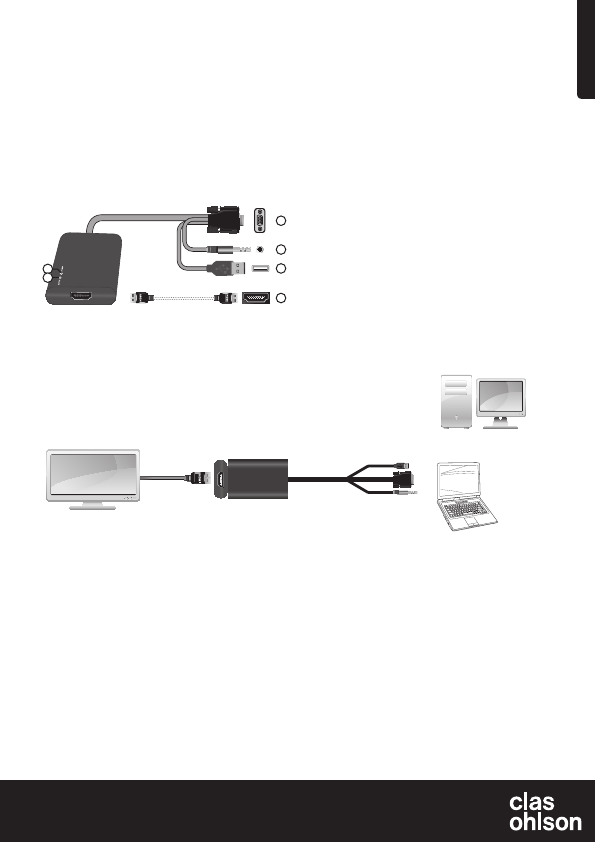
1. Power LED indicator is lit when the adaptor is connected and
has power.
2. Active LED indicator is lit when there is an existing incoming signal.
3. HDMI outlet (HDMI lead sold separately)
4. USB plug (receives power from the mains adaptor)
5. 3.5 mm stereo plug
6. VGA plug
Connections
Connection example:
Make sure the devices are turned off before connecting.
Laptop connection
Ordinarily, one needs to activate an extra display in order for the adaptor to work. There are several different ways of doing this. For instructions
concerning your particular operating system, see below.
Note: These are only general examples. Settings for individual computers and their graphics card may vary.
Windows XP
Right click on an open area of your desktop and select Properties. Click on the Settings tab and select Advanced. Click on the tab with settings
for your graphics card. Go into display settings to configure several displays and set the desired settings for your extra display.
Windows Vista
Hold down the [Windows] button on your keyboard, then press [X]. This will open the Windows Mobility Centre on your computer. Click Connect
display in the external display box. A dialogue box will appear asking how you wish to use the external display. Select Mirrored.
Windows 7
Hold down the [Windows] button on your keyboard, then press [P]. A dialogue box will appear asking how you wish to use your external display.
Select Mirrored.
Troubleshooting
Check the following if no image appears on your TV after connecting all cables:
Make sure that the drive routine for your graphics card is up to date. If your drive routine isn’t up to date you may experience bad image quality or
noimage at all.
Disposal
Follow local ordinances when disposing of this product. If you are
unsure about how to dispose of this product contact your municipality.
Specifications
HDCP compatible
Supported operating systems Windows XP/Vista (32/64)
and Windows 7 (32/64)
Supported screen resolution 800×600, 1024×768, 1280×768
1280×1024
Make sure your screen supports the stated resolutions before
connecting the device to the adaptor.
Plugs and connections
• Male VGA plug
• 3.5 mm stereo plug
• USB plug (receives power from the adaptor)
• Female HDMI socket (HDMI A)
Description
• Connects computers with a standard VGA output to modern TVs,
projectors or monitors with a HDMI input.
• Supports HD video and audio via the HDMI output.
• Connects to both VGA and 3.5 mm audio outputs from your
computer. No drive routines required.
PC
Laptop
AUDIO
USB
or
VGA
HDMI
HDTV
3
4
5
6
1
2
HDMI lead sold separately.
Ladda ner bruksanvisning i Svenska (PDF, 2.84 MB)
(Tänk på miljön och skriv endast ut denna bruksanvisning om det verkligen är nödvändigt)

Loading…

Betyg

Berätta vad du tycker om Clas Ohlson VE704 HDMI-adapter genom att betygsätta den. Vill du dela med dig av dina åsikter om denna produkt eller ställa en fråga? Lämna en kommentar nederst på sidan.
Är du nöjd med Clas Ohlson VE704 HDMI-adapter?
Ja Nej
Bli den första personen som betygsätter denna produkt
0 röster

Delta i konversationen om denna produkt

Här kan du dela vad du tycker om Clas Ohlson VE704 HDMI-adapter. Om du har en fråga, läs först noggrant igenom manualen. Att begära en manual kan göras genom att använda vårt kontaktformulär.

Mer om denna bruksanvisning

Vi förstår att det är trevligt att ha en pappersbruksanvisning för din Clas Ohlson VE704 HDMI-adapter. Du kan alltid ladda ner bruksanvisningen från vår hemsida och skriva ut den själv. Om du vill ha en originalbruksanvisning rekommenderar vi att du kontaktar Clas Ohlson. De kanske kan tillhandahålla en originalbruksanvisning. Letar du efter bruksanvisningen för din Clas Ohlson VE704 HDMI-adapter på ett annat språk? Välj ditt föredragna språk på vår hemsida och sök efter modellnumret för att se om vi har det tillgängligt.

Specifikationer

Märke Clas Ohlson
Modell VE704
Kategori HDMI-adaptrar
Filtyp PDF
Filstorlek 2.84 MB

Alla bruksanvisningar för Clas Ohlson HDMI-adaptrar
Fler bruksanvisningar för HDMI-adaptrar

Vanliga frågor om Clas Ohlson VE704 HDMI-adapter

Vårt supportteam söker efter användbar produktinformation och svar på vanliga frågor. Om du hittar en felaktighet bland våra vanliga frågor uppskattar vi om du meddelar oss detta via vårt kontaktformulär.

Vad står HDMI för? Verifierad

HDMI står för High-Definition Multimedia Interface. HDMI är en anslutning för att skicka video och ljud av hög kvalitet från en enhet till en annan.

Detta hjälpte (2) Läs mer
Bruksanvisning Clas Ohlson VE704 HDMI-adapter

Relaterade produkter

Relaterade kategorier

×
Download