Bruksanvisning Cateye CC-RD100N Strada Cykeldator

Behöver du en bruksanvisning för din Cateye CC-RD100N Strada Cykeldator? Nedan kan du se och ladda ner PDF-bruksanvisningen gratis på svenska. Den här produkten har för närvarande 3 vanliga frågor, 0 kommentarer och har 0 röster. Om det här inte är bruksanvisningen du vill ha, vänligen kontakta oss.

Är produkten defekt och erbjuder bruksanvisningen ingen lösning? Gå till ett Repair Café för gratis reparationstjänster.

Bruksanvisning

Loading…
5
4
7
0
9
6
2
1
3
8
Tire circumference
reference table
12 x 1.75
14 x 1.50
14 x 1.75
16 x 1.50
16 x 1.75
18 x 1.50
18 x 1.75
20 x 1.75
20 x 1-3/8
22 x 1-3/8
22 x 1-1/2
24 x 1
24 x 3/4
Tubular
24 x 1-1/8
24 x 1-1/4
24 x 1.75
24 x 2.00
24 x 2.125
26 x 7/8
26 x 1
(
59
)
26 x 1
(
65
)
26 x 1.25
26 x 1-1/8
26 x 1-3/8
26 x 1-1/2
26 x 1.40
26 x 1.50
26 x 1.75
26 x 1.95
26 x 2.00
26 x 2.10
26 x 2.125
26 x 2.35
26 x 3.00
27 x 1
27 x 1-1/8
27 x 1-1/4
27 x 1-3/8
650 x 20C
650 x 23C
650 x 35A
650 x 38A
650 x 38B
700 x 18C
700 x 19C
700 x 20C
700 x 23C
700 x 25C
700 x 28C
700 x 30C
700 x 32C
700C Tubular
700 x 35C
700 x 38C
700 x 40C
29 x 2.1
29 x 2.3
935
1020
1055
1185
1195
1340
1350
1515
1615
1770
1785
1753
1785
1795
1905
1890
1925
1965
1920
1913
1952
1953
1970
2068
2100
2005
2010
2023
2050
2055
2068
2070
2083
2170
2145
2155
2161
2169
1938
1944
2090
2125
2105
2070
2080
2086
2096
2105
2136
2146
2155
2130
2168
2180
2200
2288
2326
Tire size L (mm)
L mm
1
2
2
1
9
9
7
6
4
0
4
5
5
5
4
5 mm
3
4 5
2
1
3
2
Pull securely
Remove/install the computer
Spoke
Sensor line
Inside of right
front fork
Stem
Handlebar
Inside of right
front fork
Inside of right
front fork
* Attach between one and three sensor pads 8,
putting them together as required.
* After installation, rotate the front wheel gently to check that the speed is displayed on the
computer. If the speed is not displayed, check that conditions
A
and
B
are satisfied.
To the sensor
Cut
Toward the sensor line
When attaching the bracket to the handlebar
Caution:
Tighten the bracket, ensuring that the cable does
not get caught in the stem.
Caution:
Tighten the bracket, ensuring that the cable does not get caught in the handlebar.
B
The clearance between the sensor surface
and the magnet must not exceed 5 mm.
Attach the bracket to the stem or handlebar
When attaching the bracket to the stem
Wrap the cable around
the front brake cable
Caution:
Turn the handlebar to
make sure wire does
not hinder full rotation.
Caution:
Round off the cut edge
of the bracket band to
prevent injury.
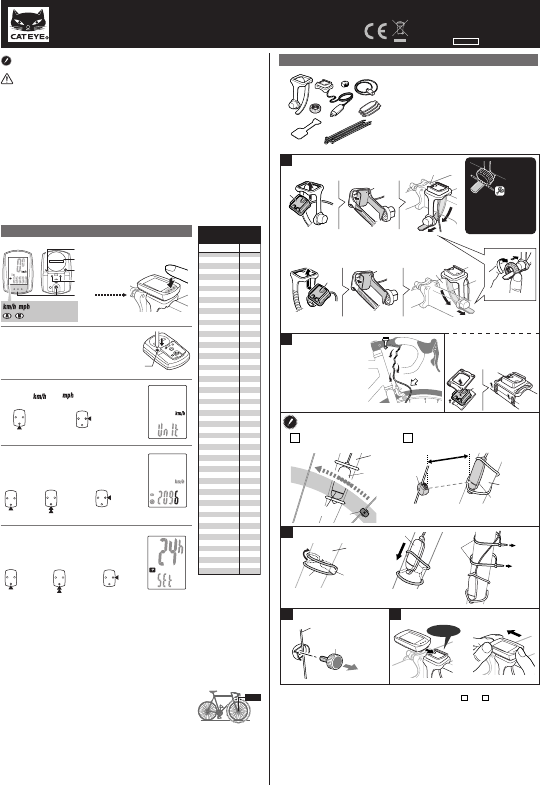
Install the sensor and magnet :
A
The magnet should pass
through the sensor line.
* You can also use ties 0 (in place of sensor rubber
band 6) to secure the sensor.
Install the sensor
Install the magnet
Click
While supporting it by hand,
push it out as if lifting the front up
* For wing type handlebar or
oversized stem, bracket can be
mounted using the Bracket
Holder and nylon ties. (Option).
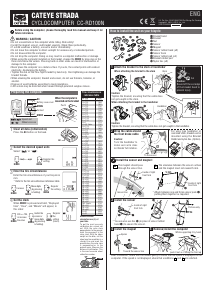
How to install the unit on your bicycle
1 Bracket band
2 Bracket
3 Nut
4 Sensor
5 Magnet
6 Sensor rubber band (x2)
7 Sensor hook
8 Sensor rubber pad (x3)
9 Bracket rubber pad
0 Nylon ties (x5)
CATEYE STRADA
CYCLOCOMPUTER CC-RD100N
ENG
Before using the computer, please thoroughly read this manual and keep it for
future reference.
U.S. Pat. Nos. 5236759/6957926 Pat./Design Pat. Pending
Copyright© 2008 CATEYE Co., Ltd.
CCRD10-080924 066600507 6
WARNING / CAUTION
• Do not concentrate on the computer while riding. Ride safely!
• Install the magnet, sensor, and bracket securely. Check these periodically.
• If a child swallows a battery, consult a doctor immediately.
• Do not leave the computer in direct sunlight for unnecessary or extended periods.
• Do not disassemble the computer.
• Do not drop the computer. Doing so may result in a computer malfunction or damage.
• When using the computer installed on the bracket, change the MODE by pressing on the
three dots below the screen. Pressing hard on other areas can result in malfunction or
damage to the computer.
• Never place the computer on a metal surface. If you do, the contact points will conduct
electricity, discharging the battery.
• Tighten the dial on the Flex-Tight bracket by hand only. Over-tightening can damage the
bracket threads.
• When cleaning the computer, bracket and sensor, do not use thinners, benzene, or
alcohol.
• Dispose of used batteries according to local regulations.
• LCD screen may be distorted when viewed through polarized sunglass lenses.
MODE
AC
MENU
MENUMENU
MODEMODE
MENUMENU
MODEMODE
MODEMODE
MODEMODE
MENUMENU
MODEMODE
Switch the
screen or
move digits
(by pressing
& holding)
Enter the tire circumference
Enter the tire circumference of your bicycle in
mm.
* Refer to the tire circumference reference table.
1
2
3
4
km/h mph
Increase
Move digits
(by pressing
& holding)
Register the
setting
Register
the setting
Clear all data (initialization)
Press the AC button on the back.
Select the desired speed units
Select “ ” or “ ”.
24h 12h,
or increase
the value
Register
the
setting
(finish)
Preparing the computer
Set the clock
When MODE is pressed and held, “Displayed
time”, “Hour”, and “Minute” will appear, in
this order.
Battery case cover
Contact
Push!
: Speed unit
: Wheel size icon
When the computer is
mounted on the bracket
AC
Measure wheel
circumference (L) of
your bike
To get the most accurate
calibration do a wheel roll
out. With the valve stem
perpendicular to the ground,
mark the pavement at the
valve stem. With the riders
weight on the bike, roll the
wheel one tire revolution in a
straight line and mark the
ground when the valve stem
is perpendicular to the
ground again. Measure the
distance in millimeters. This
is the most accurate wheel
calibration number.
Ladda ner bruksanvisning i Engelska (PDF, 0.28 MB)
(Tänk på miljön och skriv endast ut denna bruksanvisning om det verkligen är nödvändigt)

Loading…

Betyg

Berätta vad du tycker om Cateye CC-RD100N Strada Cykeldator genom att betygsätta den. Vill du dela med dig av dina åsikter om denna produkt eller ställa en fråga? Lämna en kommentar nederst på sidan.
Är du nöjd med Cateye CC-RD100N Strada Cykeldator?
Ja Nej
Bli den första personen som betygsätter denna produkt
0 röster

Delta i konversationen om denna produkt

Här kan du dela vad du tycker om Cateye CC-RD100N Strada Cykeldator. Om du har en fråga, läs först noggrant igenom manualen. Att begära en manual kan göras genom att använda vårt kontaktformulär.

Mer om denna bruksanvisning

Vi förstår att det är trevligt att ha en pappersbruksanvisning för din Cateye CC-RD100N Strada Cykeldator. Du kan alltid ladda ner bruksanvisningen från vår hemsida och skriva ut den själv. Om du vill ha en originalbruksanvisning rekommenderar vi att du kontaktar Cateye. De kanske kan tillhandahålla en originalbruksanvisning. Letar du efter bruksanvisningen för din Cateye CC-RD100N Strada Cykeldator på ett annat språk? Välj ditt föredragna språk på vår hemsida och sök efter modellnumret för att se om vi har det tillgängligt.

Specifikationer

Märke Cateye
Modell CC-RD100N Strada
Kategori Cykeldatorer
Filtyp PDF
Filstorlek 0.28 MB

Alla bruksanvisningar för Cateye Cykeldatorer
Fler bruksanvisningar för Cykeldatorer

Vanliga frågor om Cateye CC-RD100N Strada Cykeldator

Vårt supportteam söker efter användbar produktinformation och svar på vanliga frågor. Om du hittar en felaktighet bland våra vanliga frågor uppskattar vi om du meddelar oss detta via vårt kontaktformulär.

Varför måste jag ange storleken på mitt hjul? Verifierad

För att beräkna det färdade avståndet använder cykeldatorn antalet varv. Antalet varvtal multiplicerat med hjulets storlek är lika med det färdade avståndet.

Detta hjälpte (4409) Läs mer

Hur många mil är en kilometer? Verifierad

En kilometer motsvarar 0,621 mil. Tio kilometer gör 6,21 miles. En mil motsvarar 1 609 kilometer. Tio mil gör 16,09 kilometer.

Detta hjälpte (772) Läs mer

Ett batteri i min enhet är oxiderat, kan jag fortfarande använda det säkert? Verifierad

Ja, enheten kan fortfarande användas säkert. Ta först bort det oxiderade batteriet. Använd aldrig bara händer för att göra detta. Rengör sedan batterifacket med en bomullspinne doppad i ättika eller citronsaft. Låt det torka och sätt i nya batterier.

Detta hjälpte (772) Läs mer
Bruksanvisning Cateye CC-RD100N Strada Cykeldator

Relaterade produkter

Relaterade kategorier

×
Download