E-16
• Even when the watch is within range of a transmitter, signal reception may be impossible due to the
effects of geographic contours, structures, weather, the time of year, the time of day, radio interference,
etc. The signal becomes weaker at distances of approximately 500 kilometers, which means that the
infl uence of the conditions listed above becomes even greater.
• Signal reception may not be possible at the distances noted below during certain times of the year or
day. Radio interference may also cause problems with reception.
Mainfl ingen (Germany) or Anthorn (England) transmitters: 500 kilometers (310 miles)
Fort Collins (United States) transmitter: 600 miles (1,000 kilometers)
Fukushima or Fukuoka/Saga (Japan) transmitters: 500 kilometers (310 miles)
Shangqiu (China) transmitter: 500 kilometers (310 miles)
• As of December 2012, China does not use Daylight Saving Time (DST). If China does go to the Daylight
Saving Time system in the future, some functions of this watch may no longer operate correctly.
To get ready for a receive operation
1. Confi rm that the watch is in the Timekeeping Mode or World Time Mode. If it isn’t, use
D
to enter the
Timekeeping Mode or World Time Mode (Page E-24).
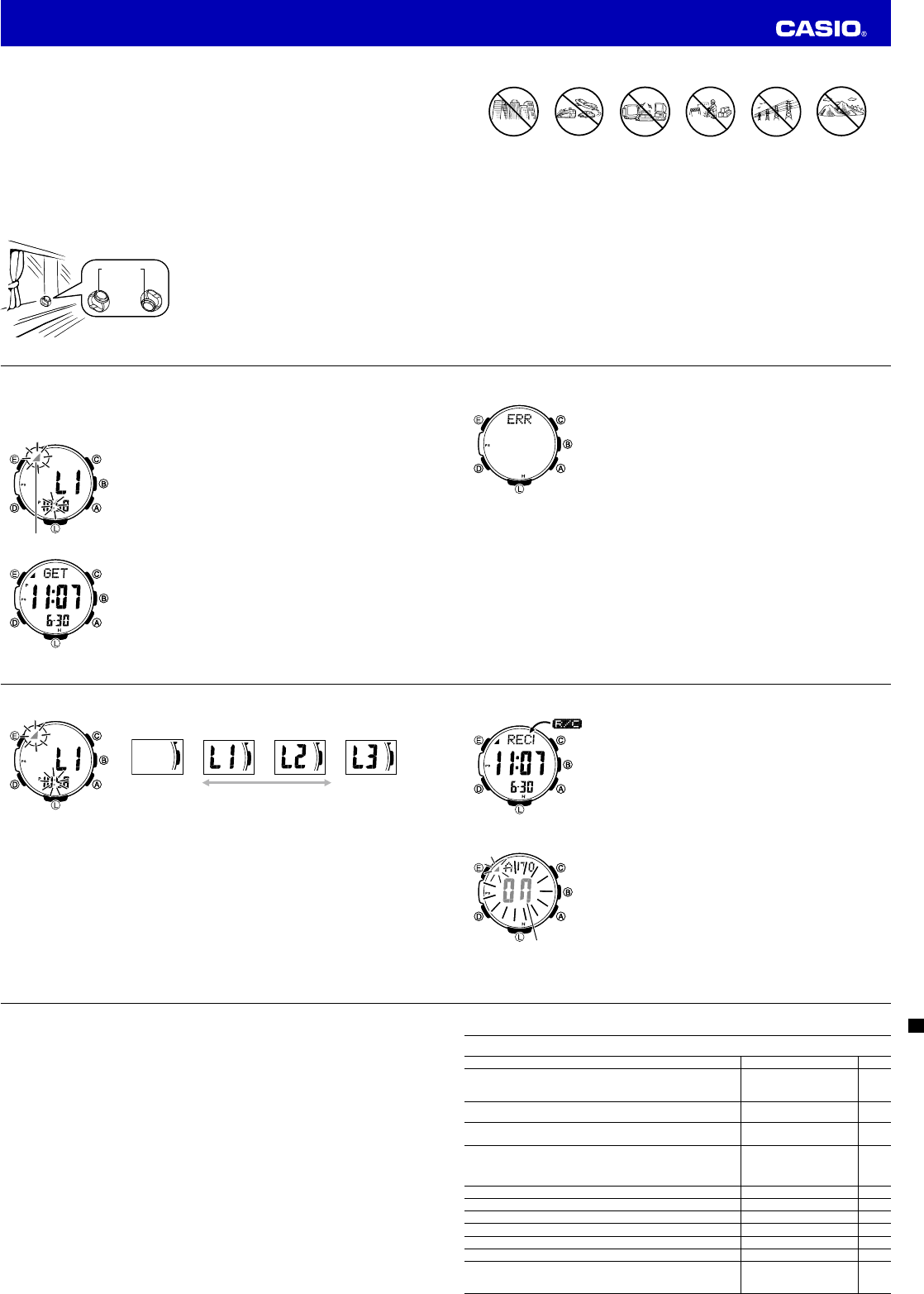
2. The antenna of this watch is located on its 12 o’clock side. Position the watch with 12 o’clock facing
towards a window as shown in the nearby illustration. Make sure there are no metal objects nearby.
• Signal reception normally is better at night.
• The receive operation takes from two to ten minutes, but
in some cases it can take as long as 20 minutes. Take
care that you do not perform any button operation or
move the watch during this time.
12 o’clock
or
12 o’clock
or
E-17
• Signal reception may be diffi cult or even impossible under the conditions described below.
Inside or
among
buildings
Inside a
vehicle
Near
household
appliances,
offi ce
equipment,
or a mobile
phone
Near a
construction
site, airport
Near
high-tension
power lines
Among or
behind
mountains
3. What you should do next depends on whether you are using auto receive or manual receive.
• Auto receive: Leave the watch over night in the location you selected in step 2. See “Auto Receive”
below for details.
• Manual receive: Perform the operation under “To perform manual receive” on page E-18.
Auto Receive
• With auto receive, the watch performs the receive operation each day automatically up to six times (up
to fi ve times for the Chinese calibration signal) between the hours of midnight and 5 a.m. (according to
the Timekeeping Mode time). When any receive operation is successful, none of the other receive
operations for that day are performed.
• When a calibration time is reached, the watch will perform the receive operation only if it is in the
Timekeeping Mode or World Time Mode. The receive operation is not performed if a calibration time is
reached while you are confi guring settings.
E-18
• You can use the procedure under “To turn auto receive on and off” (page E-21) to enable or disable
auto receive.
To perform manual receive
1. Use
D
to select the Receive Mode (
R/C
) as shown on page E-24.
• One second after R/C appears on the display, the text RECEIVED
will scroll across the upper display.
2. Hold down
A
until
RC Hold
appears on the display and then
disappears.
• A signal level indicator (L1, L2, or L3, see page E-20) will appear
on the display after reception starts. Do not allow the watch to
move and do not perform any button operation until GET or ERR
appears on the display.
• If the receive operation is successful, the reception date and time
appear on the display, along with the GET indicator.
The watch will return to the Timekeeping Mode if you press
D
or
if you do not perform any button operation for about two or three
minutes.
Receiving
Receiving indicator
Receive successful
Receiving
Receiving indicator
Receive successful
E-19
• If the current reception fails but a previous reception (within the
last 24 hours) was successful, the display shows the receiving
indicator and the ERR indicator. If the ERR indicator only is
displayed (without the receiving indicator), it means that all of the
receive operations over the past 24 hours have failed.
The watch will return to the Timekeeping Mode without changing
the time setting if you press
D
or if you do not perform any button
operation for about two or three minutes.
Note
• You can interrupt a time calibration signal reception operation by
pressing any button.
Receive failed
If there was a previously
successful reception
Receive failed
If there was a previously
successful reception
E-20
Signal Level Indicator
During manual receive, the signal level indicator displays the signal level
as shown below.
Weak (Unstable) Strong (Stable)
The level indication will change in accordance with reception conditions
while reception is being performed.
As you watch the indicator, keep the watch in a location that best
maintains stable reception.
• Even under optimum reception conditions, it can take about 10
seconds for reception to stabilize.
• Note that weather, the time of day, surroundings, and other factors all
can affect reception.
E-21
To check the latest signal reception results
Enter the Receive Mode (page E-24).
• When receive is successful, the display shows the time and date that
receive was successful.
- : - -
indicates that none of the reception
operations were successful.
• To return to the Timekeeping Mode, press
D
.
To turn auto receive on or off
1. Enter the Receive Mode (page E-24).
2. Hold down
E
for at least two seconds. First,
SET Hold
will appear on
display. After that,
AUTO
will appear in the upper display and the
current auto receive setting (
On
or
OFF
) will appear in the middle
display. Keep
E
depressed until the
AUTO
screen appears. This is
the setting screen.
• Note that the setting screen will not appear if the currently selected
Home City is one that does not support time calibration reception.
3. Press
A
to toggle auto receive between on (
On
) and off (
OFF
).
4. Press
E
to exit the setting screen.
On/Off statusOn/Off status
E-22
Radio-controlled Atomic Timekeeping Precautions
• Strong electrostatic charge can result in the wrong time setting.
• Even if a receive operation is successful, certain conditions can cause the time setting to be off by up
to one second.
• The watch is designed to update the date and day of the week automatically for the period January 1,
2000 to December 31, 2099. Updating of the date by signal reception will no longer be performed
starting from January 1, 2100.
• If you are in an area where signal reception is not possible, the watch keeps time with the precision
noted in “Specifi cations”.
• The receive operation is disabled under any of the following conditions.
– While power is at Level 3 (
L
) or lower (page E-10)
– While the watch is in the power recovery mode (page E-11)
– While a direction, barometric pressure/temperature, or altitude reading operation is in progress
– When the watch is in the function sleep state (“Power Saving”, page E-13)
– While barometric pressure change indicator is being measured
– While a trek log updating is enabled
– While a countdown timer operation is in progress (page E-89)
• A receive operation is cancelled if an alarm sounds while it is being performed.
• The Home City setting reverts to the initial default of
TYO
(Tokyo) whenever the battery power level
drops to Level 5 or when you have the rechargeable battery replaced. If this happens, change the
Home City to the setting you want (page E-28) .
E-23
Mode Reference Guide
Your watch has 11 “modes”. The mode you should select depends on what you want to do.
To do this: Enter this mode: See:
• View the current date in the Home City
• Confi gure Home City and daylight saving time (DST) settings
• Confi gure time and date settings manually
Timekeeping Mode E-27
Determine your current bearing or the direction from your current location
to a destination
Digital Compass Mode E-33
• View the barometric pressure and temperature at your current location
• View a graph of barometric pressure readings
Barometer/Thermometer
Mode
E-50
• View the altitude at your current location
• Determine the altitude differential between two locations (reference
point and current location)
• Record an altitude reading with the reading time and date
Altimeter Mode E-59
View the sunrise and sunset times for a specifi c date Sunrise/Sunset Mode E-83
Recall records created in the Altimeter Mode Data Recall Mode E-77
Use the stopwatch to measure elapsed time Stopwatch Mode E-87
Use the countdown timer Countdown Timer Mode E-89
Set an alarm time Alarm Mode E-91
View the current time in one of 48 cities (31 time zones) around the globe World Time Mode E-95
• Perform a manual time calibration signal receive operation
• Check whether the last receive operation was successful
• Confi gure auto receive settings
Receive Mode E-18
Operation Guide 3414


Delta i konversationen om denna produkt
Här kan du dela vad du tycker om Casio Pro Trek PRW-3000-1ER Armbandsur. Om du har en fråga, läs först noggrant igenom manualen. Att begära en manual kan göras genom att använda vårt kontaktformulär.