E-1
Important Safety Precautions
Note of the following safety precautions before using the
label printer for the first time. Keep these safety precautions
and operating instructions on hand for future reference.
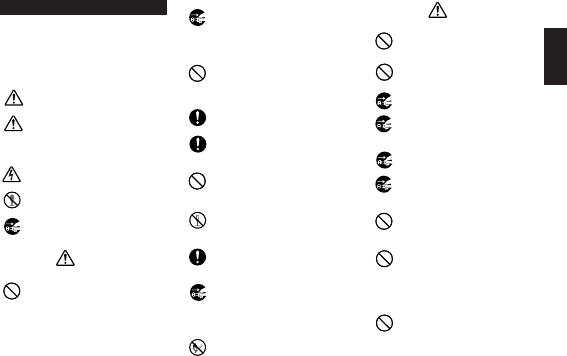
About safety precaution symbols
The following symbols are used in this manual and on the
product itself to alert you and others to the risk of personal
and material injury.
Warning
This symbol indicates an item that can result in
death or serious personal injury if ignored.
Caution
This symbol indicates an item that can result in
serious personal injury or material damage if ig-
nored.
Examples
A triangle indicates something you should be care-
ful about. This symbol warns against electrical
shock.
A circle indicates something you should not do.
This symbol indicates you should not try to take
something apart.
A black circle indicates something you must do.
This symbol indicates you should unplug some-
thing.
Warning
Power supply and voltage
• Use only a power source whose output matches
the rating marked on the plate on the bottom of
the label printer. Also, avoid plugging too many
appliances into the same extension cord. The
wrong voltage or overloading of an AC outlet
creates the danger of fire and electrical shock.
Serious malfunction
• Continued use of the unit when smoke or a
strange odor is coming from it creates the dan-
ger of electrical shock. Immediately turn power
off and unplug the power cord from the wall
outlet. Request servicing from your original
dealer.
AC adaptor
• Do not allow the power cord to become dam-
aged or broken, and never modify, over bend,
twist, or pull it. Never place heavy objects on
the power cord, and never expose it to direct
heat. A damaged power cord creates the dan-
ger of fire and electrical shock.
• Use only the AC adaptor specified for this unit.
Use of another AC adaptor creates the danger
of fire and electrical shock.
• Should the power cord become seriously dam-
aged (internal wiring is exposed or cut), request
servicing from your original dealer. Use of a
seriously damaged power cord creates the dan-
ger of fire and electrical shock.
• Never touch the AC adaptor when your hands
are wet. Doing so creates the danger of electri-
cal shock.
Never try to take the unit apart
• Never try to take the unit apart or modify it in any
way. Doing so creates the danger of electrical
shock, burn injury, or other personal injury.
Packaging
• Keep the plastic bag that the unit comes in out
of the reach of small children. Plastic bags cre-
ate the danger of suffocation for small children.
Avoid dropping
• Should the unit ever become damaged by fall-
ing down, immediately turn off power and un-
plug the power cord from the wall socket. Re-
quest servicing from your original dealer. Use
of a damaged unit creates the danger of fire
and electrical shock.
Batteries
• Never charge batteries, try to take batteries
apart, or allow batteries to become shorted.
Never expose batteries to direct heat or dispose
of them by incineration.
Caution
AC Adaptor
• Do not leave the power cord near stoves or other
sources of intense heat. Doing so can melt
power cord insulation and create the danger of
fire and electrical shock.
• When unplugging the power cord from the wall
socket, grasp the plug. Never pull on the cord
itself. Doing so can damage the power cord and
create the danger of fire and electrical shock.
• Whenever leaving the unit unattended for long
periods, be sure to unplug it from the wall socket.
• Whenever moving the unit, be sure to unplug it
from the wall socket. Leaving the unit plugged in
when it is being moved can result in damage to
the power cord and create the danger of fire and
electrical shock.
• Whenever cleaning the unit, be sure to unplug
it from the wall socket.
• When you are through using the unit, use its
power switch to turn it off and then unplug it
from the wall socket.
Avoid unstable areas
• Never place the unit on a wobbly table or a high
shelf. Doing so can cause it to fall, resulting in
personal injury.
Water and other foreign matter
• Never allow coffee, juice, or other drinks, or flower
vases to spill on the unit. Liquid spilled on the
unit creates the danger of fire and electrical
shock. Should liquid ever spill onto the unit, im-
mediately turn off power and unplug the power
cord from the wall socket. Request servicing from
your original dealer.
Location
• Avoid leaving the unit in areas subjected to high
humidity and large amounts of dust. Such con-
ditions create the danger of fire and electrical
shock.
English


Delta i konversationen om denna produkt
Här kan du dela vad du tycker om Casio KL-8100 Etikettskrivare. Om du har en fråga, läs först noggrant igenom manualen. Att begära en manual kan göras genom att använda vårt kontaktformulär.