Operation Guide 3159
3
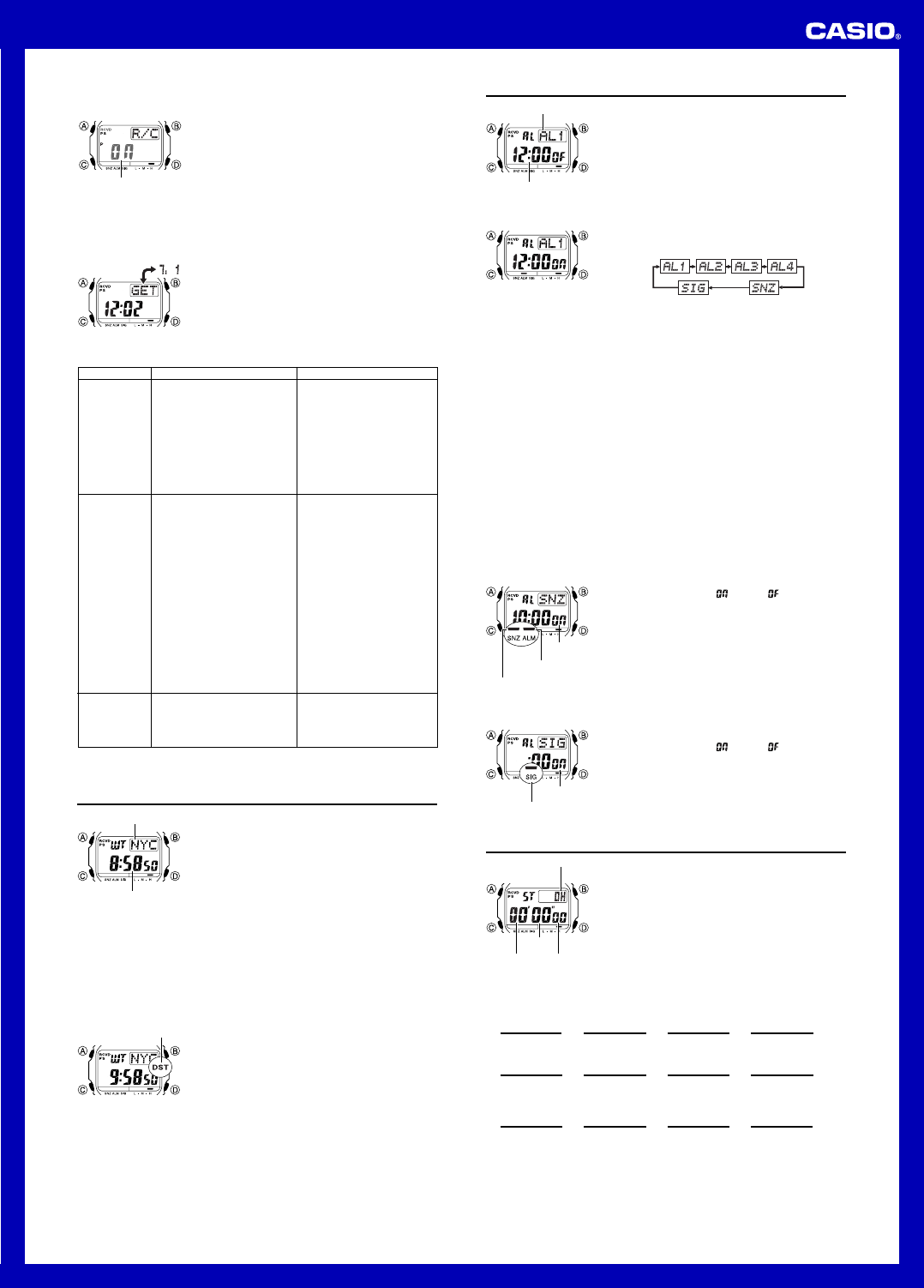
To turn auto receive on and off
1. In the Timekeeping Mode, press D to display the latest
successful receive time and date screen.
2. Hold down A until the current auto receive setting (ON
or OFF) starts to flash. This is the setting screen.
• Note that the setting screen will not appear if the
currently selected Home City is one that does not
support time calibration reception.
l
l
l
l
l
l
l
l
l
l
l
l
l
l
l
l
l
l
l
l
l
l
l
l
l
l
l
On/Off status
3. Press D to toggle auto receive on (ON) and off (OFF).
4. Press A to exit the setting screen.
• For information about city codes that support signal receive, see “To specify your
Home City”.
To check the latest signal reception results
In the Timekeeping Mode, press D to view the latest
successful receive time and date. Press D again to
return to the previous screen.
• The watch also will return to normal timekeeping if you
do not perform any button operation for about one or two
minutes.
Signal Reception Troubleshooting
Check the following points whenever you experience problems with signal reception.
• The watch is not in the
Timekeeping Mode.
• Your current Home City is not
one of the following: LIS, LON,
MAD, PAR, ROM, BER, STO,
ATH, MOW, HKG, BJS, TPE,
SEL, TYO, HNL, ANC, YVR,
LAX, YEA, DEN, MEX, CHI,
MIA, YTO, NYC, YHZ, or YYT
• A countdown timer operation is
in progress.
• You changed the time setting
manually.
•
The DST setting was changed
manually in the World Time Mode.
• You pressed a button while
signal receive was in progress.
• Even if receive is successful,
the RCVD indicator will
disappear from the display each
day when the first auto receive
operation of the day is
performed.
• Time data (hour, minutes,
seconds) only was received
during the last receive
operation. The RCVD indicator
appears only when time data
and date data (year, month,
day) are both received.
• Enter the Timekeeping Mode
and try again.
• Select LIS, LON, MAD, PAR,
ROM, BER, STO, ATH, MOW,
HKG, BJS, TPE, SEL, TYO,
HNL, ANC, YVR, LAX, YEA,
DEN, MEX, CHI, MIA, YTO,
NYC, YHZ, or YYT as your
Home City.
• Enter the Countdown Timer
Mode and stop the countdown.
• Perform manual signal receive
or wait until the next auto
signal receive operation is
performed.
• Check to make sure the watch
is in a location where it can
receive the signal.
What you should doProblem Probable Cause
Cannot perform
manual receive.
Auto receive is
turned on, but
the RCVD
indicator does
not appear on
the display.
• If the time is one hour off, the
DST setting may be incorrect.
• The Home City code setting is
not correct for the area where
you are using the watch.
• Change the DST setting to
Auto DST.
• Select the correct Home City
code.
Time setting is
incorrect
following signal
reception.
• For further information, see “Important!” under “Time Calibration Signal Reception”
and “Radio-controlled Atomic Timekeeping Precautions”.
World Time
World Time shows the current time in 48 cities (29 time
zones) around the world.
• The times kept in the World Time Mode are
synchronized with the time being kept in the
Timekeeping Mode. If you feel that there is an error in
any World Time Mode time, check to make sure you
have the correct city selected as your Home City. Also
check to make sure that the current time as shown in
the Timekeeping Mode is correct.
• Select a city code in the World Time Mode to display the
current time in any particular time zone around the
globe. See the “City Code Table” for information about
the UTC differential settings that are supported.
• All of the operations in this section are performed in the
World Time Mode, which you enter by pressing C.
Current time in
selected city
City code
To view the time in another city
While in the World Time Mode, press D to scroll through the city codes (time zones).
• Pressing D and B at the same time will jump to the UTC time zone.
To toggle a city code time between Standard Time and Daylight Saving Time
1. In the World Time Mode, press D to display the city
code (time zone) whose Standard Time/Daylight Saving
Time setting you want to change.
2. Hold down A to toggle between Daylight Saving Time
(DST indicator displayed) and Standard Time (DST
indicator not displayed).
• The DST indicator is shown on the World Time Mode
screen while Daylight Saving Time is turned on.
• Note that the Standard Time/Daylight Saving Time
setting affects only the currently displayed city code.
Other city codes are not affected.
• Note that you cannot switch between Standard Time
and Daylight Saving Time while UTC is selected as the
city code.
DST indicator
Alarms
The Alarm Mode gives you a choice of four one-time
alarms and one snooze alarm.
Also use the Alarm Mode to turn the Hourly Time Signal
(
SIG) on and off.
• There are five alarm screens numbered
AL1, AL2,
AL3 and AL4 for the one-time alarm, and a snooze
alarm screen indicated by
SNZ. The Hourly Time
Signal screen is indicated by
SIG.
• All of the operations in this section are performed in the
Alarm Mode, which you enter by pressing C.
Alarm number
Alarm time
(Hour : Minutes)
To set an alarm time
1. In the Alarm Mode, press D to scroll through the alarm
screens until the one whose time you want to set is
displayed.
• To set a one-time alarm, display alarm screen AL1, AL2, AL3 or AL4.
To set the snooze alarm, display the
SNZ screen.
• The snooze alarm repeats every five minutes.
2. After you select an alarm, hold down A until the hour setting of the alarm time
starts to flash, which indicates the setting screen.
• This operation turns on the alarm automatically.
3. Press C to move the flashing between the hour and minute settings.
4. While a setting is flashing, use D (+) and B (–) to change it.
• With the 12-hour format, set the time correctly as a.m. or p.m. (P indicator).
5. Press A to exit the setting screen.
Alarm Operation
The alarm tone sounds at the preset time for 10 seconds, regardless of the mode the
watch is in. In the case of the snooze alarm, the alarm operation is performed a total
of seven times, every five minutes, until you turn the alarm off.
• Alarm and Hourly Time Signal operations are performed in accordance with the
Timekeeping Mode time.
• To stop the alarm tone after it starts to sound, press any button.
• Performing any one of the operations below during a 5-minute interval between
snooze alarms cancels the current snooze alarm operation.
Displaying the Timekeeping Mode setting screen
Displaying the
SNZ
setting screen
To test the alarm
In the Alarm Mode, hold down D to sound the alarm.
To turn an alarm on and off
1. In the Alarm Mode, use D to select an alarm.
2. Press A to toggle it on (
) and off ( ).
• Turning on a alarm (
AL1, AL2, AL3, AL4 or
SNZ) displays the alarm on indicator on its Alarm Mode
screen.
• In all modes, the alarm on indicator is shown for any
alarm that currently is turned on.
• The alarm on indicator flashes while the alarm is
sounding.
• The snooze alarm indicator flashes while the snooze
alarm is sounding and during the 5-minute intervals
between alarms.
On/Off status
Alarm on indicator
Snooze alarm indicator
To turn the Hourly Time Signal on and off
1. In the Alarm Mode, use D to select the Hourly Time
Signal (
SIG).
2. Press A to toggle it on (
) and off ( ).
• The Hourly Time Signal on indicator is shown on the
display in all modes while this function is turned on.
On/Off status
Hourly time signal
on indicator
Stopwatch
The stopwatch lets you measure elapsed time, split times,
and two finishes.
• The display range of the stopwatch is 23 hours, 59
minutes, 59.99 seconds.
• The stopwatch continues to run, restarting from zero
after it reaches its limit, until you stop it.
• The stopwatch measurement operation continues even
if you exit the Stopwatch Mode.
• Exiting the Stopwatch Mode while a split time is frozen
on the display clears the split time and returns to
elapsed time measurement.
• All of the operations in this section are performed in the
Stopwatch Mode, which you enter by pressing C.
1/100 second
Seconds
Minutes
Hours
To measure times with the stopwatch
Elapsed Time
Split Time
Two Finishes
D
Start
D
Start
D
Start
Stop Re-start Stop
D
D
D
Split
(SPL displayed)
Split release Stop
A
D
A
Split
First runner finishes.
Display time of first
runner.
Stop
Second runner
finishes.
Split release
Display time of
second runner.
D
A
A
A
A
A
➤➤➤
➤➤➤
➤➤➤
➤
➤
➤
Clear
Clear
Clear


Delta i konversationen om denna produkt
Här kan du dela vad du tycker om Casio G-Shock GW-M5610RB-4ER Armbandsur. Om du har en fråga, läs först noggrant igenom manualen. Att begära en manual kan göras genom att använda vårt kontaktformulär.