Operation Guide 3193 3200
3
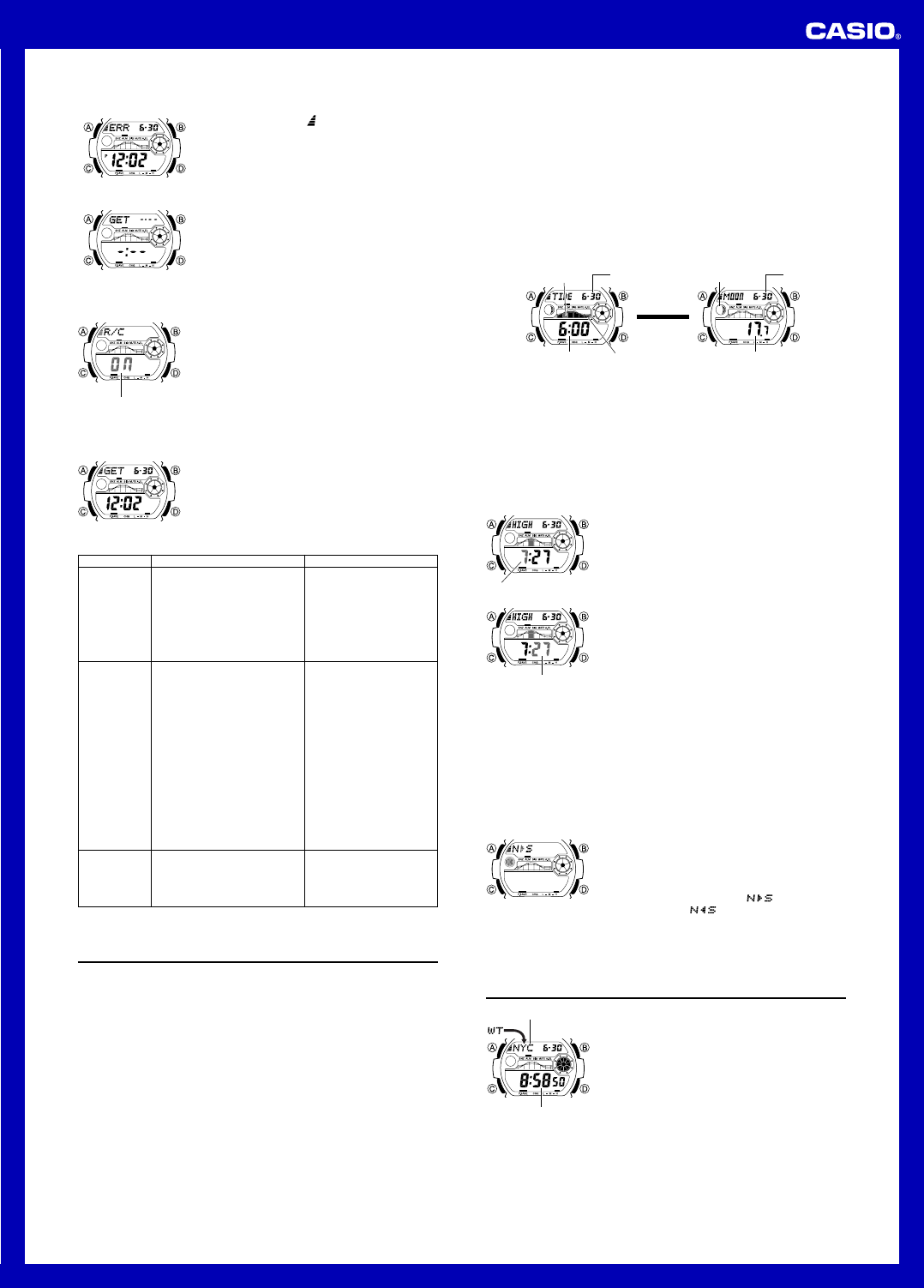
• If the latest reception fails but a previous reception was
successful, an indicator (
) will be on the display.
• The watch will return to normal timekeeping without
changing the time setting if you press D or if you do not
perform any button operation for about one or two
minutes.
Note
• To interrupt a receive operation and return to normal
timekeeping, press D.
If there was a previously
successful reception
If no reception was
successful
Receive failed
To turn auto receive on and off
1. In the Timekeeping Mode, press D to display the last
successful receive time and date screen.
2. Hold down A until the current auto receive setting (ON
or OFF) starts to flash. This is the setting screen.
• Note that the setting screen will not appear if the
currently selected Home City is one that does not
support time calibration reception.
3. Press D to toggle auto receive on (ON) and off
(OFF).
4. Press A to exit the setting screen.
• For information about city codes that support signal
receive, see “To specify your Home City” .
l
l
l
l
l
l
l
l
l
l
l
l
l
l
l
l
l
l
l
l
l
l
l
l
l
l
l
l
l
l
l
l
l
l
l
l
On/Off status
To check the latest signal reception results
Press D to view the last successful receive time and
date. Press D again to return to the previous screen.
• The watch is not in the
Timekeeping Mode.
• Your current Home City is not one
of the following: LIS, LON, MAD,
PAR, ROM, BER, STO, ATH,
MOW, HKG, BJS, TPE, SEL,
TYO, HNL, ANC, YVR, LAX, YEA,
DEN, MEX, CHI, NYC, YHZ, or
YYT
• You changed the time setting
manually.
• The DST setting was changed
manually in the World Time Mode.
• You pressed a button while signal
receive was in progress.
• Even if receive is successful, the
Settings updated indicator will
disappear from the display each
day when the first auto receive
operation of the day is performed.
• Time data (hour, minutes,
seconds) only was received
during the last receive operation.
The Settings updated indicator
appears only when time data and
date data (year, month, day) are
both received.
Cannot perform
manual receive.
Auto receive is
turned on, but
the Settings
updated
indicator does
not appear on
the display.
• Enter the Timekeeping Mode
and try again.
• Select LIS, LON, MAD, PAR,
ROM, BER, STO, AT H,
MOW, HKG, BJS, TPE, SEL,
TYO, HNL, ANC, YVR, LAX,
YEA, DEN, MEX, CHI, NYC,
YHZ, or YYT as your Home
City.
• Perform manual signal
receive or wait until the next
auto signal receive operation
is performed.
• Check to make sure the
watch is in a location where
it can receive the signal.
What you should doProblem Probable Cause
Signal Reception Troubleshooting
Check the following points whenever you experience problems with signal reception.
• For further information, see “Important!” under “Time Calibration Signal Reception”
and “Radio-controlled Atomic Timekeeping Precautions”.
• If the time is one hour off, the
DST setting may be incorrect.
• The Home City code setting is
not correct for the area where
you are using the watch.
• Change the DST setting to
Auto DST.
• Select the correct Home City
code.
Time setting
is incorrect
following
signal
reception.
Tide/Moon Data
In the Tide/Moon Data Mode, you can see the current tide and the current date’s
Moon phase for your Home City. You can specify a date and view tide and Moon data
for that date.
• See “Moon Phase Indicator” for information about the Moon phase indicator and
“Tide Graph” for information about the tide graph.
• All of the operations in this section are performed in the Tide/Moon Data Mode.
Note
• It takes about two seconds to calculate tide graph data. You will not be able to
display a setting screen while data calculation is in progress.
• Moon age is calculated to an accuracy of ±1 day.
Tide Data
The Tide Graph that appears first when you enter the Tide/Moon Data Mode shows
the data at 6:00 a.m. for your currently selected Home City on the current date,
according to the Timekeeping Mode. From there you can specify another date or time.
• If the tide data is not correct, check your Timekeeping Mode settings and correct
them if necessary.
• If you feel that the information shown by the Tide Graph is different from actual tide
conditions, you need to adjust the high tide time. See “Adjusting the High Tide Time”
for more information.
Moon Data
The Moon phase and Moon age information that appears first when you enter the
Tide/Moon Data Mode shows the data at noon for your currently selected Home City
on the current date, according to the Timekeeping Mode. After that you can specify
another date to view data.
• If the Moon data is not correct, check your Timekeeping Mode settings and correct
them if necessary.
• If the Moon phase indicator shows a phase that is a mirror image of the actual moon
phase in your area, you can use the procedure under “Reversing the Displayed
Moon Phase” to change it.
Tide/Moon Data Screens
In the Tide/Moon Data Mode, press A to toggle between the tide data screen and the
Moon data screen.
l
l
l
l
l
l
l
l
l
l
l
Tide Data Screen Moon Data Screen
Current tide range
Current
tide level
Month – Day
Moon phase
Time Moon age
Press A.
▲
▲
Month – Day
• When you display the Tide Data Screen, it initially shows tide data for 6:00 a.m..
• Use the Tide Data Screen to specify the Tide Data time. You can use D (+) and
B (–) to change the displayed time in one-hour increments.
• Use the Moon Data Screen to specify the Tide/Moon Data date. You can use D (+)
and B (–) to change the displayed date in one-day increments. Pressing D and B
will display the year of the displayed date.
Adjusting the High Tide Time
Use the following procedure to adjust the high tide time within a particular date. You
can find out high tide information for your area from a tide table, the Internet, or your
local newspaper.
To adjust the high tide time
1. In the Tide/Moon Data Mode, hold down A until the
hour digits start to flash.
2. Use D (+) and B (–) to change the hour setting.
3. When the hour is the setting you want, press C.
• This will cause the minute digits to flash.
4. Use D (+) and B (–) to change the minute setting.
5. When the minute setting is the way you want, press A
to exit the adjustment screen and return to the Tide/
Moon Data Mode screen.
• Pressing D and B at the same time while the time
adjustment screen is displayed (steps 2 through 5
above) will return the high tide time to its initial factory
default setting.
• The high tide time setting is not affected by the DST
(summer time) setting of the Timekeeping Mode.
l
l
l
l
l
l
l
l
l
l
l
l
l
l
l
l
l
l
l
l
l
l
l
l
l
l
l
l
l
l
Hour
l
l
l
l
l
l
l
l
l
l
l
l
l
l
l
l
l
l
l
l
l
l
l
l
l
l
l
l
l
l
l
l
l
l
l
l
l
Minute
• On some days, there are two high tides. With this watch, you can adjust the first high
tide time only. The second high tide time for that day is adjusted automatically based
on the first high tide time.
Reversing the Displayed Moon Phase
The left-right (east-west) appearance of the Moon depends on whether the Moon is
north of you (northerly view) or south of you (southerly view) as you view it.
You can use the procedure below to reverse the displayed Moon phase so it matches
the actual appearance of the Moon where you are located.
• To determine the viewing direction of the Moon, use a compass to take a direction
reading of the Moon at its meridian passage.
• For information about the Moon phase indicator, see “Moon Phase Indicator”.
To reverse the displayed Moon phase
1. In the Tide/Moon Data Mode, hold down A until the
hour digits start to flash.
2. Press C twice.
• This will cause the Moon phase indicator to flash. This
is the indicator switching screen.
3. Press D to toggle the Moon phase indicator between
the southerly view (indicated by
) and northerly
view (indicated by
).
• Northerly view: Moon is north of you.
• Southerly view: Moon is south of you.
4. When the Moon phase indicator setting is the way you
want, press A to exit the switching screen and return
to the Tide/Moon Data Mode screen.
l
l
l
l
l
l
l
l
l
l
l
l
l
l
l
l
l
l
l
l
l
l
l
l
l
l
World Time
World Time shows the current time in 48 cities (31 time
zones) around the world.
• The times kept in the World Time Mode are
synchronized with the time being kept in the
Timekeeping Mode. If you feel that there is an error in
any World Time Mode time, check to make sure you
have the correct city selected as your Home City. Also
check to make sure that the current time as shown in
the Timekeeping Mode is correct.
• Select a city code in the World Time Mode to display the
current time in any particular time zone around the
globe. See the “City Code Table” for information about
the UTC differential settings that are supported.
• All of the operations in this section are performed in the
World Time Mode, which you enter by pressing C.
Current time in
selected city
City code
To view the time in another city
While in the World Time Mode, use the D (eastward) and B (westward) to scroll
through the city codes (time zones).
• Pressing the D and B at the same time will jump to the UTC time zone.


Delta i konversationen om denna produkt
Här kan du dela vad du tycker om Casio G-Shock GW-7900B-1ER Armbandsur. Om du har en fråga, läs först noggrant igenom manualen. Att begära en manual kan göras genom att använda vårt kontaktformulär.