Operation Guide 3151
2
5. While the setting you want to change is flashing, use D and B to change it as
described below.
Setting
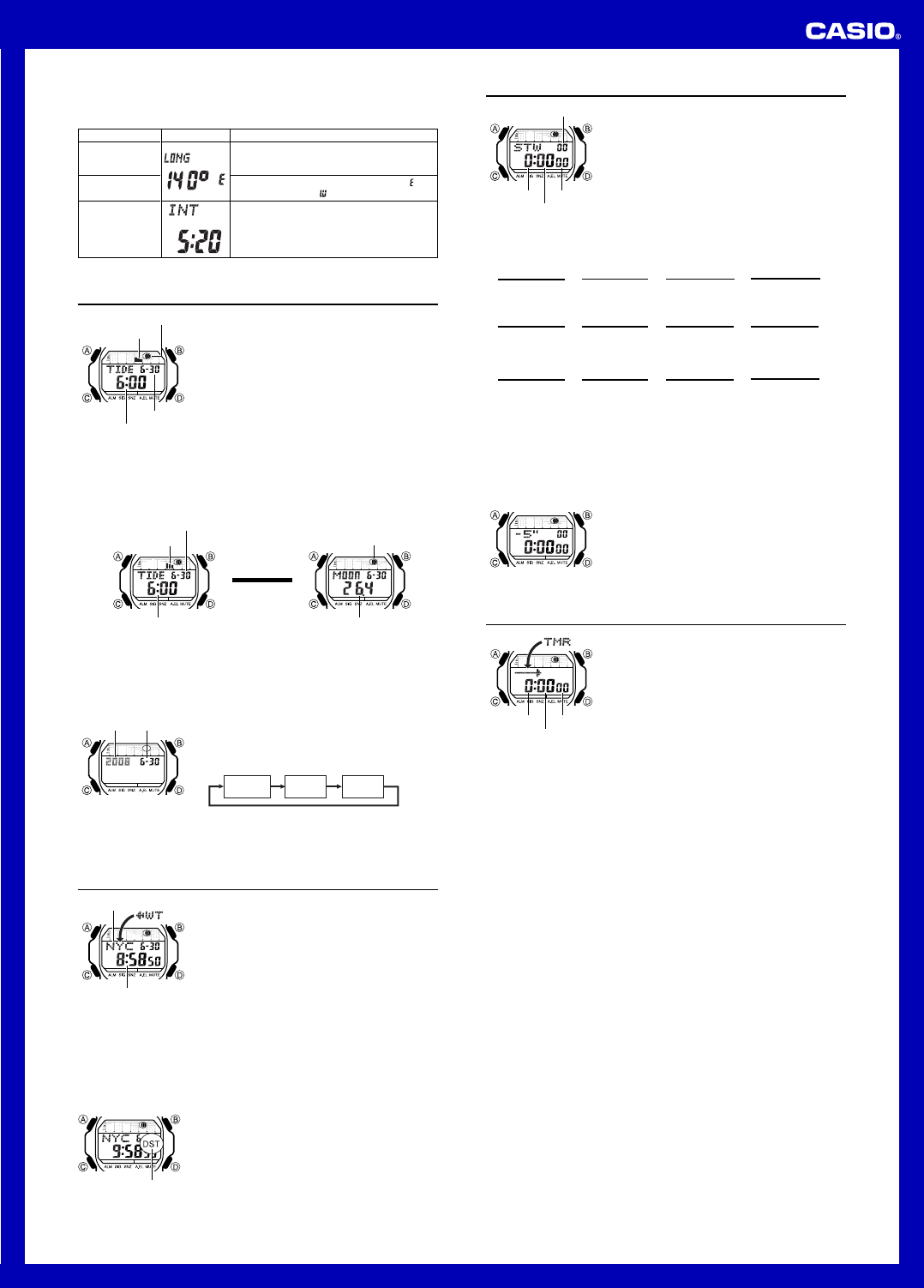
Longitude Value
Longitude
(East/West)
Lunitidal Interval
Hours, Minutes
Button Operations
Use D (+) and B (–) to change the setting.
• You can specify a value from 0° to 180°, in 1-
degree units.
Use D to switch between east longitude (
)
and west longitude ( ).
Use D (+) and B (–) to change the setting.
6. Press A to exit the setting screen.
Screen
Tide/Moon Data
Tide/Moon data lets you view the Moon age and the Moon
phase for a particular date, and tidal movements for a
particular date and time for your Home Site.
• When you enter the Tide/Moon Data Mode, the data for
6:00 a.m. on the current date appears first.
• If you suspect that the Tide/Moon data is not correct for
some reason, check the Timekeeping Mode data
(current time, date, and Home Site settings), and make
changes as required.
• See “Moon Phase Indicator” for information about the
Moon phase indicator and “Tide Graph” for information
about the tide graph.
• All of the operations in this section are performed in the
Tide/Moon Data Mode, which you enter by pressing C.
Month – Day
Tide graph
Moon phase indicator
Time
Tide/Moon Data Screens
In the Tide/Moon Data Mode, press A to toggle between the Tide Data screen and
the Moon Data screen.
Press A.
Moon Data ScreenTide Data Screen
▲
▲
Moon phase indicator
Time
Moon age
Tide graph
Month – Day
• While the Tide Data screen is displayed, press D to advance to the next hour.
• While the Moon Data screen is displayed, press D to advance to the next day.
• You also can specify a particular date (year, month, day) to view its tide data and
Moon data. See “To specify a date” for more information.
• When you enter the Tide/Moon Data Mode, the screen (tide data or Moon data) that
was displayed the last time you exited the mode appears first.
To specify a date
1. In the Tide/Moon Data Mode, hold down A until the
year setting starts to flash, which indicates the setting
screen.
2. Press C to move the flashing in the sequence shown
below to select the other settings.
Month DayYear
l
l
l
l
l
l
l
l
l
l
l
l
l
l
l
l
Month – DayYear
3. While a setting is flashing, use D (+) or B (–) to change it.
• You can specify a date in the range of January 1, 2000 to December 31, 2099.
4. Press A to exit the setting screen.
5. Use A to display either the Tide Data screen or the Moon Data screen.
World Time
World Time shows the current time in 48 cities (29 time
zones) around the world.
• The times kept in the World Time Mode are
synchronized with the time being kept in the
Timekeeping Mode. If you feel that there is an error in
any World Time Mode time, check the UTC differential of
your Home Site Data (Home City) and the current
setting of the Timekeeping Mode time.
• Select a city code in the World Time Mode to display the
current time in any particular time zone around the
globe. See the “UTC Differential/City Code List” for
information about the UTC differential settings that are
supported.
• All of the operations in this section are performed in the
World Time Mode, which you enter by pressing C.
City code
Current time in
selected city
To view the time in another city
While in the World Time Mode, press D to scroll eastwardly through the city codes
(time zones).
To toggle a city code time between Standard Time and Daylight Saving Time
1. In the World Time Mode, use D to display the city code
(time zone) whose Standard Time/Daylight Saving Time
setting you want to change.
2. Hold down A to toggle between Daylight Saving Time
(DST indicator displayed) and Standard Time (DST
indicator not displayed).
• The DST indicator is shown on the World Time Mode
screen while Daylight Saving Time is turned on.
• Note that changing the Daylight Saving Time for any city
code causes the setting to be applied to all city codes.
DST indicator
Stopwatch
The stopwatch lets you measure elapsed time, split times,
and two finishes. It also includes Auto-Start.
• The display range of the stopwatch is 23 hours, 59
minutes, 59.99 seconds.
• The stopwatch continues to run, restarting from zero
after it reaches its limit, until you stop it.
• The stopwatch measurement operation continues even
if you exit the Stopwatch Mode.
• Exiting the Stopwatch Mode while a split time is frozen
on the display clears the split time and returns to
elapsed time measurement.
• All of the operations in this section are performed in the
Stopwatch Mode, which you enter by pressing C.
1/100 second
Hours
Minutes
Seconds
To measure times with the stopwatch
D
Start Stop
Elapsed Time
➤
Re-start Clear
D
➤
Stop
D
➤
D ➤
A
Split Time
D
Start Split
➤
Split release Clear
A
➤
Stop
A
➤
D
➤
A
Two Finishes
D
Split
➤
Stop
Clear
A
➤
Split release
D
➤
A
➤
A
First runner
finishes.
Display time of
first runner.
Second runner
finishes.
Display time of
second runner.
(SPL displayed)
Start
About Auto-Start
With Auto-Start, the watch performs a 5-second countdown, and stopwatch operation
starts automatically when the countdown reaches zero.
During the final three seconds of the countdown, a beeper sounds with each second.
To use Auto-Start
1. While the stopwatch screen is showing all zeros in the
Stopwatch Mode, press A.
• This displays a 5-second countdown screen.
• To return to the all zeros screen, press A again.
2. Press D to start the countdown.
• When the countdown reaches zero, a tone sounds and a
stopwatch timing operation starts automatically.
• Pressing D while the Auto-Start countdown is in
progress will start the stopwatch immediately.
Countdown Timer
You can set the countdown timer within a range of one
minute to 24 hours. An alarm sounds when the countdown
reaches zero. The countdown timer also has an
auto
-
repeat feature and a progress beeper that signals
the progress of the countdown.
• All of the operations in this section are performed in the
Countdown Timer Mode, which you enter by pressing C.
Configuring the Countdown Timer
The following are the settings you should configure before
actually using the countdown timer.
Countdown start time; Auto-repeat on/off; Progress
beeper on/off
• See “To configure the countdown timer” for information
about setting up the timer.
Hours
Minutes
Seconds
Auto-repeat
When auto-repeat is turned on, the countdown restarts automatically from the
countdown start time when it reaches zero. If left running, the countdown is repeated a
total of eight times, after which it stops automatically.
When auto-repeat is turned off, the countdown stops when it reaches zero and the
display shows the original countdown start time.
• Pressing D while an auto-repeat countdown is in progress pauses the current
countdown. You can resume the auto-repeat countdown by pressing D, or you can
press A to reset to the countdown time starting value.
Countdown Timer Beeper Operations
The watch beeps at various times during a countdown so you can keep informed
about the countdown status without looking at the display. The following describes the
types of beeper operations the watch performs during a countdown.
Countdown End Beeper
The countdown end beeper lets you know when the countdown reaches zero.
• When the progress beeper is turned off, the countdown end beeper sounds for
about 10 seconds, or until you press any button to stop it.
• When the progress beeper is turned on, the countdown end beeper sounds for
about one second.
Progress Beeper
When the progress beeper is turned on, the watch uses beeps to signal countdown
progress as described below.
• Starting from five minutes before the end of the countdown, the watch emits four
short beeps at the top of each countdown minute.
• 30 seconds before the end of the countdown, the watch emits four short beeps.
• The watch emits a short beep for each of the last 10 seconds of the countdown.
• If the countdown start time is six minutes or greater, the watch emits a short beep for
each second of the final 10 seconds before the five-minute point is reached. Four
short beeps are emitted to signal when the five-minute point is reached.


Delta i konversationen om denna produkt
Här kan du dela vad du tycker om Casio G-Shock GLX-5600VH-4ER Armbandsur. Om du har en fråga, läs först noggrant igenom manualen. Att begära en manual kan göras genom att använda vårt kontaktformulär.