Bruksanvisning Casio G-Shock GA-1100-1AER Armbandsur

Behöver du en bruksanvisning för din Casio G-Shock GA-1100-1AER Armbandsur? Nedan kan du se och ladda ner PDF-bruksanvisningen gratis på svenska. Den här produkten har för närvarande 7 vanliga frågor, 0 kommentarer och har 1 röst med ett genomsnittligt produktbetyg på 100/100. Om det här inte är bruksanvisningen du vill ha, vänligen kontakta oss.

Är produkten defekt och erbjuder bruksanvisningen ingen lösning? Gå till ett Repair Café för gratis reparationstjänster.

Bruksanvisning

Loading…
E-8
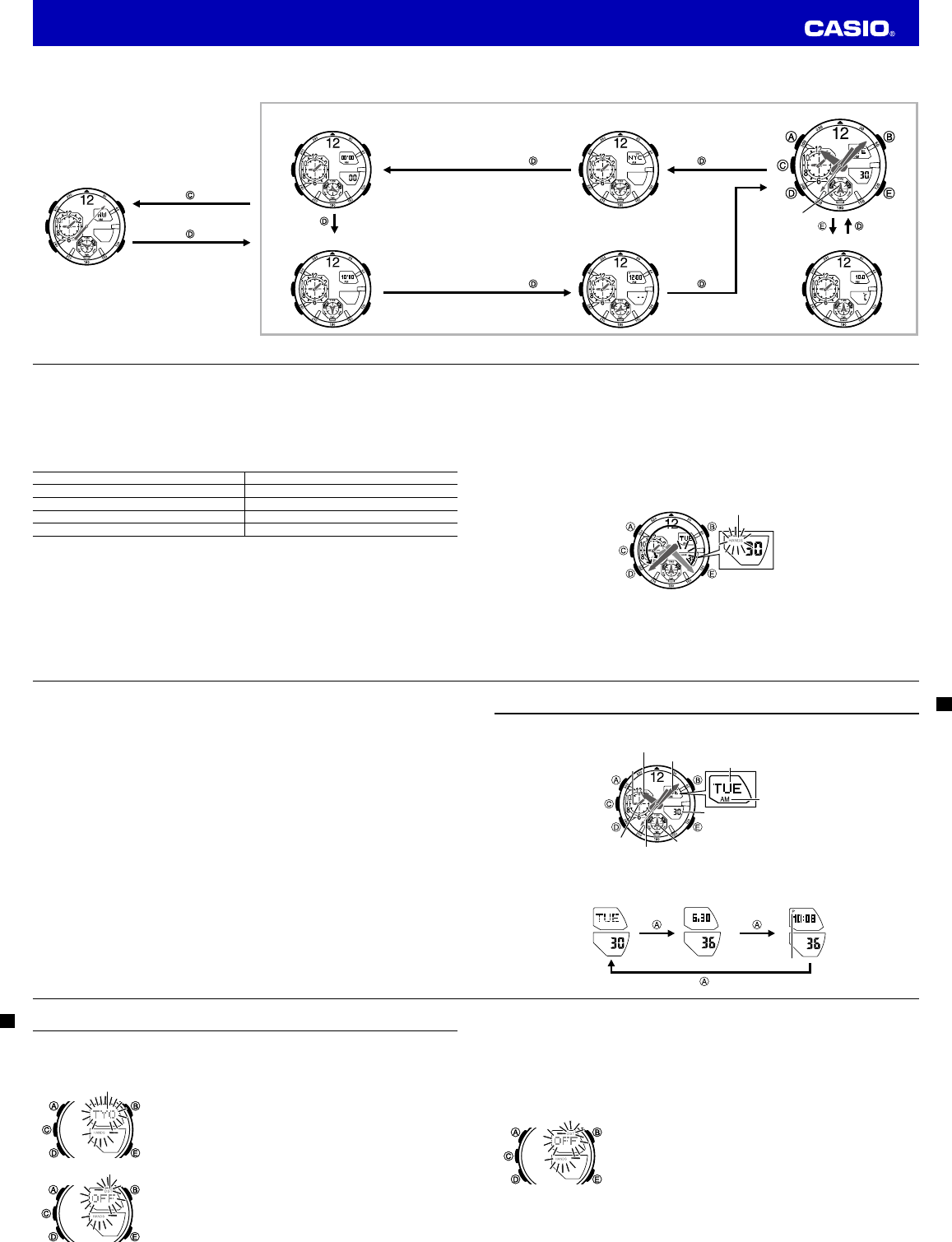
Selecting a Mode
The illustration below shows which buttons you need to press to navigate between modes.
To return to the Timekeeping Mode from any other mode, hold down
D
for about two seconds.
Stopwatch Mode
Countdown Timer Mode
Digital Compass Mode
Stopwatch Mode
Countdown Timer Mode
Digital Compass Mode
E-9
The mode dial hand indicates the watch’s current mode.
World Time Mode
Thermometer Mode
Timekeeping Mode
Alarm Mode
Mode dial hand
World Time Mode
Thermometer Mode
Timekeeping Mode
Alarm Mode
Mode dial hand
E-10
General Functions (All Modes)
The functions and operations described in this section can be used in all of the modes.
Direct Timekeeping Mode Access
To enter the Timekeeping Mode from any other mode, hold down
D
for about two seconds.
Auto Return Features
The watch will automatically return to the Timekeeping Mode if you do not perform any button operation
for a particular amount of time in each mode.
Mode Name Approximate Elapsed Time
Digital Compass 1 minute
Thermometer 1 to 2 minutes
Alarm 2 to 3 minutes
Setting screen (digital setting fl ashing) 2 to 3 minutes
Initial Screens
When you enter the Alarm, World Time, or Digital Compass Mode, the data you were viewing when you
last exited the mode appears fi rst.
Scrolling
The
E
and
B
buttons are used on the setting screen to scroll through data on the display. In most
cases, holding down these buttons during a scroll operation scrolls through the data at high speed.
E-11
Moving the Hands Out of the Way for Better Viewing
You can use the procedure below to temporarily move the hour and minute hands out of the way to better
view what is on the display.
This operation can be performed in any mode. In the case of a setting mode (setting fl ashing on the
screen), the hands will move out of the way automatically, even if you do not perform the below
operation.
1. While holding down
B
, press
D
.
This will cause the hour and minute hands to move to a location where they do not block your view
of the digital display.
Example: When the current time is 8:23
Flashes while the hands
are moved out of the way.
2. Holding down
B
again as you press
D
will cause the hands to return to their normal positions (normal
timekeeping).
E-12
Note
Watch button functions are the same regardless of whether the hands are moved out of the way or at
their normal positions.
Changing to another mode will cause the hands to move back to their normal positions.
The hands also will move back to their normal positions automatically if no operation is performed for
about one hour.
E-13
Timekeeping
Use the Timekeeping Mode to view the current time and date, and the day of the week.
Date Screen
Day of week
Hour hand
Second hand
World Time
minute hand
World Time
hour hand
Minute hand
World Time AM
and PM indicators
Mode dial hand
Seconds
Navigating between Display Screens
Each press of
A
toggles cycles the display screens as shown below.
Day of week, Day Month Day, Seconds Hour : Minutes, Seconds
PM indicator
E-14
Confi guring Home City Settings
There are two Home City settings: actually selecting the Home City, and selecting either standard time or
daylight saving time (DST).
To confi gure Home City settings
1. In the Timekeeping Mode, hold down
A
until
ADJ
appears in the
upper display.
When you release
A
(after ADJ appears), city code will be
ashing in the upper display. This is the setting mode.
The watch will exit the setting mode automatically if you do not
perform any operation for about two or three minutes.
2. Use
E
(East) and
B
(West) to scroll through the available city codes.
Keep scrolling until the city code you want to select as your Home
City is shown in the upper display.
For details about city codes, see the “City Code Table” at the back
of this manual.
3. Press
D
.
This will cause the DST indicator to appear in the upper display
and the DST setting of the currently selected Home City to appear
in the upper display.
4.
Press
E
to toggle the DST setting between daylight saving time (
ON
)
and standard time (
OFF
).
Note that you cannot switch between standard time and daylight
saving time (DST) while UTC is selected as your Home City.
City code
DST indicator
City code
DST indicator
E-15
5. After all of the settings are the way you want, press
A
to exit the setting screen.
The DST indicator will be on the upper display while daylight saving time is turned on.
Note
After you specify a city code, the watch will use UTC* offsets in the World Time Mode to calculate
the current time for other time zones based on the current time in your Home City.
* Coordinated Universal Time, the world-wide scientifi c standard of timekeeping.
The reference point for UTC is Greenwich, England.
To change the daylight saving time (summer time) setting
1. In the Timekeeping Mode, hold down
A
until
ADJ
appears in the
upper display.
When you release
A
(after ADJ appears), city code will be
ashing in the upper display.
2. Press
D
.
This will cause the DST indicator to appear in the upper display
and the DST setting of the currently selected Home City to appear
in the upper display.
3. Press
E
to toggle the DST setting between daylight saving time (
ON
) and standard time (
OFF
).
4. After all of the settings are the way you want, press
A
to exit the setting screen.
The DST indicator will be on the upper display while daylight saving time is turned on.
Operation Guide 5441
Ladda ner bruksanvisning i Engelska (PDF, 0.87 MB)
(Tänk på miljön och skriv endast ut denna bruksanvisning om det verkligen är nödvändigt)

Loading…

Betyg

Berätta vad du tycker om Casio G-Shock GA-1100-1AER Armbandsur genom att betygsätta den. Vill du dela med dig av dina åsikter om denna produkt eller ställa en fråga? Lämna en kommentar nederst på sidan.
Är du nöjd med Casio G-Shock GA-1100-1AER Armbandsur?
Ja Nej
100%
0%
1 röst

Delta i konversationen om denna produkt

Här kan du dela vad du tycker om Casio G-Shock GA-1100-1AER Armbandsur. Om du har en fråga, läs först noggrant igenom manualen. Att begära en manual kan göras genom att använda vårt kontaktformulär.

Mer om denna bruksanvisning

Vi förstår att det är trevligt att ha en pappersbruksanvisning för din Casio G-Shock GA-1100-1AER Armbandsur. Du kan alltid ladda ner bruksanvisningen från vår hemsida och skriva ut den själv. Om du vill ha en originalbruksanvisning rekommenderar vi att du kontaktar Casio. De kanske kan tillhandahålla en originalbruksanvisning. Letar du efter bruksanvisningen för din Casio G-Shock GA-1100-1AER Armbandsur på ett annat språk? Välj ditt föredragna språk på vår hemsida och sök efter modellnumret för att se om vi har det tillgängligt.

Specifikationer

Märke Casio
Modell G-Shock GA-1100-1AER
Kategori Armbandsur
Filtyp PDF
Filstorlek 0.87 MB

Alla bruksanvisningar för Casio Armbandsur
Fler bruksanvisningar för Armbandsur

Vanliga frågor om Casio G-Shock GA-1100-1AER Armbandsur

Vårt supportteam söker efter användbar produktinformation och svar på vanliga frågor. Om du hittar en felaktighet bland våra vanliga frågor uppskattar vi om du meddelar oss detta via vårt kontaktformulär.

Ett batteri i min enhet är oxiderat, kan jag fortfarande använda det säkert? Verifierad

Ja, enheten kan fortfarande användas säkert. Ta först bort det oxiderade batteriet. Använd aldrig bara händer för att göra detta. Rengör sedan batterifacket med en bomullspinne doppad i ättika eller citronsaft. Låt det torka och sätt i nya batterier.

Detta hjälpte (940) Läs mer

Min mekaniska klocka går för fort. Vad kan jag göra åt det? Verifierad

Det kan bero på att den påverkas av ett magnetfält. Det kan lösas genom en avmagnetiseringsprocess, utförd av en professionell urmakare.

Detta hjälpte (879) Läs mer

Vad betyder AM och PM? Verifierad

AM står för ante meridiem och används för att ange ett klockslag under dygnets första hälft. PM står för post meridiem och används för att ange ett klockslag under dygnets andra hälft.

Detta hjälpte (755) Läs mer

Vad är en kronograf? Verifierad

Kronograf är bokstavligen en ”tidsskrivare”. En kronograf är ett annat ord för klocka med tidtagningsfunktion, tidtagarur eller stoppur.

Detta hjälpte (660) Läs mer

Vad är GMT? Verifierad

GMT står för Greenwich Mean Time (kallas även UTC, vilket står för Coordinated Universal Time). Det är tiden för longitud 0, som passerar genom Greenwich nära London.

Detta hjälpte (500) Läs mer

Vad är en kvartsrörelse? Verifierad

Klockor och klockor med kvartsrörelse drivs av ett batteri. Detta skickar en elektrisk ström genom kvartskristaller som kommer att vibrera. Dessa vibrationer överförs till rörelsen. Eftersom vibrationerna har en fast frekvens är klockor och klockor med kvartsrörelse extremt exakta.

Detta hjälpte (482) Läs mer

Det finns fukt på insidan av glaset på min Casio-klocka. Vad ska jag göra? Verifierad

Casio anger att det förmodligen inte är något fel om fukten uppstår efter en extrem temperaturförändring och försvinner relativt snabbt efteråt. Om fukten inte försvinner ska du lämna in klockan för reparation så snart som möjligt.

Detta hjälpte (62) Läs mer
Bruksanvisning Casio G-Shock GA-1100-1AER Armbandsur

Relaterade produkter

Relaterade kategorier

×
Download