Bruksanvisning Casio G-Shock GA-100-1A2ER Armbandsur

Behöver du en bruksanvisning för din Casio G-Shock GA-100-1A2ER Armbandsur? Nedan kan du se och ladda ner PDF-bruksanvisningen gratis på svenska. Den här produkten har för närvarande 7 vanliga frågor, 0 kommentarer och har 0 röster. Om det här inte är bruksanvisningen du vill ha, vänligen kontakta oss.

Är produkten defekt och erbjuder bruksanvisningen ingen lösning? Gå till ett Repair Café för gratis reparationstjänster.

Bruksanvisning

Loading…
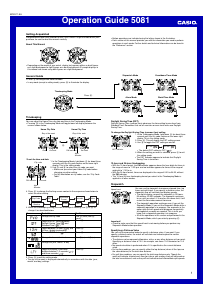
Operation Guide 5081
4
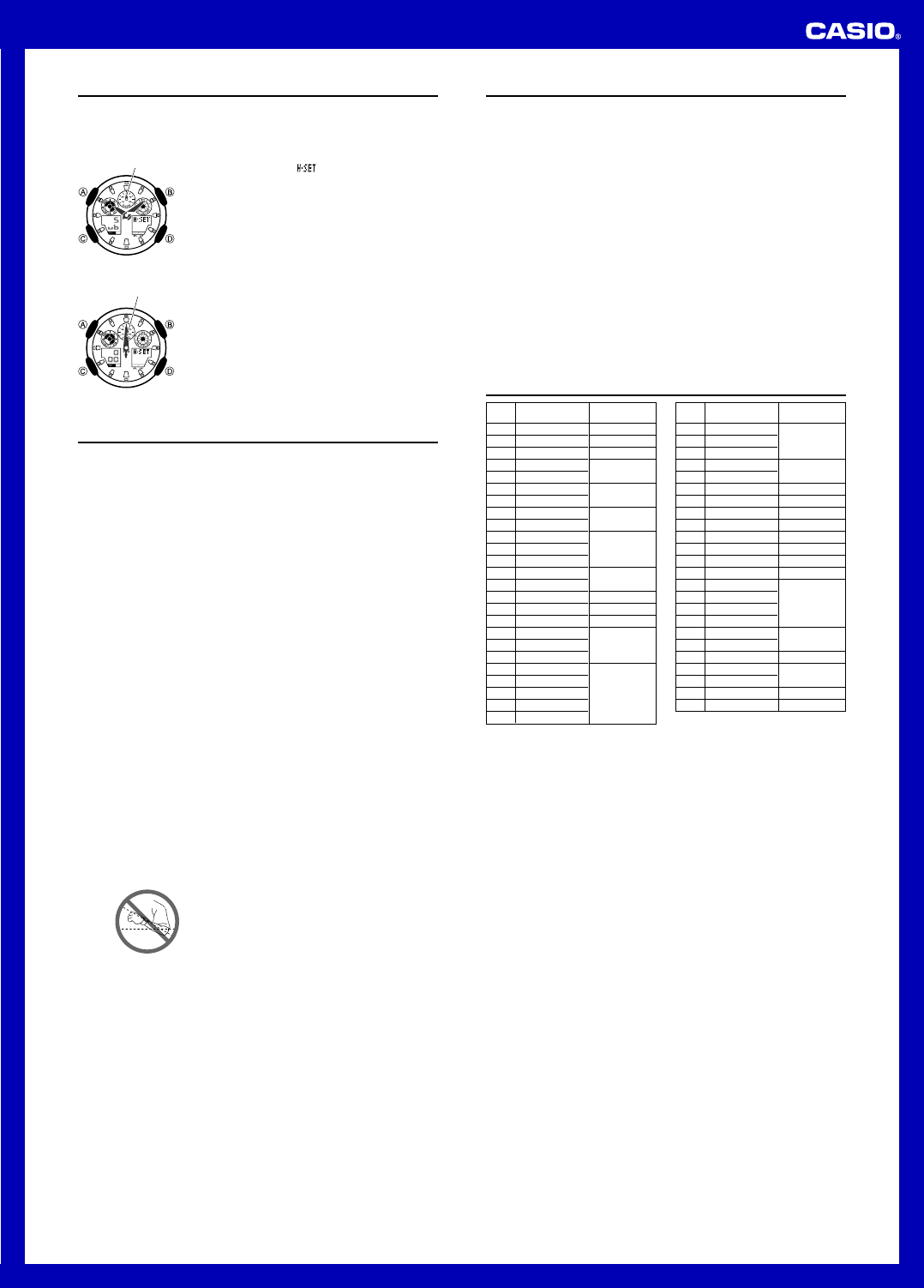
Hand Home Position Correction
The speed hand and hour and minute hands of the watch can be thrown off by
exposure to strong magnetism or impact. The watch is designed to correct speed,
hour and minute hand manually.
To adjust home positions
1. In the Timekeeping Mode, hold down D for about three
seconds until H-SET (
) appears in the lower right
display and Sub (
Sub
) appears in the lower left display.
This is the home position adjustment mode.
2. Check the position of the speed hand.
The speed hand is in the correct home position if it is
pointed at 50 (12 o’clock). If it isn’t, use D to move
the hand clockwise until it is.
After confirming that the speed hand is in its correct
home position, press C.
l
l
l
l
l
l
l
l
l
l
l
l
l
Speed hand
Correct speed hand
position
3. Check the positions of the hour and minute hands.
The hands are in the correct home positions if they
are pointed at 12 o’clock. If they aren’t, use D
(clockwise) and B (counterclockwise) to adjust their
positions.
4. When everything is the way you want, press A to
return to regular timekeeping.
This will cause the hour and minute hands to move to
the current Timekeeping Mode time and the speed hand
to move to the 0 position.
Pressing C here will return to the setting at the
beginning of step 2.
l
l
l
l
l
l
l
l
l
l
l
l
l
Correct hour and
minute hand positions
Hour and minute hands
Reference
This section contains more detailed and technical information about watch operation.
It also contains important precautions and notes about the various features and
functions of this watch.
Auto Return Features
If you leave the watch with a flashing setting on the display for two or three minutes
without performing any operation, the watch will exit the setting mode automatically.
The watch will return to the Timekeeping Mode automatically if you do not perform
any operation for two or three minutes in the Alarm Mode.
High-Speed Movement
The D and B buttons are used to change setting in various setting modes. In most
cases, holding down these buttons will start high-speed movement.
Initial Screens
When you enter the Stopwatch Mode, World Time Mode or Alarm Mode, the data you
were viewing when you last exited the mode will appear first.
Timekeeping
Resetting the seconds to
00
while the current count is in the range of 30 to 59
causes the minutes to be increased by 1. In the range of 00 to 29, the seconds are
reset to
00
without changing the minutes.
The year can be set in the range of 2000 to 2099.
The watch’s built-in full automatic calendar makes allowances for different month
lengths and leap years. Once you set the date, there should be no reason to change
it except when battery has replaced.
The current time for all city codes in the Timekeeping Mode and World Time Mode is
calculated in accordance with the Coordinated Universal Time (UTC) for each city,
based on your Home City time setting.
Illumination Precautions
Illumination may be difficult to see when viewed under direct sunlight.
Illumination turns off automatically whenever an alarm sounds.
Illumination turns off automatically depends on the current illumination duration
setting.
Frequent use of illumination runs down the battery.
Auto light switch precautions
Avoid wearing the watch on the inside of your wrist. Doing so causes the auto light
switch to operate when it is not needed, which shortens battery life. If you want to
wear the watch on the inside of your wrist, turn off the auto light switch feature.
Illumination may not turn on if the face of the watch is
more than 15 degrees above or below parallel. Make
sure that the back of your hand is parallel to the ground.
Illumination turns off in about 1.5 seconds or 3 seconds,
even if you keep the watch pointed towards your face.
More than 15 degrees
too high
Static electricity or magnetic force can interfere with proper operation of the auto
light switch. If illumination does not turn on, try moving the watch back to the starting
position (parallel with the ground) and then tilt it back toward you again. If this does
not work, drop your arm all the way down so it hangs at your side, and then bring it
back up again.
Under certain conditions, illumination may not turn on until about one second after
you turn the face of the watch towards you. This does not necessarily indicate
malfunction of the auto light switch.
You may notice a very faint clicking sound coming from the watch when it is shaken
back and forth. This sound is caused by mechanical operation of the auto light
switch, and does not indicate a problem with the watch.
Specifications
Accuracy at normal temperature: ± 15 seconds a month
Digital Timekeeping: Hour, minutes, seconds, p.m. (P), month, day, day of the week
Time format: 12-hour and 24-hour
Calendar system: Full Auto-calendar pre-programmed from the year 2000 to 2099
Other: Home City code (can be assigned one of 48 city codes); Standard Time /
Daylight Saving Time (summer time)
Analog Timekeeping: Hour, minutes (hand moves every 20 seconds)
Stopwatch:
Measuring unit: 1/1000 second
Measuring capacity: 99:59'59.999"
Measuring modes: Elapsed time, Lap time, Split time
Other: Speed
Countdown Timer:
Measuring unit: 1 second
Input range: 1 minute to 24 hours (1-minute increments)
Other: Auto-repeat timing
World Time: 48 cities (29 time zones)
Other: Daylight Saving Time/Standard Time, Home City/World Time City Swapping
Alarms: Four daily alarms, one snooze alarm, Hourly Time Signal
Illumination: LED (light-emitting diode), Auto Light Switch; Selectable illumination
duration
Battery : One lithium battery (Type: CR1220)
Approximate Battery Life: 2 years on type CR1220
(ten seconds of alarm operation per day, one illumination operation (1.5 seconds)
per day)
Pago Pago
Honolulu
Anchorage
Vancouver
Los Angeles
Edmonton
Denver
Mexico City
Chicago
Miami
Toronto
New York
Santiago
Halifax
St. Johns
Rio De Janeiro
Praia
Lisbon
London
Madrid
Paris
Rome
Berlin
Stockholm
PPG
HNL
ANC
YVR
LAX
YEA
DEN
MEX
CHI
MIA
YTO
NYC
SCL
YHZ
YYT
RIO
RAI
UTC
LIS
LON
MAD
PA R
ROM
BER
STO
City
City
UTC Offset/
Code
GMT Differential
City Code Table
–11
–10
–9
–8
–7
–6
–5
–4
–3.5
–3
–1
0
+1
City
City
UTC Offset/
Code
GMT Differential
Athens
Cairo
Jerusalem
Moscow
Jeddah
Tehran
Dubai
Kabul
Karachi
Delhi
Dhaka
Yangon
Bangkok
Singapore
Hong Kong
Beijing
Taipei
Seoul
Tok yo
Adelaide
Guam
Sydney
Noumea
Wellington
+2
+3
+3.5
+4
+4.5
+5
+5.5
+6
+6.5
+7
+8
+9
+9.5
+10
+11
+12
AT H
CAI
JRS
MOW
JED
THR
DXB
KBL
KHI
DEL
DAC
RGN
BKK
SIN
HKG
BJS
TPE
SEL
TYO
ADL
GUM
SYD
NOU
WLG
Based on data as of June 2009.
The rules governing global times (UTC offset and GMT differential) and summer
time are determined by each individual country.
Ladda ner bruksanvisning i Engelska (PDF, 0.64 MB)
(Tänk på miljön och skriv endast ut denna bruksanvisning om det verkligen är nödvändigt)

Loading…

Betyg

Berätta vad du tycker om Casio G-Shock GA-100-1A2ER Armbandsur genom att betygsätta den. Vill du dela med dig av dina åsikter om denna produkt eller ställa en fråga? Lämna en kommentar nederst på sidan.
Är du nöjd med Casio G-Shock GA-100-1A2ER Armbandsur?
Ja Nej
Bli den första personen som betygsätter denna produkt
0 röster

Delta i konversationen om denna produkt

Här kan du dela vad du tycker om Casio G-Shock GA-100-1A2ER Armbandsur. Om du har en fråga, läs först noggrant igenom manualen. Att begära en manual kan göras genom att använda vårt kontaktformulär.

Mer om denna bruksanvisning

Vi förstår att det är trevligt att ha en pappersbruksanvisning för din Casio G-Shock GA-100-1A2ER Armbandsur. Du kan alltid ladda ner bruksanvisningen från vår hemsida och skriva ut den själv. Om du vill ha en originalbruksanvisning rekommenderar vi att du kontaktar Casio. De kanske kan tillhandahålla en originalbruksanvisning. Letar du efter bruksanvisningen för din Casio G-Shock GA-100-1A2ER Armbandsur på ett annat språk? Välj ditt föredragna språk på vår hemsida och sök efter modellnumret för att se om vi har det tillgängligt.

Specifikationer

Märke Casio
Modell G-Shock GA-100-1A2ER
Kategori Armbandsur
Filtyp PDF
Filstorlek 0.64 MB

Alla bruksanvisningar för Casio Armbandsur
Fler bruksanvisningar för Armbandsur

Vanliga frågor om Casio G-Shock GA-100-1A2ER Armbandsur

Vårt supportteam söker efter användbar produktinformation och svar på vanliga frågor. Om du hittar en felaktighet bland våra vanliga frågor uppskattar vi om du meddelar oss detta via vårt kontaktformulär.

Ett batteri i min enhet är oxiderat, kan jag fortfarande använda det säkert? Verifierad

Ja, enheten kan fortfarande användas säkert. Ta först bort det oxiderade batteriet. Använd aldrig bara händer för att göra detta. Rengör sedan batterifacket med en bomullspinne doppad i ättika eller citronsaft. Låt det torka och sätt i nya batterier.

Detta hjälpte (926) Läs mer

Min mekaniska klocka går för fort. Vad kan jag göra åt det? Verifierad

Det kan bero på att den påverkas av ett magnetfält. Det kan lösas genom en avmagnetiseringsprocess, utförd av en professionell urmakare.

Detta hjälpte (865) Läs mer

Vad betyder AM och PM? Verifierad

AM står för ante meridiem och används för att ange ett klockslag under dygnets första hälft. PM står för post meridiem och används för att ange ett klockslag under dygnets andra hälft.

Detta hjälpte (743) Läs mer

Vad är en kronograf? Verifierad

Kronograf är bokstavligen en ”tidsskrivare”. En kronograf är ett annat ord för klocka med tidtagningsfunktion, tidtagarur eller stoppur.

Detta hjälpte (649) Läs mer

Vad är GMT? Verifierad

GMT står för Greenwich Mean Time (kallas även UTC, vilket står för Coordinated Universal Time). Det är tiden för longitud 0, som passerar genom Greenwich nära London.

Detta hjälpte (489) Läs mer

Vad är en kvartsrörelse? Verifierad

Klockor och klockor med kvartsrörelse drivs av ett batteri. Detta skickar en elektrisk ström genom kvartskristaller som kommer att vibrera. Dessa vibrationer överförs till rörelsen. Eftersom vibrationerna har en fast frekvens är klockor och klockor med kvartsrörelse extremt exakta.

Detta hjälpte (480) Läs mer

Det finns fukt på insidan av glaset på min Casio-klocka. Vad ska jag göra? Verifierad

Casio anger att det förmodligen inte är något fel om fukten uppstår efter en extrem temperaturförändring och försvinner relativt snabbt efteråt. Om fukten inte försvinner ska du lämna in klockan för reparation så snart som möjligt.

Detta hjälpte (62) Läs mer
Bruksanvisning Casio G-Shock GA-100-1A2ER Armbandsur

Relaterade produkter

Relaterade kategorier

×
Download