Bruksanvisning Casio Baby-G BGD-560S-8ER Armbandsur

Behöver du en bruksanvisning för din Casio Baby-G BGD-560S-8ER Armbandsur? Nedan kan du se och ladda ner PDF-bruksanvisningen gratis på svenska. Den här produkten har för närvarande 7 vanliga frågor, 0 kommentarer och har 0 röster. Om det här inte är bruksanvisningen du vill ha, vänligen kontakta oss.

Är produkten defekt och erbjuder bruksanvisningen ingen lösning? Gå till ett Repair Café för gratis reparationstjänster.

Bruksanvisning

Loading…
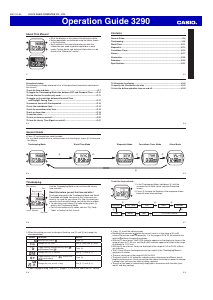
Operation Guide 3290
E-19
4. While a setting is fl ashing, use D (+) and B (–) to change it.
x When setting the alarm time using the 12-hour format, take care to set the time
correctly as a.m. (A indicator) or p.m. (P indicator).
5. Press A to exit the setting screen.
Alarm Operation
The alarm sounds at the preset time for about 10 seconds, regardless of the mode the
watch is in. In the case of the snooze alarm, the alarm operation is performed a total
of seven times, every fi ve minutes, or until you turn the alarm off (page E-20).
x To stop the alarm tone after it starts to sound, press any button.
x Performing any one of the following operations during a 5-minute interval between
snooze alarms cancels the current snooze alarm operation.
Displaying the Timekeeping Mode setting screen (page E-7)
Displaying the
setting screen (page E-18)
To test the alarm
In the Alarm Mode, hold down D to sound the alarm.
E-18
To set an alarm time
1. In the Alarm Mode, use D to scroll through the alarm
screens until the one whose time you want to set is
displayed.
x To set a one-time alarm, display one of the screens indicated by an alarm number
from
through . To set the snooze alarm, display the screen indicated
by
.
x The snooze alarm repeats every fi ve minutes.
2. After you select an alarm, hold down A until the hour setting of the alarm time
starts to fl ash, which indicates the setting screen.
x This operation turns on the alarm automatically.
3. Press C to move the fl ashing between the hour and minute settings.
E-17
Alarms
You can set fi ve independent Daily Alarms. When an alarm
is turned on, the alarm tone sounds when the alarm time
is reached. One of the alarms is a snooze alarm, while the
other four are one-time alarms.
You can turn on an Hourly Time Signal that causes the
watch to beep twice every hour on the hour.
x There are six screens in the Alarm Mode. Four are
for one-time alarms (indicated by numbers from
through
), one is for a snooze alarm (indicated by
), and one is for the Hourly Time Signal (indicated
by
).
x All of the operations in this section are performed in the
Alarm Mode, which you enter by pressing C (page E-5).
Alarm number
Alarm time
(Hour : Minutes)
On/Off status
E-16
x Press D while a countdown operation is in progress to pause it. Press D again to
resume the countdown.
x To completely stop a countdown operation, fi rst pause it (by pressing D), and then
press A. This returns the countdown time to its starting value.
To set the countdown start time
1. In the Countdown Timer Mode, hold down A until the
hours of the countdown start time start to fl ash, which
indicates the setting screen.
2. Press C to move the fl ashing between the hours and
minutes.
3. While a setting is fl ashing, use D (+) or B (–) to
change it.
x To set the starting value of the countdown time to
24 hours, set
.
4. Press A to exit the setting screen.
E-15
Countdown Timer
The countdown timer can be set within a range of one
minute to 24 hours. An alarm sounds when the countdown
reaches zero.
x The countdown operation continues even if you exit the
Countdown Timer Mode.
x All of the operations in this section are performed in the
Countdown Timer Mode, which you enter by pressing
C (page E-5).
To use the countdown timer
Press D while in the Countdown Timer Mode to start the
countdown timer.
x When the end of the countdown is reached, the alarm
sounds for 10 seconds or until you stop it by pressing any
button. The countdown time is automatically reset to its
starting value after the alarm stops.
Hours
Minutes
Seconds
E-14
To measure times with the stopwatch
Elapsed Time
D D D D A
Start Stop Re-start Stop Clear
Split Time
D A
A D
A
Start Split
( displayed)
Split release Stop Clear
Two Finishes
D A
D A
A
Start Split
First runner
nishes. Display
time of fi rst runner.
Stop
Second runner
nishes.
Split release
Display time of
second runner.
Clear
E-13
Stopwatch
The stopwatch lets you measure elapsed time, split times,
and two fi nishes.
x The display range of the stopwatch is 59 minutes,
59.99 seconds.
x The stopwatch continues to run, restarting from zero after
it reaches its limit, until you stop it.
x The stopwatch measurement operation continues even if
you exit the Stopwatch Mode.
x Exiting the Stopwatch Mode while a split time is frozen
on the display clears the split time and returns to elapsed
time measurement.
x All of the operations in this section are performed in
the Stopwatch Mode, which you enter by pressing C
(page E-5).
Minutes
Seconds
1/100 second
E-12
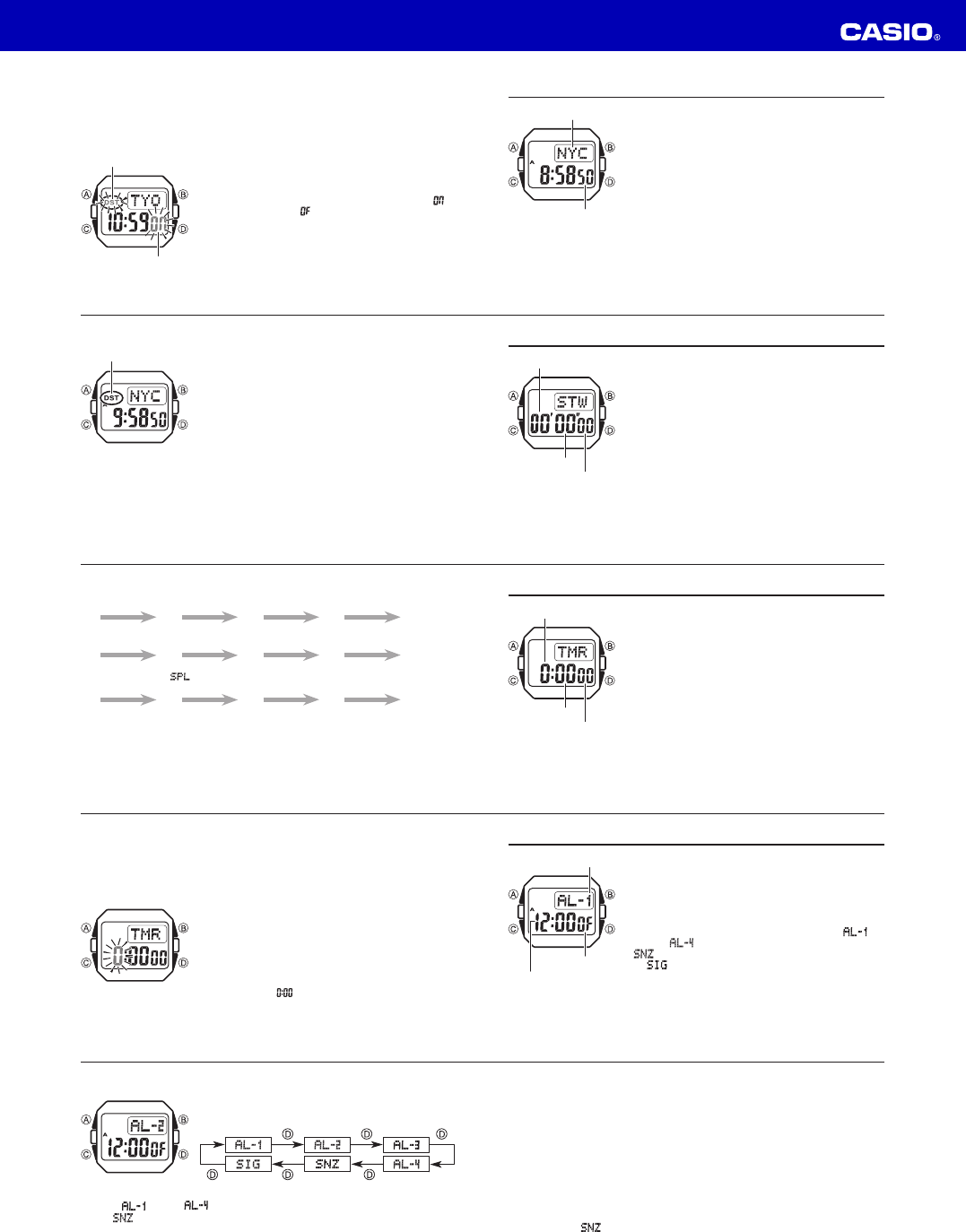
To toggle a city code time between Standard Time and Daylight Saving Time
1. In the World Time Mode, use D to display the city code
(time zone) whose Standard Time/Daylight Saving Time
setting you want to change.
2. Hold down A for about one second to toggle between
Daylight Saving Time (DST indicator displayed) and
Standard Time (DST indicator not displayed).
x The DST indicator is on the display whenever you display
a city code for which Daylight Saving Time is turned on.
x Note that the DST/Standard Time setting affects only
the currently displayed city code. Other city codes are
not affected.
x In the World Time Mode, you can switch the city code
you currently have selected as your Timekeeping Mode
Home City between Standard Time and DST. The setting
you select in the World Time Mode will also be applied in
the Timekeeping Mode.
DST indicator
E-11
World Time
World Time shows the current time in 48 cities (29 time
zones) around the world.
x All of the operations in this section are performed in
the World Time Mode, which you enter by pressing C
(page E-4).
To view the time in another city code
In the World Time Mode, press D to scroll eastwardly
through city codes.
x For full information about city codes, see the “City Code
Table” at the back of this manual.
x If the current time shown for a city is wrong, check your
Timekeeping Mode time and Home City code settings
and make the necessary changes.
City code
Current time in the zone of
the selected city code
E-10
Daylight Saving Time (DST)
Daylight Saving Time (summer time) advances the time setting by one hour from
Standard Time. Remember that not all countries or even local areas use Daylight
Saving Time.
To toggle the Timekeeping Mode time between DST and Standard Time
1. In the Timekeeping Mode, hold down A until the
seconds start to fl ash, which indicates the setting
screen.
2. Press C twice to display the DST setting screen.
3. Press D to toggle between Daylight Saving Time (
)
and Standard Time (
).
4. Press A to exit the setting screen.
x The DST indicator is displayed on the Timekeeping Mode
and Alarm Mode screen while Daylight Saving Time is
turned on.
DST indicator
On/Off status
Ladda ner bruksanvisning i Engelska (PDF, 0.22 MB)
(Tänk på miljön och skriv endast ut denna bruksanvisning om det verkligen är nödvändigt)

Loading…

Betyg

Berätta vad du tycker om Casio Baby-G BGD-560S-8ER Armbandsur genom att betygsätta den. Vill du dela med dig av dina åsikter om denna produkt eller ställa en fråga? Lämna en kommentar nederst på sidan.
Är du nöjd med Casio Baby-G BGD-560S-8ER Armbandsur?
Ja Nej
Bli den första personen som betygsätter denna produkt
0 röster

Delta i konversationen om denna produkt

Här kan du dela vad du tycker om Casio Baby-G BGD-560S-8ER Armbandsur. Om du har en fråga, läs först noggrant igenom manualen. Att begära en manual kan göras genom att använda vårt kontaktformulär.

Mer om denna bruksanvisning

Vi förstår att det är trevligt att ha en pappersbruksanvisning för din Casio Baby-G BGD-560S-8ER Armbandsur. Du kan alltid ladda ner bruksanvisningen från vår hemsida och skriva ut den själv. Om du vill ha en originalbruksanvisning rekommenderar vi att du kontaktar Casio. De kanske kan tillhandahålla en originalbruksanvisning. Letar du efter bruksanvisningen för din Casio Baby-G BGD-560S-8ER Armbandsur på ett annat språk? Välj ditt föredragna språk på vår hemsida och sök efter modellnumret för att se om vi har det tillgängligt.

Specifikationer

Märke Casio
Modell Baby-G BGD-560S-8ER
Kategori Armbandsur
Filtyp PDF
Filstorlek 0.22 MB

Alla bruksanvisningar för Casio Armbandsur
Fler bruksanvisningar för Armbandsur

Vanliga frågor om Casio Baby-G BGD-560S-8ER Armbandsur

Vårt supportteam söker efter användbar produktinformation och svar på vanliga frågor. Om du hittar en felaktighet bland våra vanliga frågor uppskattar vi om du meddelar oss detta via vårt kontaktformulär.

Ett batteri i min enhet är oxiderat, kan jag fortfarande använda det säkert? Verifierad

Ja, enheten kan fortfarande användas säkert. Ta först bort det oxiderade batteriet. Använd aldrig bara händer för att göra detta. Rengör sedan batterifacket med en bomullspinne doppad i ättika eller citronsaft. Låt det torka och sätt i nya batterier.

Detta hjälpte (929) Läs mer

Min mekaniska klocka går för fort. Vad kan jag göra åt det? Verifierad

Det kan bero på att den påverkas av ett magnetfält. Det kan lösas genom en avmagnetiseringsprocess, utförd av en professionell urmakare.

Detta hjälpte (868) Läs mer

Vad betyder AM och PM? Verifierad

AM står för ante meridiem och används för att ange ett klockslag under dygnets första hälft. PM står för post meridiem och används för att ange ett klockslag under dygnets andra hälft.

Detta hjälpte (745) Läs mer

Vad är en kronograf? Verifierad

Kronograf är bokstavligen en ”tidsskrivare”. En kronograf är ett annat ord för klocka med tidtagningsfunktion, tidtagarur eller stoppur.

Detta hjälpte (651) Läs mer

Vad är GMT? Verifierad

GMT står för Greenwich Mean Time (kallas även UTC, vilket står för Coordinated Universal Time). Det är tiden för longitud 0, som passerar genom Greenwich nära London.

Detta hjälpte (491) Läs mer

Vad är en kvartsrörelse? Verifierad

Klockor och klockor med kvartsrörelse drivs av ett batteri. Detta skickar en elektrisk ström genom kvartskristaller som kommer att vibrera. Dessa vibrationer överförs till rörelsen. Eftersom vibrationerna har en fast frekvens är klockor och klockor med kvartsrörelse extremt exakta.

Detta hjälpte (481) Läs mer

Det finns fukt på insidan av glaset på min Casio-klocka. Vad ska jag göra? Verifierad

Casio anger att det förmodligen inte är något fel om fukten uppstår efter en extrem temperaturförändring och försvinner relativt snabbt efteråt. Om fukten inte försvinner ska du lämna in klockan för reparation så snart som möjligt.

Detta hjälpte (62) Läs mer
Bruksanvisning Casio Baby-G BGD-560S-8ER Armbandsur

Relaterade produkter

Relaterade kategorier

×
Download