17.
18. The radio should be kept in a dry room.
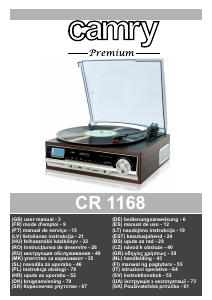
DESCRIPTION OF THE DEVICE
1. Turntable cover 23. Turntable needle guard
2. LCD display 24. LINE OUT jack
3. Power diode 25. FM antenna cable
4. In-built speaker 26. Power cord
5. FUNCTION button 27. STANDBY button
6. SLEEP/TIMER button 28. PRESET/ALBUM DN button
7. Headphone port 29. PRESET/ALBUM UP button
8. REC/DEL button 30. SD card port
9. MODE/CLOCK button 31. MUTE button
10. PLAY/PAUSE/TUNER SCAN button 32. AUTO-STOP switch
11. STOP/BAND button 33. REC/DEL button
12. SKIP DOWN button 34. FM ST. button
13. SKIP UP button 35. FUNCTION button
14. AUX port 36. MODE/CLOCK button
15. ALBUM/PRESET DOWN button 37. PLAY/PAUSE button
16. ALBUM/PRESET UP button 38. STOP/BAND button
17. ON/OFF switch/volume control 39. SKIP DOWN button
18. 45RPM disc adaptor 40. SKIP UP button
19. Turntable lever 41. VOLUME UP/DOWN buttons
20. Turntable arm lock 42. USB port
21. Plate spin speed adjustment
22. Turntable arm
To save energy, if there is no audio signal from Turntable /AUX IN / USB / SD for a
period of over 10 minutes, then the unit will automatically switch to Standby Mode.
SETTING THE CLOCK
Before first use, unpack everything and remove all protective materials. Unwind the FM antenna cable and power cable. Do not cover the ventilation holes,
make sure that there is a gap of a few centimeters around the radio, which is required for proper ventilation.
1. In standby mode, press and hold the MODE/CLOCK button (9, 36). '12H/24H' will start flashing on the display (2). Using the SKIP DOWN button (12, 39)
and SKIP UP button (13, 40) select either the 12-hour or 24-hour mode and confirm by pressing the MODE/CLOCK button again (9, 36). The device will
enter the hour editing mode.
2. Using the SKIP DOWN button (12, 39) and SKIP UP button (13, 40) set the current hour and confirm by pressing the MODE/CLOCK button (9, 36). The
device will enter the minute editing/ mode.
3. Using the SKIP DOWN button (12, 39) and SKIP UP button (13, 40) set the current minute and confirm by pressing the MODE/CLOCK button (9, 36).
TIMER FUNCTION (AUTOMATIC SHUT-OFF)
1. When the device is switched on, press the SLEEP/TIMER button (6) the appropriate number of times to select the time after which the device is to switch
off (90, 80, 70...10 minutes).
2. The word 'SLEEP' on the display informs you that the automatic shut-off function is activated.
3. After the selected time has elapsed the device will turn off and enter standby mode.
FUNCTION BUTTON (5)
Used to change the operating mode of the device
– PHON (turntable operation mode)
– AUX (external device operation mode)
– FM radio mode
– MP3 (USB memory playback mode and SD card playback mode)
-- Bluetooth mode
LISTENING TO THE RADIO
1. Turn the device on using the ON/OFF button (17, 27) and set the radio mode using the FUNCTION button (5).
2. Using the BAND button (11) set the wavelength to FM.
3. Using the SKIP DOWN button (12, 39) and SKIP UP button (13, 40) tune to the desired radio frequency. Pressing and holding these buttons for
approximately 1-2 seconds will automatically search for the closest frequency. After it is found the search will stop.
4. When the frequency of the selected station is found, press the MODE/CLOCK button (9, 36) to save the station.
5. Repeat steps 3-4 to program selected stations (maximum of 30 programs - FM, maximum of 20 programs - AM ).
6. You can switch between saved programs by using the PRESET DOWN button (15) and PRESET UP button (16).
7. You can set the volume by turning the volume control knob (17) or using the buttons (40) on the remote control.
8. The FM antenna (24) is located on the back panel. If the reception is poor, try to move the antenna and find a spot in which the signal is strongest.
The AM antenna is located inside the radio receiver. If the reception is poor, try moving the receiver to a different place or turning it in another direction to
catch the strongest signal.
9. The TUNER SCAN button (10) is used to automatically find and save available radio stations.
PLAYBACK OF MP3 FILES FROM USB/SD MEMORY
CAUTION: The device may not be compatible with all of the files due to coding differences. The device may not work with some USB/SD memories. The
device supports 8GB USB memories and SD cards.
1. Turn the player on using the ON/OFF button (17, 27). Place the USB or SD memory in the port (USB port - 42, SD port - 30)
2. Select the mode using the FUNCTION button (5, 35).
3. The device will read the memory and show the number of recorded tracks on the display. The device will then begin playback of the first track.
4. You can pause and resume playback of the given track using the PLAY/PAUSE button (10, 37).
5. You can playback the previous or next tracks using the SKIP DOWN button (12, 39) and SKIP UP button (13, 40). Pressing and holding these buttons
during playback of a track will make it rewind or fast-forward.
6. You can playback the previous or next track album using the ALBUM DOWN button (15, 28) and ALBUM UP button (16, 29).
7. During playback of a track press the MODE/CLOCK button (9, 36) once to activate repeat of one track. Pressing the MODE/CLOCK button (9,
4


Delta i konversationen om denna produkt
Här kan du dela vad du tycker om Camry CR 1168 Skivspelare. Om du har en fråga, läs först noggrant igenom manualen. Att begära en manual kan göras genom att använda vårt kontaktformulär.
svara | Detta hjälpte (0) (Översatt av Google)