6
5
THERMAL CARAFE
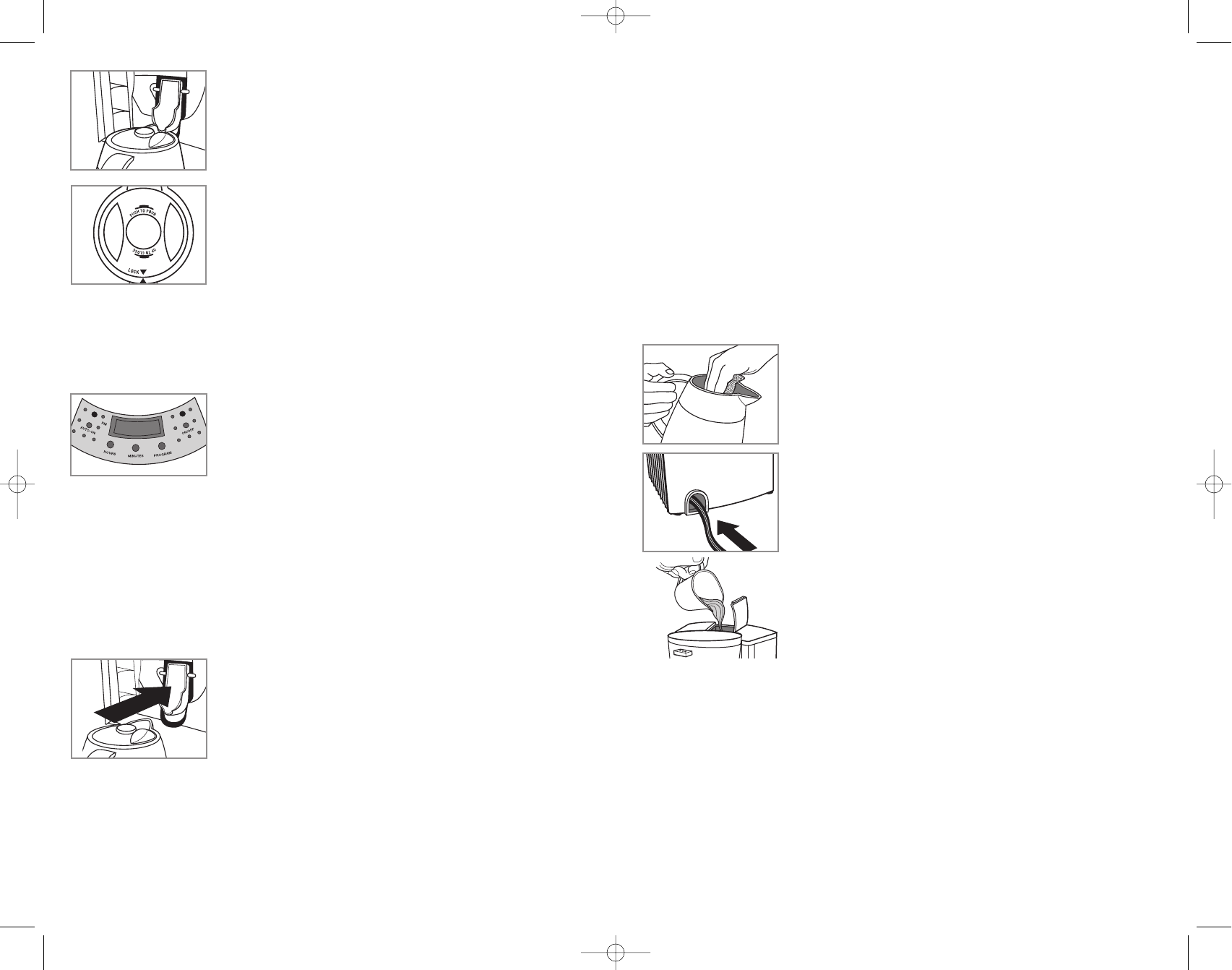
1. Coffee is brewed directly into carafe via closed brew thru lid.
Lock lid by aligning LOCK arrowhead with arrowhead on carafe
rim. Coffee may overflow if the lid is not properly
in place.
2. Carafe keeps coffee hot and may be left away from coffeemaker
for serving. Be sure the pour button is in the up position to seal
in heat and flavor.
3. To pour, push down on the pour button. Be sure that lid and
carafe rim arrowheads are aligned (G).
Caution: Do not pour liquid from the carafe until lid is securely
closed.
4. When finished pouring, push down on the pour button again
and button pops up.
5. Thermal carafe keeps coffee hot for up to four hours.
SETTING THE CLOCK (H)
1. Plug in the coffeemaker.
2. Press the HOURS and MINUTES buttons to the current time. A small light at the top left of
the clock display indicates P.M.
Note: Unplugging the unit will reset the clock/timer to12:00.
PROGRAMMING THE TIMER FOR AUTO-BREW (H)
If the clock is not set for the current time of day, see "Setting the
Clock" section.
To preset your coffeemaker to begin brewing at a certain time, first
follow steps 1-11 in the "BREWING A POT OF COFFEE" section.
1. Press and hold the PROGRAM button for 1 second. Green light flashes and the clock
display changes to show current programmed time or default of 12:00.
2. Press the HOURS and MINUTES buttons until the desired brew time is reached.
Note: If you wait more than 3 seconds to program brew time, or if the green light stops
flashing, the clock redisplays the current time of day. You must then repeat the above steps
to program.
3. Once programmed to the desired time, press the AUTO-ON button.
4. Programmed brewing time momentarily displays and the green AUTO-ON light
illuminates indicating that the coffeemaker is preset for automatic brewing. If AUTO-ON
light is not lit, automatic brewing function is not properly set.
5. When brewing begins the red "On" light illuminates.
6. Be sure carafe is properly placed into coffeemaker or coffee will
not brew (J).
Note: The Auto-Brew function can be cancelled at any time by
pressing the AUTO-ON button a second time. The AUTO-ON light
will go out.
Care and Cleaning
This product contains no user serviceable parts. Refer service to qualified service
personnel.
Caution: Do not overexpose the control pad to water. It is not waterproof. Water may cause
permanent damage and make coffeemaker inoperable.
CLEANING
1. Be sure the unit is unplugged and cooled.
2. Press latch to open brew chamber.
3. Use filter basket handle to lift filter basket out.
4. Discard the paper filter with the grounds.
5. The filter basket and lid are top-rack dishwasher safe, or they may be hand washed in
warm, sudsy water.
6. Wipe the interior of the brew chamber and the exterior of the carafe and coffeemaker with
a soft damp cloth. Do not use abrasive cleaners or scouring pads. Never immerse the
coffeemaker in water.
7. Place cleaned filter basket into cleaned brew chamber and swing closed.
8. To clean the inside of the thermal carafe (K) and the water
reservoir, wash in warm sudsy water, rinse well and allow to air
dry. Do not clean the carafe with abrasive cleansers, steel
wool, or other abrasives.
STORING
Power cord tucks into back of unit for convenient storage (L).
Maintaining Your Coffeemaker
Mineral deposits left by hard water can clog your coffeemaker.
1. Lift water reservoir fill-top or detach water reservoir and pour
white vinegar into the water reservoir up to the 4-cup level mark
on the water window. Add cold water up to the 6-cup line (M).
2. Press latch and swing out brew chamber.
3. Be sure the filter basket is aligned into position.
4. Insert paper filter into the filter basket. Swing brew chamber
closed.
5. Place the carafe with lid secured, all the way into the
coffeemaker. Position carafe with spout facing straight in, and
plug in the unit.
6. Press the ON/OFF button, red brewing "On" light illuminates.
7. Let half of the vinegar solution brew into the carafe (until the
solution level in the water window goes down to "3"). Press the
ON/OFF button again to turn off the coffeemaker and let it soak for at least 15 minutes to
soften mineral deposits.
8. Press the ON/OFF button to turn the unit on again, and brew the remaining vinegar
solution into the carafe.
9. When the vinegar solution has finished brewing, discard the paper filter, empty
the carafe and rinse with clean water.
10. Refill the water reservoir with cold water, put a paper filter in the filter basket and run
another brew cycle to rinse out any vinegar solution remaining.
11. Wash the water reservoir, filter basket, carafe and lid as instructed in "Cleaning."
G
J
K
L
M
H
F



Delta i konversationen om denna produkt
Här kan du dela vad du tycker om Black and Decker TCMKT850C Kaffebryggare. Om du har en fråga, läs först noggrant igenom manualen. Att begära en manual kan göras genom att använda vårt kontaktformulär.