Bruksanvisning Black and Decker D1700 Strykjärn

Behöver du en bruksanvisning för din Black and Decker D1700 Strykjärn? Nedan kan du se och ladda ner PDF-bruksanvisningen gratis på svenska. Den här produkten har för närvarande 4 vanliga frågor, 0 kommentarer och har 0 röster. Om det här inte är bruksanvisningen du vill ha, vänligen kontakta oss.

Är produkten defekt och erbjuder bruksanvisningen ingen lösning? Gå till ett Repair Café för gratis reparationstjänster.

Bruksanvisning

Loading…
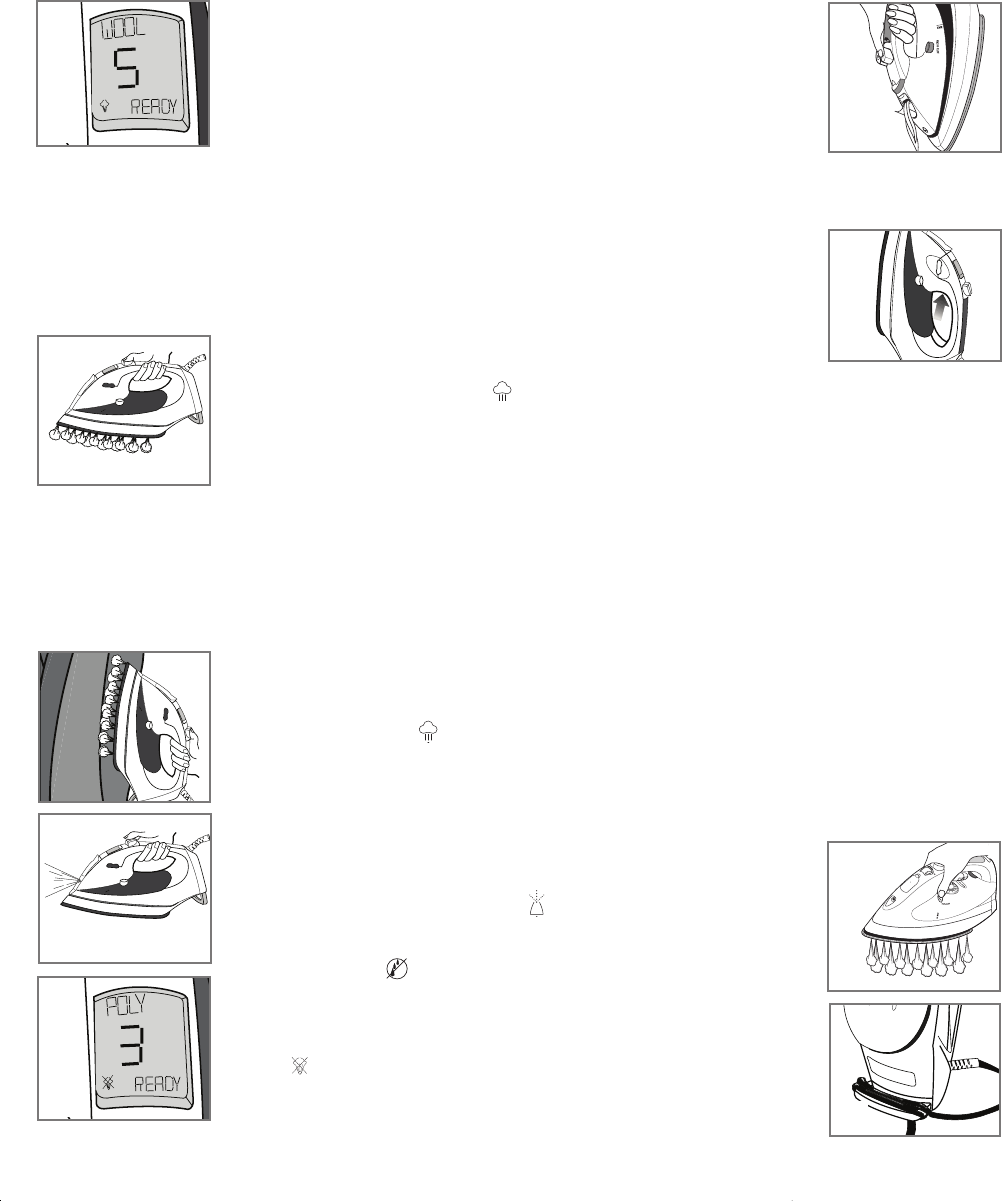
Smart Steam
Technology
The Smart Steam
system generates steam only at higher
temperature settings (between 4 and 7) (F). Once you select
the temperature, the Smart Steam
technology detects the set
temperature and adjusts the steam power accordingly. The higher
the setting, the more powerful the steam.
Surge of Steam
Horizontal
Use to remove stubborn creases.
1.
With the water tank filled to the MAX mark, set fabric-select dial to appropriate setting
(between 4 and 7) for your fabric. Read garment's label to help you determine fabric
type.
Note: Steam is automatically turned off between settings 1 and 3.
2. Once you select the appropriate setting, wait for iron to beep
and display READY.
3. Press the surge-of-steam button to generate a burst of steam
(G). For best performance,
leave an interval of 5 seconds between bursts.
Important: Always stand the iron on its heel rest when powered on
but not in use.
Vertical
Use for removing wrinkles from hanging clothes and drapes.
1. Be sure the water tank is filled to the MAX mark.
2. Hang the garment to be steamed on a clothes hanger. (Curtains or drapes can be
steamed once they are hung.)
3. Set the fabric-select dial to appropriate setting (between 4 and 7) for your fabric.
4. Wait for iron to beep and display READY.
5. Hold the iron close to, but not touching, the fabric.
6. Pull the fabric tight in your free hand and pump the
surge-of-steam button as you move the iron over the
fabric (H).
Important: Always stand the iron on its heel rest when powered on
but not in use.
Using Spray
Use to dampen tough wrinkles at any setting (J).
1. Be sure the iron is filled with water.
2. On first use, pump the spray button several times.
ANTI-DRIP SYSTEM
The anti-drip system prevents water spotting at low temperatures.
Dry Ironing
1. Turn the fabric-select dial to setting 1, 2, or 3 to iron without
steam (K). The Smart Steam
system will automatically turn off
and there will not be any steam generated.
2. To dry iron at higher settings, empty the water from the reservoir
to prevent steaming.
6
5
Emptying Water Tank (Optional)
Note: It is not necessary to empty the water after each use.
1. Unplug the iron and let it cool.
2. To release the water, hold the iron over a sink with the tip
pointing down. Water will empty out of the water-fill hole (L).
DIGITAL DISPLAY LANGUAGE
Your iron has a multilingual digital display that lets you select from the English, French or
Spanish language.
1. When you plug in the iron, the display defaults to English.
To change the language, press and hold the change language
button for 2-4 seconds (M). The digital display changes to
French.
2. Press and hold the button for another 2-4 seconds to change
from French to Spanish.
3. To go back to English, press the button again for 2-4 seconds.
Note: The languages will change in the order listed above.
4. Once you unplug the iron, the language will default to English again.
Care and Cleaning
This product contains no user-serviceable parts. Refer service to qualified service
personnel.
Cleaning Outside Surfaces
1. Make sure iron is unplugged and has cooled completely. Wipe the soleplate and outer
surfaces with a soft cloth dampened with water. Add mild household detergent. Never
use abrasives, heavy-duty cleansers, vinegar or scouring pads that may scratch
or discolor the iron.
2. After cleaning, steam iron over an old cloth to remove any residue from the
steam vents.
Auto Cleaning
To keep the steam vents free of any buildup, about once a month follow these instructions.
1. Fill the water tank well below the MAX line. Plug in the iron.
2. Turn the fabric-select dial to 7 and stand the iron on its heel rest.
3. Wait for the iron to beep and READY to display on the digital window.
4. Unplug the iron and hold over a sink with the soleplate facing down.
5. Press and hold the AUTO CLEAN
®
button. Be careful, as hot
water and steam will come out of the steam vents (N). Continue
to hold the auto-clean button until all the water has emptied. If
necessary, rock iron side to side and front to back.
6. When finished, release the button, stand the iron on its heel rest
and plug it in. Heat for about 2 minutes to dry out any remaining
water.
Storing your Iron
1. Unplug the iron and allow it to cool.
2. Store vertically on its heel to prevent water leaking from the
soleplate. You can wrap the cord around the smart stand for
storage (P).
MAX
A
UT
O
C
L
EA
N
G
L
MA
X
A
UT
O
C
L
E
A
N
M
N
P
M
A
X
A
U
T
O
C
L
E
A
N
H
MAX
A
UT
O
C
L
EAN
J
K
F
D1700 6/1/07 10:44 AM Page 6
Ladda ner bruksanvisning i Engelska (PDF, 1.3 MB)
(Tänk på miljön och skriv endast ut denna bruksanvisning om det verkligen är nödvändigt)

Loading…

Betyg

Berätta vad du tycker om Black and Decker D1700 Strykjärn genom att betygsätta den. Vill du dela med dig av dina åsikter om denna produkt eller ställa en fråga? Lämna en kommentar nederst på sidan.
Är du nöjd med Black and Decker D1700 Strykjärn?
Ja Nej
Bli den första personen som betygsätter denna produkt
0 röster

Delta i konversationen om denna produkt

Här kan du dela vad du tycker om Black and Decker D1700 Strykjärn. Om du har en fråga, läs först noggrant igenom manualen. Att begära en manual kan göras genom att använda vårt kontaktformulär.

Mer om denna bruksanvisning

Vi förstår att det är trevligt att ha en pappersbruksanvisning för din Black and Decker D1700 Strykjärn. Du kan alltid ladda ner bruksanvisningen från vår hemsida och skriva ut den själv. Om du vill ha en originalbruksanvisning rekommenderar vi att du kontaktar Black and Decker. De kanske kan tillhandahålla en originalbruksanvisning. Letar du efter bruksanvisningen för din Black and Decker D1700 Strykjärn på ett annat språk? Välj ditt föredragna språk på vår hemsida och sök efter modellnumret för att se om vi har det tillgängligt.

Specifikationer

Märke Black and Decker
Modell D1700
Kategori Strykjärn
Filtyp PDF
Filstorlek 1.3 MB

Alla bruksanvisningar för Black and Decker Strykjärn
Fler bruksanvisningar för Strykjärn

Vanliga frågor om Black and Decker D1700 Strykjärn

Vårt supportteam söker efter användbar produktinformation och svar på vanliga frågor. Om du hittar en felaktighet bland våra vanliga frågor uppskattar vi om du meddelar oss detta via vårt kontaktformulär.

Kan jag rengöra botten på strykjärnet med en skurmedel? Verifierad

Nej, detta kan skada botten. Använd en fuktig trasa eller en mjuk svamp för att rengöra den.

Detta hjälpte (424) Läs mer

Vad är det för skillnad mellan ett ångstrykjärn och ett vanligt strykjärn? Verifierad

Den största fördelen med ett ångstrykjärn är att det enkelt tar bort skrynklor och veck med hjälp av varm ånga. Ett vanligt strykjärn är dock mycket lättare och ofta billigare.

Detta hjälpte (346) Läs mer

Sålen på mitt strykjärn är missfärgat, kan jag fortfarande stryka med det? Verifierad

Det är möjligt, men det finns en chans att det kommer att gnugga på ljusa kläder.

Detta hjälpte (287) Läs mer

Kan jag stryka över knappar? Verifierad

Nej, detta kommer att skada stryksulan och det förhindrar att strykjärnet fungerar korrekt. Stryk aldrig över knappar, blixtlås eller andra hårda föremål.

Detta hjälpte (238) Läs mer
Bruksanvisning Black and Decker D1700 Strykjärn

Relaterade produkter

Relaterade kategorier

×
Download