2
1 format.
■ Decimal Point and Separator Symbols
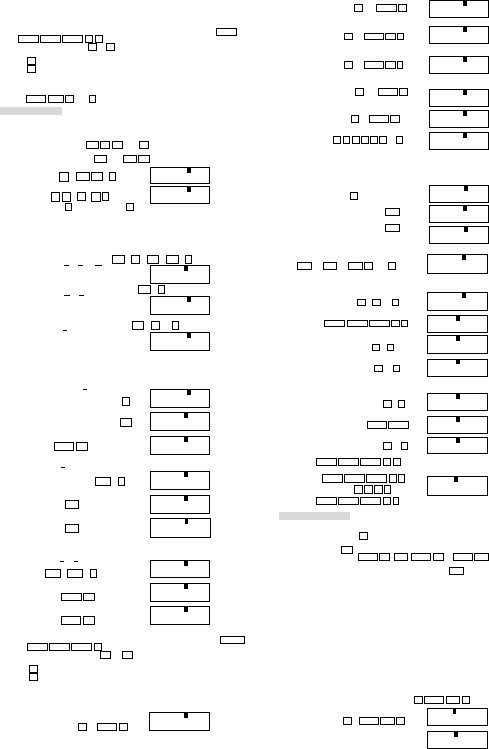
You can use the display setup (Disp) screen to specify the symbols you want for
the decimal point and 3-digit separator.
To change the decimal point and separator symbol setting, press the MODE
MODE MODE MODE 1 ►.
Press the number key( 1 or 2 )that corresponds to the setting you want to
use.
1 (Dot): Period decimal point, comma separator
2 (Comma): Comma decimal point, period separator
■ Initializing the Calculator
Perform the following key operation when you want to initialize the calculation
mode and setup, and clear replay memory and variables.
SHIFT CLR 3 (All) =
Basic Calculations
■ Arithmetic Calculations
● Use the COMP mode for basic calculations.
● Negative values inside of calculations must be enclosed within parentheses.
Sin -1.23 → sin ( (-) 1.23 )
● It is not necessary to enclose a negative exponent within parentheses.
Sin 2.34×10
-5
→ sin 2.34 EXP (-) 5
● Example 1:3×(5×10
-
9
)=1.5×10
-
8
3 × 5 EXP (-) 9 =
● Example 2:5×(9+7)=80
5 × ( 9 + 7 ) =
● You can skip all ) operations before = .
■ Fraction Operations
● Fraction Calculations
● Use the COMP mode for fraction calculations. Values are displayed in
decimal format automatically whenever the total number of digits of a
fractional value (integer + numerator + denominator + separator marks)
exceeds 10.
● Example 1:
2 a
b
/c 3 + 1 a
b
/c 4 a
b
/c 5 =
● Example 2:
2 ab/c 4 =
● Example 3:
1 a
b
/c 2 + 1.6 =
● Results of calculations that mix fraction and decimal values are always
decimal.
● Decimal ↔ Fraction Conversion
● Example 1:
(Decimal ↔ Fraction)
2.75 =
a
b
/c
SHIFT d/c
● Example 2:
(Fraction ↔ Decimal)
1 a
b
/c 2 =
a
b
/c
a
b
/c
● Mixed Fraction ↔ Improper Fraction Conversion
● Example:
1 a
b
/c 2 a
b
/c 3 =
SHIFT d/c
SHIFT d/c
● You can use the display setup (Disp) screen to specify the display format
when a fraction calculation result is greater than one. Pressing MODE
MODE MODE MODE 1 .
● Press the number key( 1 or 2 )that corresponds to the setting you
want to use.
1 (a
b
/c):Mixed fraction
2 (d/c):Improper fraction
● An error occurs if you try to input a mixed fraction while the d/c display
format is selected.
■ Percentage Calculations
● Use the COMP mode for percentage calculations.
● Example 1: To calculate 12% of 1500(180)
1500 × 12 SHIFT %
● Example 2: To calculate what percentage of 880 is 660(75%)
660 ÷ 880 SHIFT %
● Example 3: To add 15% onto 2500 (2875)
2500 × 15 SHIFT % +
● Example 4: To discount 3500 by 25% (2625)
3500 × 25 SHIFT % -
● Example 5: If 300 grams are added to a test sample originally weighing 500
grams, what is the percentage increase in weight ? (160%)
300 + 500 SHIFT %
● Example 6: If the temperature changes from 40℃ to 46℃, what percentage did
it rise? How about to 48℃? (15%, 20%)
46 - 40 SHIFT %
◄ ◄ ◄ ◄ ◄ ◄ 8 =
■ Degrees, Minutes, Seconds Calculations
● You can perform sexagesimal calculations using degrees (hours), minutes,
and seconds, and convert between sexagesimal and decimal values.
● Example 1: To convert the decimal value 2.258 to a sexagesimal value and
then back to a decimal value.
2.258 =
° ′ ″
° ′ ″
● Example 2: To perform the following calculation:
12°34′56″ ×3.45
12 ° ′ ″ 34 ° ′ ″ 56 ° ′ ″ × 3.45 =
■ FIX, SCI, RND
● Example 1: 200÷7×14 =
200 ÷ 7 × 14 =
MODE MODE MODE 1 3
(Internal calculation 200 ÷ 7 =
continues using 12 digits.) × 14 =
The following performs the same calculation using the specified number of
decimal places.
200 ÷ 7 =
( Internal rounding ) SHIFT Round
× 14 =
● Press MODE MODE MODE 3 1 to clear the Fix specification.
● Example 2: 1÷3, displaying result with two significant digits (Sci 2).
MODE MODE MODE 2 2
1 ÷ 3 =
● Press MODE MODE MODE 3 1 to clear the Sci specification.
Memory Calculations
■ Answer Memory
● Whenever you press = after inputting values or an expression, the calculated
result automatically updates Answer Memory contents by storing the result.
● In addition to = , Answer Memory contents are also updated with result
whenever you press SHIFT % , M+ , SHIFT M- or SHIFT STO followed by
a letter (A through F, or M, X, or Y).
● You can recall Answer Memory contents by pressing Ans .
● Answer Memory can store up to 12 digits for the mantissa and two digits for
the exponent.
● Answer Memory contents are not updated if the operation performed by any of
the above key operations results in an error.
■ Consecutive Calculations
● You can use the calculation result that is currently on the display (and also
stored in Answer Memory) as the first value of your next calculation. Noted
that pressing an operator key while a result is displayed causes the displayed
value to change to Ans, indicating it is the value that is currently stored in
Answer Memory.
● The result of a calculation can also be used with a subsequent Type A
function(x
2
, x
3
, x
-1
, x!), +, -, ^(x
y
),
x
√, ×,÷, nPr , nCr and ° ′ ″.
■ Independent Memory
● Values can be input directly into memory, added to memory, or subtracted
from memory. Independent memory is convenient for calculating cumulative
totals.
● Independent memory uses the same memory area as variable M.
● To clear independent memory (M), input 0 SHIFT STO M (M+).
● Example:
23 + 9 = 32 23 + 9 SHIFT STO M
D
12˚34˚56˚×3.
▲
→
43˚24˚31.2


Delta i konversationen om denna produkt
Här kan du dela vad du tycker om Aurora AX-582BL Räknemaskin. Om du har en fråga, läs först noggrant igenom manualen. Att begära en manual kan göras genom att använda vårt kontaktformulär.