Bruksanvisning Aurora AX-501 Räknemaskin

Behöver du en bruksanvisning för din Aurora AX-501 Räknemaskin? Nedan kan du se och ladda ner PDF-bruksanvisningen gratis på svenska. Den här produkten har för närvarande 1 vanliga frågor, 0 kommentarer och har 0 röster. Om det här inte är bruksanvisningen du vill ha, vänligen kontakta oss.

Är produkten defekt och erbjuder bruksanvisningen ingen lösning? Gå till ett Repair Café för gratis reparationstjänster.

Bruksanvisning

Loading…
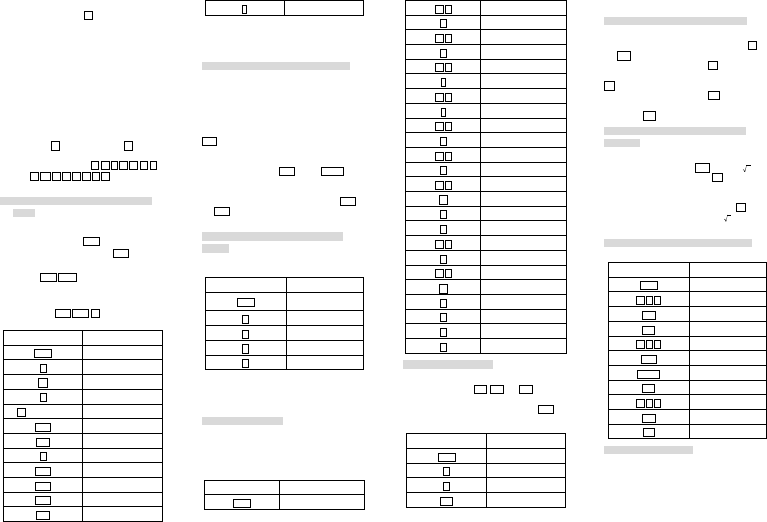
multiplication
When you press the key ( , the small sign”(
)”appears on the display above the digits, means that
parenthesis has been opened. This sign disappears
when the parenthesis is closed
b) Levels of the Parenthesis
There are 4 levels of parenthesis. This means that
you cannot have more than 4 operations pending.
-Try the calculation 2+(3+(4+(5+(6+7))) .
To carry out this calculation, simply press the keys in
the order they appear in writing. When you press the fifth
sign “+”, the error message will display.
c) Closing Parenthesis
Instead of closing the nested parenthesis and
pressing the key = , simply press the key = and
calculator will give the correct result. For example ,in the
calculation of 5×(4+9),you type 5 × ( 4 + 9 =
instead of 5 × ( 4 + 9 ) = you will get the
correct answer..
5. Selecting the Display Notation and Decimal
Places
When calculation result is displayed in the floating
point system, pressing F↔E displays the result in
the scientific notation. Pressing F↔E once more
displays the result again in the floating point system.
Pressing 2ndF TAB and any value between 0 and
9 specifies the number of decimal places in the
calculation result. To clear the setting of decimal
places, press 2ndF TAB · .
Example 1÷3
Key to Press
ON/C
1
÷
3
= (floating point)
2ndF
TAB
2
FE
FE
2ndF
TAB
.
If the value for floating point system does not fit in
the following range, the calculator will display the result
using scientific notation system:
0.000000001≤x≤9999999999
6. Angle Units : Degree, Radian and Gradient
Before any trigonometric calculation, make sure the
angle unit with which you use to make the calculation
conforms with the one that the calculator will use. The
angle unit is indicated above the display of the digits.
This unit is marked by DEG for degree, RAD for
radian and GRAD for gradient. Each press the key
DRG will alternate between these units.
You may also want to convert an angle into another
unit. The function that enables you to do that is the
second function of the key DRG, marked DRG.
We shall try to convert 180° in radian. First, make
sure that the angle unit display is the degree(symbol
DEG):Press the number 180,then press the key 2ndF
and DRG, The calculator will display the value of
“π”(3.141592654),value of 180°in radian.
7. Addition, Multiplication, Subtraction and
Division
a) Addition of Two Numbers
Example: 8+5:
Key to Press
Display
ON/C
0.
8
8.
+
8.
5
5.
=
13.
b) Multiplication, Division and Subtraction of Two
Numbers
These calculations are performed in the same
manner as the addition.
8. Constant Calculations
In the constant calculations, the addend becomes a
constant. Subtraction and division are performed in the
same manner. For multiplication, the multiplicand
becomes a constant.
Example:
Key to Press
Display
ON/C
0.
5 8
58.
+
58.
6 4
64.
=
122.
4 5
45.
=
109.
7 3
73.
-
73.
5 7
57.
=
16.
4 9
49.
=
-8.
6 4
64.
÷
64.
8
8.
=
8.
1 6
16.
=
2.
3 6
36.
×
36.
5
5.
=
180.
8
8.
=
288.
9. Trigonometric Functions
The functions cosine, sine and tangent are accessed
respectively by the keys cos , sin , and tan .
To calculate, for example, the cosine of an angle,
enter the value of the angle, and press the key cos .
Example: The calculation cosine of 60
о
(make sure
the calculator is In degree mode.)
Key to Press
Display
ON/C
0.
6
6.
0
60.
cos
0.5
Attention: before making any calculations, check
the angle unit display by the calculator.
10. Logarithmic and Exponential Functions
The natural logarithm and common logarithm
functions are accessed respectively with the keys ln
and log .
The second function of the key ln is the inverse
function of the natural logarithm, or natural antilogarithm
e
x
.
The second function of the key log is the inverse
function of the common logarithm, or common
antilogarithm 10
x
.
11. The functions Square, Root, Power and
Reciprocal
The calculation square( x
2
), square root(x), cubic
root(second function of the key x ,marked by
3
x
), and
reciprocal(second function of the key x
2
,marked by 1/x)
is the same as the one explained above for trigonometric
functions. The value, ”x” must be enter first before the
chosen function. For the universal power(key y
x
), and
root (second function of the key y
x
,marked by ), enter
the value for “y” first then the value for “x”.
12. Hyperbolic/Inverse Hyperbolic Functions
Example: cosh5.7 sinh
-1
9.4 tanh8.7
Key to Press
Display
ON/C
0.
5 . 7
5.7
hyp
5.7
cos
149.4353735
9 . 4
9.4
2ndF
9.4
arc hyp
9.4
sin
-1
2.936674272
8 . 7
8.7
hyp
8.7
tan
0.999999944
13. Percentage Calculation
The second function of the key “=” (marked by “%”)
permits percentage calculations. We can sum up the
capabilities of this function in four
x
y
Ladda ner bruksanvisning i Engelska (PDF, 0.65 MB)
(Tänk på miljön och skriv endast ut denna bruksanvisning om det verkligen är nödvändigt)

Loading…

Betyg

Berätta vad du tycker om Aurora AX-501 Räknemaskin genom att betygsätta den. Vill du dela med dig av dina åsikter om denna produkt eller ställa en fråga? Lämna en kommentar nederst på sidan.
Är du nöjd med Aurora AX-501 Räknemaskin?
Ja Nej
Bli den första personen som betygsätter denna produkt
0 röster

Delta i konversationen om denna produkt

Här kan du dela vad du tycker om Aurora AX-501 Räknemaskin. Om du har en fråga, läs först noggrant igenom manualen. Att begära en manual kan göras genom att använda vårt kontaktformulär.

Mer om denna bruksanvisning

Vi förstår att det är trevligt att ha en pappersbruksanvisning för din Aurora AX-501 Räknemaskin. Du kan alltid ladda ner bruksanvisningen från vår hemsida och skriva ut den själv. Om du vill ha en originalbruksanvisning rekommenderar vi att du kontaktar Aurora. De kanske kan tillhandahålla en originalbruksanvisning. Letar du efter bruksanvisningen för din Aurora AX-501 Räknemaskin på ett annat språk? Välj ditt föredragna språk på vår hemsida och sök efter modellnumret för att se om vi har det tillgängligt.

Specifikationer

Märke Aurora
Modell AX-501
Kategori Räknemaskiner
Filtyp PDF
Filstorlek 0.65 MB

Alla bruksanvisningar för Aurora Räknemaskiner
Fler bruksanvisningar för Räknemaskiner

Vanliga frågor om Aurora AX-501 Räknemaskin

Vårt supportteam söker efter användbar produktinformation och svar på vanliga frågor. Om du hittar en felaktighet bland våra vanliga frågor uppskattar vi om du meddelar oss detta via vårt kontaktformulär.

Ett batteri i min enhet är oxiderat, kan jag fortfarande använda det säkert? Verifierad

Ja, enheten kan fortfarande användas säkert. Ta först bort det oxiderade batteriet. Använd aldrig bara händer för att göra detta. Rengör sedan batterifacket med en bomullspinne doppad i ättika eller citronsaft. Låt det torka och sätt i nya batterier.

Detta hjälpte (484) Läs mer
Bruksanvisning Aurora AX-501 Räknemaskin

Relaterade produkter

Relaterade kategorier

×
Download