Bruksanvisning Aube TH132 A Thermostat

Behöver du en bruksanvisning för din Aube TH132 A Thermostat? Nedan kan du se och ladda ner PDF-bruksanvisningen gratis på svenska. Den här produkten har för närvarande 2 vanliga frågor, 0 kommentarer och har 0 röster. Om det här inte är bruksanvisningen du vill ha, vänligen kontakta oss.

Är produkten defekt och erbjuder bruksanvisningen ingen lösning? Gå till ett Repair Café för gratis reparationstjänster.

Bruksanvisning

Loading…
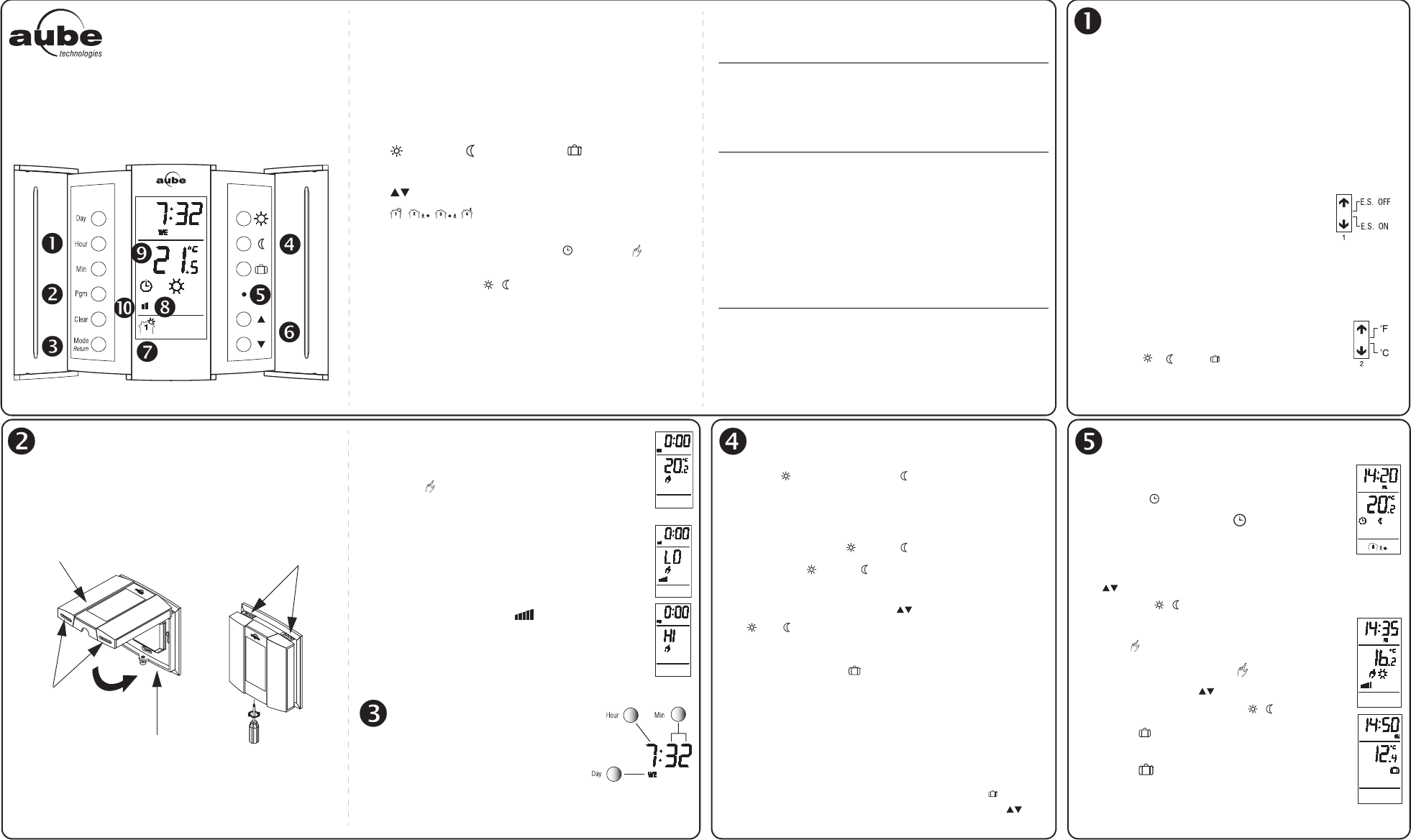
Thank you for choosing the Aube TH132, a programma-
ble thermostat that provides both energy savings and total
comfort.
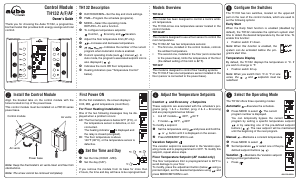
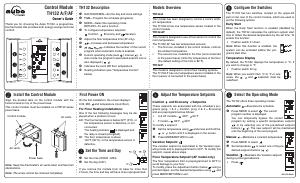
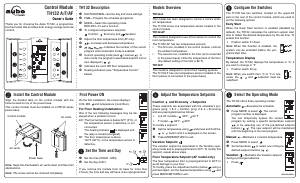
n DAY/HOUR/MIN—Set the day and clock settings.
o PGM—Program the schedule (programs).
p MODE—Select the operating mode.
RETURN—To exit a function.
q To configure temperature setpoints:
Comfort, Economy and Vacation.
r Adjust the floor temperature limit (AF only).
s —Increase and decrease temperature.
t —Indicates the number of the current
program when Automatic mode is enabled.
u Current operating mode (auto / manual ). In
Auto mode, the program’s associated setpoint icon is
also displayed ( ).
v Indicates the room OR floor temperature.
w Heating indicators (see “Temperature Control”
below).
TH132-A
This model has been designed to control a room’s ambi-
ent temperature.
The TH132-A has one temperature sensor located in the
control module.
TH132-AF
This model is designed to use a floor sensor to control the
room temperature.
The TH132-AF has two temperature sensors:
The first one, installed in the control module, controls
the ambient temperature.
The second one, installed in the floor (and connected
to the power base), limits the temperature of the floor
(the default setting of this limit is 82°F).
TH132-F
This model is designed to control floor heating systems.
The TH132-F has one temperature sensor installed in the
floor (sensor is connected to the power base).
The TH132 has two switches, located on the upper-left
part on the rear of the control module, which are used to
set the following options:
Early Start
When the Early Start function is enabled (disabled by
default), the TH132 calculates the optimum system start
time to obtain the desired temperature by the set time. To
enable this function:
Position switch #1 down.
Note: When this function is enabled, the
system can be activated before the pro-
gram’s start time.
Temperature Display
By default, the TH132 displays the temperature in °C. If
you wish to change to °F:
Position switch #2 up.
Note: When you switch from °C to °F or vice
versa, the , and setpoints must be
redefined.
Control Module
TH132 A/F/AF
Owner’s Guide
TH132 Description
Models Overview
Configure the Switches
Align the bracket tabs on the control module with the
holes located on top of the power base.
This control module must be installed on a PB130 series
power base.
Note: Keep the thermostat's air vents clean and free from
obstructions.
Note: The screw cannot be removed completely.
On the first installation, the screen displays:
0:00, MO, and temperature (room/floor).
For Floor Heating Installations:
One of the two following messages may be dis-
played when a problem occurs:
LO: The floor temperature is below 32°F (0°C), or
the temperature sensor is defective, or not
connected.
The heating indicator is displayed and
the relay is closed (energized).
HI: The floor temperature is above
140°F (60°C), or the temperature sensor is
defective.
n Set the time (HOUR - MIN).
o Set the day (DAY).
If you remove the module from its base for more than
2 hours, the time and day will have to be reprogrammed.
Comfort and Economy Setpoints
These setpoints are associated with the schedule’s pro-
grams (prog. 1 & 3 = Comfort, prog. 2 & 4 = Economy)
and are preprogrammed as follows:
A & AF models— 68°F, 64°F
F model— 82°F, 68°F
To modify a setpoint:
n Set the temperature using and press and hold the
or button until it is displayed on the screen.
o Press MODE/RETURN to exit.
Vacation Setpoint
The vacation setpoint is associated to the Vacation oper-
ating mode and is preprogrammed to 50°F. To modify this
setpoint, repeat above steps.
Floor Temperature Setpoint (AF model only)
The floor temperature limit is preprogrammed to 82°F to
avoid damage to your floor.
To modify, press the adjustment button (below ) using a
pointed object, set the desired temperature using and
press MODE/RETURN to exit.
The TH132 offers three operating modes:
Automatic Executes the schedule.
n Press MODE to select . The current
program number is displayed.
You can temporarily bypass the current
program by setting a specific temperature setpoint
or by selecting one of the pre-defined setpoint
buttons ( ). The new setpoint will be maintained
until the beginning of the next program.
Manual —Maintains a constant temperature.
n Press MODE to select .
o Set temperature or select one of the pre-
defined setpoint buttons ( ).
Vacation —Maintains the Vacation setpoint
during a prolonged absence.
Press .
Install the Control Module
Power base
Control module
Air vents
Air vents
First Power ON
Set the Time and Day
Adjust the Temperature Setpoints
Select the Operating Mode
400-132-000-A
Ladda ner bruksanvisning i Engelska (PDF, 0.37 MB)
(Tänk på miljön och skriv endast ut denna bruksanvisning om det verkligen är nödvändigt)

Loading…

Betyg

Berätta vad du tycker om Aube TH132 A Thermostat genom att betygsätta den. Vill du dela med dig av dina åsikter om denna produkt eller ställa en fråga? Lämna en kommentar nederst på sidan.
Är du nöjd med Aube TH132 A Thermostat?
Ja Nej
Bli den första personen som betygsätter denna produkt
0 röster

Delta i konversationen om denna produkt

Här kan du dela vad du tycker om Aube TH132 A Thermostat. Om du har en fråga, läs först noggrant igenom manualen. Att begära en manual kan göras genom att använda vårt kontaktformulär.

Mer om denna bruksanvisning

Vi förstår att det är trevligt att ha en pappersbruksanvisning för din Aube TH132 A Thermostat. Du kan alltid ladda ner bruksanvisningen från vår hemsida och skriva ut den själv. Om du vill ha en originalbruksanvisning rekommenderar vi att du kontaktar Aube. De kanske kan tillhandahålla en originalbruksanvisning. Letar du efter bruksanvisningen för din Aube TH132 A Thermostat på ett annat språk? Välj ditt föredragna språk på vår hemsida och sök efter modellnumret för att se om vi har det tillgängligt.

Specifikationer

Märke Aube
Modell TH132 A
Kategori Thermostater
Filtyp PDF
Filstorlek 0.37 MB

Alla bruksanvisningar för Aube Thermostater
Fler bruksanvisningar för Thermostater

Vanliga frågor om Aube TH132 A Thermostat

Vårt supportteam söker efter användbar produktinformation och svar på vanliga frågor. Om du hittar en felaktighet bland våra vanliga frågor uppskattar vi om du meddelar oss detta via vårt kontaktformulär.

Vad är en termostats döda zon? Verifierad

Många moderna termostater har en död zon. Om temperaturen avviker från mindre än 4 ° C från den inställda temperaturen värms eller svalnar systemet inte. Denna så kallade termostats döda zon förhindrar att systemet slås på och av för ofta, vilket sparar energi.

Detta hjälpte (1756) Läs mer

Vad är det bästa stället att montera en termostat på? Verifierad

Det bästa stället för en termostat är cirka 1,5 meter över marken. Placera aldrig termostaten i en radiator eller annan värmeavgivande utrustning eller i direkt solljus. Välj ett rum som används ofta. I de flesta fall är detta vardagsrummet.

Detta hjälpte (1128) Läs mer
Bruksanvisning Aube TH132 A Thermostat

Relaterade produkter

Relaterade kategorier

×
Download