Technical Data
420x297 mm
Safety instructions and recommendations
Dimensions.. .. .... .. .... .. .... .. .... .. .... .. .... .. .... .. .... .. .... .. .... .. .... .. .... .. .... .. .... .. .... .. .... .. .... .. .... .. .... .. .... .. ..
203×162.5×88.1mm (AF5088PS)
.... .. .. ...... .. .. ...... .. .. .... .. .. ...... .. .. ...... .. .. ...... .. ...... .. .. ...... .. .. ...... .. .. .... .. .. ...... .. .. ...... .. .. ...... 255×202×88.3mm (AF5108PS)
Scre en size.... .. ...... .. ...... .. .. ...... .. .. ...... .. ...... .. .. ...... .. .. ...... .. .. ...... .. ...... .. .. ...... .. .. ...... .. .. .... .. .. ...... 20cm/ 8'' (AF5088PS)
.... .. .. ...... .. .. ...... .. .. .... .. .. ...... .. .. ...... .. .. ...... .. ...... .. .. ...... .. .. ...... .. .. ...... .. ...... .. .. ...... .. .. ...... .. .. .... .2 6cm/10.4 (AF5108PS)''
Aspect ra ti o.. .. ...... .. .. ...... .. .. .... .. .. ...... .. .. ...... .. .. ...... .. ...... .. .. ...... .. .. ...... .. .. .... .. .. ...... .. .. ...... .. .. ...... .. ...... .. .. ...... .. .. ....4:3
Resolution.... ...... .. .. ...... .. .. ...... .. ...... .. .. ...... .. .. ...... .. .. .... .. .. ...... .. .. ...... .. .. ...... .. ...... .. .. ...... .. .. ...... .. .. .... .. .8 00 x 600 pixel
Inte rn al memory.. .. .. ...... .. .. .... .. .. ...... .. .. ...... .. .. ...... .. ...... .. .. ...... .. .. ...... .. .. .... .. .. ...... .. .. ...... .. .. ...... .. ...... .. .. ...... .. .. .128MB
USB port. .... .. .. ...... .. .. ...... .. .. .... .. .. ...... .. .. ...... .. .. ...... .. ...... .. .. ...... .. .. ...... .. .. ...... .. ...... .. .. ...... .. .. ...... .. .. .... .. .. ....USB-H ost
Compati ble memory card.. ...... .. .. ...... .. .. ...... .. ...... .. .. ...... .. .. ...... .. .. .... .. .. ...... .. .. ...... .. .. ...... .. ...... .. .. ...... .. .SD/MMC/MS/XD
Photo format... ...... .. .. ...... .. .. ...... .. .. ...... .. ...... .. .. ...... .. .. ...... .. .. .... .. .. ...... .. .. ...... .. .. ...... .. ...... .. .. ...... .. .. ...... .. ...... .. .. ..JPEG
File form at. .. .. ...... .. .. .... .. .. ...... .. .. ...... .. .. ...... .. ...... .. .. ...... .. .. ...... .. .. .... .. .. ...... .. .. ...... .. .. ...... .. ...... .. .. ...... .. .. ...... .. .. .... *. jpg
- In ord er to prevent damage to th e card or the unit, please tu rn off th e power before removing or inserti ng the card .
- Use enclosed DC 5V/2 A power adapter, th e unit is for indoor use only.
- Always handle the unit with care . Avoid touching th e LCD scre en.
- Never place heavy or sharp objects on the LCD panel, fra me, or power cord .
- Keep th e scre en clean (please use a dry soft cloth for cleaning). Make sure the power is off before cleaning th e unit. Then
gentl y wipe with a dry soft cloth.
- Do not place the unit near any oth er heat sourc es.
- Do not splash or fill th e unit with liquids.
- Do not place the unit to rain, wate r, moisture or high humidity.
- Temperature and humidity :
Opera ting te mperature : 0C- + 45C, Humidity: 20%-80%
- This equipment complies with th e voltage ty pe specified on the unit.
The CE marking certifies that the product meets the main requirements of the European Parliament and Council
directive 1999/5/CE on telecommunications terminal equipment,regarding safety and health of users,and
regarding electromagnetic interference.
The declaration of compliance can be consulted on the site www.agfaphoto.com
Preservation of the environment as part of a sustainable development logic is an essential concern of AgfaPhoto.
The desire of AgfaPhoto is to operate systems observing the environment and consequently it has decided to
integrate environmental performances .
In the life cycle of this products,from manufacturing to commissioning use and elimination.
Packaging:
The presence of the logo(green dot) means that a contribution is paid to an approved national organisation to
improve package recovery and recycling infrastructures to facilitate.please respect the sorting rules set up locally
for this kind of waste.
AgfaPhoto Holding Gmbh:AGFAPHOTO is used under license of Agfa-Gevaert NV & Co.KG.Agfa-Gevaert NV & Co.KG does not
manufacture these products or provide any product warranty or support.Contact:www.agfaphoto.com
For service,support and warranty information,contact the distributor or manufacturer.
Product:
The cro ssed-o ut waste bin stuck on th e product means th at th e pro duct belongs to the family of electri cal and electro nic
equipment. In th is respect, th e Euro pean regulati ons ask you to dispose of it selecti vely;
At sales points in th e event of th e purc hase of similar equipment.
At the collection points made available to you local-l y(dro p-off centre , selecti ve collection, etc .).
In this way you can parti cipate in the re-use and upgrading of Electri cal and Electro nic Equipment Waste, which can have an
effect on the enviro nment and human health.
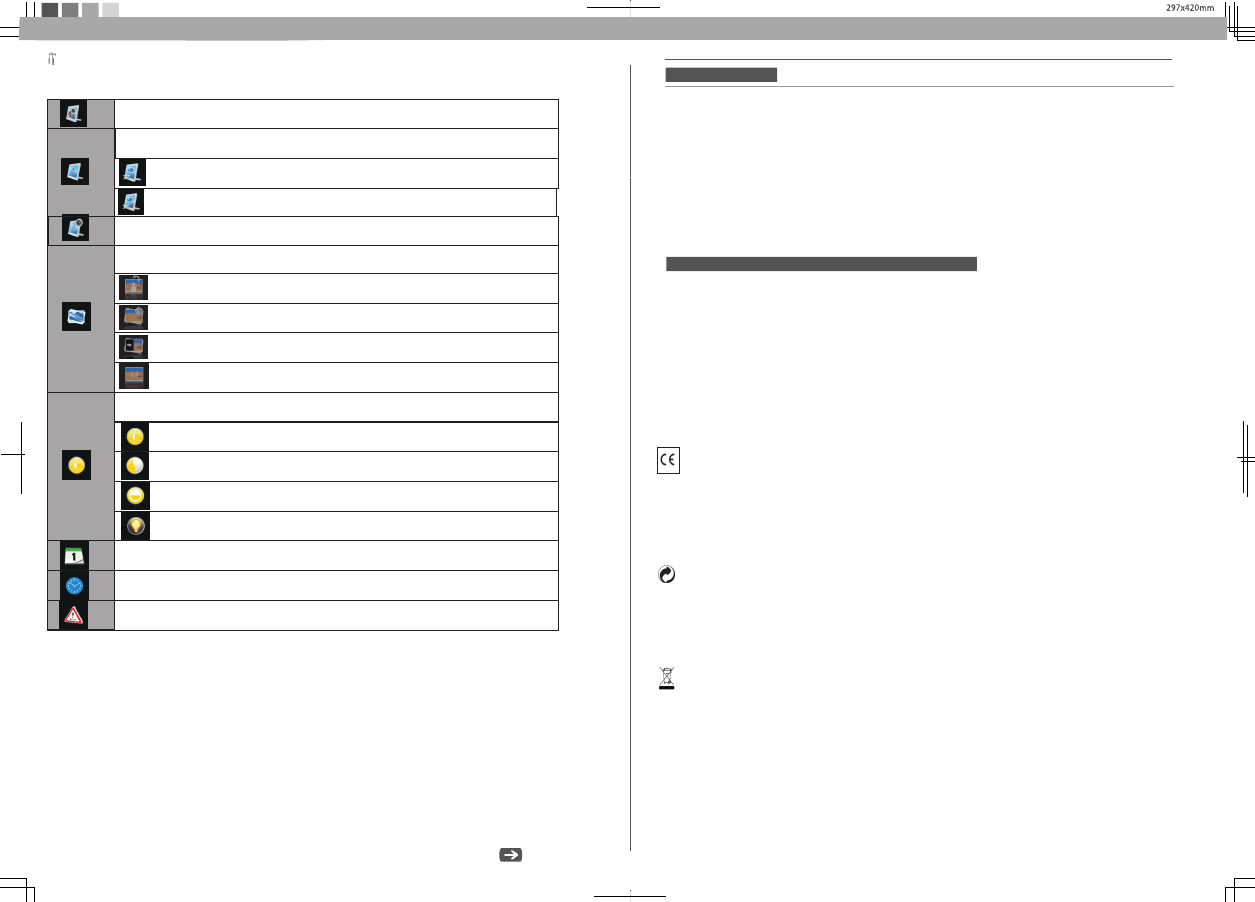
Icons in the setting mode:
Setting Mode
To set specific fun frame
Eco Setting(Set the automatically power on/off time).
Rotation
To change the interval time for slide show.
Photo Setting(from the left to the right)
To choose different transition effect for slide show.
To set different LCD screen display ratio.
Adjust LCD Setting( from left to right )
Brightness
Contrast
Color Saturation
LCD Backlight
Date Setting
Time Setting
Reset
To choose the specific power start mode
Start up with photo slideshow orderly
Start up with photo slideshow randomly


Delta i konversationen om denna produkt
Här kan du dela vad du tycker om Agfa AF 5108 PS Digital fotoram. Om du har en fråga, läs först noggrant igenom manualen. Att begära en manual kan göras genom att använda vårt kontaktformulär.