Bruksanvisning Sylvania SMP2200 Mp3 spelare

Behöver du en bruksanvisning för din Sylvania SMP2200 Mp3 spelare? Nedan kan du se och ladda ner PDF-bruksanvisningen gratis på svenska. Den här produkten har för närvarande 4 vanliga frågor, 0 kommentarer och har 0 röster. Om det här inte är bruksanvisningen du vill ha, vänligen kontakta oss.

Är produkten defekt och erbjuder bruksanvisningen ingen lösning? Gå till ett Repair Café för gratis reparationstjänster.

Bruksanvisning

Loading…
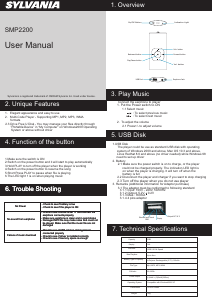
SMP2200
User Manual
1. Overview
2. Unique Features
1. Elegant appearance and easy to use
2. Multi-Code Player - Supporting MP1, MP2, MP3, WMA
2.3 Drive Free U Disk - You may manage your files directly through
4.Switch on the power button to resume the song
210mm
297mm
Sylvania is a registered trademark of OSRAM Sylvania Inc. Used under license.
4. Voice Play
Connect the earphone to player
1. Put the Power switch to ON
1.1
: To select previous music
: To select next music
2. To adjust the volume
2.1 Press+/- to adjust volume
1.USB Disk
The player could be use as standard USB disk with operating
system of Windows 2000 and above, Mac OS 10.3 and above,
Linux Redhat 8.0 and above (no driver needed) while Windows 98
need to set up driver
2. Battery
3. Remarks (Additional information for Adaptor purchase)
2.1 Make sure the power switch is on to charge, or the player
3.1 The adaptor must be conformed to following standard
could not be charged properly. The indication LED light is
on when the player is charging. It will turn off when the
battery is full
2.2 Disconnect the player and charger if you want to stop charging
3.1.2 Output: 5.2V 0.2V
3.1.3 Max.: 350mA
3.1.4 4 pins adaptor
3.1.1 Input: 100V - 240V, 50/60Hz
2.3 Turn off the player when you do not use player
3. Play Music
2.Switch on the power button and it will start to play automatically
5.Short Press PLAY to pause when file is playing
6.The LED light 1 is on when playing music
1.Make sure the switch is ON
3.Hold PLAY to turn off the player when the player is working
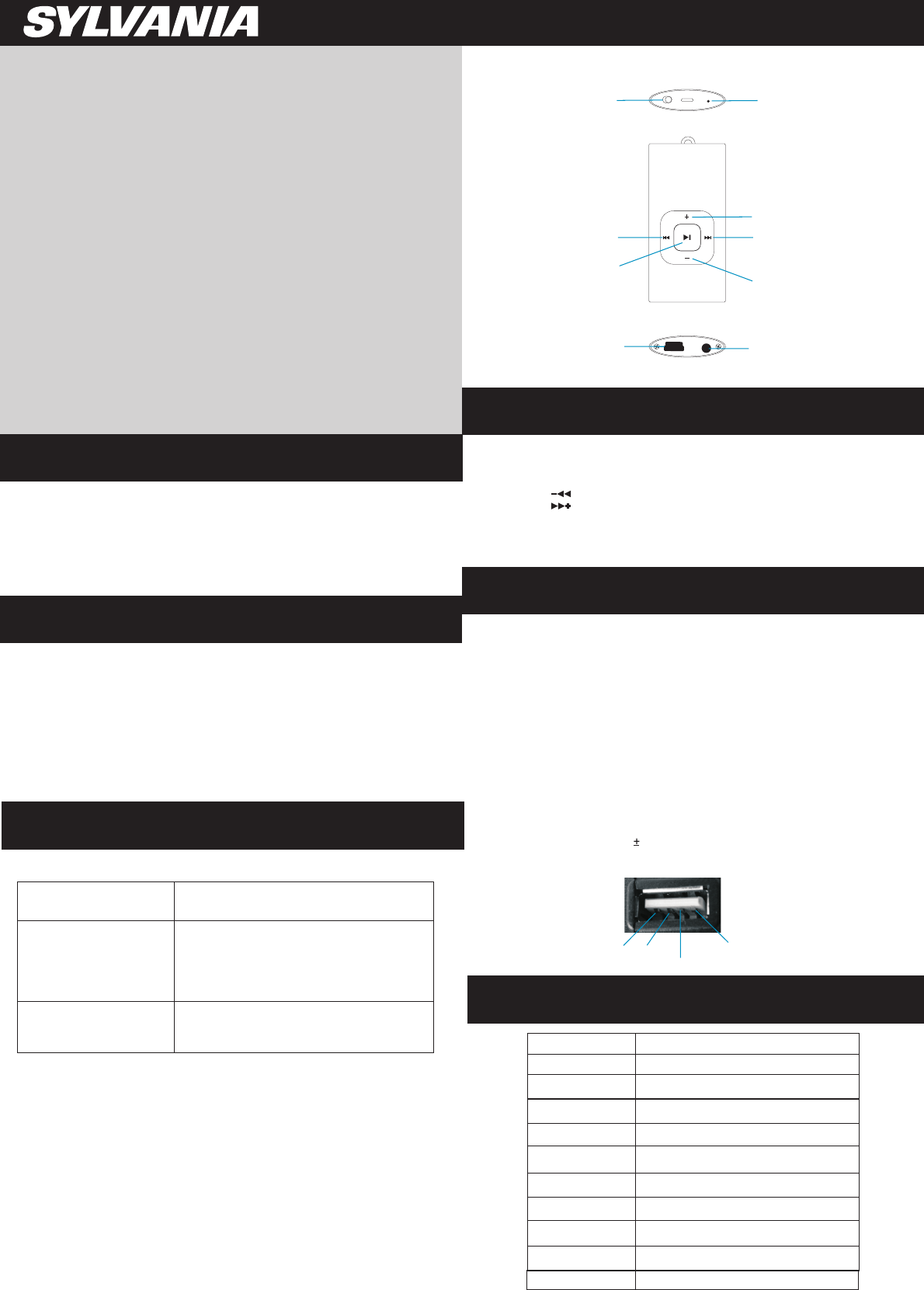
4. Function of the button
5. USB Disk
Play/Pause button
Forward button
Backward button
Vol+ button
Earphone Jack
USB Port
Output DC 5V 2
Shorted and Touch
GND
Empty
Device” in “My Computer” on Windows2000 Operating
formats
“Portable
System or above without driver
Select music
7. Technical Specifications
Capacity
2GB
NA
USB 2.0 Full Speed
Interface
Max Playtime
Battery Type & Capacity
File Type
S/N ratio
Power Output
Operating System
Dimensions
Weight
Up to 4hrs
Li-Polymer Rechargeable (3.7V) 110mAh
Mp1, MP2 ,MP3, WMA
85~95Db
(L)5mW + (R)5mW(320hm)
Compatible with Windows2000/ XP
59 x 29 x 8mm
20g
Display
6. Trouble Shooting
- Check to see if battery is low
No Power
- Check to see if the player is ON
- Check to see Volume is set “0” and connect the
earphone connects properly
- Make sure earphone is clean and in good status
- Damaged MP3 file may make noise and could not
be played. Make sure that the music file are not
damaged
- Check to see if USB cable is damaged and
connected properly
- Check to see if driver is installed correctly
- Check to see if memory space is enough
No sound from earphone
Failure of music download
6. Trouble Shooting
- Check to see if battery is low
No Power
- Check to see if the player is ON
- Check to see Volume is set “0” and connect the
earphone connects properly
- Make sure earphone is clean and in good status
- Damaged MP3 file may make noise and could not
be played. Make sure that the music file are not
damaged
- Check to see if USB cable is damaged and
connected properly
- Check to see if driver is installed correctly
- Check to see if memory space is enough
No sound from earphone
Failure of music download
6. Trouble Shooting
- Check to see if battery is low
No Power
- Check to see if the player is ON
- Check to see Volume is set “0” and connect the
earphone connects properly
- Make sure earphone is clean and in good status
- Damaged MP3 file may make noise and could not
be played. Make sure that the music file are not
damaged
- Check to see if USB cable is damaged and
connected properly
- Check to see if driver is installed correctly
- Check to see if memory space is enough
No sound from earphone
Failure of music download
V
On/Off Button
Indication Light
ol- button
Ladda ner bruksanvisning i Engelska (PDF, 0.66 MB)
(Tänk på miljön och skriv endast ut denna bruksanvisning om det verkligen är nödvändigt)

Loading…

Betyg

Berätta vad du tycker om Sylvania SMP2200 Mp3 spelare genom att betygsätta den. Vill du dela med dig av dina åsikter om denna produkt eller ställa en fråga? Lämna en kommentar nederst på sidan.
Är du nöjd med Sylvania SMP2200 Mp3 spelare?
Ja Nej
Bli den första personen som betygsätter denna produkt
0 röster

Delta i konversationen om denna produkt

Här kan du dela vad du tycker om Sylvania SMP2200 Mp3 spelare. Om du har en fråga, läs först noggrant igenom manualen. Att begära en manual kan göras genom att använda vårt kontaktformulär.

Mer om denna bruksanvisning

Vi förstår att det är trevligt att ha en pappersbruksanvisning för din Sylvania SMP2200 Mp3 spelare. Du kan alltid ladda ner bruksanvisningen från vår hemsida och skriva ut den själv. Om du vill ha en originalbruksanvisning rekommenderar vi att du kontaktar Sylvania. De kanske kan tillhandahålla en originalbruksanvisning. Letar du efter bruksanvisningen för din Sylvania SMP2200 Mp3 spelare på ett annat språk? Välj ditt föredragna språk på vår hemsida och sök efter modellnumret för att se om vi har det tillgängligt.

Specifikationer

Märke Sylvania
Modell SMP2200
Kategori Mp3 spelare
Filtyp PDF
Filstorlek 0.66 MB

Alla bruksanvisningar för Sylvania Mp3 spelare
Fler bruksanvisningar för Mp3 spelare

Vanliga frågor om Sylvania SMP2200 Mp3 spelare

Vårt supportteam söker efter användbar produktinformation och svar på vanliga frågor. Om du hittar en felaktighet bland våra vanliga frågor uppskattar vi om du meddelar oss detta via vårt kontaktformulär.

När jag ansluter en hörlur till min enhet fungerar den inte korrekt, vad kan jag göra? Verifierad

Det är möjligt att smuts har samlats i öppningen där hörlurarna är ansluten, vilket förhindrar att den kommer i rätt kontakt. Det bästa sättet att rengöra detta är med tryckluft. Om du är osäker, gör detta av en professionell.

Detta hjälpte (51) Läs mer

Vad är det för skillnad mellan Mp3, WAV, AIFF och FLAC? Verifierad

Skillnaden är att WAV, AIFF och FLAC är förlustfria filtyper och Mp3 är ett ”lossy” komprimeringsformat. Det innebär att det krävs högre komprimering för att skapa en Mp3-fil. Det gör filerna mindre, men leder också till kvalitetsförlust.

Detta hjälpte (37) Läs mer

Vad står Mp3 för? Verifierad

Mp3 är en förkortning för MPEG3. Detta står för Moving Picture Experts Group Layer-3 Audio. Mp3 är det mest använda filformatet för att lagra och spela musik eller andra ljudformer.

Detta hjälpte (26) Läs mer

Hur mycket kostar kilobyte, megabyte, gigabyte och terabyte? Verifierad

En kilobyte består av 1000 byte. 1 megabyte = 1000 kilobyte. 1 gigabyte = 1000 megabyte. 1 terabyte = 1000 gigabyte.

Detta hjälpte (22) Läs mer
Bruksanvisning Sylvania SMP2200 Mp3 spelare

Relaterade produkter

Relaterade kategorier

×
Download