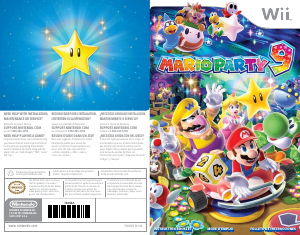
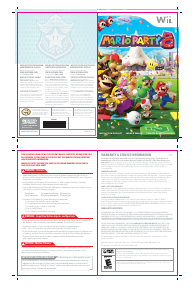
Bruksanvisning Nintendo Wii Mario Party 8

Behöver du en bruksanvisning för din Nintendo Wii Mario Party 8? Nedan kan du se och ladda ner PDF-bruksanvisningen gratis på svenska. Den här produkten har för närvarande 3 vanliga frågor, 0 kommentarer och har 1 röst med ett genomsnittligt produktbetyg på 100/100. Om det här inte är bruksanvisningen du vill ha, vänligen kontakta oss.

Är produkten defekt och erbjuder bruksanvisningen ingen lösning? Gå till ett Repair Café för gratis reparationstjänster.

Bruksanvisning

Loading…
SELECT RULESSELECT RULES
MINIGAME STAR: For the player or team who earned the most coins in minigames.
CANDY STAR: For the player or team who used the most Candy.
GREEN STAR: For the player or team who landed on the most Green Spaces.
RUNNING STAR: For the player or team who advanced the most spaces.
SHOPPING STAR: For the player or team who spent the most coins in shops.
RED STAR: For the player or team who landed on the most Red Spaces.
GAME FLOWGAME FLOWGAME FLOW
SELECT STAGESELECT STAGE
SELECT RULESSELECT RULES
SELECT CHARACTERSELECT CHARACTER
SELECT PLAYERSSELECT PLAYERS
One player
Two players
Three players
Four players
SELECT BATTLESELECT BATTLE
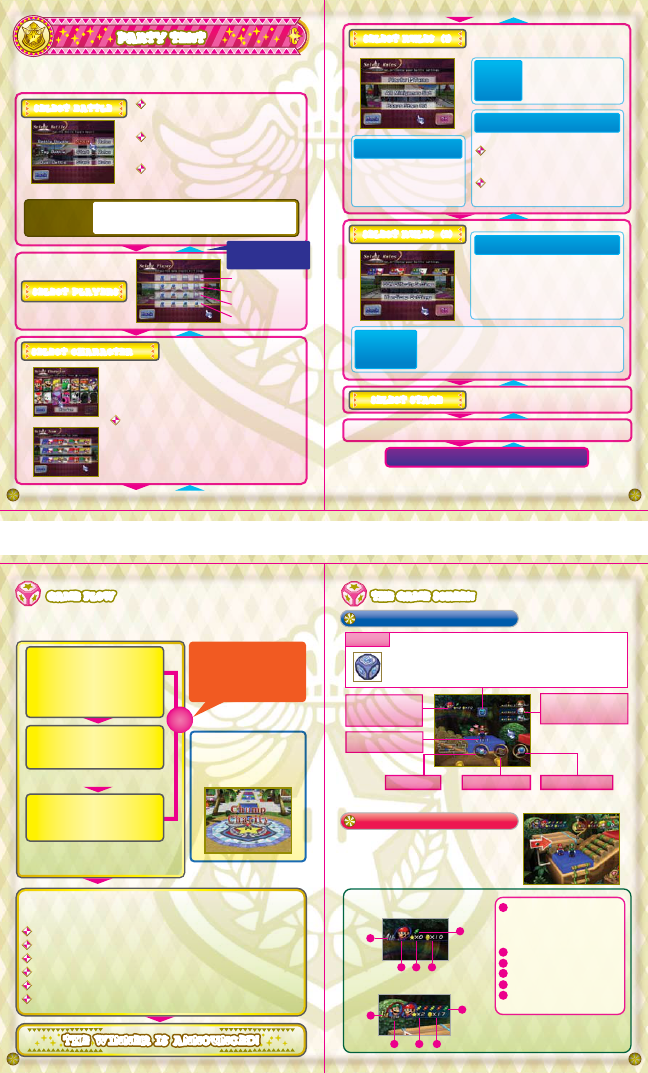
PARTY TENT
87
109
You’ll see the rules for a battle when you select it. Take a
good look, especially if you’re trying a new kind of battle for
the first time, then confirm your selection.
When you start a new game in the Party Tent, you’ll use the following procedure
to choose the rules and settings for your party-board match. Player 1 controls
all choices except the character selections.
Four characters face off
(one to four players)
Two characters battle
(one or two players) (p. 16)
Two teams of two fight it out
(one to four players)
Each player will control a different finger pointer
when choosing a character. Player 1 must choose
any system-controlled (COM) characters. Player 1
must also select OK when everyone has finished
with their selections.
You must also choose teams when playing a
Tag Battle. Each team has a unique team name,
depending on which two characters are paired.
Player 1 can select this option to randomly
assign characters to players who haven’t
chosen one yet.
Select Back to return
to the previous screen.
BATTLE ROYALE
DUEL BATTLE
TAG BATTLE
RANDOM
SELECT TEAM
CONFIRM
BATTLE RULES
PARTY TENTPARTY TENT
Choose a party-board stage to play.
You can select
between 10 and 50 turns
(in intervals of 5) (p. 9).
Choose a skill setting for any
system-controlled characters
(COM players) to make each an
Easy, Normal, or Hard foe to beat.
In Battle Royale and Tag Battle, you can choose the
Handicap setting for each character, giving each an
advantage of Stars to start out with (0 to 3 Stars).
If you set this option
to ON, then Bonus Stars
will be awarded at the end
of the game.
Choose one of the following two options:
All party-board minigames
can show up.
Only the easy-to-play minigames
will appear.
The default rules are those shown
to the left.
Review your selections, then select Start Game to continue.
ALL MINIGAMES SET
SIMPLE MINIGAME SET
Number
of Turns
Bonus Stars
Minigame Sets
COM Difficulty Settings
Handicap
Settings
(2)
(1)
(2)
(1)
If you have turned Bonus Stars ON, then those Stars will be awarded
at the end of the game. (Not in a Duel Battle.)
Once everyone has moved
and the minigame has ended,
the next turn will begin.
ONE
TURN
Let’s take a look at how the game is played. Some modes have different
conditions for winning, but the general goal is to collect Stars and coins.
When the game is
almost over, an event
called Chump Charity
will begin (p. 15).
The first player or team hits the
Dice Block and moves that many
spaces forward. You can also use
Candy before you move (p. 13).
A minigame begins when
all players and teams
have finished moving (p. 15).
(Not in a Duel Battle.)
The player will experience an event
depending on the spaces he lands
on (p. 11) or the Candy he uses.
The other players will repeat the above steps.
The game ends when the players
have fulfilled certain set conditions.
THE WINNER IS ANNOUNCED!THE WINNER IS ANNOUNCED!THE WINNER IS ANNOUNCED!
Status Panel:
Battle Royale/Duel Battle
Status Panel: Tag Battle
Character currently
taking a turn.
Status Panels for the
characters awaiting
their turns.
Full Map
In a Tag Battle, teams of two players each will
compete on the board. Each player moves on
their own, but their Stars, coins, and Candy
are owned by both teammates.
For more information, see Stage Controls (p. 12).
When your turn arrives, you must first use the Dice Block to
determine how far you’ll move. To hit the block, motion upward
with the Wii Remote. You can move the number of spaces
(1 to 10) that you roll. If you have Candy, you must first select
the Dice Block icon to roll a number.
In a Battle Royale, the panel’s color changes to the
color of the space you land on, which determines
what kind of minigame everyone plays at the end
of the turn (p. 15).
Current ranking
A character’s or team’s rank is
determined by the number of Stars
owned, with coins used as a
tie-breaker.
Number of Stars
Number of coins
Current Candies
COM-controlled characters
Blue (P1), Red (P2), Green (P3),
and Yellow (P4)
Dice Block
Path MapCandy
Status Panel for the
player currently
taking a turn.
THE GAME SCREENTHE GAME SCREENTHE GAME SCREEN
BATTLE ROYALE/DUEL BATTLE
1
2
3
6
5
1
2
3
4
4
1
2
3
4
5
6
TAG BATTLE
Start the game!
Ladda ner bruksanvisning i Engelska (PDF, 4.07 MB)
(Tänk på miljön och skriv endast ut denna bruksanvisning om det verkligen är nödvändigt)

Loading…

Betyg

Berätta vad du tycker om Nintendo Wii Mario Party 8 genom att betygsätta den. Vill du dela med dig av dina åsikter om denna produkt eller ställa en fråga? Lämna en kommentar nederst på sidan.
Är du nöjd med Nintendo Wii Mario Party 8?
Ja Nej
100%
0%
1 röst

Delta i konversationen om denna produkt

Här kan du dela vad du tycker om Nintendo Wii Mario Party 8. Om du har en fråga, läs först noggrant igenom manualen. Att begära en manual kan göras genom att använda vårt kontaktformulär.

Mer om denna bruksanvisning

Vi förstår att det är trevligt att ha en pappersbruksanvisning för din Nintendo Wii Mario Party 8. Du kan alltid ladda ner bruksanvisningen från vår hemsida och skriva ut den själv. Om du vill ha en originalbruksanvisning rekommenderar vi att du kontaktar Nintendo Wii. De kanske kan tillhandahålla en originalbruksanvisning. Letar du efter bruksanvisningen för din Nintendo Wii Mario Party 8 på ett annat språk? Välj ditt föredragna språk på vår hemsida och sök efter modellnumret för att se om vi har det tillgängligt.

Specifikationer

Märke Nintendo Wii
Modell Mario Party 8
Kategori Spel
Filtyp PDF
Filstorlek 4.07 MB

Alla bruksanvisningar för Nintendo Wii Spel
Fler bruksanvisningar för Spel

Vanliga frågor om Nintendo Wii Mario Party 8

Vårt supportteam söker efter användbar produktinformation och svar på vanliga frågor. Om du hittar en felaktighet bland våra vanliga frågor uppskattar vi om du meddelar oss detta via vårt kontaktformulär.

Vad betyder regionskoden på mitt Nintendo Wii-spel? Verifierad

Regionskoderna anger för vilken modellspeldator ditt spel passar. Till exempel kan ett PAL-spel bara spelas på en PAL-speldator. Följande regionkoder finns: PAL (Europa och Oceanien), NTSC-U (Nordamerika, Sydamerika, Singapore, Malaysia och Filippinerna), NTSC-J (Japan, Hong Kong & Taiwan) och NTSC-K (Sydkorea) .

Detta hjälpte (15) Läs mer

Kan jag spela mitt Nintendo Wii-spel på Nintendo Wii U också? Verifierad

Ja, Nintendo säger att alla Wii-spel också kan spelas på Wii U.

Detta hjälpte (9) Läs mer

Kan jag reparera repor på en spelskiva själv? Verifierad

Repor förhindrar att lasern läser skivan korrekt. När reporna bara är ytliga är det möjligt att reparera dem själv genom att polera skivan med en lätt slipande förening. Helst använder du en professionell slipmedel men det är också möjligt att använda vanlig tandkräm. Efter att du har polerat skivan måste den tvättas och torka. Det finns specialiserade företag som kan göra detta.

Detta hjälpte (9) Läs mer
Bruksanvisning Nintendo Wii Mario Party 8

Relaterade produkter

Relaterade kategorier

×
Download