8765
FN
I
D
13
14
15
16
12
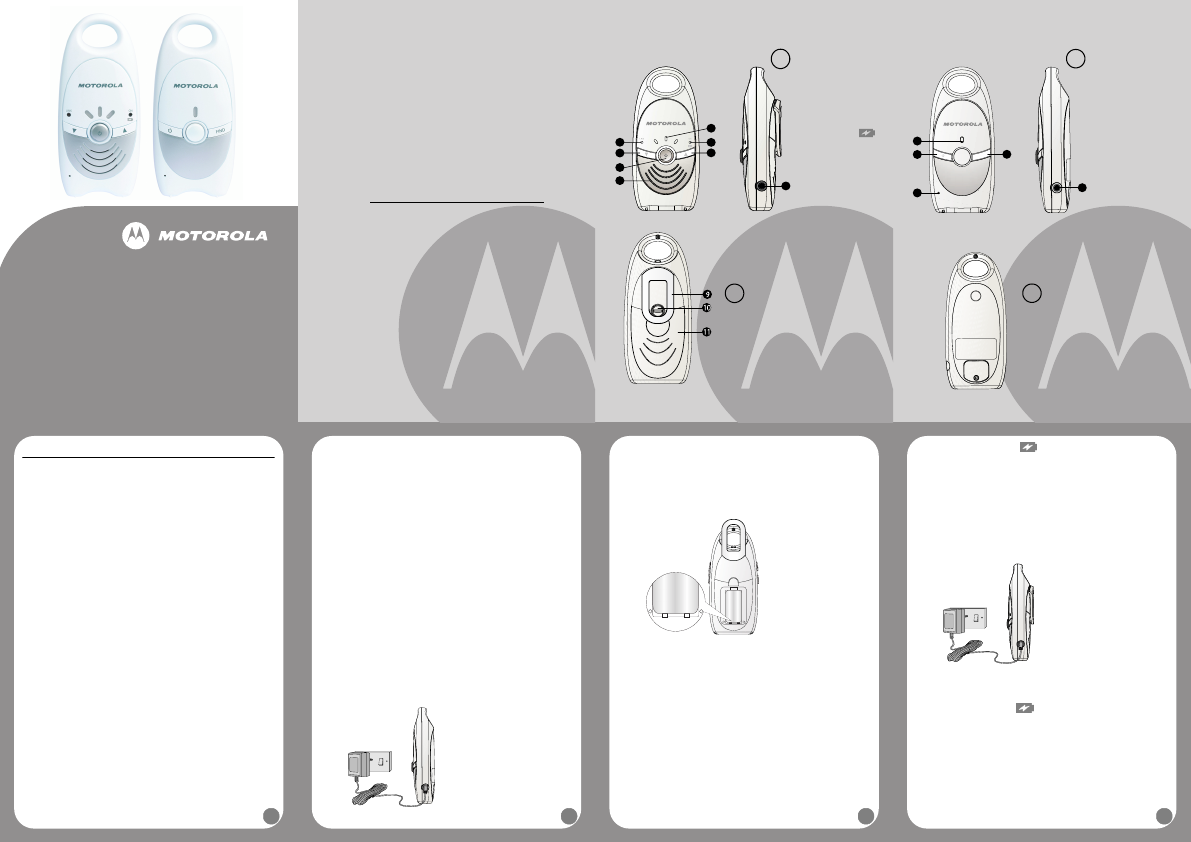
Overview of your Baby unit
C
Back of baby unit, no
serviceable parts.
D
12. Power LED
13. Power On/Off
button
A
14. Microphone
15. Paging button
B
16. Power adapter
connector
1. Safety Instructions
WARNING
This baby monitor is compliant with all relevant standards regarding electromagnetic
fields and is, when handled as described in the User’s Guide, safe to use. Therefore,
always read the instructions in this User’s Guide carefully before using the device.
• Adult assembly is required. Keep small parts away from children when assembling.
• This product is not a toy. Do not allow children to play with it.
• This baby monitor is not a substitute for responsible adult supervision.
• Keep this User’s Guide for future reference.
• Do not place the baby unit or cables in the crib or within arm's reach of the baby
(the unit should be at least 3 feet away).
• Keep the cords out of reach of children.
• Do not cover the baby monitor with a towel or blanket.
• Never use extension cords with power adapters. Only use the power adapters
provided.
• Test the baby monitor before use. Become familiar with its functions.
• Do not use the baby monitor near water.
• Do not install the baby monitor near a heat source.
• Only use the chargers and power adapters provided. Do not use other chargers
or power adapters as this may damage the device and batteries.
• For the parent unit, only insert a rechargeable battery pack of the same type.
• Do not touch the charger or plug contacts with sharp or metal objects.
CAUTION
Risk of explosion if battery is replaced by an incorrect type. Dispose of used
batteries according to the instructions.
2. Getting Started
2.1 Baby unit power supply
1. Connect the small plug of the power adapter to the power connector on the
baby unit and the other end of the adapter to the electrical outlet (110V/60Hz).
NOTE
Only use the enclosed power adapter (6V DC / 300mA).
2. Press
A. The Power LED will illuminate.
3. Press and hold
A to switch off the baby unit.
2.2 Parent unit battery installation
The Parent unit can be used with either the rechargeable battery pack (2.4V
600mAh Ni-MH rechargeable battery pack supplied) or via the power adapter
supplied.
NOTE
The Ni-MH rechargeable battery pack must be charged for 15 hours before using
the Parent unit without the power supply.
We recommend installing the rechargeable battery pack, so that the unit continues
to work in the event of a power outage.
1. Using a screwdriver, turn the screw of the battery cover on the back of the parent
unit counterclockwise 90 degrees to remove the battery cover.
NOTE
Rotate the belt clip to its hanging position to make it easier to access the battery
compartment.
Do not try to turn the screw further than the
OPEN
position marked on the cover.
2. Fit the Ni-MH rechargeable battery pack in the compartment as shown above.
3. Close the battery compartment and turn the screw back 90 degrees.
+
-
+
-
4. Press P. The Power (ON / ) LED will illuminate green if it only has
battery power.
5. Press and hold
P to switch off the parent unit.
NOTE
When the battery level is low, the green power LED will flash and the parent unit
will emit a warning beep once every minute. If the baby unit loses power or goes
out of range, the link will be lost and the parent unit will emit a warning beep every
3 seconds and the green link LED on the parent unit will continue to flash.
WARNING
Keep battery pack away from small children.
Do not short-circuit battery pack or dispose of in fire.
Remove the battery pack if this device is not going to be used for a long period of time.
2.3 Parent unit power supply
1. Connect the small plug of the power adapter to the power connector on the
parent unit and the other end of the adapter to the electrical outlet (110V/60Hz).
NOTE
Only use the enclosed adapter (6V DC / 300mA).
2. Press
P. The Power (ON / ) LED will illuminate red when it is connected
to the power supply.
3. Press and hold
P to switch off the parent unit.
2.4 Link
NOTE
Do not place the baby unit or the unit's cord in the crib or within arm's reach of the
baby (the unit should be at least 3 feet away).
When using the baby monitor for the first time, it is advised to test the connection.
• Install the parent unit in the same room as the baby unit, but make sure there
are at least 3 feet between the 2 units.
• When both units are switched on, the parent unit will search for the baby unit.
Table of contents
1. Safety Instructions........................................................................ 6
2. Getting Started .............................................................................. 6
2.1 Baby unit power supply ................................................................ 6
2.2 Parent unit battery installation ...................................................... 7
2.3 Parent unit power supply.............................................................. 8
2.4 Link............................................................................................... 8
2.5 Registration .................................................................................. 9
2.6 Paging .......................................................................................... 9
3. Using the MBP10, MBP10L........................................................... 9
3.1 Volume adjustment on the Parent unit ......................................... 9
4. Disposal of the Device in the Environment .............................. 10
5. Cleaning....................................................................................... 10
6. Help .............................................................................................. 11
7. General Information.................................................................... 11
1
2
3
4
5
6
7
8
1. Link indicator LED
2. Volume down
button
M
3. Power On/Off
button
P
4. Speaker
5. Volume up
button
O
6. Power (ON / )
LED
7. Volume indicator
LEDs
8. Power adapter
connector
Overview of your Parent unit
B
9. Belt clip
10. Battery cover screw
11. Battery cover
A
This User’s Guide provides you with all the information you need to get
the most from your product.
Before you can use the baby monitor, you’ll need to insert and fully
charge the battery on the Parent unit. Please read the Safety
Instructions in section 1 “Safety Instructions” before you install the units.
Got everything?
• 1 x Parent unit
• 1 x Baby unit
• 1 x Rechargeable battery pack for the Parent unit
• 1 x Power adapter for the Parent unit
• 1 x Power adapter for the Baby unit
Welcome...
to your new Motorola Digital Baby Monitor!
Thank you for purchasing the MBP10, MBP10L. This baby monitor uses
digital communication which ensures that you can hear your baby
clearly without any distracting noise or interference.
Please retain your original dated sales receipt for your records. For
warranty service of your Motorola product, you will need to provide a
copy of your dated sales receipt to confirm warranty status. Registration
is not required for warranty coverage.
For product related questions, please call:
1-888-331-3383 in US and Canada
On the Web: www.motorola.com
USER’S GUIDE
MBP10, MBP10L
DIGITAL BABY MONITOR
The features described in this user’s guide are subject to
modifications without prior notice.


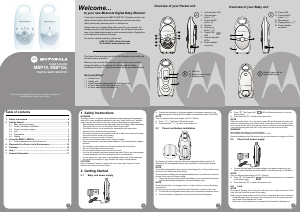


Delta i konversationen om denna produkt
Här kan du dela vad du tycker om Motorola MBP10L Babyvakt. Om du har en fråga, läs först noggrant igenom manualen. Att begära en manual kan göras genom att använda vårt kontaktformulär.