3
Operation Guide 3173 3246
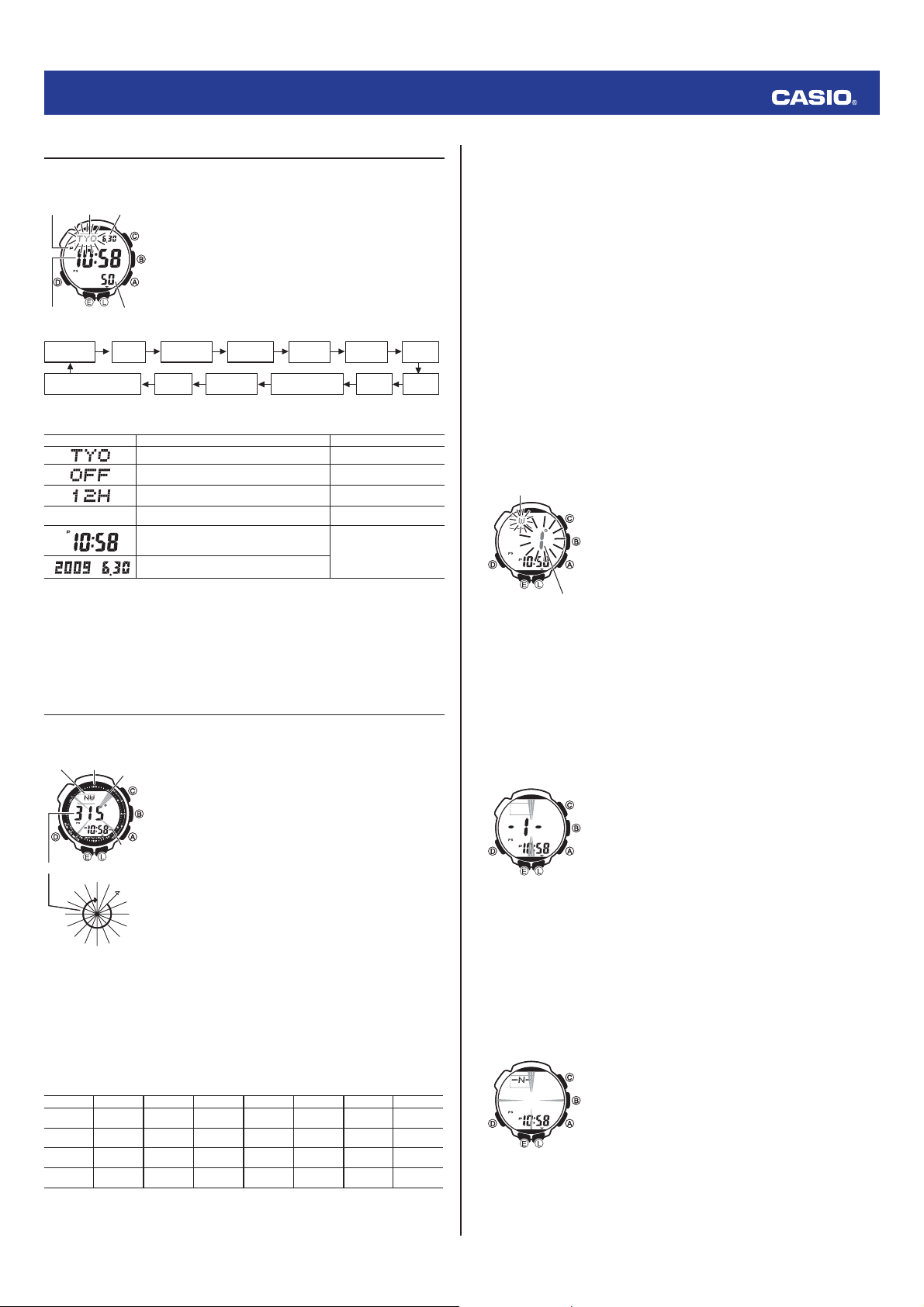
Confi guring Current Time and Date Settings
You can use the procedure below to adjust the Timekeeping Mode time and date settings if they are off.
To change the current time and date settings
1. In the Timekeeping Mode, hold down
E
until the currently selected
city code starts to fl ash. This is the city code setting screen.
• Before the city code starts to fl ash, the message SET Hold
will appear on the display. Keep
E
depressed until SET Hold
disappears and the city code starts to fl ash.
2. Use
A
and
C
to select the city code you want.
• Select your Home City code before changing any other setting.
• For full information on city codes, see the “City Code Table”.
3. Press
D
to move the fl ashing in the sequence shown below to select the other settings.
Thermometer/Barometer/
Altitude unit
Power
Saving
Illumination
Duration
Button Operation
Tone On/Off
Day Month
City Code DST
12/24-Hour
Format
Seconds Hour Minutes Year
• The following steps explain how to confi gure timekeeping settings only.
4. When the timekeeping setting you want to change is fl ashing, use
A
and/or
C
to change it as
described below.
Screen To do this: Do this:
Change the city code Use
A
(East) and
C
(West).
Toggle between Daylight Saving Time (
On
) and
Standard Time (
OFF
).
Press
A
.
Toggle between 12-hour (
12H
) and 24-hour (
24H
)
timekeeping.
Press
A
.
50
Reset the seconds to
00
Press
A
.
Change the hour or minutes
Use
A
(+) and
C
(–).
Change the year, month, or day
5. Press
E
twice to exit the setting screen.
Note
• For information about selecting a Home City and confi guring the DST setting, see “Confi guring
Home City Settings”.
• While 12-hour format is selected for timekeeping, a P (PM) indicator will appear for times from
noon to 11:59 p.m. No indicator appears for times from midnight to 11:59 a.m. With 24-hour format,
time is displayed from 0:00 to 23:59, without any P (PM) indicator.
• The watch’s built-in full automatic calendar makes allowances for different month lengths and leap
years. Once you set the date, there should be no reason to change it except after you have the
watch’s rechargeable battery replaced or after power drops to Level 5.
Digital Compass
In the Digital Compass Mode, a built-in bearing sensor detects magnetic north at regular intervals and
indicates one of 16 directions on the display.
To take a digital compass reading
1. Make sure the watch is in the Timekeeping Mode or any one of the
sensor modes.
• The sensor modes are: Digital Compass Mode, Barometer/
Thermometer Mode, and Altimeter Mode.
2. Place the watch on a fl at surface. If you are wearing the watch, make
sure that your wrist is horizontal (in relation to the horizon).
3. Point the 12 o'clock position of the watch in the direction you want to
measure.
4. Press
C
to start digital compass measurement.
• COMP will appear on the display to indicate that a digital compass
operation is in progress.
• See “Digital Compass Readings” for information about what
appears on the display.
Note
• If a value appears to the right of the direction indicator, it means
that the bearing memory screen is displayed. If this happens, press
E
to exit the bearing memory screen.
5. After you are fi nished using the digital compass, press
D
to return to
the Timekeeping Mode.
Digital Compass Readings
• When you press
C
to start digital compass measurement,
COMP
will appear on the display initially to
indicate that a digital compass operation is in progress.
• About two seconds after you start a digital compass measurement operation, letters on the display will
indicate the direction that the 12 o’clock position of the watch is pointing. Four pointers that indicate
magnetic north, south, east, and west also will appear.
• After the fi rst reading is obtained, the watch will continue to take digital compass readings automatically
each second for up to 20 seconds. After that, measurement will stop automatically.
• The direction indicator and angle value will show
- - -
to indicate that digital compass readings are
complete.
• The auto light switch is disabled during the 20 seconds that digital compass readings are being taken.
• The following table shows the meanings of each of the direction abbreviations that appear on the
display.
Direction Meaning Direction Meaning Direction Meaning Direction Meaning
N
North
NNE
North-
northeast
NE
Northeast
ENE
East-
northeast
E
East
ESE
East-
southeast
SE
Southeast
SSE
South-
southeast
S
South
SSW
South-
southwest
SW
Southwest
WSW
West-
southwest
W
West
WNW
West-
northwest
NW
Northwest
NNW
North-
northwest
• The margin of error for the angle value and the direction indicator is ±11 degrees while the watch is
horizontal (in relation to the horizon). If the indicated direction is northwest (
NW
) and 315 degrees, for
example, the actual direction can be anywhere from 304 to 326 degrees.
PM
indicator
City
code
Month
Day
SecondsHour : Minutes
PM
indicator
City
code
Month
Day
SecondsHour : Minutes
NW
0
W
NW
W
WSW
SW
SSW
S
S
S
E
SE
ESE
E
E
N
E
NE
NNE
N
NNW
90
180
270
12 o’clock
position
Current
time
North
pointer
Direction
indicator
Angle value (in degrees)
NW
0
W
NW
W
WSW
SW
SSW
S
S
S
E
SE
ESE
E
E
N
E
NE
NNE
N
NNW
90
180
270
12 o’clock
position
Current
time
North
pointer
Direction
indicator
Angle value (in degrees)
• Note that taking a measurement while the watch is not horizontal (in relation to the horizon) can result in
large measurement error.
• You can calibrate the bearing sensor if you suspect the direction reading is incorrect.
• Any ongoing direction measurement operation is paused temporarily while the watch is performing an
alert operation (daily alarm, Hourly Time Signal, countdown timer alarm) or while illumination is turned
on (by pressing
L
). The measurement operation resumes for its remaining duration after the operation
that caused it to pause is fi nished.
• See “Digital Compass Precautions” for important information about taking direction readings.
Calibrating the Bearing Sensor
You should calibrate the bearing sensor whenever you feel that the direction readings being produced by
the watch are off. There are three different calibration methods available: magnetic declination correction,
bidirectional calibration, and northerly calibration.
•
Magnetic Declination Correction
With magnetic declination correction, you input a magnetic declination angle (difference between
magnetic north and true north), which allows the watch to indicate true north. You can perform this
procedure when the magnetic declination angle is indicated on the map you are using. Note that you can
input the declination angle in whole degree units only, so you may need to round off the value specifi ed
on the map. If your map indicates the declination angle as 7.4°, you should input 7°. In the case of 7.6°
input 8°, for 7.5° you can input 7° or 8°.
•
Bidirectional Calibration and Northerly Calibration
Bidirectional calibration and northerly calibration calibrate the accuracy of the bearing sensor in relation
to magnetic north. Use bidirectional calibration when you want to take readings within an area exposed
to magnetic force. This type of calibration should be used if the watch becomes magnetized for any
reason. With northerly calibration, you “teach” the watch which way is north (which you have to determine
with another compass or some other means).
Important!
The more correctly you perform bidirectional calibration, the better the accuracy of the bearing sensor
readouts. You should perform bidirectional calibration whenever you change environments where you
use the bearing sensor, and whenever you feel that the bearing sensor is producing incorrect readings.
To perform magnetic declination correction
1.
In the Digital Compass Mode, hold down
E
until the current magnetic
declination settings start to fl ash on the display. This is the setting screen.
•
Before the magnetic declination settings start to fl ash, the message
SET Hold will appear on the display. Keep
E
depressed until
SET Hold disappears and the magnetic declination settings start to
fl a s h .
2. Use
A
(East) and
C
(West) to change the settings.
• The following explains magnetic declination angle direction
settings.
OFF
: No magnetic declination correction performed. The magnetic
declination angle with this setting is 0°.
E
: When magnetic north is to the east (east declination)
W
: When magnetic north is to the west (west declination)
• You can select a value within the range of W 90° to E 90° with
these settings.
• You can turn off (OFF) magnetic declination correction by pressing
A
and
C
at the same time.
• The illustration, for example, shows the value you should input
and the direction setting you should select when the map shows a
magnetic declination of 1° West.
3. When the setting is the way you want, press
E
to exit the setting
screen.
Precautions about bidirectional calibration
• You can use any two opposing directions for bidirectional calibration. You must, however, make sure
that they are 180 degrees opposite each other. Remember that if you perform the procedure
incorrectly, you will get wrong bearing sensor readings.
• Do not move the watch while calibration of either direction is in progress.
• You should perform bidirectional calibration in an environment that is the same as that where you plan
to be taking direction readings. If you plan to take direction readings in an open fi eld, for example,
calibrate in an open fi eld.
To perform bidirectional calibration
1. In the Digital Compass Mode, hold down
E
until the current magnetic
declination settings start to fl ash on the display. This is the setting
screen.
• Before the magnetic declination settings start to fl ash, the
message SET Hold will appear on the display. Keep
E
depressed
until SET Hold disappears and the magnetic declination settings
start to fl ash.
2. Press
D
to display the bidirectional calibration screen.
• At this time, the north pointer fl ashes at the 12 o’clock position
and the display will show -1- to indicate that the watch is ready to
calibrate the fi rst direction.
3. Place the watch on a level surface facing any direction you want, and
press
C
to calibrate the fi rst direction.
• - - - is shown on the display while calibration is being performed.
When calibration is successful, the display will show OK and -2-,
and the north pointer fl ashing at the 6 o’clock position. This means
that the watch is ready for calibration of the second direction.
4. Rotate the watch 180 degrees.
5. Press
C
again to calibrate the second direction.
• - - - is shown on the display while calibration is being performed. When calibration is successful,
the display will show OK and then change to the Digital Compass Mode screen (- - -).
To perform northerly calibration
Important!
If you want to perform both northerly and bidirectional calibration, perform bidirectional calibration fi rst,
and then perform northerly calibration. This is necessary because bidirectional calibration cancels any
existing northerly calibration setting.
1. In the Digital Compass Mode, hold down
E
until the current magnetic
declination settings start to fl ash on the display. This is the setting
screen.
• Before the magnetic declination settings start to fl ash, the
message SET Hold will appear on the display. Keep
E
depressed
until SET Hold disappears and the magnetic declination settings
start to fl ash.
2. Press
D
twice to display the northerly calibration screen.
• At this time, -N- (north) appears on the display.
3. Place the watch on a level surface, and position it so that its 12 o’clock
position points north (as measured with another compass).
4. Press
C
to start the calibration operation.
• - - - is shown on the display while calibration is being performed.
When calibration is successful, the display will show OK and then
change to the Digital Compass Mode (- - -).
Magnetic declination
angle direction value
(E, W, or OFF)
Magnetic declination
angle value
Magnetic declination
angle direction value
(E, W, or OFF)
Magnetic declination
angle value
l
l
l
l
l
l
l
l
l
l
l
l
l
l
l
l
l
l
l
l
l
l
l
l
l
l
l
l
l
l
l
l
l
l
l
l
l
l
l
l
l
l
l
l
l
l
l
l
l
l
l
l
l
l
l
l
l
l
l
l
l
l
l
l
l
l


Delta i konversationen om denna produkt
Här kan du dela vad du tycker om Casio Pro Trek PRG-240-3ER Armbandsur. Om du har en fråga, läs först noggrant igenom manualen. Att begära en manual kan göras genom att använda vårt kontaktformulär.