Bruksanvisning Casio Pro Trek PRG-240-3ER Armbandsur

Behöver du en bruksanvisning för din Casio Pro Trek PRG-240-3ER Armbandsur? Nedan kan du se och ladda ner PDF-bruksanvisningen gratis på svenska. Den här produkten har för närvarande 7 vanliga frågor, 0 kommentarer och har 0 röster. Om det här inte är bruksanvisningen du vill ha, vänligen kontakta oss.

Är produkten defekt och erbjuder bruksanvisningen ingen lösning? Gå till ett Repair Café för gratis reparationstjänster.

Bruksanvisning

Loading…
2
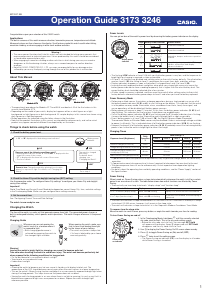
Operation Guide 3173 3246
Mode Reference Guide
Your watch has 10 “modes”. The mode you should select depends on what you want to do.
To do this: Enter this mode:
View the current date in the Home City
Confi gure Home City and daylight saving time (DST) settings
Confi gure time and date settings
Timekeeping Mode
View the sunrise and sunset times for a specifi c date Sunrise/Sunset Mode
Determine your current bearing or the direction from your current location to a
destination as a direction indicator and angle value
Determine your current location using the watch and a map
Digital Compass Mode
View the barometric pressure and temperature at your current location
View a graph of barometric pressure readings
Barometer/Thermometer
Mode
To do this: Enter this mode:
View the altitude at your current location
Determine the altitude differential between two locations (reference point and
current location)
Record an altitude reading with the measurement time and date
Altimeter Mode
Recall records created in the Altimeter Mode Data Recall Mode
View the current time in one of 48 cities (31 time zones) around the globe World Time Mode
Use the stopwatch to measure elapsed time Stopwatch Mode
Use the countdown timer Countdown Timer Mode
Set an alarm time Alarm Mode
General Functions (All Modes)
The functions and operations described in this section can be used in all of the modes.
Auto Return Features
The watch returns to the Timekeeping Mode automatically if you do not perform any button operation
for two or three minutes in the Sunrise/Sunset, Data Recall, Alarm, or Digital Compass Mode.
If you leave a screen with fl ashing digits on the display for two or three minutes without performing any
operation, the watch exits the setting screen automatically.
Initial Screens
When you enter the World Time, Alarm, or Digital Compass Mode, the data you were viewing when you
last exited the mode appears fi rst.
Scrolling
The
A
and
C
buttons are used on the setting screen to scroll through data on the display. In most
cases, holding down these buttons during a scroll operation scrolls through the data at high speed.
Timekeeping
Use the Timekeeping Mode to set and view the current time and date.
Pressing
E
while in the Timekeeping Mode will cycle through the Timekeeping Mode display formats
as shown below.
Year
Barometric
pressure graph
Day of the Week Screen Year Screen Barometric Pressure
Graph Screen
PM
indicator
Day of
week
Month
Day
SecondsHour : Minutes
Confi guring Home City Settings
There are two Home City settings: actually selecting the Home City and selecting either standard time or
daylight saving time (DST).
To confi gure Home City settings
1. In the Timekeeping Mode, hold down
E
until the currently selected
city code starts to fl ash. This is the city code setting screen.
Before the city code starts to fl ash, the message SET Hold
will appear on the display. Keep
E
depressed until SET Hold
disappears and the city code starts to fl ash.
The watch will exit the setting mode automatically if you do not
perform any operation for about two or three minutes.
For details about city codes, see the “City Code Table.
2. Press
A
(East) and
C
(West) to select the city code you want to use
as your Home City.
Keep pressing
A
or
C
until the city code you want to select as
your Home City appears on the display.
3. Press
D
to display the DST setting screen.
4.
Use
A
to toggle the DST settings between
OFF
and
On
.
Note that you cannot switch between standard time and daylight
saving time (DST) while UTC is selected as your Home City.
5. After all the settings are the way you want, press
E
twice to return to the Timekeeping Mode.
The DST indicator appears to indicate that Daylight Saving Time is turned on.
Note
After you specify a city code, the watch will use UTC* offsets in the World Time Mode to calculate
the current time for other time zones based on the current time in your Home City.
* Coordinated Universal Time, the world-wide scientifi c standard of timekeeping.
The reference point for UTC is Greenwich, England.
To change the Daylight Saving Time (summer time) setting
1. In the Timekeeping Mode, hold down
E
until the currently selected
city code starts to fl ash. This is the city code setting screen.
Before the city code starts to fl ash, the message SET Hold
will appear on the display. Keep
E
depressed until SET Hold
disappears and the city code starts to fl ash.
2. Press
D
to display the DST setting screen.
3. Use
A
to toggle the DST settings between
OFF
and
On
.
4. After all the settings are the way you want, press
E
twice to return to
the Timekeeping Mode.
The DST indicator appears to indicate that Daylight Saving Time is
turned on.
PM
indicator
City
code
Month
Day
SecondsHour : Minutes
DST indicator
PM
indicator
City
code
Month
Day
SecondsHour : Minutes
DST indicator
DST indicatorDST indicator
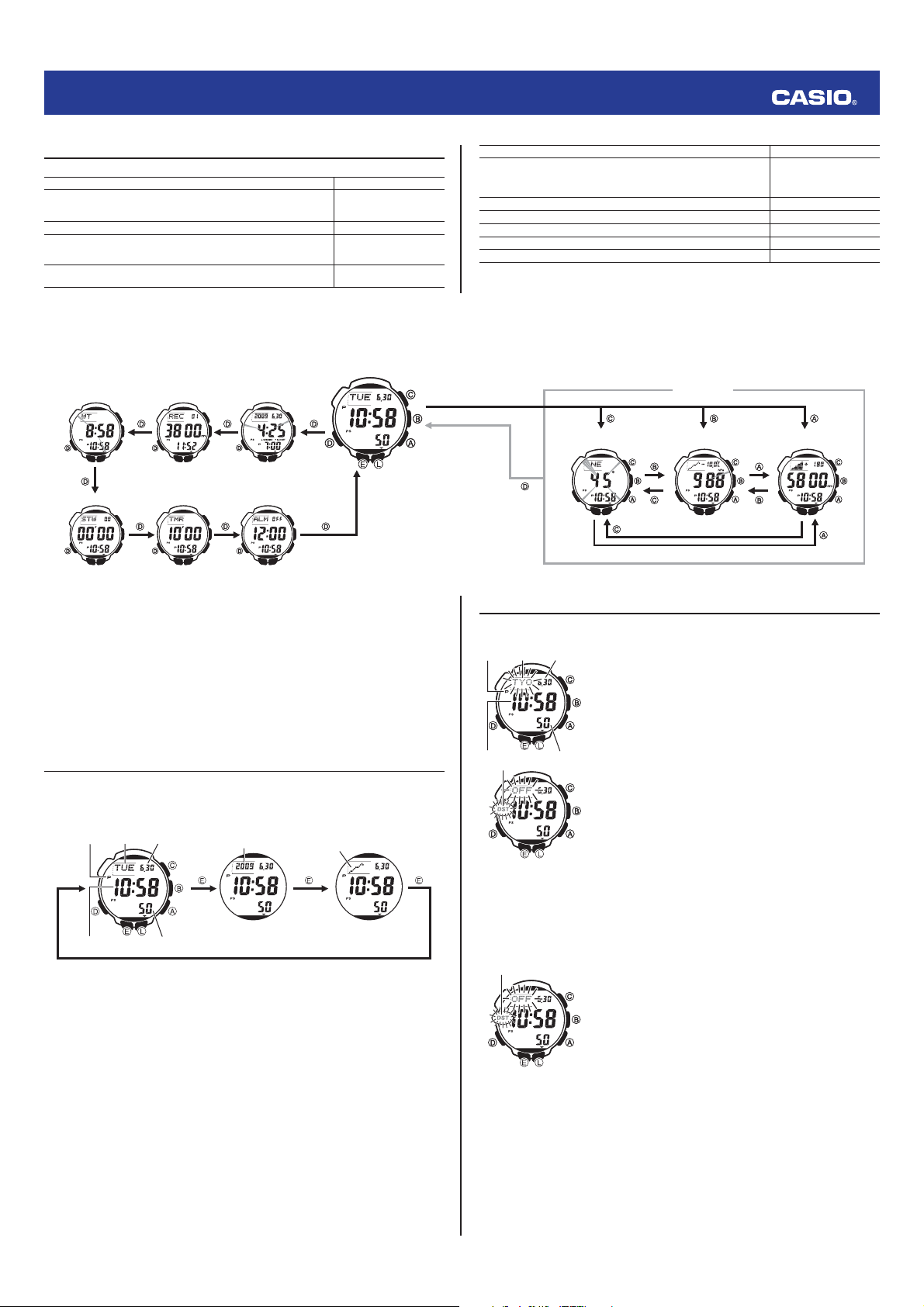
Selecting a Mode
The illustration below shows which buttons you need to press to navigate between modes.
For about one second after you enter a mode by pressing
D
, a pointer will appear on the display
pointing the applicable mode name on the watch's bezel.
In any mode, press
L
to illuminate the display.
You can use buttons
A
,
B
, and
C
to enter a sensor mode directly from the Timekeeping Mode or
from another sensor mode. To enter a sensor mode from the Sunrise/Sunset Mode, Data Recall, World
Time, Stopwatch, Countdown Timer, or Alarm Mode, fi rst enter the Timekeeping Mode and then press
the applicable button.
World Time
Mode
Data Recall
Mode
Sunrise/Sunset
Mode
Stopwatch Mode
Countdown
Timer Mode
Alarm Mode
Altimeter Mode
Barometer/
Thermometer Mode
Digital Compass Mode
Timekeeping Mode
Sensor Modes
World Time
Mode
Data Recall
Mode
Sunrise/Sunset
Mode
Stopwatch Mode
Countdown
Timer Mode
Alarm Mode
Altimeter Mode
Barometer/
Thermometer Mode
Digital Compass Mode
Timekeeping Mode
Sensor Modes
Ladda ner bruksanvisning i Engelska (PDF, 1.84 MB)
(Tänk på miljön och skriv endast ut denna bruksanvisning om det verkligen är nödvändigt)

Loading…

Betyg

Berätta vad du tycker om Casio Pro Trek PRG-240-3ER Armbandsur genom att betygsätta den. Vill du dela med dig av dina åsikter om denna produkt eller ställa en fråga? Lämna en kommentar nederst på sidan.
Är du nöjd med Casio Pro Trek PRG-240-3ER Armbandsur?
Ja Nej
Bli den första personen som betygsätter denna produkt
0 röster

Delta i konversationen om denna produkt

Här kan du dela vad du tycker om Casio Pro Trek PRG-240-3ER Armbandsur. Om du har en fråga, läs först noggrant igenom manualen. Att begära en manual kan göras genom att använda vårt kontaktformulär.

Mer om denna bruksanvisning

Vi förstår att det är trevligt att ha en pappersbruksanvisning för din Casio Pro Trek PRG-240-3ER Armbandsur. Du kan alltid ladda ner bruksanvisningen från vår hemsida och skriva ut den själv. Om du vill ha en originalbruksanvisning rekommenderar vi att du kontaktar Casio. De kanske kan tillhandahålla en originalbruksanvisning. Letar du efter bruksanvisningen för din Casio Pro Trek PRG-240-3ER Armbandsur på ett annat språk? Välj ditt föredragna språk på vår hemsida och sök efter modellnumret för att se om vi har det tillgängligt.

Specifikationer

Märke Casio
Modell Pro Trek PRG-240-3ER
Kategori Armbandsur
Filtyp PDF
Filstorlek 1.84 MB

Alla bruksanvisningar för Casio Armbandsur
Fler bruksanvisningar för Armbandsur

Vanliga frågor om Casio Pro Trek PRG-240-3ER Armbandsur

Vårt supportteam söker efter användbar produktinformation och svar på vanliga frågor. Om du hittar en felaktighet bland våra vanliga frågor uppskattar vi om du meddelar oss detta via vårt kontaktformulär.

Ett batteri i min enhet är oxiderat, kan jag fortfarande använda det säkert? Verifierad

Ja, enheten kan fortfarande användas säkert. Ta först bort det oxiderade batteriet. Använd aldrig bara händer för att göra detta. Rengör sedan batterifacket med en bomullspinne doppad i ättika eller citronsaft. Låt det torka och sätt i nya batterier.

Detta hjälpte (926) Läs mer

Min mekaniska klocka går för fort. Vad kan jag göra åt det? Verifierad

Det kan bero på att den påverkas av ett magnetfält. Det kan lösas genom en avmagnetiseringsprocess, utförd av en professionell urmakare.

Detta hjälpte (865) Läs mer

Vad betyder AM och PM? Verifierad

AM står för ante meridiem och används för att ange ett klockslag under dygnets första hälft. PM står för post meridiem och används för att ange ett klockslag under dygnets andra hälft.

Detta hjälpte (743) Läs mer

Vad är en kronograf? Verifierad

Kronograf är bokstavligen en ”tidsskrivare”. En kronograf är ett annat ord för klocka med tidtagningsfunktion, tidtagarur eller stoppur.

Detta hjälpte (649) Läs mer

Vad är GMT? Verifierad

GMT står för Greenwich Mean Time (kallas även UTC, vilket står för Coordinated Universal Time). Det är tiden för longitud 0, som passerar genom Greenwich nära London.

Detta hjälpte (489) Läs mer

Vad är en kvartsrörelse? Verifierad

Klockor och klockor med kvartsrörelse drivs av ett batteri. Detta skickar en elektrisk ström genom kvartskristaller som kommer att vibrera. Dessa vibrationer överförs till rörelsen. Eftersom vibrationerna har en fast frekvens är klockor och klockor med kvartsrörelse extremt exakta.

Detta hjälpte (480) Läs mer

Det finns fukt på insidan av glaset på min Casio-klocka. Vad ska jag göra? Verifierad

Casio anger att det förmodligen inte är något fel om fukten uppstår efter en extrem temperaturförändring och försvinner relativt snabbt efteråt. Om fukten inte försvinner ska du lämna in klockan för reparation så snart som möjligt.

Detta hjälpte (62) Läs mer
Bruksanvisning Casio Pro Trek PRG-240-3ER Armbandsur

Relaterade produkter

Relaterade kategorier

×
Download